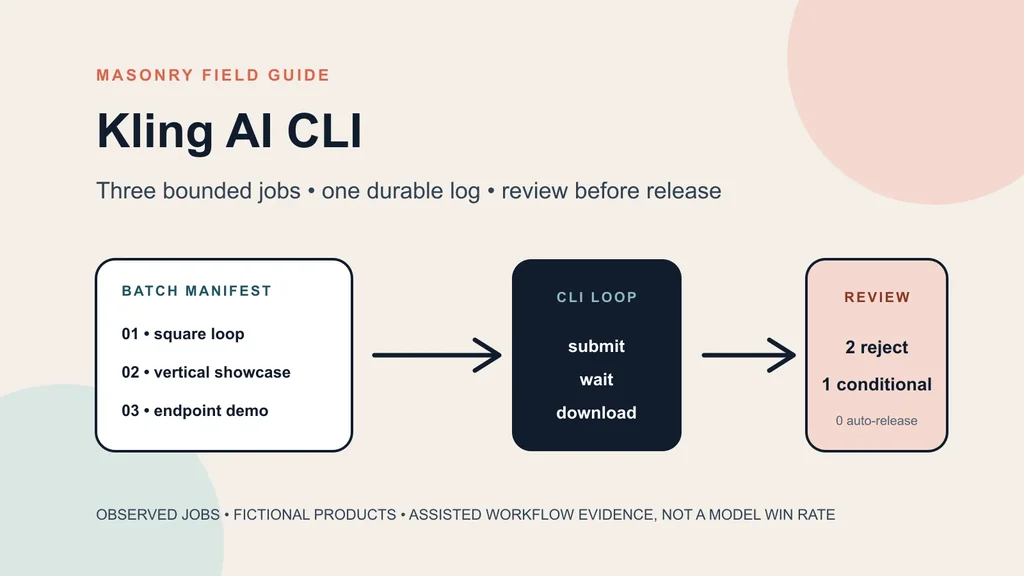
The useful Kling AI CLI workflow for an ecommerce merchant is not “generate videos in bulk.” It is: declare a small set of product jobs, submit them without losing their IDs, download each file to a known path, and stop every clip that changes the sold product.
We checked the installed Masonry CLI and the live kling-o3-pro route on August 17, 2026. The route
accepts a required prompt, an optional first image, an optional last image, square, landscape, or
vertical output, and an audio opt-out. We also reconciled three completed Kling O3 jobs with their
stored files and earlier product reviews. All three jobs succeeded technically. Two were rejected
for product drift; one earned a conditional visual pass.
This guide turns that evidence into an executable three-row pilot. It includes a bounded shell runner, a reusable TSV, the three observed job records, and the production-to-revenue gates a merchant needs before scaling.
Evidence boundary: the three product jobs and files are real prior Masonry runs, not a new three-candidate benchmark. The NORTHLINE serum and graphite folding stand are fictional. Reusing the jobs here establishes the operational CLI handoff and acceptance pattern; it does not create a model reliability rate, physical-product proof, campaign result, or revenue claim.
Download the bounded batch kit
- Download the three-row batch template.
- Download the reviewed shell runner.
- Download the three observed job records.
The template contains three different merchant jobs: a square product loop, a vertical showcase, and a first-to-last-frame product demo. It does not ask the model for three vague “viral ads.” Each row identifies the SKU, approved source, optional ending frame, current route, aspect, audio policy, prompt, and output path.
The runner defaults to three rows. It refuses missing source files, missing ending frames, invalid
row limits, and output overwrites. It records the returned job_id after each successful download.
That is deliberately smaller than a catalog automation system: a merchant should discover the
accepted-clip rate before funding a larger queue.
Why this is a distinct merchant job
Masonry already publishes a Kling product-ad model test, a Shopify product-page-to-video workflow, and a PDP product-demo workflow. Those pages answer which visible product behavior survived a specific creative or commerce brief. This page answers a different question: how does a merchant operate several approved Kling jobs from a terminal without turning successful renders into automatic releases?
The supplied non-brand Search Console export contains kling cli with 31 impressions at position
8.65 and kling ai cli with 10 impressions at position 5.90. Together that is 41 impressions, zero
clicks, and an impression-weighted position of 7.98. It is a small striking-distance signal, not a
market-size estimate.
Merchant discussions supply the workflow context. One ecommerce operator describes turning a single product image into hook, body, and CTA video segments, while others ask whether AI agents can produce store videos without creating another manual tool chain. These are qualitative reports, not verified performance claims. Read the product-video discussion and the Shopify agent-workflow question.
Step 1: inspect the live route before copying a command
Run current discovery immediately before the pilot:
masonry version
masonry video models
masonry models params kling-o3-pro
The checked Kling O3 Pro contract exposed:
| Input | Current CLI behavior |
|---|---|
| prompt | required text argument |
| first image | optional --image source for image-conditioned generation |
| last image | optional --last-image, used with a first image |
| output | 16:9, 9:16, or 1:1 aliases mapped to current route dimensions |
| audio | synchronized audio by default; --no-audio disables it |
| duration | no duration flag in the checked model-specific contract |
Do not add a copied --duration, seed, negative-prompt, or reference flag merely because another
video route accepts it. The top-level CLI offers generic flags, but the selected model contract
defines which inputs are actually available.
Step 2: treat the TSV as an approval boundary
The first row in the template is intentionally conservative:
SKU001-SQUARE-LOOP → one approved first frame → one slow push → square review candidate
Before running it, replace the fictional path and prompt with the real merchant record. At minimum, the source pack should name:
- exact SKU and variant;
- immutable source file and hash;
- visible geometry, material, color, label, quantity, and included-item invariants;
- the one camera or product motion allowed;
- prohibited new surfaces, product actions, people, props, text, claims, and scene changes;
- target placement and output path;
- reviewer and release owner.
A single front photo cannot authorize the back label, hidden ports, package interior, mechanism, fit, strength, ingredients, or use by a person. Asking for an orbit or unboxing sequence from one front image forces the model to invent evidence.
Step 3: submit, wait, download, and log
From a directory containing the template and approved source files:
chmod +x ./kling-ai-cli-product-video-runner.sh ./kling-ai-cli-product-video-runner.sh \ ./kling-ai-cli-product-video-batch-template.tsv \ 3
For every row, the runner executes the same lifecycle:
masonry video "$prompt" \ --model kling-o3-pro \ --image "$source_image" \ --aspect "$aspect" \ --no-audio masonry job wait "$job_id" --timeout 15m masonry job download "$job_id" --output "$output_file"
The submission response is JSON. The runner requires .job_id, then writes the ID, SKU, model,
output path, and completion time into kling-ai-cli-product-video-jobs.tsv. If a row fails, the
script exits rather than silently advancing to an incomplete batch.
The runner is sequential on purpose. Parallel production needs an explicit concurrency ceiling,
rate-limit behavior, retry policy, cancellation plan, and cost guard. Do not hide those decisions in
an ampersand or an unbounded xargs -P call.
What three real Kling jobs returned
The observed-job download reconciles server-side job records with exact public file hashes and the review dispositions already published in the underlying first-hand workflows.
| Job | Intended merchant job | Technical result | Product review |
|---|---|---|---|
a62dcfe9… | square serum product-ad loop | succeeded, 5.04 s, 1440 × 1440 | REJECT: invented dense side copy |
3959f61c… | vertical folding-stand showcase | succeeded, 5.04 s, 1076 × 1924 | REJECT: graphite plate became silver and gained a ring |
55d051ea… | two-endpoint folding-stand demo | succeeded, 5.04 s native return | CONDITIONAL_VISUAL_PASS: closer path, no mechanical proof |
The batch-level result is three technically successful jobs, two rejections, one conditional visual pass, and zero clips eligible for automatic factual-primary release. That is not a 33% model success rate. The jobs differ in source, brief, placement, and acceptance standard. It is an operating lesson: infrastructure success and merchant acceptance are different columns.
Step 4: review every timeline before adding copy
Inspect the full file at normal speed, then sample the first frame, last frame, and several frames across every motion or reveal. Use the approved sources beside the clip rather than relying on memory.
| Gate | Reject when |
|---|---|
| identity | the SKU, variant, quantity, colorway, or included item changes |
| geometry | silhouette, proportions, parts, joins, label shape, or hardware drifts |
| surface | material, transparency, reflection, liquid, texture, or finish changes |
| visible copy | any required character changes or any unauthorized text appears |
| motion | the camera or product performs a behavior outside the declared job |
| evidence | a new view implies hidden geometry, compatibility, use, or mechanism without authority |
| delivery | aspect, crop, duration, frame integrity, audio, or safe zones fail the placement |
Keep price, offer, claims, captions, disclosure, CTA, and destination outside the generated pixels. Those facts should come from approved commerce records and remain editable without another model run.
Step 5: calculate cost from accepted clips
Before increasing the row cap, record:
accepted-clip rate = accepted clips / attempted jobs cost per accepted clip = credits + labor + repair + reruns / accepted clips cycle time per accepted clip = elapsed production time / accepted clips
The current CLI output does not provide a normalized cost record in the three stored job rows, so this article does not invent one. Use the current route estimate or billing record, then add source preparation, review, deterministic copy, editing, storage, publishing, and rejected attempts.
A technically cheap batch can be expensive if product drift forces full manual replacement. A slower route can be cheaper when more clips pass the declared gate. The denominator is accepted merchant deliverables—not files on disk.
Step 6: connect release to revenue
For each published clip, retain the released file hash, product and variant destination, placement, copy version, offer, audience, budget, dates, and attribution treatment. Then separate the decision metric from diagnostics:
- Production: attempts, service success, accepted clips, correction time, and cost per accepted clip.
- Attention: video start, three-second view, completion, replay, and hold rate.
- Intent: outbound click and product-page landing.
- Commerce: variant continuity, add-to-cart, checkout start, completed order, return, and contribution.
Do not reroll the video when clicks land on a stale price, wrong variant, broken page, or slow checkout. The visual may be working while the commerce path is failing. Conversely, a high completion rate does not authorize more spend when completed-order economics remain weak.
Bottom line
Use the Kling AI CLI to make a small product-video pilot observable and repeatable. Freeze the source authority, declare one job per row, cap spend and concurrency, keep every job ID, download to deterministic paths, and reject the full clip when the product changes. Scale only from accepted assets with a measured destination—not from the number of successful API responses.