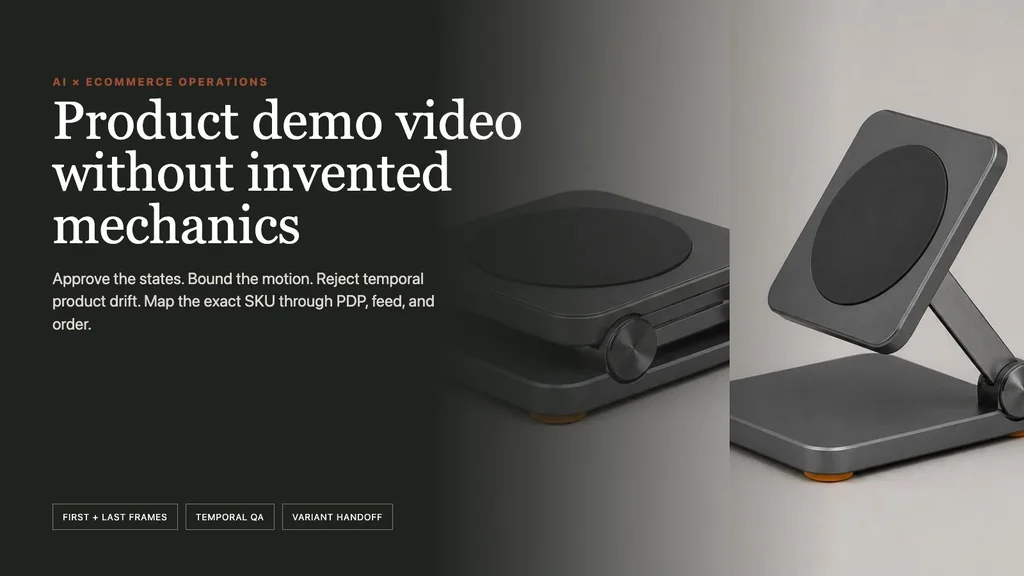
The useful AI product-demo video workflow is one exact SKU → one buyer question → approved product states → bounded motion → first/last-frame generation → temporal product review → deterministic captions and poster → exact PDP and feed mapping → completed-order economics. AI can animate a documented operation. It cannot decide how the product works.
We ran the workflow on a fictional $49 USD NORTHLINE ARC folding tablet stand. The buyer question is narrow: How does the stand move from folded storage to an upright viewing position? The source record authorizes only that visible transition. It does not authorize a device-compatibility, load-capacity, magnet-strength, stability, hinge-durability, material-grade, safety, or universal-fit claim.
Evidence boundary: NORTHLINE, the product, SKU, price, mechanics, states, and channel records are fictional. The generated source sheet, endpoints, two live Masonry video jobs, rejected Seedance path, conditional-pass Kling path, frame sampling, deterministic delivery transforms, and audit artifacts are real. No physical product, Shopify store, Merchant Center account, customer, order, conversion lift, compatibility, performance, safety, or legal outcome was tested.
Why this is a distinct merchant job now
Masonry already has a same-photo product-ad model comparison, a real-product AI UGC workflow, and a cinematic product-animation workflow. Those answer which model to test, how to build a routine-style ad, and how to art-direct multi-shot animation. This workflow answers a different revenue question: Can one short product-page clip resolve one purchase uncertainty without changing the sold SKU or adding an unsupported claim?
The channel opportunity also changed. Google's April 2026 Merchant Center specification introduced the optional video_link attribute for product videos and began serving plus policy/quality validation on June 30, 2026. Google says the asset can show a product from different angles or demonstrate it in use and should map to the specific product shown. Read the 2026 specification update and current video_link requirements.
Shopify product media supports video on compatible themes and lets merchants replace the generated thumbnail. Its current UX guidance says video should normally default to paused; autoplay must be muted, mobile media should remain inactive until the customer starts it, invisible gallery media should not keep playing, and controls need accessible states. Review Shopify product media, video types and limits, poster replacement, and media UX guidance.
A July 2026 Shopify merchant described testing a polished fourteen-second loop against a product image for an easy-to-understand electronic item. The discussion quickly moved from premature one-day results to compression, poster imagery, audio removal, hosting, and load behavior. That is qualitative workflow evidence—not a conversion benchmark or a recommendation to autoplay every PDP. Read the merchant discussion.
The supplied non-brand Search Console export contains 25 impressions for kling ai image to video product ads 2026 and 9 impressions for kling ai image to video product video features 2026, but no Shopify PDP product-demo workflow query. The existing model-comparison page owns those model-led terms. This page is a timely merchant-intent expansion, not an attempt to cannibalize them or claim established traffic.
Step 1: answer one buyer question
“Make a product video” is not a production brief. Start with a question that a visible operation can actually resolve:
- How does it fold for storage?
- Which latch opens first?
- What is included when the lid lifts?
- How does the adjustable part move between documented states?
Reject the AI route when the video would need to prove hidden mechanics, material strength, fit, safety, efficacy, durability, sound, speed, or a real person's result. Record the real product or use verified CAD/3D when the operation itself is evidence.
Download the fictional product-demo record. It joins exact variant NL-ARC-STAND-GPH, US/USD price $49.00, the buyer question, approved states and motion, visible product invariants, claim exclusions, poster, caption, Shopify destination, Google candidate, and effective dates.
Step 2: approve product states before motion
The built-in source generation created one fictional product in folded, intermediate, and upright states:
The source sheet is not a video endpoint because each panel has a different crop. We derived separate 16:9 start and finish candidates, then approved their camera, scale, background, lighting, product identity, and state independently:
Approve each endpoint at full resolution. A first/last-frame model constrains the ends; it does not guarantee the path. If the two stills disagree on a hinge, fastener, support, label, included item, or sold configuration, stop before paying for motion.
Step 3: define the motion and rejection record
Download the six-beat shot plan. The generated portion has only three beats: folded hold, opening transition, upright hold. A deterministic one-second final-frame extension makes the delivered clean master exactly six seconds without asking the model to invent more motion.
The immutable product list is deliberately visual rather than aspirational:
| Area | Approved condition |
|---|---|
| Identity | exact fictional graphite variant NL-ARC-STAND-GPH |
| Base | one low rounded rectangle; planted throughout |
| Feet | four burnt-orange feet; no duplication or disappearance |
| Support | one brushed-aluminum arm; no extra linkage |
| Hinge | approved visible hinge geometry; no changing axis or part count |
| Cradle | one rounded-square graphite plate and one centered charcoal pad |
| Camera | locked front three-quarter view; unchanged scale and crop |
| Communication | no generated text, device, person, claim, UI, or audio |
Step 4: generate, inspect, and reject when needed
The first live first/last-frame job used Seedance 1.5 Pro:
masonry video "Six-second-style locked-camera product demonstration. Begin on the exact approved folded graphite tablet stand in the first frame. Rotate only the same support system so the same cradle reaches the exact approved upright state in the last frame. One smooth mechanically plausible opening motion, then hold. Keep the base planted, camera locked, background and lighting unchanged. Preserve the exact base, orange feet, arm, hinge geometry, cradle, center pad, finish, proportions, and part count. No device, hand, person, extra product, duplicated part, motorized implication, bounce, wobble, text, logo, claim, UI, or audio." \ --model seedance-1-5-pro \ --image ./approved-folded-frame.png \ --last-image ./approved-upright-frame.png \ --aspect 16:9 \ --seed 2608165 \ --no-audio
Job 2c07ffdc-c8ff-4a28-bdc8-8a9abe30830e succeeded technically but failed product-demo review. The model orbited from a front three-quarter view to the rear, changed the visible support from the approved single-arm grammar into a broader two-sided structure, and revealed invented mechanism details. The start and finish remained recognizable; the path was not authorized.
We used the failure to tighten one bounded retry: preserve both endpoint images, prohibit any new camera side, and name camera motion plus linkage changes explicitly. Kling O3 Pro accepted the same first and last frames:
masonry video "Locked-off tripod product demonstration with zero camera movement. Use the first image as exact frame zero and the last image as the exact final frame. The camera, lens, framing, product center, product scale, base orientation, background, light, and shadow never move. Keep the base planted in precisely the same pixels. Open only the approved support system until the cradle reaches the approved upright endpoint. Do not reveal a new camera side or hidden mechanism. Preserve every approved visible part. No orbit, pan, tilt, dolly, zoom, reframing, base rotation, extra linkage, duplicated arm, changing hinge, changing feet, morph, wobble, bounce, device, hand, person, text, logo, claim, UI, or audio." \ --model kling-o3-pro \ --image ./approved-folded-frame.png \ --last-image ./approved-upright-frame.png \ --aspect 16:9 \ --no-audio
Job 55d051ea-be4e-4ce9-9e89-20ec579612ef succeeded. Its native file is 1916 × 1080, 24 fps, 5.041667 seconds, with no audio stream. The delivery transform scaled it to exact 1920 × 1080 and added only 23 duplicate final frames, producing a 6.000-second, 144-frame H.264 MP4 with no black bars or audio.
Step 5: inspect time, not only endpoints
A beautiful first and last frame can hide a changing product between them. Sample the clip at the start, immediately before motion, through the transition, at the generated end, and across any deterministic extension. Inspect the full video frame by frame around suspected defects.
The Kling production disposition is conditional visual pass, not mechanical validation. It preserves the recognizable base, orange feet, graphite cradle and center pad, single visible support system, studio background, and folded-to-upright intent substantially better than the rejected Seedance path. Minor scale and interpolation differences remain, and neither output proves real hinge kinematics, compatibility, strength, stability, durability, or safety. A merchant with the physical product must compare every frame with approved product and engineering sources—or replace the clip with conventional footage.
Step 6: add communication outside generation
Keep the clean master free of generated words. Render the approved overlay FOLDED → UPRIGHT, exact SKU, caption, poster, price, and CTA through a deterministic editor or storefront layer. That lets merchandising change a price or caption without regenerating product motion.
The text alternative should describe what is visible: “The stand opens from its folded storage state to the approved upright viewing position.” Do not turn it into “supports every device,” “rock solid,” or “built for years.” If the video contains meaningful spoken information, provide synchronized captions; if it is silent, preserve an accessible play/pause path and a useful nearby description.
Google Search says a consistent VideoObject name, description, thumbnail, upload date, duration, and content URL can help it discover and understand a video, but valid markup does not guarantee a rich result. Keep the actual on-page video, poster, and metadata aligned. Review Google's video structured-data guidance and video SEO guidance.
Step 7: release to the exact Shopify variant
Shopify currently accepts uploaded .mp4, .mov, and .webm product video up to ten minutes, one gigabyte, and 4K, and serves uploaded video as MP4 or HLS. Those maximums are not performance targets. Use the smallest reviewed file that remains legible for the product and connection conditions.
Verify the rendered store rather than the admin record alone:
- video appears only on the intended product and exact variant context;
- the poster paints before playback and matches the demonstrated state;
- controls, keyboard focus, pause, replay, reduced-motion expectations, and mobile behavior work;
- gallery navigation stops hidden media;
- product title, selected variant, price, availability, and add-to-cart remain current;
- fallback product imagery still explains the item when video fails or is not played;
- page load, interaction responsiveness, and layout stability remain acceptable.
The Shopify variant-image workflow covers selected-SKU continuity into cart and checkout. The return-reason visual correction workflow helps select the buyer uncertainty worth addressing before producing motion.
Step 8: validate the Google product-video handoff
Google's current video_link specification requires a stable public video URL or YouTube URL, licensed marketing rights, a supported format, 6–240 seconds, no more than 500 MB, 9:16, 16:9, or 1:1, and at least 720p. A non-YouTube URL must point directly to the raw video rather than a landing page. Google recommends mapping the specific product shown, avoiding black bars, and using coherent high-quality motion. Requirements can change; validate the current feed and Needs attention state.
The clean master meets the controlled file checks—six seconds, 1920 × 1080, 16:9, H.264 MP4, no black bars, and far below 500 MB—but no public URL, rights chain, real offer mapping, crawlability, Merchant Center validation, or serving result exists in this fictional example.
Step 9: audit the whole path to revenue
Download the ten-surface product-demo audit.
Measure fulfilled contribution from eligible PDP exposure as the commercial outcome. Gallery video views, play starts, 25/50/75/100% completion, poster clicks, variant selection, add-to-cart, and checkout are diagnostics.
eligible exact-variant PDP visit → product-demo eligible and loaded → play state and completion observed → correct variant selected → correct SKU added to cart → completed order → fulfillment and return window matured → contribution after discounts, returns, support, and service cost
Guardrail wrong-SKU incidents, unsupported-claim reports, playback failures, mobile abandonment, page speed, accessibility defects, support contacts, cancellations, return reasons, refund rate, and margin. Version the source, endpoints, prompt, job, clean master, delivery transform, poster, caption, product mapping, offer, experiment, and attribution window. A play is not revenue; use a valid experiment before claiming the video caused incremental purchases.
The valuable output is not “a cinematic AI product video.” It is one buyer uncertainty, one exact SKU, one source-supported operation, one temporally reviewed clip, one accessible channel handoff, and one order path that can be reconciled to contribution.
When the merchant job is a no-creator vertical acquisition asset rather than an on-PDP mechanical demonstration, use the Shopify product-page-to-AI-video workflow. It starts from a reviewed product record, rejects material drift in both keyframe and motion, and keeps copy plus destination deterministic.