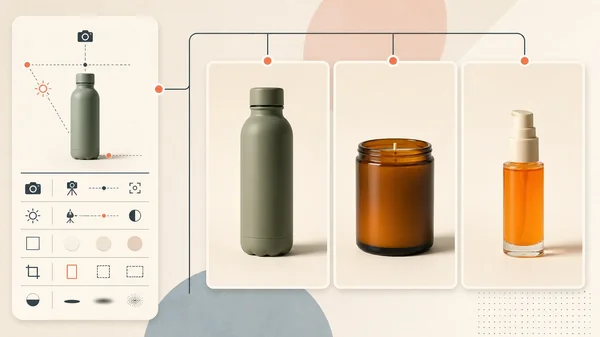
Bulk AI product photography is not “run the same prompt 500 times.” At catalog scale, the hard problem moves from generation to operations: which approved source belongs to each SKU, what cannot change, which scene version ran, where the job ID went, who reviewed the file, and whether the output is actually consistent with the rest of the set.
We tested that system on three fictional NORTHLINE products: an amber candle, a Vitamin C serum, and a sage water bottle. Every row used the same Nano Banana 2 route, 4:5 output, seed, background, plinth, camera, light direction, and negative-space brief. All three jobs succeeded and preserved their visible product names and quantities. The set still drifted in product scale, vertical position, plinth size, background warmth, and shadow strength.
That makes the result useful: three plausible secondary assets, but not one locked catalog system. This guide publishes the source sheet, output sheet, manifest, exact prompt contract, job IDs, and disposition logic so a merchant can reproduce the workflow without mistaking file count for production progress.
Evidence boundary: NORTHLINE is fictional, and these source products were created for earlier controlled Masonry articles. The three jobs and files below are real. This is a small operational pilot, not evidence about a physical catalog, model reliability, conversion lift, or performance at hundreds of SKUs. Current merchant discussions establish qualitative demand; they do not validate vendor performance claims.
Why the catalog workflow is a distinct merchant job
Masonry already has a one-supplier-photo asset-set workflow and a same-SKU model-fidelity test. Neither answers what happens after a merchant has chosen a route and needs repeatability across many products.
That gap appears directly in merchant questions. A Shopify merchant with about 400 lighting-fixture SKUs wanted five or six contextual images per product, exact fixture consistency, and bulk production because manual work was not viable. Read the catalog question. Another ecommerce discussion about hundreds of SKUs recommended a source-of-truth file, standardized templates, batch editing, and discrepancy detection rather than treating imagery as unrelated one-off shoots. Read the workflow discussion.
A current August 2026 Shopify app-builder post describes the same operational problem—recreating setups across a catalog, product-detail accuracy, manual work, and predictable cost—but it is the vendor's own positioning, not independent proof. Read it as qualitative product discovery.
The supplied three-month Search Console export contains no “bulk product photography” query among its top 1,000 rows. This page is therefore a deliberate adjacent-intent expansion based on current merchant workflow evidence and strong product fit, not a claim that Masonry already ranks for the term.
Step 1: build the SKU source-of-truth manifest
Start with rows, not prompts. Each row needs enough information to reject a beautiful image of the wrong product.
The operational manifest for this run recorded:
| Field | Why it exists |
|---|---|
sku and variant | prevents files and reviews from crossing products |
| approved source path | identifies the factual pixels supplied to the route |
| product invariants | makes label, geometry, material, color, quantity, and included-item rejection explicit |
| scene version | separates the reusable art direction from product facts |
| model, aspect, seed | records the generation contract without pretending it locks the scene |
| output path and job ID | supports asynchronous download, resume, and audit |
| status, reviewer, disposition | separates service success from merchant acceptance |
Download the completed TSV manifest. It includes the three actual job IDs and dispositions, not placeholder “done” rows.
Step 2: separate the fixed scene from each SKU's invariants
The shared scene specification stayed constant:
4:5 catalog-secondary image; centered product; one low rectangular pale limestone plinth; seamless warm-cream background; soft large window light from camera-left at 45 degrees; faint grounded shadow to camera-right; camera at product mid-height; straight-on view; restrained realistic contrast; quiet upper 18 percent negative space; no props.
Each row then appended a different immutable product block. The candle block required one amber cylindrical jar, black lid, ivory label, and exact NORTHLINE / CEDAR / 8 OZ text. The serum block required one clear cylinder, orange liquid, stepped silver pump, transparent cap, white label, and exact NORTHLINE / VITAMIN C / 30 ML text. The bottle block required one matte sage bottle, black cap and loop, vertical NORTHLINE, 750 ML, and the source shoulder, body, and base.
Keep claims, prices, offers, headlines, promotional badges, and channel disclosures outside the generated bitmap. They change on a different approval cycle and should not force a product rerun.
Step 3: launch asynchronous jobs and retain every ID
The live route was Nano Banana 2 through gemini-3.1-flash-image-preview. Its August 15 contract accepted repeated references, seed, and explicit image dimensions; this run used one reference per SKU, 4:5 (928 × 1152), and seed 260815.
One recorded command looked like this; the other two changed only the reference path, output name, and product-invariant paragraph:
masonry image "$SCENE_SPEC $PRODUCT_INVARIANTS" \ --model gemini-3.1-flash-image-preview \ --aspect 4:5 \ --ref ./sources/NL-CANDLE-CEDAR-8OZ.webp \ --seed 260815 \ --output ./outputs/NL-CANDLE-CEDAR-8OZ_catalog-secondary.png
The command returns before generation completes. Capture the JSON response, write its job_id to the row, poll with masonry job status <job-id>, and download only after the status is succeeded. Do not launch an unbounded catalog in a shell loop without concurrency limits, rate-limit handling, a retry policy, and idempotent output names.
The successful jobs were:
- candle:
7b25c75c-e85f-47ae-b80b-67a8338dcc08; - serum:
786c1df9-9b2a-4752-a0d5-85ea645b09cd; - bottle:
6646ee22-c9e5-4d2b-99d4-245049969a91.
The CLI returned no normalized per-job cost, so this run does not invent one. A production runner should store any available credit or invoice metadata beside the job, then add human review and repair cost before calculating cost per accepted image.
Step 4: review product truth and set consistency separately
The shared prompt succeeded at semantic consistency: warm neutral set, limestone plinth, left-side illumination, rightward shadow, straight-on product, upper negative space. It failed at layout consistency: those ideas were redrawn rather than locked.
Candle row
Serum row
Bottle row
The acceptance result
| Gate | Candle | Serum | Bottle | Set disposition |
|---|---|---|---|---|
| One correct product and variant | Pass visible review | Pass visible review | Pass visible review | Continue |
| Exact visible product text | Pass | Pass | Pass | Continue |
| Source-locked physical geometry | Review | Review | Review | Cannot prove from generated redraws |
| Shared background family | Pass | Pass | Pass | Keep direction |
| Shared product scale and baseline | Fail set review | Fail set review | Fail set review | Normalize or rerun |
| Shared plinth geometry | Fail set review | Fail set review | Fail set review | Use a deterministic plate/template |
| Shared light and shadow strength | Fail set review | Fail set review | Fail set review | Composite or use controlled photography/3D |
| Final disposition | Keep secondary | Keep secondary | Keep secondary | Reject as one locked catalog set |
This pilot produced three successful generations, three files that pass the narrow visible-product screen, and zero files accepted into the proposed locked catalog set. That is not a 0% model success rate. It is a distinction between individual product plausibility and set-level art-direction compliance.
Step 5: fix the system before adding more SKUs
Do not respond to set drift by launching 497 more products. Choose a production route based on the required exactness:
- For deterministic catalog geometry: remove or preserve the real product, place every approved cutout into one locked background/plinth template, and build shadows with a repeatable compositing rule.
- For generative secondary scenes: define acceptable ranges for product height, baseline, background color, plinth footprint, and shadow angle; generate several candidates per row and accept only the ones inside the range.
- For physical accuracy across views: use conventional photography or a verified 3D asset. A front reference cannot reveal hidden geometry or prove dimensions.
- For a new catalog version: change one scene-version identifier and rerun a small stratified pilot—hard labels, transparent items, reflective items, tall and short products—before the long tail.
The same-SKU fidelity benchmark explains why exact text can coexist with changed package geometry. The Shopify variant-image workflow covers the downstream preview, gallery, cart, and checkout checks when a batch contains variants. When one approved product needs a different card treatment in several collection contexts, keep the batch source authoritative and add the collection-specific product-image routing workflow instead of duplicating the product or relying on file order.
Measure throughput with accepted assets, not generated files
Track a funnel for the production system:
| Stage | Definition |
|---|---|
| attempted | one manifest row sent to a route |
| service-succeeded | the route returned a downloadable file |
| source-reviewed | product and variant truth were checked |
| set-reviewed | crop, scale, baseline, scene, light, and shadow fit the catalog version |
| accepted | the file passed every required gate for its intended channel |
| published | the accepted file is mapped to the correct SKU and placement |
Then calculate:
acceptance rate = accepted files / attempted jobs cost per accepted image = all production cost / accepted files cycle time per accepted image = elapsed production time / accepted files
“All three jobs succeeded” is an infrastructure metric. “Zero entered the locked set” is the production decision. Both belong in the record.
Feed the observed acceptance rate, attempts, review time, correction time, credits, and external spend into the AI product-photography cost calculator before approving a larger batch. It converts this production funnel into cost per accepted asset, cost per SKU, and a conservative gross break-even order threshold.
Where this belongs in the ecommerce workflow
Use the AI product-photography tools guide when choosing between a dedicated batch editor, API pipeline, art-directed tool, and multi-model workspace. Use Masonry when explicit model choice, canvas review, or CLI orchestration fits the workflow; this article does not claim native Shopify sync or a one-click catalog batch product.
When one listing combines several sold SKUs, use the AI product-bundle image workflow to add exact component-count and packaging-truth gates instead of treating the bundle as another single-SKU row.
When a catalog slot must explain dimensions, capacity, or included items, use the fact-safe product listing infographic workflow and render approved facts separately from the generated visual layer.
Keep approved product media authoritative and check current channel rules before publishing. Shopify's product-media guidance describes supported product media and store behavior; marketplace and ad requirements can differ.
The scalable unit is not one prompt. It is one versioned scene contract, one row per approved SKU, one asynchronous job record, two separate review gates, and one honest acceptance denominator.
If accepted catalog products need to become a buyer-ready B2B offer, continue to the AI wholesale line-sheet workflow and join each approved source to exact wholesale pricing, case packs, minimums, validity, buyer context, and an auditable order handoff.