A Shopify product URL is a useful retrieval starting point. It is not permission for an AI model to infer what the product looks like, how it works, which devices it supports, what it costs, or what a merchant may promise.
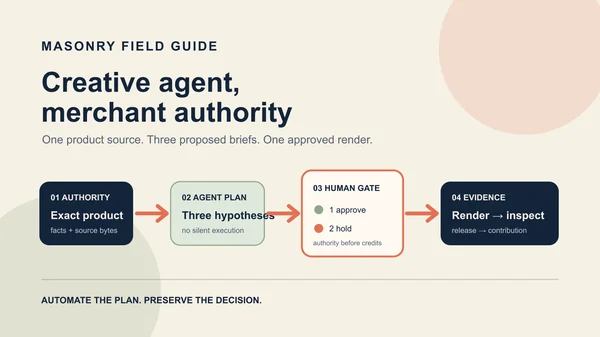
The safe workflow is deliberately less magical: review the product record, freeze the exact variant and source media, separate visual direction from claims, generate one bounded candidate, inspect it frame by frame, add copy deterministically, and recheck the destination before release.
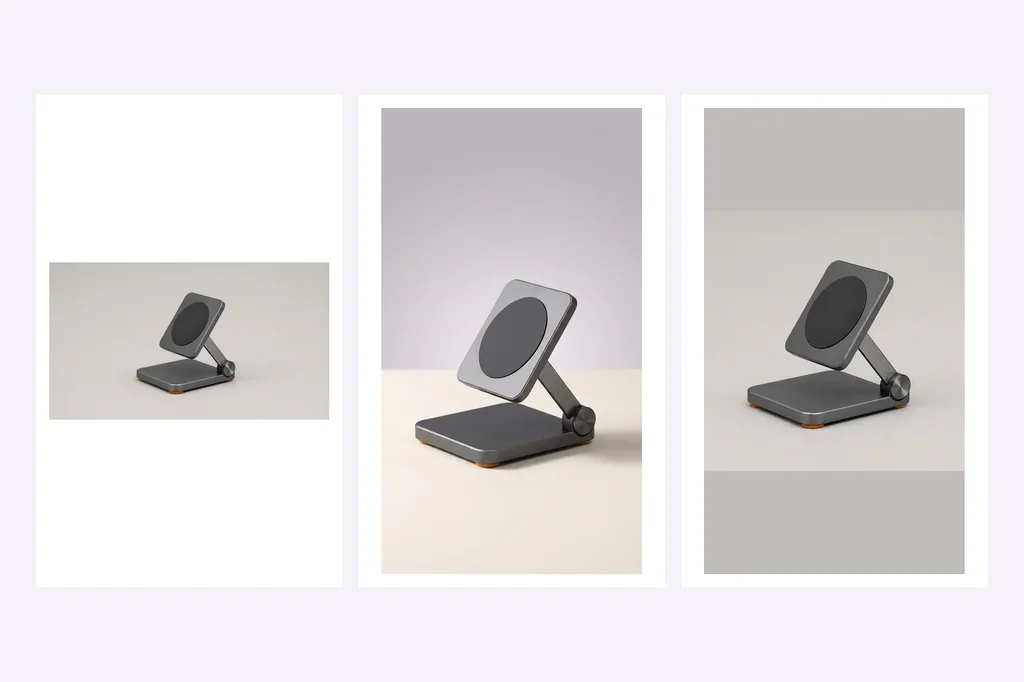
We ran that workflow on a fictional graphite folding stand. The first AI keyframe changed its finish. We rejected it. A deterministic vertical keyframe preserved the approved source, but the Kling O3 video then changed the charging plate from graphite to silver and invented a bright central ring. We rejected that too. A conservative source-pixel push became the only secondary-review candidate.
Evidence boundary: the product and destination identifiers below are fictional. The source, generated keyframe, generated clip, deterministic fallback, job IDs, and file measurements are real. This is one source and one first return per generative step—not a model reliability rate, Shopify account test, ad experiment, purchase result, or revenue claim.
Quick answer: product URL to video in eight controlled steps
- Resolve the exact Shopify product and variant you intend to show.
- Export the approved title, identifiers, factual claims, destination, and source media.
- Remove every field the model is not allowed to infer or render.
- Choose one source image that already shows the sold configuration clearly.
- Build or generate a vertical first frame, then reject any product redraw.
- Animate one bounded camera behavior and inspect several frames against the source.
- Add headline, facts, captions, offer, disclosure, and CTA as deterministic layers.
- Recheck the rendered placement, linked variant, cart path, and commercial outcome.
Download the five-row release manifest. It keeps source authority, both rejected generations, the deterministic keyframe, and the conservative video fallback separate instead of collapsing them into one “AI video created” status.
Why this is a distinct merchant job
A current merchant asked for a simple way to turn a Shopify or other product-page link into a short vertical product showcase or talking-head ad without filming. The thread also exposes the important split: a product showcase can start from several approved product views, while a talking-head asset adds a creator, likeness, script, disclosure, and testimonial problem. Read the August 2026 merchant discussion.
This page handles the no-creator showcase path. Use the real-product AI UGC workflow when the brief needs a synthetic routine or person. Use the Shopify PDP demo workflow when one documented product operation must be shown on the product page. Use the product-ad video model comparison when the decision is which route to test on the same approved source and prompt.
Step 1: turn the product page into an authority record
Do not paste a URL into a generator and assume everything it extracts is safe. Product pages contain descriptive copy, selected or default variants, recommendations, reviews, price treatments, scripts, and media that can change independently. Record the exact fields that control the asset:
| Layer | Minimum record before generation |
|---|---|
| Identity | Shopify product ID, variant ID, SKU, selected options, sold quantity |
| Source | Approved file URL or export, bytes hash, dimensions, owner, review date |
| Visible truth | Geometry, color, material, parts, marks, included items, source camera view |
| Claim authority | Approved factual claims and explicit exclusions |
| Offer | Price, discount, dates, inventory rule, market, terms—kept outside generation |
| Destination | Exact product or variant URL expected after the click |
| Decision | Reviewer, release status, placement, test window, stopping rule |
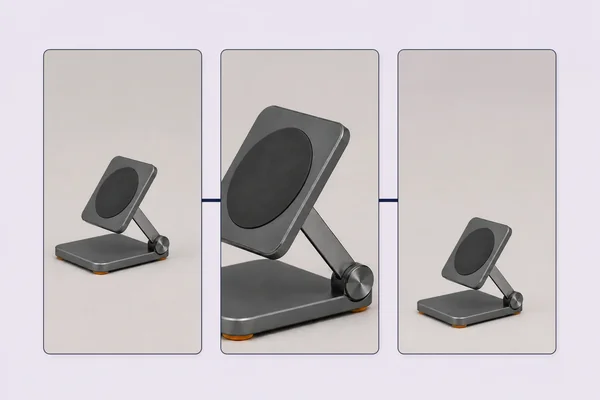
For this controlled example, the authority was one approved 1672 × 941 image of a fictional graphite folding stand. The visible record allowed one rounded-square base, four orange feet, one circular right-side hinge, one narrow support arm, one rounded-square upper plate, and one dark circular charging pad. It did not authorize compatibility, charging performance, dimensions, materials, price, stock, warranty, certification, reviews, or customer outcomes.
Step 2: derive a visual brief, not a sales claim
The model needs only the information required to render the shot. For a simple showcase that means the permitted product appearance, composition, motion, and exclusions. Product benefits, social proof, compatibility, price, offer, and CTA belong in reviewed layers added later.
Our vertical keyframe brief asked for the exact stand at the same three-quarter angle, fully visible in the lower two-thirds, with quiet space above for later copy. It prohibited a phone, cable, person, packaging, logo, words, badge, UI, duplicate, new button, altered hinge, altered geometry, or invented port.
The unselected gemini-3.1-flash-image-preview return came from job
a93e2f91-9da8-423b-b841-f6bd9ccdbc19 with seed 520260816.
That file failed before motion. It preserved the broad part count, orange feet, hinge, support arm, and charging circle, but materially changed the upper plate. A merchant should not repair that failure by calling the lighter finish “creative lighting.” If color or material can change the sold expectation, reject it.
Step 3: preserve the source pixels when a redraw is not authorized
The correction did not ask the model for a luckier result. We center-cropped the approved source around the complete product, padded above and below with the source corner color, and resized the canvas to 768 × 1376. This changes layout, not product content.
The exact demonstration transform was:
magick approved-upright-frame.webp \ -crop 941x941+365+0 +repage \ -background 'rgb(192,187,187)' -gravity center -extent 941x1686 \ -resize 768x1376 vertical-approved-keyframe.webp
Those crop numbers belong to this exact 1672 × 941 source. A real workflow should calculate and review its own safe crop. The result remains secondary creative, not new evidence about the physical product.
Step 4: generate one motion and inspect the whole timeline
We asked Kling O3 Pro for a slow push-in, subtle parallax, and a soft background light sweep. The product had to stay stationary and fully visible. The prompt prohibited folding, rotation, floating, phones, hands, cables, packaging, text, claims, extra parts, cuts, transitions, and audio.
masonry video "Create a restrained vertical ecommerce product-showcase shot from this approved first frame. The single graphite folding charging stand remains upright, stationary, centered, and fully visible. Preserve the exact rounded-square base, four small orange feet, right-side circular hinge, narrow support arm, rounded-square upper plate, dark circular charging pad, graphite color, material appearance, camera angle, and product count. Use only a very slow camera push-in with subtle parallax and a soft source-consistent light sweep across the background. Keep the quiet upper copy space. No fold, rotation, floating, phone, hand, person, cable, packaging, logo, text, letter, number, claim, badge, UI, extra part, duplicate, invented port, scene change, cut, transition, or audio. This is a review candidate, not a factual product demonstration." \ --model kling-o3-pro \ --image ./vertical-approved-keyframe.webp \ --aspect 9:16 \ --no-audio
The CLI returned asynchronous job 3959f61c-2660-48eb-8a9e-28de45b418c2. The delivered H.264 file
is 5.041667 seconds, 1076 × 1924, 24 fps, 121 frames, with no audio stream.
Disposition: REJECT. The plate turns silver and gains an unauthorized bright center. This clip cannot show the exact graphite variant, even though the camera motion looks plausible.
Step 5: choose the smallest motion that can pass
When generative motion is not necessary, a deterministic push is a valid fallback. It is less spectacular, but it preserves the product pixels and leaves room for reviewed copy.
The fallback is also 5.041667 seconds at 24 fps and 121 frames, with no audio. Its resolution is
768 × 1376 and the file is about 291 KB. It earns SECONDARY_REVIEW, not automatic release, because
the source, crop, copy, placement, destination, accessibility, and account behavior still require a
real merchant check.
Step 6: add commerce facts deterministically
Build the final ad outside the generated pixels:
- headline from an approved creative brief;
- product name and factual feature language from the reviewed product record;
- captions and audio description where needed;
- price, discount, dates, inventory language, and terms from current commerce systems;
- synthetic-media or commercial disclosure required by the channel and market;
- CTA and exact destination for the shown variant.
Do not render “works with every phone,” “fast charging,” a star rating, testimonial, price, or stock claim because the product page appears to contain it. Resolve each field from its controlling source and keep it editable when that source changes.
Step 7: release to the right surface
Shopify currently accepts uploaded product videos in MP4, MOV, or WebM, up to ten minutes, 1 GB, and 4K. The store theme must support the desired media type. Review Shopify's current product-media requirements.
Shopify's current product-media documentation also says videos and 3D models cannot be used as variant media. A merchant therefore cannot treat the uploaded clip as a native exact-variant media assignment. Verify the selected variant, surrounding gallery, product copy, price, availability, cart, and checkout separately, and keep approved variant images as the factual fallback.
Shopify also documents that the first product-media item is the featured media used on additional storefront surfaces. Do not make a video the main item accidentally; inspect the product page, collection, cart, checkout, and theme behavior after changing media order. Review Shopify's current media-order guidance.
For Instagram-specific paid acquisition, use the 15-second AI product Reels shot plan to turn an approved vertical asset into three controlled hook variants. For broader concept testing, continue into the one-SKU creative testing matrix. Lock the SKU, offer, copy, CTA, destination, audience, placements, attribution treatment, budget, and window. Vary only the declared visual route. If the ad shows a different variant than the click path, use the Shopify variant-image workflow before spending more.
Measure the decision, not the render count
Record the full progression:
| Layer | Useful fields |
|---|---|
| Production | attempts, rejects, reviewer minutes, correction minutes, accepted file cost |
| Delivery | spend, impressions, placement, frequency |
| Attention | first-frame hold and comparable view milestones |
| Intent | outbound click and landing-page view |
| Commerce | selected variant, add-to-cart, checkout, purchase |
| Economics | contribution after media, discount, returns, fulfillment, and service |
| Trust | product mismatch complaints, returns, support contacts, disclosure issues |
The honest conclusion from this run is small: the URL-to-video job is real, but automation does not remove product review. One image edit and one video generation both rewrote the product. The safest returned deliverable used less generative motion, not more.
That is the operating rule: let the product page locate the record; let approved bytes define the product; let AI propose a visual; let review decide whether it can ship.