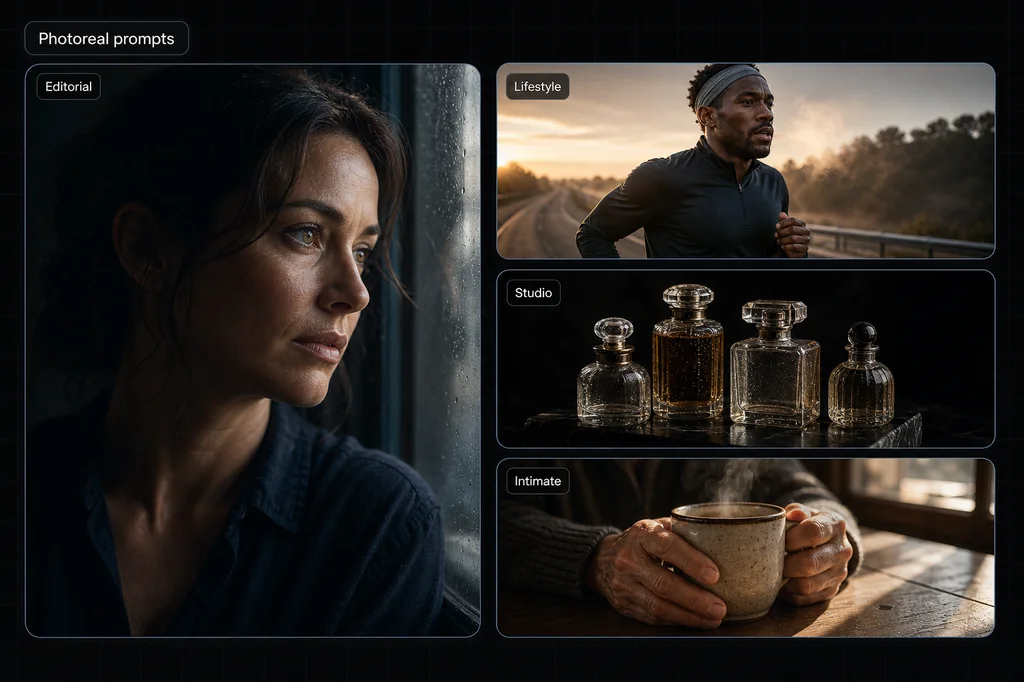
Creating photorealistic AI-generated images is not just a matter of asking for "a realistic photo." The useful work is deciding what a camera would have to see: where the light comes from, what each surface is made of, how the frame is composed, and which imperfections should remain. This guide turns those decisions into six copy-ready prompts and a repeatable test.
The six images below are illustrative outputs, not a controlled benchmark. They show that a prompt can produce the pictured result; they do not prove that the prompt will repeat reliably across seeds, models, or subjects. Each example therefore includes two things most prompt galleries omit: the visible instruction-to-output match and the detail you should inspect before accepting your own result.
You can run every prompt in Masonry's canvas. For a useful comparison, keep the prompt and aspect ratio fixed, generate three candidates in one model, then repeat in a second model. Judge the sets, not just the luckiest image.
Quick answer: the six-part prompt formula
A useful photorealistic prompt settles six decisions in this order: subject, setting, light, framing, material detail, and mood. Start with this template, then delete any slot that does not change the image:
[Subject and action] in [specific setting]. Lit by [source, direction, and softness], creating [shadow and highlight behavior]. Framed as [shot size and camera position] with [depth-of-field behavior]. Preserve [two or three material, skin, fabric, or product textures]. [Color palette and emotional tone]. Natural imperfections, believable background geometry, no unwanted text or logos.
Do not treat the template as a bag of magic words. It is a checklist for unresolved visual decisions. If a detail would not be visible in the finished frame, it probably does not belong in the prompt.
Merchant shortcut: if the image must represent a real product, photorealism is only the first gate. Route the job through the AI product-photography model comparison before generating a campaign set. It maps the label, geometry, color, material, set-count, and claim failures that a realistic-looking image can still hide, then gives you a reference-first acceptance test. Choose by accepted assets and review time—not by the prettiest sample.
A simple way to test whether a prompt improved
Run the same prompt three times before judging it. Then change one variable—light, framing, or texture language—and run three more. Score both sets on four things: subject anatomy, material texture, background geometry, and instruction following. This small controlled test tells you whether the wording helped or whether one attractive result was luck.
How to read the six examples
Do not copy the adjectives and assume they are magic tokens. Look for visible relationships:
- Light: source, direction, softness, and the shadows that should result.
- Framing: shot size, camera position, foreground scale, and depth-of-field behavior.
- Material: a few surfaces whose texture can actually be inspected.
- Scene logic: contact shadows, reflections, repeated objects, hands, and background geometry.
- Mood: the color and expression choices that remain after the physical scene is settled.
Camera and lens language is useful only when it describes a visible effect. A model may imitate shallow focus, but that does not mean it simulated a real lens or aperture exactly.
Example 1: The Moody Window Portrait
Here's the prompt:
Close-up portrait of a person sitting beside a window on an overcast day, soft natural light illuminating one side of the face while the other fades into shadow. Visible skin texture, subtle freckles, calm expression, eyes gazing outward. Neutral clothing, minimal styling, shallow depth of field, cinematic realism, moody yet peaceful atmosphere, high-detail editorial photography.
What the prompt controls
- Light: an overcast window is the source; the near cheek is brighter and the far side falls into shadow.
- Framing: the close crop and outward gaze make the face the only focal point.
- Texture: freckles, pores, eyelashes, and the knit collar provide several inspectable surfaces.
- Acceptance check: reject candidates with mismatched catchlights, melted eyelashes, waxy skin, or a background edge crossing the face.
Visible evidence in this output: the requested side-light pattern, freckles, shallow background, and calm outward gaze are present. The image is one successful match; it does not establish how often the same prompt reproduces those details.
Example 2: The Athletic Lifestyle Portrait
Here's the prompt:
A close-up portrait of a young woman on an outdoor basketball court, bathed in warm natural sunlight. She has dewy, glowing skin with soft freckles, light makeup, and slightly parted lips. Her hair is tied back neatly, with a few loose strands framing her face. A basketball is positioned close to her cheek, dominating part of the foreground and adding texture contrast to her smooth skin. The lighting creates gentle shadows and highlights across her face, emphasizing her natural features and sporty confidence. Shot with a shallow depth of field and cinematic color grading for a modern, lifestyle aesthetic.
What the prompt controls
- Foreground scale: the basketball should occupy a large part of the frame without hiding the face.
- Material contrast: pebbled rubber and skin should remain visually distinct.
- Environment: court color and hard sunlight should support the sports context without becoming the focal point.
- Acceptance check: inspect the ball's seams and lettering, the boundary where it touches the face, both eyes, and hairline geometry.
Visible evidence in this output: the ball is close to camera, its texture contrasts with the face, and warm directional light creates cheek and nose shadows. The displayed crop does not show enough of the court to prove the full environmental instruction was followed.
Example 3: The Artist Documentary Portrait
Here's the prompt:
Intimate portrait of a painter standing in a quiet studio, face partially turned toward the camera, specks of dried paint on hands and cheek. Soft directional lighting highlights skin texture and thoughtful eyes. Muted earth-tone color palette, blurred background with hints of canvases and brushes, shallow focus, authentic documentary-style portrait, high realism.
What the prompt controls
- Narrative detail: dried paint on the hands and cheek has a job; it identifies the subject's activity.
- Palette: skin, paint, hair, and studio should stay within muted earth tones.
- Focus: the eyes and hands must remain legible while studio details recede.
- Acceptance check: hands are high-risk. Count fingers, trace every joint, and reject paint that merges fingers or erases nail boundaries.
Visible evidence in this output: paint marks, hands beside the face, a muted palette, and a soft studio background all match the brief. The pose is centered and deliberate, so the image only partially supports the requested candid documentary feeling.
Example 4: The Street Style Selfie
Here's the prompt:
A trendy young woman takes a casual street-style selfie on a sunny day. She has short, wavy brown hair and wears round rose-tinted sunglasses, puckering her lips playfully. She is dressed in a loose red-and-pink knit sweater layered over a white top, distressed denim shorts, and sporty sneakers. A large quilted blue shoulder bag hangs on her side, and she wears layered necklaces, including a cross pendant. The background shows an urban street with storefronts, graffiti art, parked cars, and pedestrians, all bathed in warm golden sunlight with long shadows. The style is photorealistic, modern, and urban with a relaxed, youthful vibe.
What the prompt controls
- Wardrobe hierarchy: the red-and-pink knit, blue bag, glasses, and necklace should remain separate objects with coherent straps and edges.
- Action: the phone, gaze, arm position, and selfie framing must agree.
- Background: storefronts, graffiti, people, and cars should read as an urban street without impossible scale changes.
- Acceptance check: inspect every visible finger, the phone-camera orientation, necklace continuity, bag strap, clothing seams, and any accidental text.
Visible evidence in this output: the requested warm street light, colored knit, blue shoulder bag, glasses, and selfie action are present. The phone appears in the frame even though a true front-camera selfie would not normally show it this way; treat that as a composition mismatch to fix, not proof of realism.
Example 5: The Intimate Glasses Close-Up
Here's the prompt:
Extreme close-up portrait of a young woman with soft natural features, photographed from a slightly low angle. She wears round, thin metal-framed eyeglasses with clear lenses that catch subtle reflections of ambient light. Her gaze is directed upward and to the side, creating a thoughtful, introspective expression. The focus is sharply centered on one eye visible through the glasses, revealing fine eyelashes, delicate skin texture, faint freckles, and natural pores. Her lips are relaxed and slightly parted, with a soft matte texture and muted natural color. Dark, slightly tousled hair frames the face, with loose strands falling naturally across the forehead and temple. The lighting is soft and diffused, producing gentle shadows and a shallow depth of field that blurs the background into a dark, unobtrusive gradient. Color palette is subdued and cinematic, leaning toward cool greens and warm skin tones. Photorealistic, editorial-style portrait photography, intimate mood, high resolution, minimal retouching, natural beauty emphasis, no text, no logos.
What the prompt controls
- Focus target: one eye through the glasses should be the sharpest point.
- Optical interaction: the rims, nose pads, and reflections must follow the face instead of floating above it.
- Microtexture: eyelashes, pores, freckles, lips, and fine hair provide a demanding close-range check.
- Acceptance check: reject duplicated lashes, broken rims, asymmetric lenses, reflections that ignore lens curvature, or skin texture that repeats as a pattern.
Visible evidence in this output: the low angle, one-eye focus, cool-green cast, freckles, and reflections are visible. The very wide crop differs from the portrait-oriented examples, and the glasses deserve close inspection at full resolution before production use.
Example 6: The High-Fashion Studio Shot
Here's the prompt:
A stylized studio fashion photograph of a woman in winter sportswear, posed in a dynamic crouching stance against a dark, neutral background. She is wearing a textured purple fleece jacket with a bright green zipper and collar detail, paired with light gray knit leg warmers and gray alpine ski boots with visible buckles. A black glove covers one hand as she grips a ski pole, reinforcing the winter sport theme. Fine artificial snow is scattered on the ground and lightly dusts her skin and boots, suggesting a cold, alpine environment despite the indoor studio setting. Her hair is pulled back tightly, and the lighting emphasizes natural skin texture and highlights, giving the image a high-fashion, editorial feel rather than an action shot. The camera angle is slightly low and close, creating an intimate yet powerful composition that blends sport, fashion, and attitude. The overall mood is bold, modern, and confident, with strong contrast between the vibrant clothing and the dark background.
What the prompt controls
- Genre boundary: studio lighting and a neutral backdrop should coexist with snow and technical ski clothing.
- Material separation: fleece, knit, leather or plastic buckles, snow, skin, and metal pole should not melt together.
- Pose: the crouch must remain anatomically plausible while both boots and the pole support the composition.
- Acceptance check: inspect every buckle, pole continuity, hand grip, boot geometry, knee direction, and where snow contacts the body.
Visible evidence in this output: the purple fleece, green trim, boots, pole, artificial snow, low camera, and dark studio all appear. The output is square rather than the portrait ratio used by four earlier examples, so compare composition separately from prompt fidelity.
Turn a good-looking output into a reproducible result
A single attractive image is a candidate, not a conclusion. Save the prompt, model, aspect ratio, and each output from the six-image test. Then use this compact acceptance sheet:
| Check | 0: reject | 1: usable with edits | 2: ready |
|---|---|---|---|
| Anatomy and object count | Broken, duplicated, or missing parts | Minor edge or pose issue | Coherent at full size |
| Material texture | Waxy, merged, or repeated pattern | Mostly distinct surfaces | Materials remain distinct under zoom |
| Background geometry | Impossible lines or scale | Small local inconsistency | Perspective and contact feel coherent |
| Instruction following | Misses a required relationship | Gets most required details | All acceptance-critical details appear |
Score the three baseline images and three one-variable variants out of eight. Keep the revision only if the set improves, not because its best image is prettier. Record any failure that appears twice; that recurring failure becomes the next prompt change.
Key Vocabulary for Photorealism
Use terms that point to something visible. These are options, not guarantees:
For Skin
- Visible skin texture
- Natural pores and fine facial hair
- Subtle freckles or uneven pigmentation
- Fine lines around the eyes and lips
- Minimal retouching
For Lighting
- Soft natural light
- Large diffused source at camera left
- Warm low-angle sunlight with long shadows
- Soft contact shadow under the subject
- Narrow rim light along one edge
For Photography Style
- Shallow depth of field
- Eye-level, low-angle, or overhead framing
- Chest-up, full-body, or extreme close-up crop
- Documentary, editorial, or catalog composition
- Foreground sharp; background progressively softer
For Mood
- Moody yet peaceful
- Quiet and observational
- Energetic without a staged smile
- Bold and graphic
- Relaxed and candid
Common Mistakes to Avoid
When an otherwise promising prompt misses, these are the first patterns to check:
- Stacking quality words: "masterpiece, 8K, award-winning, photorealistic" does not resolve the scene. Replace the stack with one visible instruction.
- Naming light without its effect: "cinematic lighting" is ambiguous. State the source, direction, softness, and resulting shadow.
- Over-specifying invisible details: a camera body name or fabric fact that cannot appear in the frame only adds noise.
- Changing five variables at once: you cannot tell which revision helped. Change one relationship and rerun the same number of candidates.
- Using a broad negative list: exclusions can conflict with the positive brief. Name only the failure that would make the output unusable.
- Judging at thumbnail size: inspect eyes, hands, accessories, text, reflections, contact shadows, and background edges at full resolution.
Diagnose the output instead of adding more adjectives
| If the result looks like this | The prompt is probably missing | Add a visible instruction like |
|---|---|---|
| Flat, evenly lit, and synthetic | Light direction and contrast | "Large window at camera left; far side falls one stop darker" |
| Plastic skin or waxy fabric | Material-specific microtexture | "Visible pores and fine facial hair" or "open wool weave with loose fibers" |
| Subject pasted onto the background | Shared light and environmental contact | "Warm storefront light reflects on the jacket; soft contact shadow under both shoes" |
| Busy scene with no focal point | Visual hierarchy and framing | "Chest-up frame; eyes in sharp focus; background two stops softer" |
| Random signs or lettering | A narrow exclusion | "No readable signs, captions, watermarks, or logos" |
Fix the first visible failure, then rerun. Adding five unrelated quality terms at once makes it impossible to learn which instruction changed the result.
The bottom line
Better photorealistic prompts make visible decisions testable. Define the subject and setting, describe what the light does, choose a frame, name a few inspectable materials, and set the mood. Then generate more than once and reject outputs that fail anatomy, texture, geometry, or an acceptance-critical instruction.
Start with one example above, adapt it to your subject, and paste it into Masonry's canvas. Run three baselines, change one relationship, and run three variants. That small record is more useful than a gallery of unrelated favorites because it tells you what to keep for the next image.
For prompting quirks specific to each model, see our guide to prompting every major AI image model. If your realistic shots are products, start with the 12 ecommerce product-photography prompts to add exact-SKU authority, placement constraints, and a merchant review gate; then use the best AI image model for product photography roundup to choose which model to test.