Most image-prompt advice mixes three things: useful scene description, controls that only some model routes accept, and folklore that sounds technical but is hard to verify. A better workflow is to write an observable brief, run a controlled candidate, and change one failed dimension at a time.
This guide covers the current Masonry routes for Nano Banana 2, GPT Image 2, Seedream 5 Pro, FLUX.2 Pro, and Ideogram V4. It is about constructing and debugging the prompt. Use the product-photography model roundup when the decision is which model to run.
Evidence boundary: the two image pairs below are first-hand artifacts from the stated prompts. They test one Nano Banana 2 quality-tag variation and one FLUX.2 Pro negative-prompt attempt. They do not establish universal prompt laws or rank every current model.
The six-part prompt framework
- Subject: name the main person, product, place, or object first so the brief is easy to parse. Example: “A matte cobalt serum bottle.”
- Action: state what is happening in a physically reproducible way. “An artist shapes a vase at the wheel” is more testable than “creative pottery moment.”
- Scene: add only the props and environment needed to tell the story. Three coherent cues are usually more useful than a catalog of décor.
- Composition: specify framing, camera height, angle, subject placement, and required negative space when layout matters.
- Light and materials: name the light source and observable surface behavior: translucent cobalt glass, soft window light from camera-left, one contact shadow.
- Constraints: finish with the small set of pass/fail requirements: exact label copy, both hands visible, empty street, no other text. Phrase the desired state directly when the route does not expose a negative-prompt field.
One to three sentences is a practical starting point. Add a detail only when it expresses a requirement or corrects a visible failure. Prompt length by itself is not a quality setting.
What the two recorded tests show
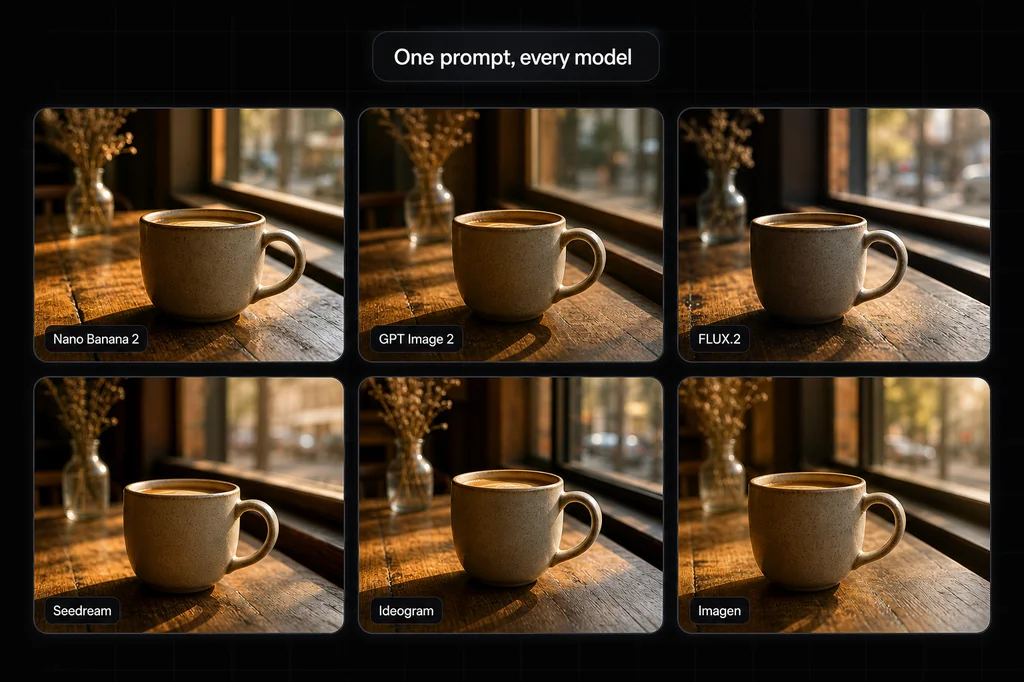
Quality tags did not help this Nano Banana 2 pair. I ran the same cafe scene twice: once as a plain description and once with the full "4k, masterpiece, award winning, hyperrealistic, 8k" tag stack. In this pair, the plain-language version has stronger depth and atmosphere. The tag stack did not add visible sharpness and produced a flatter composition. That is a reason to test observable requirements before relying on praise tags, not proof that a phrase can never affect another model or seed.
A generic negative flag did not remove objects from this FLUX.2 Pro output. I prompted the current Masonry route for "a busy city street" and supplied "people, cars, vehicles" through the CLI's generic negative-prompt flag. The output retained people and cars. The route's live contract does not expose a model-specific negative-prompt field, so acceptance of a generic CLI flag is not evidence that the selected model consumes it. For an empty result, put the desired state in the main prompt: "an empty city street before sunrise."
Current model-route notes
These are starting points based on the inputs exposed by Masonry's live model routes on August 4, 2026. They are not quality rankings. Before automating a batch, run masonry models params <model-slug>; route contracts change faster than general prompting principles.
| Model | Useful prompt starting point | Inputs exposed by the current Masonry route | Reproduction control |
|---|---|---|---|
| Nano Banana 2 | Describe the scene or edit conversationally; attach references when identity or product form matters. | Text, seed, output size, and reference images for supported reference workflows | Seed exposed |
| GPT Image 2 | State layout, exact copy, spatial relationships, and edit instructions explicitly. | Text, output size, and up to 10 reference images | No seed exposed |
| Seedream 5 Pro | State the scene first, then use references for identity, composition, or product fidelity. | Text, seed, dimensions, and up to 10 reference images | Seed exposed |
| FLUX.2 Pro | Put subject, action, and composition in the main prompt; describe the desired state positively. | Text, seed, and fixed output dimensions | Seed exposed |
| Ideogram V4 | Quote displayed copy exactly and specify hierarchy, placement, and line breaks. | Text, seed, and output size | Seed exposed |
None of these five current route contracts exposes a model-specific negative-prompt field. Reference-image support also differs: do not assume that because one model accepts references, every model does.
Debug the failed dimension, not the whole prompt
| Visible failure | First prompt change to try | Acceptance check |
|---|---|---|
| Wrong subject or action | Move the subject first and rewrite the action as a physical moment: “right hand turns the jar lid” instead of “opening product.” | Subject identity and required action are both unambiguous. |
| Wrong framing or layout | Add frame size, camera height, angle, subject placement, and required negative space. | The output can be cropped into the intended placement without losing the subject. |
| Misspelled label or headline | Put the exact copy in quotation marks, give one line per intended line, and remove competing text. | Every character is correct; reject invented claims or marks. |
| Too much clutter | Name the desired clean state and list only the few props that must remain. | No object competes with the subject or covers required copy. |
| Person or character drifts | Use reference images only on a route that supports them, restate stable visible traits, and review each candidate. | Face, hair, wardrobe, and other identity-critical traits stay within the approved reference. |
| Product shape, label, or color drifts | Supply a clean product reference on a supported route and state which properties must remain unchanged. | Silhouette, packaging geometry, color, and claims match the source. |
| A batch is inconsistent | Reuse the same prompt and seed where the route exposes one; change one variable at a time. | Compare within one model route. A seed is not a cross-model identity. |
For text-heavy assets, a readable headline is not enough. Treat every character, logo, price, legal line, and product claim as a pass/fail requirement. For identity or product work, references improve control but do not remove the need for human review.
The bottom line
A useful prompt is an observable creative brief: subject, action, scene, composition, light and materials, then a short set of constraints. Generate one candidate, name its first visible failure, and change only the relevant part of the brief. When the model choice is still uncertain, compare the same acceptance sheet—not assumed prompt syntax—across candidates in Masonry's canvas. For repeatable runs, inspect the live parameters and use the Masonry CLI.
Continue with the photorealistic prompt guide for six copy-ready visual briefs, the AI UGC prompt workflow for consistent fictional creators and disclosure, or the FLUX vs Seedream same-prompt test when model choice is the unresolved variable.