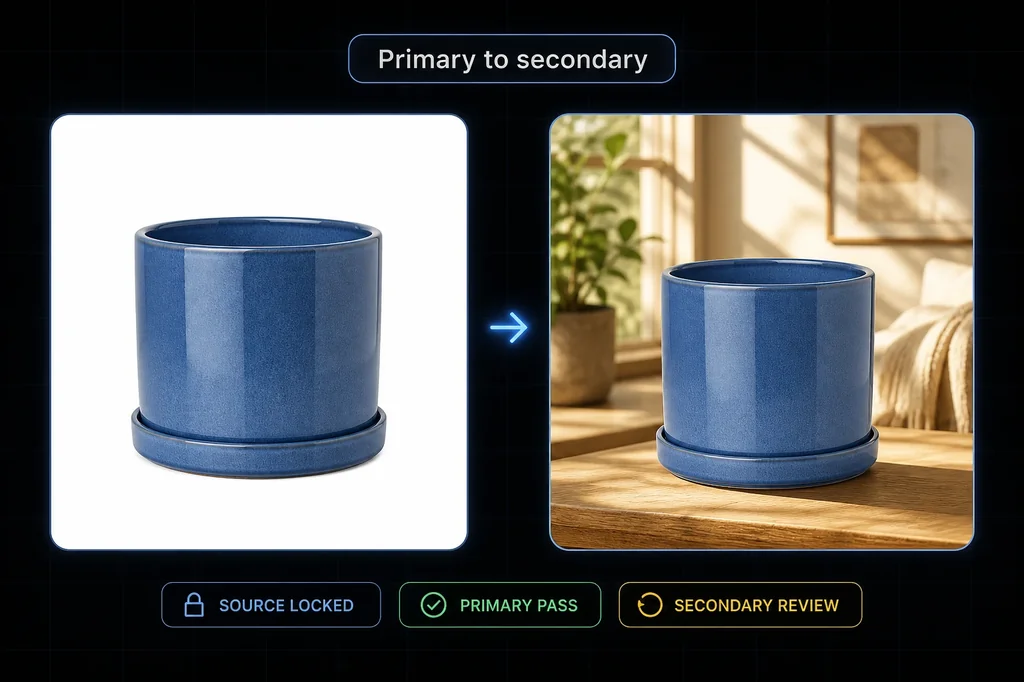
The safest Walmart Marketplace image workflow does not ask an image model to recreate the product. It separates two jobs:
- build the factual primary image from approved product pixels on literal white; and
- generate only an empty secondary-image environment, then place the same approved product into it.
That separation matters because Walmart's public guidance gives the primary and additional images different jobs. The primary identifies the item under stricter presentation rules. Additional images may show an appropriate setting. A polished lifestyle result is not a substitute for the factual primary image.
Evidence boundary: the blue planter is a fictional controlled SKU already used in a Masonry image test. For this article we ran one real Masonry empty-scene job, cleaned the previously reviewed chroma-key cutout, made one deterministic white primary, and composited one secondary candidate. Nothing was uploaded to Walmart, mapped to a live item, shown to buyers, or measured for sales. Account, item, contribution, publication, and commercial fields remain NOT_RUN in the release manifest.
Walmart's primary and secondary image rules are not interchangeable
Walmart's public Item Setup Content Policies guide says all listings must have at least two images, and all images must be in focus, professionally lit and photographed. Images cannot show accessories that do not come with the item.
For the primary image, the same guide specifies:
- seamless white at RGB 255, 255, 255;
- a frontal item view;
- no placeholder; and
- no additional graphics, illustrations, logos, watermarks, overlays, or text.
For additional images, it says the item may appear in an appropriate setting or environment and may be rotated. That is the production opening for AI-assisted scene work, but it is not permission to change the product.
A separate Walmart Listing Quality Optimization guide recommends four professional high-resolution images, at least 1000 by 1000 pixels, and a white background. Read that as optimization guidance alongside the two-image policy minimum, not as evidence that every category has the same live specification.
Both documents were checked on 17 August 2026 PT. Their URL paths contain older dates, and marketplace rules change. Verify the current policy, category style guide, and item specification in Seller Center before release.
The release contract
| Decision | Authority | This test |
|---|---|---|
| Which exact item and variant are being sold? | seller's approved item record and source asset | fictional blue planter, one unit |
| What belongs in the primary slot? | current Walmart image policy and category rules | deterministic 2000 × 2000 JPEG on literal white |
| What may change in the secondary image? | declared scene brief | environment and derived contact shadow only |
| What may not change? | approved source | count, silhouette, rim, body, groove, saucer, terracotta base, color, material-facing texture |
| How is product identity checked? | file record and product-owner review | source checksum and output checksum plus visual review |
| Was Walmart acceptance proved? | Seller Center or item API result | NOT_RUN |
| Was commercial value proved? | buyer exposure and contribution data | NOT_RUN |
The downloadable Walmart image release manifest keeps these states separate. A design review cannot silently become a marketplace-approval claim.
Step 1: preserve an approved source
The source is a pale-blue ceramic planter with a matching saucer and terracotta-colored base. The first chroma-key extraction carried a visible magenta matte around the rim and base. That version failed review. We re-extracted the source with a soft matte, despill, and one-pixel edge contraction before continuing.
This is a useful release lesson: “same source file” does not guarantee a good composite. Review the alpha edge against both white and a mid-tone background before treating a cutout as approved evidence.
Step 2: build the primary image deterministically
No generative model touched the product or background in the primary asset. The pipeline trimmed transparent padding, resized the reviewed source, centered it on a 2000 by 2000 RGB-white canvas, and exported JPEG.
The four corner pixels measure RGB 255, 255, 255. That proves the exported canvas corners are literal white; it does not prove that a live Walmart category accepts the file. Product-owner review, current file requirements, item mapping, and upload status are independent gates.
Step 3: generate an empty secondary-image scene in Masonry
We sent this bounded brief through the Masonry CLI:
masonry image "Create an empty square ecommerce secondary-image background plate for product placement: light oak console surface in the lower third, warm off-white plaster wall, soft window light from camera-left, restrained out-of-focus linen chair at the far left, one distant soft green plant shape at the far right, large clean central placement zone, straight-on camera at surface height, natural commercial product photography. No product, planter, pot, vase, package, person, hand, animal, logo, words, letters, numbers, price, badge, watermark, or object in the central foreground." \ --model gemini-3.1-flash-image-preview \ --aspect 1:1
Masonry job 02619470-2940-42d1-8a6f-94ec618a19d9 succeeded and returned a 1024 × 1024 empty plate. The model did the work it is good at: lighting, materials, atmosphere, and negative space. It never received responsibility for the sold product.
Step 4: composite the source and review contact
The first composite failed twice: the magenta edge matte was visible, and the planter floated above the console. The corrected version uses the cleaned source and places the base on the declared contact plane with a restrained derived shadow.
The accepted visual checks are deliberately narrow:
- one product, no duplicate or invented accessory;
- source-preserved silhouette, rim, groove, saucer, base, color, and texture;
- no words, logo, badge, offer, or unsupported claim;
- plausible contact with the console; and
- an appropriate, non-distracting setting.
SECONDARY_REVIEW does not mean APPROVED_FOR_WALMART. A product owner still needs to compare the full-resolution result with the sold unit, and the seller must confirm current category and account requirements.
Step 5: map the asset to the current item specification
Do not hardcode a generic Walmart spreadsheet and call the workflow complete. Walmart's current Get Spec API returns the item specification for requested product types. The seller-authenticated response, current category, and current version should control the contribution fields.
For each SKU, record at minimum:
- seller SKU, product ID, item ID if one exists, marketplace, and product type;
- current spec version and retrieval time;
- source asset checksum and reviewer;
- intended image slot and asset checksum;
- upload or feed ID;
- processing result, selected image state, and publication time; and
- rollback asset and owner.
This article does not fabricate those fields. The downloadable manifest leaves them NOT_RUN so a merchant can see exactly where creative production ends and marketplace operations begin.
Where this workflow makes money
The commercial promise is not “AI makes prettier images.” It is lower production cost per accepted, accurate asset and faster creation of useful secondary scenes without risking the factual primary.
Measure the workflow at three levels:
- Production: total generation, extraction, compositing, review, correction, and external cost divided by accepted assets.
- Marketplace: contribution accepted, asset selected, item published, and rollback available.
- Business: buyer exposure, conversion, contribution after fees and returns, return-reason movement, and support contacts.
Do not optimize on files returned, aesthetic preference, or click-through alone. A secondary image can improve attention and still lose money through inaccurate expectations or higher returns.
For a broader role-by-role gallery plan, use the ecommerce product-photography shot list. If the main image is already failing on Amazon rather than Walmart, use the Amazon main-image suppression recovery workflow; platform outcomes and contribution paths are different.
The bottom line
Treat Walmart primary and secondary images as separate production contracts. Build the primary from authoritative product evidence on literal white. Let AI generate an empty secondary scene, not a plausible replacement SKU. Composite, review the edge and contact plane, map the accepted asset to the current item specification, and keep marketplace and revenue states explicit.
That workflow is less magical than asking for a finished listing image in one prompt. It is also much easier to audit, correct, and scale.