An ecommerce product photography shot list should not begin with “hero, lifestyle, detail.” It should begin with the purchase questions your current gallery leaves unanswered, the product evidence required to answer each one, and the safest way to produce the pixels.
We used that rule to build a seven-slot brief for a fictional NORTHLINE 750 ML bottle whose starting gallery contained one approved front view. The exercise found six unanswered buyer questions, but it did not authorize six AI generations. Three slots need additional factual sources before production, two are candidates for controlled compositing, one can use a reviewed scene edit, and the exact-product source remains the factual anchor.
That distinction prevents a common failure: using visually convincing AI output as evidence for scale, hidden features, included items, or packaging that the model was never given.
Evidence boundary: NORTHLINE is fictional. The approved source, one Masonry job, returned image, downloadable manifest, and visual review are real. The seven slots are a planning template, not a claim that every product needs exactly seven images or that adding them will increase conversion. No physical bottle dimensions, back view, open-cap view, packaging, or included-item record was available; the brief blocks rather than invents those facts.
Why this deserves a workflow, not another prompt list
The commercial problem is buyer uncertainty. Baymard's large-scale usability testing found that 56% of users' first action on a product page was to explore its images, while its current product-page research says 42% try to judge product size from images. Read the image-resolution research and the current scale-image finding.
Merchant discussions expose the production side. One ecommerce photography thread recommends arriving with a complete shot list and the needed props or hand model rather than improvising on set. Read the merchant discussion. A current Shopify discussion draws the trust boundary at changing the product itself and warns that a prettier image can increase “not as described” returns. Read the AI-image trust discussion.
The practical unit is therefore not “an image.” It is one buyer question + one authority record + one production route + one acceptance gate.
The seven-slot buyer-question map
| Slot | Buyer question | Required authority | Safe production route | NORTHLINE status |
|---|---|---|---|---|
| 1. Exact product | What exactly will arrive? | approved front view, variant, quantity, visible label | factual photography or approved render | READY_SOURCE |
| 2. Alternate view | What is on the back and sides? | approved back and side views | photography or verified 3D | BLOCKED_SOURCE |
| 3. In scale | How large is it in a hand or space? | verified dimensions and scale reference | controlled photography, verified 3D, or dimensional composite | BLOCKED_DIMENSIONS |
| 4. Detail | What do finish, texture, seam, and closure look like? | macro source and material record | macro photography; bounded cleanup only | BLOCKED_MACRO |
| 5. In use | How does it fit a real routine? | approved product plus allowed human or scene context | reviewed scene edit or product-preserving composite | CANDIDATE |
| 6. Included items | What is in the box? | bill of materials and exact component sources | factual flat lay or approved render | BLOCKED_BOM |
| 7. Delivery state | What packaging and condition should I expect? | current packaging and market/version record | factual photography | BLOCKED_PACKAGING |
Download the completed seven-slot TSV brief. Replace the example rows with one SKU, keep blocked rows visible, and add the final asset URL only after review.
Step 1: mine questions before naming shots
Collect the last 30–90 days of product-specific evidence you already own:
- pre-purchase support questions;
- review phrases that describe surprise, confusion, fit, size, finish, or missing items;
- return reasons, especially “not as expected,” wrong size, wrong color, or missing component;
- on-site search terms and product-page questions;
- gallery, zoom, variant, add-to-cart, and checkout behavior.
Turn each repeated issue into a neutral buyer question. “Show a hand holding it” is a production idea. “Can I judge its size before ordering?” is the buyer question. The second wording leaves room for a real hand photo, a dimension diagram, a verified 3D scene, or a composite—whichever can answer truthfully.
Do not copy a competitor gallery and assume its slots solve your buyers' questions. Do not treat a Reddit anecdote as your store's conversion evidence. Both can help discovery; neither replaces product-specific records.
Step 2: score the gaps, then block unsupported facts
Use a deliberately simple planning score:
Planning score:
priority = question frequency × purchase impact × current evidence gap, with each factor rated from one to three.
A repeated size question that prevents purchase and has no current visual scores 3 × 3 × 3 = 27. A rare styling question with low purchase impact and a partial answer might score 1 × 1 × 2 = 2.
This score only orders the production queue. It does not estimate revenue or statistical uplift. Add a separate authority_status field:
READY: the approved facts and sources exist;PARTIAL: production may begin, but named evidence is still missing;BLOCKED: the shot would imply a fact the team cannot currently prove.
For the NORTHLINE bottle, scale is probably valuable but remains BLOCKED_DIMENSIONS. A model cannot repair the missing authority record.
Step 3: route each slot instead of sending everything to AI
Use the least permissive route that can produce the required truth:
- Factual capture: exact product, alternate views, openings, components, packaging, condition, regulated text, and color-critical details.
- Deterministic composite: approved cutout placed into a scene, dimension board, or layout whose scale and geometry are controlled.
- Verified 3D: views or scale scenes generated from an approved dimensional asset.
- AI-assisted edit: allowed environment, lighting, cleanup, or human context where the product remains source-checked and the result is secondary.
- AI concept only: preproduction art direction that cannot be mistaken for a product fact.
The product-photo model comparison helps shortlist routes and failure classes. The same-SKU fidelity test shows why a supplied source still needs a rejection sheet. For a multi-product operation, move the accepted recipe into the three-SKU batch workflow only after the first SKU passes.
Step 4: the real scale-image test—and why it failed its stated job
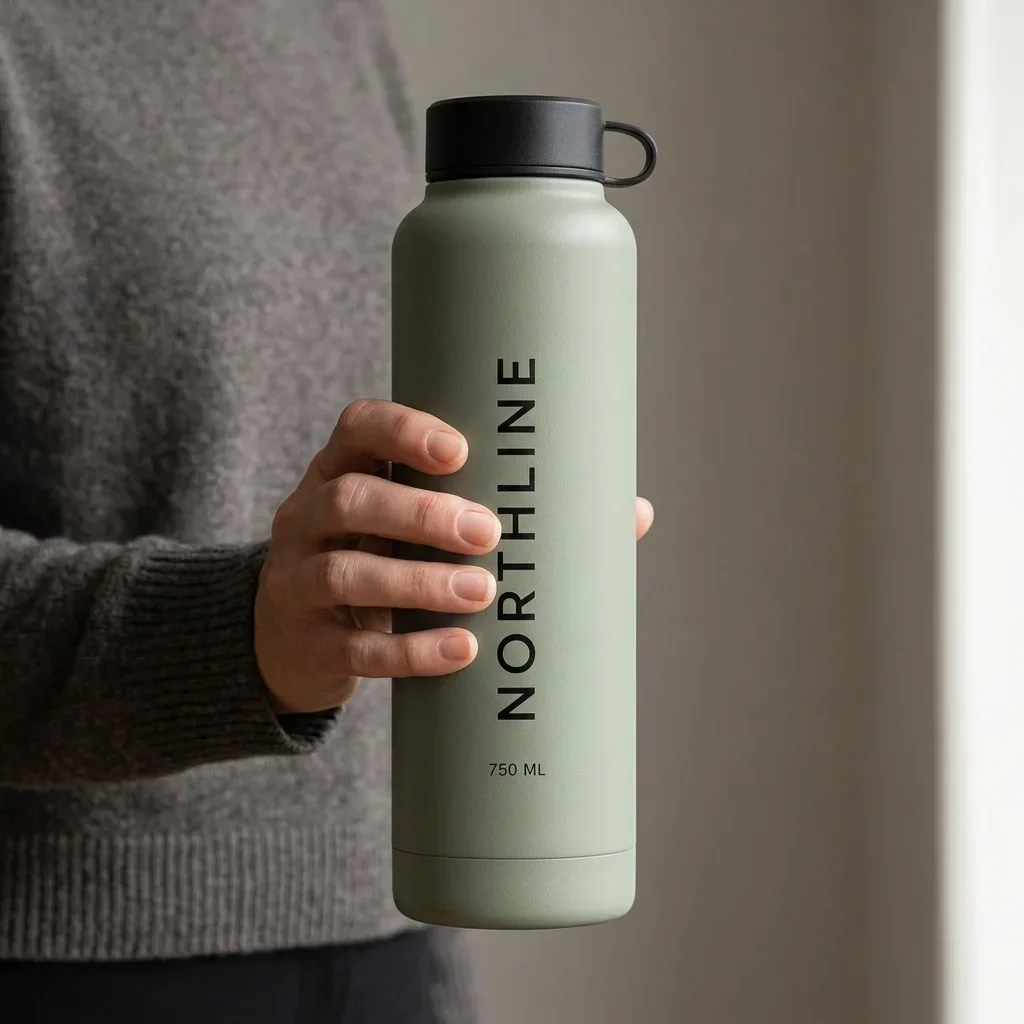
We sent the approved front view to Masonry's gemini-3.1-flash-image-preview route with a square in-hand brief, seed 260817, and explicit instructions to preserve the sage color, black cap and loop, vertical NORTHLINE, and 750 ML. The asynchronous job was 1f29ae0d-9142-4468-ac75-ae43501fedc7.
The image is visually useful and visibly product-like. It also fails the exact buyer question it was meant to answer: the relative hand-to-bottle scale is model-authored. A plausible hand does not make the dimensions factual.
Disposition:
KEEP_STYLE_REFERENCEfor lighting, crop, and human-context discussion;REJECT_AS_SCALE_PROOFfor the product page;- next action: obtain verified dimensions, then photograph the exact bottle in hand or build a controlled dimensional composite.
That is why the manifest stores both candidate_disposition and authority_status. “Generation succeeded” is not the same as “buyer question answered.”
Step 5: write acceptance gates before production
Every row needs a short pass/fail gate. For the in-use slot:
Pass only if the exact approved SKU, variant, quantity, silhouette, cap, loop, finish, label, and visible text survive full-resolution review; the human grip is anatomically plausible; no unapproved feature or claim appears; and the image is released only for the buyer question its authority record can support.
For the blocked scale slot, the gate begins earlier: verified physical dimensions must exist. For the included-items slot, the exact bill of materials and component sources must exist. A prettier prompt cannot substitute for either.
Step 6: release the set as a measured hypothesis
First measure the production system:
- attempted, service-succeeded, reviewed, accepted, and published assets;
- failure reason by slot and SKU;
- review and correction time;
- cost per accepted asset;
- blocked rows caused by missing product data.
Then measure the commercial change against a stable control. Pick one primary outcome before launch—often add-to-cart rate for the affected PDP—and keep raw counts visible. Use gallery engagement or zoom as diagnostic behavior, not automatic proof of purchase value. Guard against:
- “not as expected” returns;
- size, color, feature, and missing-item support contacts;
- wrong-variant or wrong-SKU image mapping;
- slower page loads and layout shift;
- image changes overlapping price, offer, copy, traffic, or inventory changes.
The Shopify product-image A/B test workflow covers assignment, exposure, sample-size boundaries, and rollback. If returns are the priority, use the product-image return-reduction workflow to connect a specific expectation gap to its corrective visual rather than redesigning the whole gallery.
The finish line
A complete shot list is not seven checked boxes. It is a ranked set of buyer questions in which every row has a product authority record, a bounded production route, a predeclared rejection gate, a named owner, and a measurable release decision.
For this bottle, the honest result is one ready factual source, one generated style reference, zero accepted scale-proof images, and five blocked factual slots. That is more commercially useful than seven polished files whose claims nobody can verify.