

- 3–15 seconds
Clip length
- 1080p
Current output
- 16:9 · 9:16 · 1:1
Layouts
- Text · first/last frames
Inputs
About Kling O3 Pro
Kling O3 Pro is Kuaishou's current professional short-video model for text-to-video and image-to-video work. In Masonry, the live route accepts clips from 3 to 15 seconds, landscape, vertical, or square output, an optional first frame and last frame, optional native audio, and either a single prompt or a structured multi-shot sequence. Those controls make it useful for a bounded merchant job: turn a reviewed product image or campaign concept into a short motion candidate without pretending one generation is a finished ad.
The important ecommerce tradeoff is not simply “more motion is better.” Masonry has retained two first-hand product tests with this route. In a same-source serum test, it followed the requested push and parallax but rotated far enough to invent dense side copy that the approved front view did not authorize, so the clip was rejected for exact-SKU use. In a separate first-and-last-frame tablet-stand workflow, it connected the approved folded and upright endpoints well enough to illustrate the intended opening, but the generated path could not prove the real mechanism. Use it when motion, shot direction, or endpoint control creates value—and keep product facts, claims, prices, overlays, and release approval outside the generative layer.
Why teams choose Kling O3 Pro
Choose Kling O3 Pro when a merchant needs more active camera motion, a 3–15 second short-video canvas, multi-shot direction, optional audio, or explicit first-and-last-frame control. Kling 2.6 Pro was more conservative in Masonry's one same-source serum screen and preserved the authorized front surface better, although its motion was nearly static; O3 followed more of the requested parallax but invented side copy. Seedance and Veo are also strong creative alternatives when cinematic motion or audio is the priority. The practical choice is the route with the best accepted-clip rate on your real SKU and release rubric—not the most dramatic first result. Keep approved photography or deterministic compositing as the authority whenever exact source pixels or mechanically factual behavior are required.
What Kling O3 Pro can do
The capabilities that set Kling O3 Pro apart and earn its place in a brief
Text or Approved-Frame Starting Points
Start from a written concept or use a first-frame product image when the opening composition and visible SKU matter. A supplied frame gives the model stronger visual context, but it does not make later frames factual records of hidden labels, geometry, materials, or mechanisms.
First-and-Last-Frame Direction
Supply both endpoint images for a transition with a defined beginning and landing frame. This is useful for reveals, assembly concepts, before-and-after staging, and product-demo illustrations; review the path between the endpoints because keyframes constrain destinations, not physical truth.
Three-to-Fifteen-Second Clips
The current Masonry route exposes integer duration from 3 through 15 seconds. That range fits one restrained product loop or a short sequence, but every extra beat competes for the same runtime, so simplify the action before extending the prompt.
Single-Shot or Multi-Shot Direction
Use one prompt for a continuous shot or the multi-prompt control for an intentional sequence. Define each shot's subject, framing, movement, and duration rather than asking the model to infer an entire ad edit from adjectives such as “cinematic.”
Landscape, Vertical, and Square Output
Masonry currently exposes 1920×1080, 1080×1920, and 1080×1080 layouts, corresponding to 16:9, 9:16, and 1:1. Choose the placement before describing camera movement so a horizontal orbit is not later cropped into a vertical ad.
Optional Native Audio
Audio is off by default and can be enabled for generated ambience, effects, or Chinese- or English-language speech. Treat any spoken claim as draft creative: approve the script separately, verify the rendered words, and do not let generated audio become the source for product facts.
Where teams reach for Kling O3 Pro
- Product hero loopsAnimate one approved packshot with a restrained push, light sweep, or small parallax move for a PDP secondary slot, landing page, or collection module, then compare the complete clip with the source.
- Vertical paid-social conceptsCreate 9:16 product-first motion candidates for Reels, Shorts, or TikTok while keeping offer copy, price, disclosure, CTA, and platform overlays deterministic.
- First-and-last-frame product revealsDirect a transition between two approved compositions when both endpoints matter, while labeling the result as a visual illustration unless the intermediate behavior is independently verified.
- Short multi-shot campaign boardsTest a compact establishing shot, product detail, and landing frame as one sequence before investing in production footage or a larger batch.
- Lifestyle concept animationAdd bounded camera or environmental motion to an approved product-in-scene image when creative exploration matters more than exact hidden-surface fidelity.
- Sound-on creative prototypesGenerate room tone, effects, or draft dialogue with the visuals to evaluate pacing, then replace or approve every commercial claim and required disclosure through the normal review workflow.
- Pre-production motion testsUse fast generated candidates to compare camera language and timing before briefing a photographer, animator, editor, or deterministic product-compositing workflow.
- Variant-safe campaign explorationRun each sold variant from its own approved source and manifest instead of asking one generated clip to stand in for colors, sizes, bundles, or included items it did not receive.
What sets Kling O3 Pro apart
The strengths teams reach for, shown on real renders.
More Motion Can Expose Unapproved Surfaces
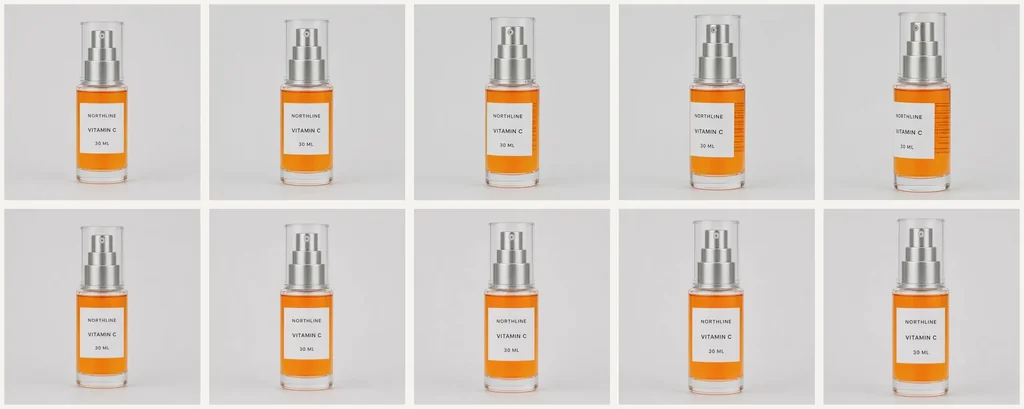
In Masonry's August 16, 2026 same-source serum screen, O3 produced the requested slow push and parallax while retaining the visible front wording, pump, orange liquid, and one-product count. As the bottle turned, it invented dense side copy absent from the approved front view. The first return was therefore rejected for exact-SKU use; motion quality did not override the source-authority failure.
Endpoints Constrain the Story, Not the Truth Between Them
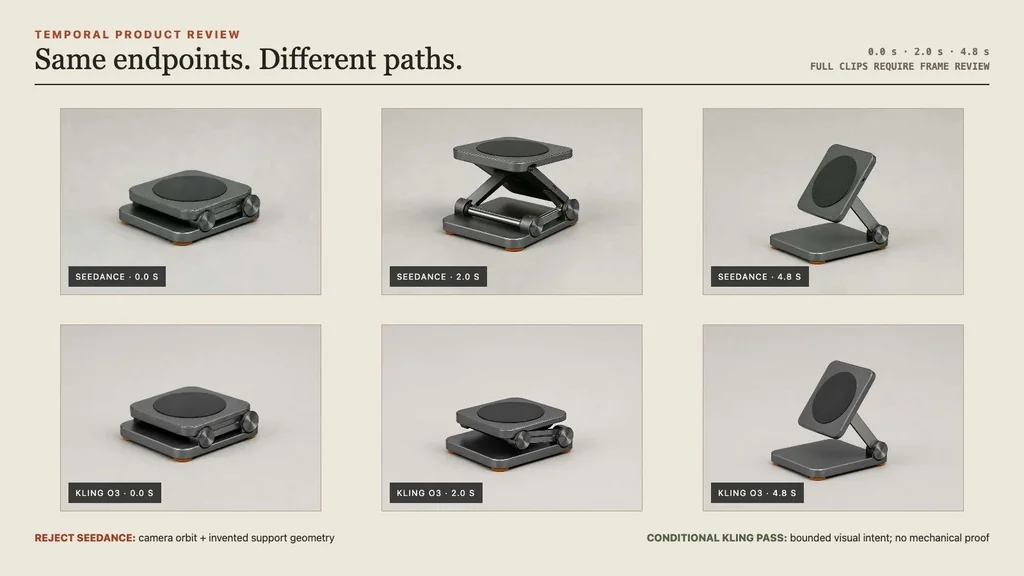
A separate tablet-stand test supplied approved folded and upright frames. The retained O3 candidate visually connected them and kept a locked product-demo composition, but the generated motion was accepted only as a bounded illustration. Two approved endpoints cannot establish that the intermediate linkage or physical behavior is real.
Frequently asked questions
What teams need to know about creating with Kling O3 Pro in Masonry
What is Kling O3 Pro best used for in ecommerce?
It is best used for short product-video candidates that benefit from active camera motion, first-and-last-frame direction, multi-shot structure, vertical or square delivery, or optional sound. Good jobs include secondary PDP loops, paid-social concepts, campaign storyboards, and pre-production motion tests. It should not be treated as automatic factual product footage.
What does Kling O3 Pro support in Masonry?
The live `kling-o3-pro` route checked August 17, 2026 supports text-to-video and image-to-video, integer duration from 3 to 15 seconds, optional first and last images, optional audio, single- or multi-prompt direction, and 1920×1080, 1080×1920, or 1080×1080 output. Recheck the live parameter contract before automating a durable batch.
How long can a Kling O3 Pro video be?
Masonry currently exposes 3–15 seconds for one generation. A longer maximum does not mean every prompt should use it: one clear motion often holds product identity better and is easier to inspect than a dense sequence. For multi-shot work, budget every beat inside the total runtime.
Can Kling O3 Pro make vertical ecommerce ads?
Yes. The current route includes 1080×1920 output for a 9:16 vertical placement, along with 1920×1080 landscape and 1080×1080 square. Choose the final placement before generation, keep the product inside interface-safe areas, and add platform copy, price, CTA, and disclosures as deterministic overlays after review.
Can Kling O3 Pro animate an existing product photo?
Yes. Supply an approved product photo as the first frame, then constrain the prompt to camera, lighting, and bounded subject motion. The frame helps anchor visible identity, but it cannot authorize the unseen side of a package or guarantee that labels, materials, geometry, reflections, and quantities remain stable later in the clip.
Does Kling O3 Pro support first and last frames?
Yes. Masonry exposes optional first-frame and last-frame images for image-to-video direction. The pair is useful when both the opening and landing composition are approved. Inspect the complete transition because the model generates the path and may invent movement, parts, or intermediate geometry even when the endpoints look correct.
Does Kling O3 Pro generate audio?
Audio is optional and off by default in the current Masonry contract. When enabled, the provider supports generated sound and Chinese- or English-language speech. Commercial scripts, claims, pronunciation, music rights, and required disclosures still need separate review; generated audio is creative output, not a product-data source.
Is Kling O3 Pro good at preserving exact product details?
It can retain visible product identity, but exact preservation is not guaranteed. In Masonry's one controlled serum run, the model kept the front wording, pump, orange liquid, and product count while inventing dense copy on a newly exposed side. That candidate was rejected for exact-SKU use. Measure acceptance on your own products instead of generalizing from one sample.
How does Kling O3 Pro compare with Kling 2.6 Pro for product video?
In one same-source Masonry screen, O3 delivered the requested push and more visible parallax but invented side copy. Kling 2.6 Pro kept the authorized front surface more stable, though the motion was nearly static. This is a tradeoff observed on one fictional SKU, not a universal leaderboard; test both on the same source and score accepted clips.
Can Kling O3 Pro prove how a product mechanism works?
No. A first-and-last-frame clip can illustrate a documented transition, but generated intermediate frames do not prove hinges, linkages, internal parts, speed, force, safety, durability, or real-world behavior. Use verified footage, engineering material, or a clearly labeled explanatory animation when a mechanical claim matters.
How should I prompt Kling O3 Pro for a product video?
State the approved source and invariants first, then give one subject action, one camera move, the composition, duration, landing state, audio intent, and explicit rejection conditions. Replace vague requests such as “make it cinematic” with observable direction. Keep the prompt short enough that every requested beat fits the runtime.
How should merchants review a Kling O3 Pro output?
Watch the full clip and inspect evenly spaced frames against the exact SKU and variant source. Check quantity, silhouette, label text, logo, color, material, part count, liquid level, reflections, background, claims, added objects, and unsupported surfaces. Record the prompt, input hashes, route, date, job, output, reviewer, decision, and reason before publishing.
Should generated text, prices, and offers be included in a Kling O3 Pro render?
Usually no. Keep claims, prices, promotions, CTA copy, disclosures, and captions as deterministic overlays connected to current commerce data. That makes changes and rollback possible and avoids relying on video pixels or generated speech for facts that may expire or require approval.
Can Kling O3 Pro outputs be used as primary PDP product media?
Only after the merchant and channel have approved the exact output for that purpose. A safer default is approved photography or verified footage for factual primary media and generated motion as secondary or campaign creative. Reject any clip that changes the sold variant, included items, packaging, claims, operation, or visible product truth.
How should I measure a Kling O3 Pro ecommerce workflow?
Track technical completion, review time, product-truth pass rate, creative-quality pass rate, correction time, and cost per accepted clip—not just generated files. After an approved asset is actually exposed, measure placement-level engagement and conversion with a clean creative comparison. Do not attribute revenue to the model from a small assisted journey.
What is Kling O3 Pro?
Kling O3 Pro is an AI video generation model from Kuaishou, available inside Masonry, the AI creative agent teams use to produce marketing, product, and brand videos.
How does my team use Kling O3 Pro in Masonry?
Open a Masonry canvas, pick Kling O3 Pro from the model selector, and describe the video you need: a product shot, an ad creative, a social post. Masonry generates it, then you refine, edit, and combine Kling O3 Pro with other models in one workspace.
Is Kling O3 Pro free to try?
Yes, you can start generating videos with Kling O3 Pro on Masonry's free tier, then scale up with higher limits and priority processing as your team grows.
How do I write good prompts for Kling O3 Pro?
Write the source of truth first, then the motion. Name the exact subject and what must remain unchanged; specify one camera move, bounded subject motion, framing, duration, and the end state; list prohibited inventions that would invalidate the clip. Use a first frame for visible product identity and a last frame only when the landing composition matters. Keep claims, prices, offers, captions, disclosures, and CTAs out of the generated pixels and audio so they can be versioned and approved separately. Review the full clip plus evenly spaced frames—an attractive first and last frame can hide a label, geometry, quantity, or material failure in the middle.
Who makes Kling O3 Pro?
Kling O3 Pro is built by Kuaishou. Inside Masonry it runs alongside 50+ image and video models, so your team can pick the right one for each brief without switching tools.
Start creating with Kling O3 Pro
Generate, edit, and compare across 50+ models in one workspace.
Guides for Kling O3 Pro
Prompt walkthroughs and examples from the Masonry blog
Explore more AI models
Compare Kling O3 Pro with other models teams run in Masonry