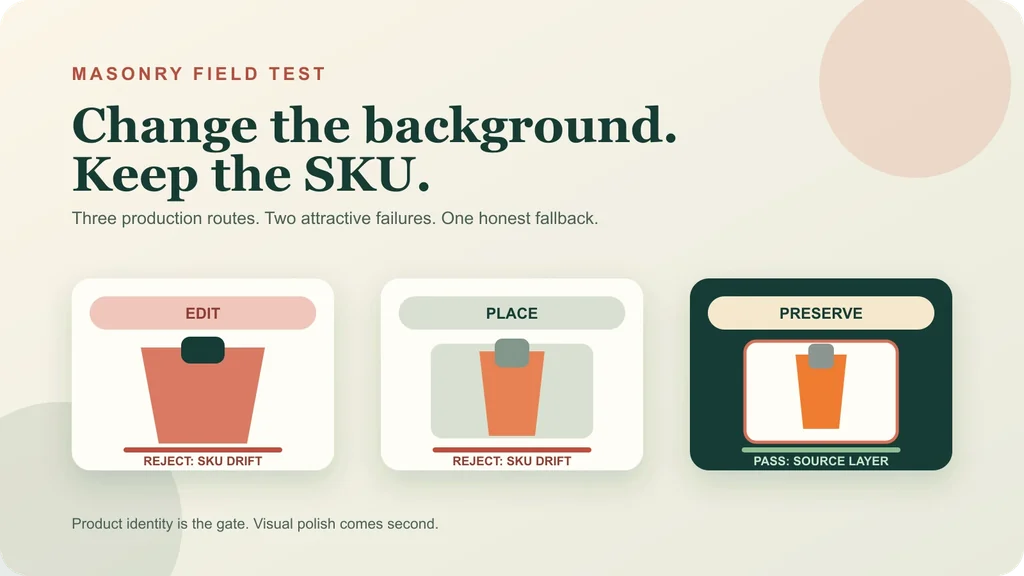
Changing a background sounds like the safest AI product-photo task. The product already exists; the model only needs to build the scene around it. In practice, “edit the background” can mean three different production routes—and two of them may quietly redraw the thing you sell.
We ran one fictional skincare SKU through a general reference edit and a structured product-placement model, then built a deterministic source-card fallback. Both generative routes made polished images. Both changed the package enough to fail an exact-SKU review.
Evidence boundary: NORTHLINE is fictional. This test contains one observed output from each generative route, not repeated-run acceptance rates or a model leaderboard. The scene plates differ between routes because the structured endpoint required public input URLs. No listing, feed, ad, or revenue experiment was run. “Accepted” means accepted for the next stated review stage—not proven to convert.
Quick answer: choose the route before the tool
| If the production requirement is… | Start with… | Do not assume… |
|---|---|---|
| Fast scene exploration where minor reinterpretation is tolerable | General reference edit | That “preserve exactly” prevents geometry drift |
| A product positioned at explicit coordinates in a prepared plate | Structured placement | That placement is the same as pixel-preserving compositing |
| Exact approved product evidence in a designed layout | Deterministic source layer or reviewed cutout composite | That the result will automatically look like a seamless lifestyle photograph |
| A compliant factual main image | Controlled capture, approved render, or reviewed cutout on the required background | That a lifestyle generation belongs in the primary slot |
The useful distinction is generative redraw versus deterministic placement of approved evidence. A model can receive a reference and still reconstruct its own bottle. A layout tool can reuse the approved raster without inventing a different bottle, but it may look more designed than photographic. The right route follows the product promise and channel slot.
The source and the rejection contract
The controlled source is a fictional NORTHLINE Vitamin C 30 ML serum. It deliberately combines several difficult details: transparent plastic, chrome-like pump parts, orange liquid, a white label, exact wording, and strong vertical proportions.
We declared the rejection sheet before reviewing outputs:
- Identity: one NORTHLINE Vitamin C 30 ML bottle; no substitute SKU or extra item.
- Geometry: preserve bottle height-to-width ratio, shoulders, base, transparent over-cap, and three-part pump assembly.
- Appearance: preserve orange liquid, fill line, transparent and metallic materials, white label size, and label position.
- Data: preserve every visible character; add no claim, badge, price, certification, or ingredient statement.
- Scene: keep the product physically plausible, supported by the surface, and free of misleading props.
Download the route scorecard before testing your own SKU. Its fourth row stays NOT_RUN because an exact integrated composite needs a reviewed transparent cutout or approved 3D render; we did not invent one for this article.
Route 1: a general reference edit
First, Masonry generated an empty 4:5 bathroom shelf. Separating the scene from the product is useful even when the eventual route changes: the empty plate can be reviewed for composition, rights, and channel fit without a plausible-looking package distracting the reviewer.
masonry image "Create an empty 4:5 ecommerce bathroom shelf background for product placement: pale warm-gray limestone shelf across the lower third, warm off-white plaster wall, soft morning window light from camera-left at 45 degrees, restrained natural shadow falloff, straight-on camera at shelf height, realistic materials, quiet upper negative space. No product, bottle, package, person, hand, plant, fruit, text, logo, claim, watermark, frame, or decorative object." \ --model gemini-3.1-flash-image-preview \ --aspect 4:5 \ --seed 2026081802
Then we supplied the approved source and instructed the model to replace only the background:
masonry image "Using the supplied reference as the immutable sold product, replace only its background with a pale warm-gray limestone bathroom shelf, warm off-white plaster wall, soft morning window light from camera-left at 45 degrees, straight-on camera at shelf height, realistic contact shadow, and quiet upper negative space. Preserve exactly the bottle silhouette and proportions, orange liquid and fill line, transparent over-cap, silver pump geometry, white label size and placement, and every character of NORTHLINE, VITAMIN C, 30 ML. One bottle only. No person, hand, plant, fruit, claim, headline, price, CTA, watermark, or extra text. Return a review candidate, not a factual packshot." \ --model gemini-3.1-flash-image-preview \ --ref ./northline-approved-source.webp \ --aspect 4:5 \ --seed 2026081803
This is the dangerous failure class: the image looks professional and the label is readable, so a fast review may approve it. Exact words are not proof of exact product identity. The physical package is part of the promise.
Route 2: structured product placement
A structured placement endpoint accepts a prepared background, an element image, and coordinates. That is more operationally explicit than a free-form edit, but it is still generative. It can interpret the supplied element rather than paste its pixels.
masonry multimedia generate \ --model bria-embed-product \ --prompt "Place the supplied NORTHLINE bottle upright and centered inside the large upper card. Keep the product identity, label, cap, proportions, and orange liquid visually unchanged. Add only a restrained contact shadow. No text, props, people, hands, or extra products." \ --input '{ "first_frame_image":"https://masonry.so/images/blog/ai-abandoned-cart-email-workflow/background-plate.webp", "elements":[{ "image":"https://masonry.so/images/blog/ai-product-photo-fidelity-test/source.webp", "coordinates":{"x":165,"y":80,"width":350,"height":600} }], "seed":2026081804 }'
Structured placement still has real value. Coordinates make layout automation easier, and some products or use cases tolerate interpretation. But the route name must not become the acceptance test. Inspect the output pixels against the sold product.
The prepared plate differs from Route 1, so this is not a controlled comparison of model quality. The observation is narrower: both available generative routes redrew critical SKU details in their one returned candidate.
Route 3: preserve the approved source as one layer
When we had no reviewed transparent cutout, the honest fallback was not to fake a seamless composite. We resampled the approved square source as one raster layer inside a designed 4:5 card, placed it over the generated scene, and added a deterministic frame and shadow.
That distinction matters:
- The product layer was resized and re-encoded, so it is not byte-identical to the source file.
- Its visual content was reused as one deterministic raster layer; no model reconstructed the bottle.
- The original white product-photo background remains inside the card.
- An integrated shelf scene would require a reviewed alpha cutout, careful edge treatment, color management, contact shadow, and reflection work—or an approved 3D render.
This fallback is immediately useful for paid-social cards, collection headers, email modules, comparison panels, and other designed placements where a source-card treatment is acceptable. It should not be mislabeled as a photographic lifestyle image.
Download the generation manifest for job IDs, seeds, output paths, SHA-256 values, and dispositions. It records the failed first structured request only in the research trail; the public manifest contains the successful evidence route, not a troubleshooting narrative.
Turn the test into a production decision
Use this decision sequence for each asset slot:
1. Name the channel slot
Separate factual primary, alternate factual view, scale or fit evidence, detail crop, lifestyle context, paid-social creative, email module, and experimental visual. A route that is safe for one slot can be wrong for another.
Google's current Merchant Center image requirements recommend a solid white or transparent background for the main image, clear whole-product framing, and minimal staging. Google separately requires preserved AI-generated image metadata. Shopify supports several product-media types and provides practical product-photography guidance. Check the live rules for the destination instead of inheriting one export across every channel.
2. Declare the product invariants
List the exact SKU, quantity, variant, geometry, materials, color, artwork, marks, label copy, identifiers, condition, included items, and claims that may not change. Add product-specific checks: prong count for jewelry, shade and finish for cosmetics, ports for electronics, dosage panels for supplements, or fitment data for automotive parts.
3. Choose the least generative acceptable route
- Use a general edit when the output is conceptual or the product is low-risk and reviewable.
- Use structured placement when layout coordinates and a prepared plate matter, but keep the full SKU review.
- Use a reviewed cutout or approved render when exact product evidence dominates.
- Use a source card when exact evidence matters and an integrated cutout does not yet exist.
4. Review product truth before craft
Reject identity, quantity, geometry, material, color, label, mark, and claim failures before discussing mood, lighting, composition, or “premium” feel. Save attractive failures; they train the next brief and make rejection cost visible.
5. Measure accepted output economics
Track generation attempts, external credits, review minutes, correction or compositing time, accepted assets, and channel-ready assets. Divide the full cost by accepted assets. A route returning ten files and zero approvals did not create cheap production.
Where this workflow fits
This article does not replace a broad AI product-photography tool comparison, a repeated model benchmark, or a multi-SKU batch test. It answers the narrower route question that comes after a merchant already has an approved product image and wants a different background.
For a clean supplier image that must become primary, alternate, detail, scale, and lifestyle slots, use the supplier-photo to ecommerce image-set workflow. For multiple catalog items with a shared art direction, use the AI product-photography batch workflow. For the compliance handoff between Shopify and feeds, use the Google Merchant Center image workflow.
Current merchant discussions show why this route decision matters: teams are asking how to standardize bulk catalog photos, handle inconsistent supplier images, and repair a messy 500-SKU grid. Those threads establish workflow demand, not performance benchmarks.
Bottom line
“Product background generator” describes an outcome, not one technical route. A general edit can redraw the product. Structured placement can redraw it too. Deterministic compositing preserves approved evidence but needs the right source asset and more deliberate integration.
In this observed run, the two polished generative candidates failed exact-SKU review. The less cinematic source-card layout advanced because it told the truth about what it was. For ecommerce production, that is the order of operations: product identity first, channel fit second, visual polish third.