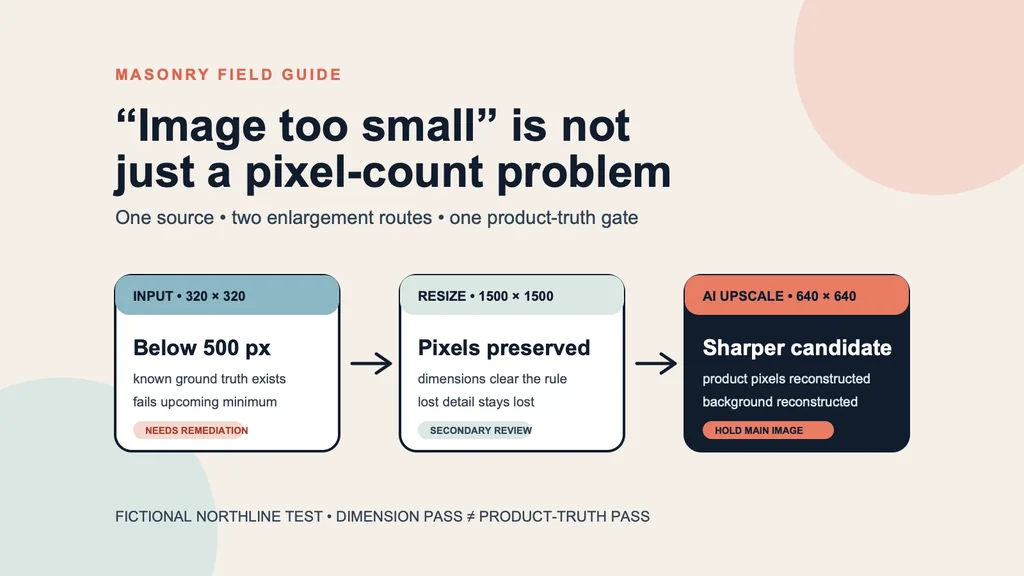
A Google Merchant Center “image too small” warning is not merely asking for a bigger number in a file inspector. The merchant has two obligations: provide enough pixels for the named Google surface and keep the image faithful to the exact product and variant being sold. A 1500 × 1500 export can satisfy the first while preserving every blur in a 320 × 320 thumbnail. An AI upscaler can make the same thumbnail look sharper while reconstructing product, label, and background pixels that never existed in the small source.
This guide tests both routes on the same fictional SKU. Download the filled five-route release manifest and the copyable remediation checklist. Use them to move from warning to a named release decision without confusing pixel dimensions with product authority.
Evidence boundary: NORTHLINE is fictional. We deliberately reduced its approved 1254 × 1254 source to 320 × 320, then made one deterministic 1500 × 1500 resize and one first-return Crystal Upscaler file at 640 × 640. Because we retained the larger original, this is a controlled recovery test—not evidence that an unknown supplier thumbnail can be reconstructed perfectly. We did not connect a Merchant Center account, submit a feed, receive approval, run ads, or observe impressions, purchases, returns, or revenue.
Why this warning matters now
Google’s current “How to fix: Image too small” guidance says warnings for images below the new 500 × 500 minimum began in July 2026. Enforcement is scheduled to begin January 31, 2027. Until then, older lower minimums can still apply to some product images, while YouTube Shopping on TV already requires at least 500 × 500. Google also says some small images may receive an optimized version. That platform-generated result does not remove the merchant’s obligation to inspect the product that shoppers see.
The related Merchant Center image-link specification says to submit the largest, highest-resolution full-size image available, recommends roughly 1500 × 1500 or above when possible, and limits an image to 64 megapixels and 16 MB. It also requires the image to show the correct product and variant. Those are current format and content rules, not a promise of traffic or conversion.
Shopify’s current product-media documentation permits product and collection images up to 5000 × 5000 or 25 megapixels and below 20 MB, and says 2048 × 2048 usually displays best for square product images. Shopify upload support and Merchant Center eligibility are different contracts. A file can upload successfully to Shopify and still be too small, too soft, incorrectly cropped, or wrong for a Google surface.
Merchant discussions show why the remedy cannot begin with “pick an AI app.” One Shopify merchant explicitly asks for an app that can enhance or upscale product images. A newer Shopify-development discussion describes manual resizing expense and inconsistent AI results that still need product review. Another current store-owner thread reveals a separate cause—theme aspect-ratio cropping on mobile. These are qualitative reports, not prevalence estimates. They establish a practical diagnostic: determine whether the problem is the source, the transformation URL, the theme crop, or the feed before generating anything.
The supplied non-brand Search Console export contains adjacent product-image and compliant-listing demand but no exact Merchant Center image too small AI upscale query. The mature PostHog product-photography comparison has the strongest observed ecommerce money path, including a later checkout, but its eligible counts remain below the charter’s stability floor. That makes this a well-fitted testable expansion—not a claim that this exact query or page already converts.
The controlled input and ground truth
The approved source is a 1254 × 1254 WebP showing one NORTHLINE Vitamin C 30 ML bottle. It establishes the amber-orange liquid, clear cylinder and cap, stepped silver pump, white rectangular label, and the visible words NORTHLINE, VITAMIN C, and 30 ML. It does not establish ingredients, efficacy, certifications, reverse-panel text, bundle contents, or a real commercial product.
We reduced that file to a 320 × 320 JPEG at 11,778 bytes. This is an intentionally degraded test input, not a claim about how a supplier delivered the image. At normal article size it still looks recognizable. At full size the label edges, pump highlights, transparent boundaries, and bottle contours have lost detail.
Route 1: enlarge the existing pixels to 1500 × 1500
The deterministic route resampled the 320 × 320 JPEG to 1500 × 1500 and wrote a 142,197-byte JPEG. It changes the canvas dimensions without inventing a fresh label, cap, or bottle. Object count, composition, product-to-frame relationship, readable words, and background arrangement remain tied to the small input.
This route answers a narrow question: can we produce a larger file without asking a model to synthesize product detail? Yes. It does not answer whether Google, a theme, or a shopper will treat the image as high quality. Google’s guidance explicitly favors the largest full-size source and cautions against relying on thumbnails or simple scaling. A dimension-only pass is useful as a technical control, not an automatic publishing decision.
Route 2: let an AI upscaler reconstruct a 640 × 640 candidate
Crystal Upscaler received the exact 320 × 320 JPEG and returned one 640 × 640 PNG at 350,993 bytes. The successful Masonry job is 68c95d9c-e938-4abb-aea1-1d650892f6a7. An earlier submission using a local filesystem path failed as job b92770b1-e737-45e8-81a8-3a1898e61d86; no asset returned, so it is recorded as an execution failure rather than hidden or counted against visual quality.
The returned file is materially sharper. The three visible label lines remain readable, one bottle remains in frame, the major silhouette and orange liquid remain recognizable, and the 640-pixel sides clear the upcoming 500-pixel minimum. It does not reach Google’s approximate 1500-pixel recommendation. More importantly, the sharper edges, text, highlights, background tone, and surface texture are reconstructed output pixels. They must be compared against product authority, not accepted because they look cleaner.
The correct disposition is not “AI failed” or “AI fixed it.” It is SECONDARY_REVIEW and HOLD_MAIN_IMAGE. A product owner could approve this specific file after comparing physical packaging or another authoritative master. This test cannot grant that authority on the owner’s behalf.
What the side-by-side review actually shows
| File | Dimensions | What it establishes | What it cannot establish | Disposition |
|---|---|---|---|---|
| Deliberately small input | 320 × 320 | exact degraded test input | upcoming eligibility or fine detail | NOT_ELIGIBLE_DIMENSIONS |
| Deterministic resize | 1500 × 1500 | composition and interpolated source pixels | recovered factual detail or perceived quality | HOLD_MAIN_IMAGE |
| Crystal Upscaler return | 640 × 640 | a sharper minimum-clearing candidate | exact reconstructed pixels or platform approval | HOLD_MAIN_IMAGE |
| Approved source | 1254 × 1254 | ground truth for this fictional test | a real product, claim, or live feed outcome | APPROVED_SOURCE |
File size does not settle the decision either. The Crystal PNG is more than twice the bytes of the 1500-pixel JPEG while having fewer than half as many pixels on each side. Format, compression, and reconstructed texture all affect byte count. Review actual dimensions, the full-resolution image, and the named delivery surface separately.
The six-step remediation workflow
1. Diagnose the exact failure
Record the Merchant Center item, SKU, variant, diagnostic text, current image URL, returned dimensions, and named surface. Open the original URL outside the storefront. If the file is crisp there but blurry in a collection grid, investigate the theme or transformation URL. If the feed points to a thumbnail parameter, fix that reference before editing pixels.
2. Retrieve the largest existing authority
Check the product information system, digital asset manager, supplier portal, photographer delivery, original Shopify media, and approved campaign masters. The supplier-photo image-set workflow starts from the strongest available source for the same reason. Upscaling is a fallback after retrieval, not the first step.
Record the authority file, owner, dimensions, hash, visible product facts, and unknowns. If a larger original exists—as it does in this controlled test—use it instead of a reconstructed small copy.
3. Declare one route per file
Keep deterministic resize and generative enhancement separate. Record the input, operation or model, job ID, output, dimensions, bytes, and hashes. Do not overwrite the input or call both outputs product-final.jpg. A failed submission belongs in the execution record but not in a model-quality denominator.
4. Review product truth before sharpness
Compare object count, exact variant, color, pattern, material, silhouette, product-to-frame scale, closure, hardware, included parts, label shape and placement, every readable character, transparent boundaries, crop, background, shadow, sharpening halos, and color shift. The same-SKU product-photo fidelity test provides the deeper gate when reflective or transparent products are difficult.
Use SECONDARY_REVIEW when the file may be useful but reconstructed product pixels still need an owner. Use REJECT_PRODUCT_DRIFT when the route changes a visible sold fact. Use APPROVED_FOR_NAMED_MAIN_IMAGE only when both product and technical owners clear the exact file for that exact placement.
5. Update the feed and destination as one change
Replace the correct image_link or additional_image_link, verify that the URL serves the intended file without authentication or a thumbnail transform, and confirm the landing page shows the same SKU and selected variant. The Shopify-to-Merchant-Center image-feed workflow owns the broader catalog release and rollback contract.
Wait for reprocessing or use the available account review flow, then inspect Diagnostics and the live product surface. Controls and timing can vary by account and release. Do not publish universal click paths from one account screenshot.
6. Measure eligibility and business outcomes separately
The first outcome is technical: warning cleared, correct file fetched, product eligible, no new mismatch. The next outcomes are merchandising: detail-page engagement, add-to-cart, purchase, return, and “not as described” contacts. Keep raw counts and comparison windows. An image that clears a warning is not automatically a conversion winner, and a later purchase does not prove the upscaler caused it.
Release gate
Before approving a recovered image, the record must make these statements inspectable:
- Source: the exact file and owner that establish product truth.
- Operation: deterministic interpolation or a named generated route, never an ambiguous “enhanced” label.
- Output: stable dimensions, bytes, hash, and job ID where applicable.
- Product review: what passed, what changed, and what remains unknown.
- Technical review: the exact Google surface and current rule used.
- Destination review: the served URL, item, SKU, and selected variant.
- Disposition: approved, held, rejected, not eligible, or failed—for one named placement.
Use the remediation checklist as the human review surface and the TSV manifest as the durable machine-readable record.
Bottom line
If Merchant Center says an image is too small, first retrieve the largest original and verify the feed is not pointing at a thumbnail. If the original is gone, a deterministic resize can clear a dimension field without recovering detail. An AI upscaler can produce a sharper candidate by reconstructing detail, which makes product review more—not less—important.
In this one controlled test, Crystal Upscaler turned 320 × 320 into a sharper 640 × 640 file that clears the upcoming minimum. It did not reach the recommended neighborhood of 1500 × 1500, and its output pixels were not source authority. The honest decision was HOLD_MAIN_IMAGE, pending a product owner, even though the file looked better.
That is the reusable merchant rule: retrieve first, enlarge second, compare truth third, and release only to a named surface.