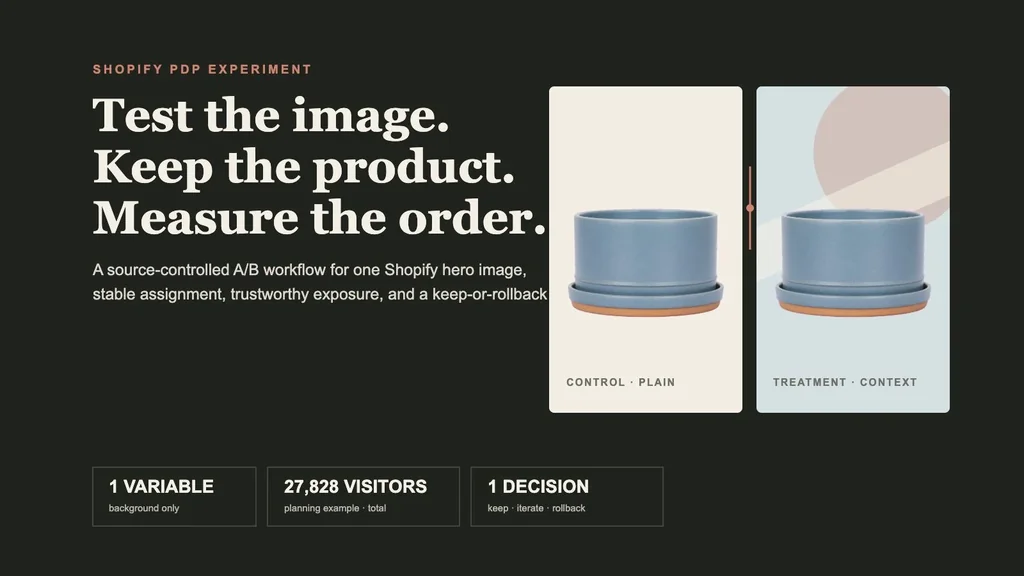
To A/B test product images on Shopify without fooling yourself, use this sequence: one exact SKU and selected variant → one approved control → one source-faithful treatment → one predeclared hypothesis → stable visitor assignment → render-confirmed exposure → identical commerce path → completed-order and contribution read → matured return guardrail → signed keep, iterate, or rollback decision.
The important word is not “A/B.” It is controlled. Swapping an image this week and comparing it with last week mixes the picture with traffic, seasonality, promotions, inventory, device mix, and campaign changes. Duplicating a product can split inventory, URLs, reviews, SEO signals, or variant state. Optimizing image clicks can reward a dramatic visual that attracts curiosity but sends fewer qualified shoppers through checkout.
This workflow isolates one PDP hero-image treatment while keeping the underlying product and commerce system stable.
Evidence boundary: NORTHLINE, the Ridge planter, Shopify IDs, store, traffic, baseline, orders, contribution, return policy, and economics are fictional controls. One product source was generated for this article. The transparent extraction, exact-pixel composites, sample-size calculations, TSV artifacts, editorial boards, and local file checks are real. No live Shopify theme, testing app, visitor assignment, customer event, order, return, causal lift, or revenue result was tested.
Why this is a distinct merchant job
The AI product-photo trust test explains why faithful images and downstream outcomes matter. The one-SKU ad creative matrix controls acquisition creative, audience, offer, and destination. The return-reasons workflow starts after verified returns reveal an expectation gap. None of those pages supplies the operating contract for randomizing one Shopify PDP image, logging the rendered exposure, checking sample quality, or recording the decision.
Current merchant intent makes that gap concrete. A January 2026 Shopify merchant asked how to test first images on collection pages and complete image sets on PDPs because the apps they reviewed did not describe that job clearly. Replies proposed app and theme-level approaches, often from vendors, so they are useful evidence of the problem shape—not neutral tool recommendations. Another ecommerce discussion claimed an expensive professional shoot reduced conversion, but the post is anonymous, later promotes an AI vendor, and does not disclose enough data to validate causality. The useful lesson is the question commenters raised: were the same products and traffic randomized, and was the sample adequate? Read the Shopify image-test question and the qualitative photoshoot discussion.
The supplied top-1,000 Search Console query export contains 922 rows after excluding obvious Masonry brand variants, representing 552 clicks and 41,835 impressions in that bounded file. It includes non-brand demand for product-photography tools, model choice, real-product examples, and compliant ecommerce imagery, but no exact Shopify product-image A/B-test query. This is adjacent commercial-intent expansion, not evidence that Masonry already owns the term.
Step 1: sign the experiment contract before creating the treatment
Download the complete experiment contract. It binds one product handle, product ID, variant ID, SKU, market, eligible population, randomization unit, allocation, persistence key, asset versions, changed layer, locked fields, metrics, planning assumptions, stop rules, owners, and status.
The fictional hypothesis is deliberately narrow:
For first-time eligible visitors to the exact NORTHLINE Ridge planter variant, replacing the plain hero background with a restrained editorial background will increase completed purchase per eligible visitor enough to justify rollout, without changing product truth, contribution, page performance, variant behavior, accessibility, support contacts, or verified returns.
Lock these fields in both arms:
- exact product, SKU, selected variant, and product pixels;
- product scale, crop, hero position, and the remainder of the gallery;
- title, description, price, discount, inventory, shipping promise, and return policy;
- theme version, destination URL, traffic eligibility, allocation, and event definitions;
- acquisition campaigns unless the experiment is explicitly stratified and powered for them.
If you change the image, price, copy, template, and gallery order together, you may test a bundle, but you cannot say the image caused the result.
Step 2: create a treatment that keeps the product fixed
We generated one fictional matte mineral-blue ceramic planter with a matching saucer on a flat magenta field. The built-in product-mockup prompt required exactly one product, a straight-on view, no plant, no prop, no text, and no cast shadow.
The flat field was removed locally. The same transparent product file was then placed at the same size and coordinates in both final images. Control A uses an off-white field. Treatment B adds only a mineral-blue background, a muted coral circle, and a soft paper band behind the product.
This is stricter than asking a model to regenerate the whole photograph twice. It prevents background exploration from silently changing the rim, glaze, foot ring, quantity, or scale. In a real store, the approved source record—not the generated article object—must control product identity. Use the same-SKU product-fidelity test when the candidate itself needs model evaluation before experimentation.
Step 3: decide the smallest commercial effect worth detecting
“Run it for two weeks” is not a sample-size plan. Duration follows eligible traffic, baseline conversion, the minimum effect that would change a decision, exclusions, power, and the measurement method. A store with 200 eligible product-page visitors a week cannot reliably detect the same lift as a store with 20,000.
Download the twelve-row sample-size planning table. It crosses 1%, 2%, 3%, and 5% purchase baselines with 10%, 20%, and 30% relative lifts. Each row uses a two-proportion normal approximation, 80% power, and a two-sided 0.05 alpha.
For the worked 3.0% baseline and 20% relative lift:
control purchase rate 3.0% treatment planning rate 3.6% absolute difference 0.6 percentage points planned eligible visitors 13,914 per arm planned total 27,828
That number is a planning estimate, not permission to stop the instant a counter reaches 27,828. A production analysis needs the approved statistical method, exclusion and data-loss allowance, a representative business cycle, novelty and seasonality review, multiplicity handling, and a complete data-quality check. If the economically relevant effect requires traffic the store cannot produce in a reasonable window, use moderated research, sequentially improve the product page from stronger evidence, or aggregate only truly comparable products under a valid design. Do not manufacture certainty from a low-powered test.
Step 4: assign once and log what actually rendered
Use a stable, consent-aware randomization unit supported by your implementation—commonly an anonymous visitor or customer identifier. Assign the unit before the hero choice, persist the arm for the declared experiment lifetime, and prevent the same unit from switching between A and B across reloads or navigation.
Then log a deduplicated exposure after the correct image renders. At minimum, preserve:
experiment_id · arm · assignment_id · exposure_id product_id · variant_id · SKU · asset_version · theme_version market · device class · traffic source · exposed_at
Do not call every product-page view an exposure if a personalization script failed, the visitor bounced before the image rendered, a cached theme showed the wrong arm, or variant selection replaced the asset. Assignment counts diagnose randomization; exposure counts diagnose delivery.
Shopify's current Web Pixels standard-event reference includes page_viewed, product_viewed, product_added_to_cart, checkout_started, and checkout_completed. Those events can support the commerce chain, but the experiment assignment and rendered asset version still need an explicit, governed join in the testing or analytics system. Review Shopify's current standard events.
Before reading lift, test for an unexplained sample-ratio mismatch: observed assignment materially different from the configured allocation. Microsoft Experimentation Platform research describes SRM as a symptom of assignment, execution, logging, or analysis problems and warns that ignoring it can reverse a decision. Treat SRM as a stop-and-diagnose gate, not a metric to explain away. Read the Microsoft Research SRM paper.
Step 5: make the treatment equivalent in accessibility and delivery
An image test is invalid when treatment B is also a performance test. Preserve rendered dimensions and aspect ratio, set explicit width and height to prevent layout shift, use responsive sources, and compare encoded bytes. Above-the-fold hero media should not be lazy-loaded merely because the rest of the gallery is. Shopify's current theme-performance guidance recommends responsive images and says above-the-fold resources should load normally rather than lazily. Read Shopify's performance guidance.
Measure LCP and CLS by arm on the actual page. If a heavier treatment slows the hero enough to reduce purchase, “background concept lost” is the wrong diagnosis. Optimize equivalent delivery first or record performance as part of the treatment bundle.
Both arms also need accurate alternative text. Decorative background language should not replace the product meaning. Shopify recommends describing images accurately for customers who use screen readers and lets merchants add alt text to product images in admin. Read Shopify's current theme-accessibility guidance.
Step 6: clear the release audit in the rendered store
Download the fourteen-gate release audit. It separates checks that teams often collapse:
- product identity and declared change isolation;
- eligible population, assignment, persistence, and exposure;
- event-chain joins and symmetric data exclusions;
- option selection, gallery, cart, checkout, and order-line consistency;
- alt text, keyboard and screen-reader behavior;
- LCP, CLS, dimensions, responsive delivery, and cached variants;
- control restoration and signed decision rules.
Test desktop and mobile, a fresh visitor and returning visitor, each supported option change, back/forward navigation, refresh, cart, checkout, and a test order. Confirm that an unavailable variant cannot enter the experiment and that staff, bots, QA traffic, and consent-denied states follow the declared policy.
Do not launch without a one-action rollback to the approved control. If the testing app, theme script, or edge layer fails, the safe default should be the factual image—not a blank hero or an arbitrary arm.
Step 7: read the decision hierarchy in order
Download the decision-record template. It preserves assignment and exposure counts, purchase rates, uncertainty, contribution, return maturity, SRM, performance, product truth, asset versions, decision, reason, owner, and timestamp. Its controlled row is intentionally NOT_RUN; it contains no invented outcome.
Read results in this order:
- Trustworthiness: assignment, exposure, exclusions, joins, deduplication, and SRM are valid.
- Product and delivery guardrails: both arms show the correct variant, checkout works, accessibility passes, and performance remains inside the signed boundary.
- Primary outcome: completed purchase per eligible visitor, with the predeclared estimate and uncertainty.
- Economics: contribution per eligible visitor after discount, payment, fulfillment, media, and other declared variable costs.
- Diagnostics: add-to-cart, checkout start, zoom, gallery interaction, and support contacts help explain the path; they do not overrule the primary outcome.
- Downstream trust: verified return reasons and refunds after comparable purchase cohorts mature.
Choose keep when the declared business threshold clears and every required guardrail passes. Choose iterate when the trustworthy result is inconclusive or the hypothesis needs a new treatment; archive the test before writing a new contract. Choose rollback when product truth, delivery, economics, or a stop rule fails. Do not search device, channel, or new-versus-returning cuts until one turns green and then rename it the result.
Step 8: wait for the return cohort before claiming the image worked
Purchases arrive before many returns. Record the near-term purchase decision when the experiment reaches its valid analysis point, but keep the final trust review open until comparable control and treatment purchase cohorts pass the relevant return window.
Join returns by the original purchase cohort and exact variant. Separate requested, approved, received, verified, refunded, canceled, and exchanged states. Compare the targeted “not as described,” wrong-color, wrong-size, or wrong-configuration reasons with overall returns and operational causes. A treatment can increase orders and still be a bad release if it creates expensive expectation gaps.
If traffic is too low to support both a reliable purchase read and a useful return comparison, say so. Treat returns as a monitored guardrail with wider uncertainty rather than claiming the absence of observed harm proves safety.
Do not run this test when the prerequisite is the real problem
Skip or postpone the experiment when:
- the control does not accurately show the sold product;
- the candidate changes product identity, label, color, material, scale, quantity, or included items;
- Shopify option selection, gallery, cart, checkout, or inventory mapping is already broken;
- traffic cannot support the minimum commercially meaningful effect;
- a campaign, price, promotion, theme redesign, or stock event will contaminate the comparison;
- consent, privacy, accessibility, performance, or analytics ownership is unresolved;
- there is no reliable exposure-to-order join or tested rollback.
The next best action may be fixing product data, shipping a conventional photo, conducting five moderated shopper sessions, improving one factual secondary image, repairing analytics, or waiting for sufficient traffic. An underpowered A/B test is not automatically more rigorous than direct evidence.
If the control or treatment is missing from organic image results, do not use the experiment to diagnose crawlability. Run the Shopify product-image SEO audit first to check rendered HTML, asset access, exact-variant schema, sitemap and preferred-image signals, responsive delivery, and the separate non-brand search baseline.
Bottom line
A Shopify product-image A/B test should answer a commercial question about one truthful visual change. Lock the product and offer, decide the effect worth detecting, assign visitors once, log the image that rendered, protect accessibility and performance, validate sample quality, and read completed orders plus contribution before diagnostics. Then wait for the relevant return cohort and sign one decision.
Use the Shopify variant-image workflow before experimentation when selected-option consistency is not yet proven. Use the supplier-photo ecommerce image-set workflow when the whole gallery lacks approved roles. For the wider merchant sequence, return to the AI ecommerce use-case map.