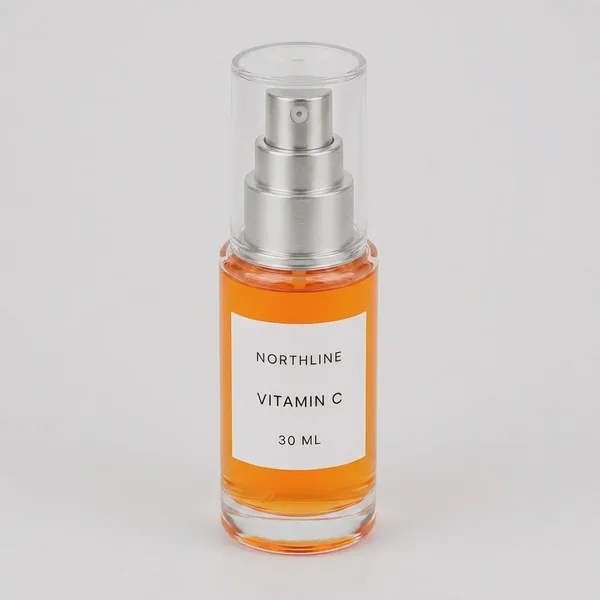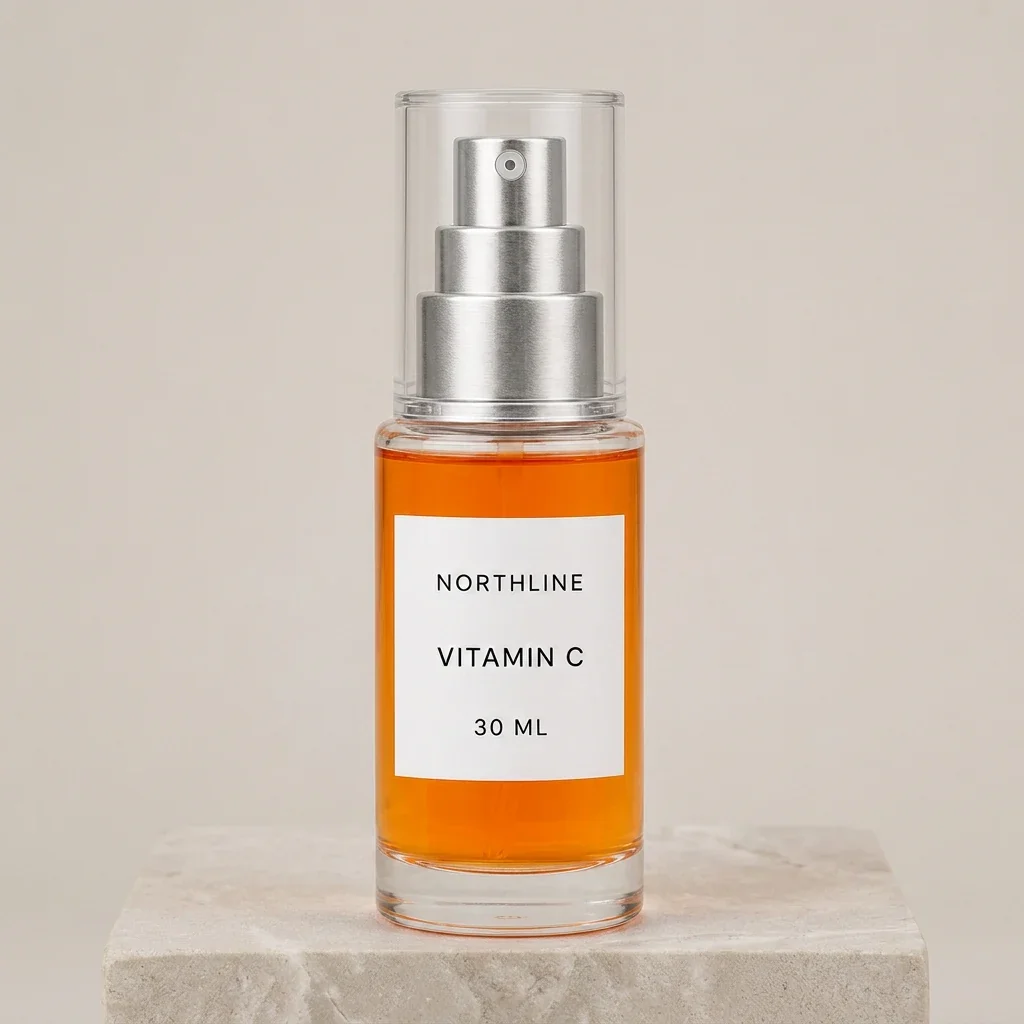
We gave four image models the same fictional serum packshot, the same 1024 × 1024 output size, and the same tightly constrained ecommerce scene brief. All four kept the three visible label lines readable. None kept the product pixel-identical.
The useful answer: Nano Banana 2 stayed closest to the source in this one run. Nano Banana Pro made the strongest polished secondary-gallery candidate, but changed bottle and label proportions more. GPT Image 2 substantially redrew the cap, pump, and bottle proportions. Qwen Image Edit Plus preserved the words but restyled the typography and product most aggressively. All four need merchant review; none should silently replace the factual primary image.
Evidence boundary: NORTHLINE is a fictional product created with built-in image generation for this controlled test, not a merchant SKU. The four candidates are real Masonry job outputs from August 14, 2026. We selected one returned candidate per model, did not reroll unattractive results, and did not normalize generation cost. This is not a reliability study, not a conversion experiment, and not a universal model leaderboard.
What we tested
The source is a straight-on studio packshot of one clear cylindrical serum bottle. The acceptance sheet locked six visible attributes before generation.
| Product truth | Fixed acceptance rule |
|---|---|
| Silhouette | One clear cylindrical bottle with the same shoulder, base, and proportions |
| Liquid | Vivid orange color and approximately the same fill line |
| Cap | One transparent cylindrical over-cap with no tint or decoration |
| Pump | Three visible brushed-silver tiers with the same relative geometry |
| Label | One centered white rectangle with the same size and placement |
| Text | NORTHLINE, VITAMIN C, and 30 ML, each appearing exactly once |
A real SKU requires more evidence than one front photo can provide: other angles, dimensions, material and formula data, approved artwork, packaging, variant information, included items, claims, and rights to the source photography.
The exact prompt and run contract
Every model received this prompt:
Using the supplied reference image as the immutable product, create a square premium ecommerce secondary-gallery photograph. Place the exact bottle centered on a pale warm-gray limestone pedestal against a softly lit neutral studio wall. Keep the camera straight-on and the product fully visible. Change only the background, surface, and lighting. Preserve exactly: cylindrical clear-glass silhouette and proportions, orange liquid color and fill line, transparent over-cap, three-tier brushed-silver pump geometry, white rectangular label size and placement, and every character of NORTHLINE, VITAMIN C, 30 ML. Do not add or remove product parts. No fruit, leaves, water, hands, box, extra bottle, claims, icons, headline, price, watermark, or extra text.
The live Masonry routes were gemini-3.1-flash-image-preview (Nano Banana 2), gemini-3-pro-image-preview (Nano Banana Pro), gpt-image-2, and qwen-image-edit-plus. The first, second, and fourth runs used seed 20260814; GPT Image 2 did not expose a seed parameter in its live route. All used one reference image and a square 1024-pixel output.
Masonry's CLI is asynchronous: masonry image returns a job ID, then the completed file is downloaded separately.
masonry image "<fixed prompt above>" \ --model gemini-3.1-flash-image-preview \ --ref ./northline-source.png \ --aspect 1:1 \ --seed 20260814 masonry job wait <job-id> masonry job download <job-id> --output ./nano-banana-2.png
Run masonry models list --type image before putting a model key into a durable production script. The successful job IDs were 3d181c24-2114-4d2a-b595-f7303b7ac3ac, fba42463-20e8-4f2b-a971-f021258eb3cf, ed5b7314-3267-4815-acf5-359c09c7f3c0, and cba49fb4-3fff-43a3-9955-3a42a4621b87. A Seedream 5 Pro attempt failed before generation for insufficient credits; it is not silently omitted from the test history.
Four models, four real outputs
Nano Banana 2: closest product relationship in this run
This candidate made the smallest overall product change in our visual review. It is the best starting point of these four for a secondary gallery slot, subject to full-resolution approval. “Closest” does not mean identical: the cap height, pump rendering, orange fill, base thickness, and reflections move relative to the source.
Nano Banana Pro: strongest finished scene, more proportion drift
The lighting, surface, and product separation are strong. This is the most campaign-ready composition in the run, but the product is less source-faithful than its polish suggests. That makes it a good example of why aesthetics and SKU accuracy need separate scores.
GPT Image 2: excellent text, material product redraw
GPT Image 2 demonstrates that text accuracy alone is not product accuracy. The candidate is coherent and commercially polished, but it depicts a materially different package geometry. We would reject it for a factual PDP slot and consider only the environment for compositing.
Qwen Image Edit Plus: visible words survive, identity drifts
This is a useful failure case. The result looks like the same product family at a glance, yet it changes the visual identity and ignores the requested pale neutral treatment. It should be rejected rather than rescued with a tighter crop.
Scorecard: product truth before beauty
| Model | Exact text | Color / fill | Label geometry | Bottle / pump geometry | Brief adherence | Merchant disposition |
|---|---|---|---|---|---|---|
| Nano Banana 2 | Pass | Review | Review | Review | Pass | Secondary candidate after approval |
| Nano Banana Pro | Pass | Review | Review | Review | Pass | Campaign candidate after approval |
| GPT Image 2 | Pass | Review | Fail | Fail | Pass | Keep scene; composite approved product |
| Qwen Image Edit Plus | Pass | Review | Fail | Fail | Fail | Reject |
One candidate per model cannot reveal variance or establish a durable win rate. A procurement benchmark should run the same candidate count per model, review results blind, and record the reason for every rejection. Four or more candidates per model begins to show whether an attractive result is repeatable.
The model documentation supports why these routes belong on a current shortlist; it is not evidence of exact SKU fidelity. Google documents image editing and multiple reference inputs for Gemini image generation. OpenAI documents image inputs and edits for GPT Image 2. Qwen publishes its image-editing model and workflow. Capabilities are not acceptance results.
What merchants are actually trying to avoid
Merchant discussions repeatedly describe the same operational problem: a generator produces a beautiful lifestyle scene but shifts a label, changes a product color, morphs a bottle, or makes multiple channel images look like different SKUs. Those threads are qualitative intent evidence—not market sizing or conversion proof—but the concerns are concrete enough to design a useful test around.
- A Shopify merchant asked which edits are safe because improved photos can still make a product look unlike what the customer receives. Read the product-photo discussion.
- Another merchant trying to create lifestyle images with real products called out product consistency as the hard part. Read the lifestyle-image discussion.
The business task is not “generate a pretty bottle.” It is “create more usable placements without increasing customer uncertainty or review cost.”
A merchant workflow that measures accepted assets
- Keep one approved source of truth. Store the original packshot, artwork, rights record, dimensions, materials, variant data, and packaging version with the SKU.
- Declare invariants before generation. List the geometry, colors, marks, text, claims, quantity, and included items that cannot change. Separately list what may change: background, surface, crop, or lighting.
- Use one fixed test matrix. Hold source, prompt, ratio, size, and candidate count constant. If a model does not support a control such as seed, record that difference.
- Review blind at full resolution. Score product truth before scene quality. Compare overlays or flicker views for geometry, zoom into labels and hardware, and review the actual mobile PDP.
- Choose a disposition. Approve as secondary creative, composite the approved product into the generated scene, or reject. Keep the factual primary image untouched.
- Measure cost per accepted asset. Track attempts, credits or spend, review minutes, retouching time, accepted outputs, downstream conversion, returns, and “not as described” contacts where traffic is sufficient.
If you need a complete production sequence rather than a model comparison, use the supplier-photo to ecommerce image-set workflow. If the product passes fidelity review but still looks pasted onto the scene, the product-grounding prompt test separates contact, shadow, shared light, and floor physics from product redraw. If you are tempted to synthesize missing sides from that one source, first inspect the three-view product-angle consistency test: plausible new views are not evidence of hidden product geometry. If the approved recipe must cross several SKUs, the bulk product-photography workflow shows why one route, prompt, aspect, and seed still need separate product and set review. The broader product-photography model comparison maps failure modes across thirty categories; this same-SKU test supplies the direct reference benchmark that page deliberately did not claim.
If fidelity testing is only one step in a larger merchant job, use the AI for ecommerce workflow map to route catalog, PDP, acquisition, lifecycle, evidence, and wholesale work by its authority record and commercial finish line.
Publishing and platform handoff
Keep generated copy out of the bitmap whenever possible. Add approved claims, price, CTA, and legal copy deterministically after the image passes product review. Test the asset in the real crop and placement rather than approving an isolated file.
When the secondary gallery asset must communicate dimensions, capacity, or included items, use the fact-safe product listing infographic workflow to separate the approved SKU record from the generated layout draft.
When several exact products need to be evaluated against the same buyer requirements, use the AI product-comparison visual workflow to keep product sources, field definitions, prices, decision logic, and destinations independently reviewable.
When feedback identifies which product detail buyers struggle to inspect, the AI review-mining to creative-brief workflow shows how to code that evidence without letting anecdotes override this source-fidelity gate.
For Google Merchant Center, current guidance says images created with generative AI must preserve the IPTC DigitalSourceType value TrainedAlgorithmicMedia. That metadata requirement does not excuse a visually incorrect SKU or variant. Review Google's current AI-generated image requirements before export, because policies can change. The Shopify-to-Merchant-Center image-feed workflow continues from the local candidate into exact item IDs, public image URLs, delivered metadata, landing-page preselection, processing, and rollback.
Use the AI product-photo trust test to set release guardrails, the Shopify variant-image workflow when adjacent colors need separate sources and assignments, and the platform rules hub before syndication. Then run the controlled source through Masonry's AI product photography studio or automate the matrix with the Masonry CLI.
Bottom line
All four models produced attractive serum imagery and exact visible label words. They did not produce the same exact product. Nano Banana 2 was closest in this run; Nano Banana Pro was the strongest polished alternative. Neither result overrides the core merchant rule: keep the approved packshot factual, treat generated scenes as candidates, and optimize for accepted assets rather than generated assets. The next production step is a controlled one-SKU ad creative matrix that keeps the offer and copy fixed while testing two genuinely different visual hypotheses.