The useful AI back-in-stock workflow is authorized notification request → exact variant → real inventory transition → eligible batch → textless visual plate → source-preserved product → live storefront check → completed-purchase readout. AI can make the message feel fresh. It should not decide which variant the shopper requested, whether it is actually sellable, how many people to notify, or whether scarcity is real.
We ran that workflow on a fictional NORTHLINE Vitamin C Serum, variant 30 ML, priced at $36.00 USD. Tracked inventory moves from zero or less to 24 at one fictional online fulfillment location. The controlled waitlist contains 31 eligible requests, so the fictional first batch is capped at 12 and must be rechecked before any later batch. No recipient identity appears in the artifact, and the send remains blocked.
Evidence boundary: NORTHLINE, the notification request, variant ID, price, inventory, waitlist, batch size, permission state, location, and storefront are fictional controlled records. The built-in style-board run, live Masonry background job, approved-source composition, deterministic fact layer, and consistency audit are real. This article reports no live notification, deliverability, purchase, incrementality, or legal-compliance result.
Why this is a distinct merchant job
Shopify Flow now documents a dedicated Product variant back in stock trigger. It starts when tracked inventory for one variant increases from zero or less to one or more, whether the change comes from an order, a manual adjustment, or an app. The trigger provides the affected productVariant; draft orders do not affect available inventory until converted. Read Shopify's current trigger documentation.
That event is not a customer-notification system by itself. Shopify's Flow connector directory separately lists back-in-stock apps and triggers for subscriptions, demand, and alerts. A merchant must know where the request is stored, whether it is tied to the exact variant, and which system owns sending and suppression. Review Shopify's current Flow connectors.
One common third-party implementation makes the separation explicit. Klaviyo's current guide describes a restock form plus a flow triggered by Subscribed to Back in Stock, a delay that waits for inventory, minimum-inventory rules, and customer-notification rules. This is implementation evidence, not a Masonry endorsement or a universal setup. Read Klaviyo's current back-in-stock flow guide.
Merchant reports show why literal testing matters. One Shopify seller believed a notify-me form would automatically email the customer, then saw no message after restocking. Replies questioned whether the form came from a theme or an actual connected alert system. Another merchant asked whether to use notifications, preorders, or backorders; that choice changes permission, payment, inventory commitment, and customer expectation, so this article does not collapse them into one workflow. Read the notification-system discussion and the notification-versus-preorder discussion.
The supplied three-month Search Console export contains no non-brand back in stock email image, restock email creative, Shopify stock alert image, notify me email design, or equivalent page row. This is a revenue-adjacent expansion from Masonry's exact-variant and lifecycle-email cluster—not proof of existing search demand.
Step 1: freeze the notification and restock record
Do not begin with “make the restock feel urgent.” Begin with a record that can block the send:
| Field | Fictional controlled value |
|---|---|
| Notification | BIS-NL-2026-001; email alert for one exact variant |
| Recipient data | email and name not stored; synthetic request token |
| Permission | restock alert requested; marketing subscription unknown and not inferred |
| SKU / variant | NL-VITC-30 / 30 ML |
| Product / price | NORTHLINE VITAMIN C SERUM / $36.00 USD |
| Discount | $0.00; no restock discount authorized |
| Inventory transition | tracked; zero or less → 24 at Primary online fulfillment |
| Waitlist / first batch | 31 eligible requests / maximum 12 recipients |
| Buffer / threshold | four-unit reservation buffer / minimum six available |
| Destination | synthetic exact-variant URL; blocked |
| Release | blocked pending permission, suppression, inventory, publication, price, destination, rendering, and deliverability review |
Download the complete fictional notification and restock record. It separates privacy, permission, product, inventory, batching, destination, eligibility, generation, release, and measurement authority.
The numbers are a worked example, not recommended defaults. A store with substitutions, multiple fulfillment locations, safety stock, wholesale allocation, preorders, overselling, or fast concurrent demand needs different logic. Never put customer email, name, token, or unrelated purchase history into the image prompt.
Step 2: assign one authority to each input
The approved source controls product truth:
The textless board controls only visual direction:
The restock record controls requested variant, price, permission, inventory transition, buffer, batch, destination, and release state. The image model controls none of them.
Step 3: generate only the background plate
We used the style board as the sole reference for a live Masonry job:
masonry image "Create one textless 4:5 ecommerce back-in-stock email background plate from the reference's warm ivory paper, mineral-gray panels, pale apricot translucent glass, charcoal path, restrained deep blue accent, and soft directional daylight. Build a fresh, trustworthy editorial composition with one large empty product zone, one separate empty availability-message zone, and generous safe margins for deterministic copy added later. The reference controls visual direction only. Do not include a product, package, bottle, words, letters, numbers, price, currency, percentage, discount, email address, personal data, inbox, phone, browser, countdown, clock, low-stock warning, scarcity badge, CTA, logo, watermark, or claim." \ --model gemini-3.1-flash-image-preview \ --aspect 4:5 \ --seed 2608160 \ --ref ./back-in-stock-style-board.webp
Job 3fc493d2-8112-4801-89c6-d8e52fae9711 succeeded and returned a 928 × 1152 file.
Step 4: render the variant and message deterministically
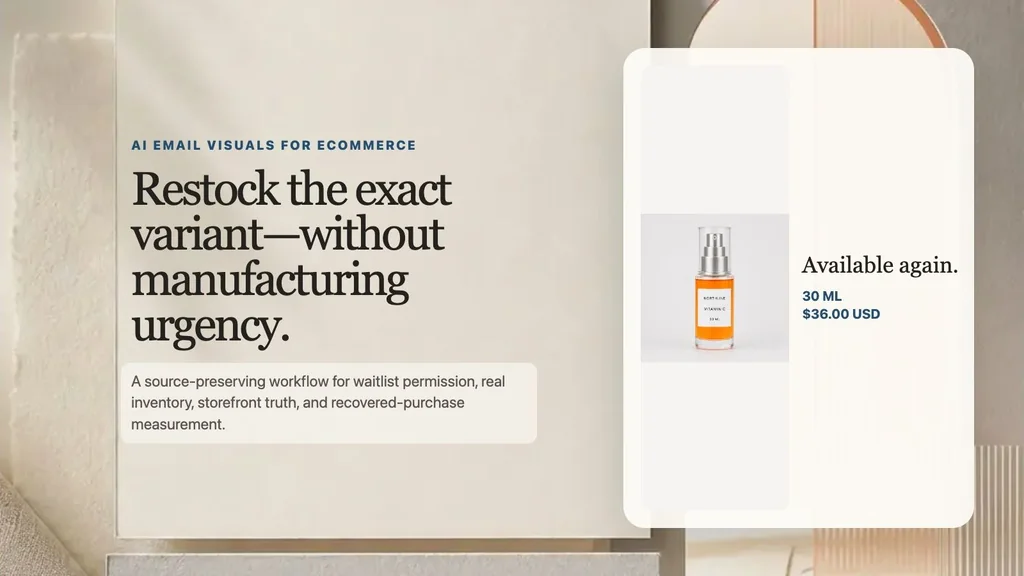
The controlled creative places the approved 1254 × 1254 source without generative redraw. The product name, 30 ML, and $36.00 USD come from the versioned record. “Available again” is eligible only while the exact variant remains online and sellable.
The visible button is a design label. The production message needs a live HTML anchor to the exact variant so the link remains usable when images are blocked. Keep the core product and availability statement in HTML, write concise alt text, and test mobile width, dark mode, supported fonts, contrast, keyboard navigation, plain text, tracking, and the destination.
Step 5: audit request → inventory → email → storefront
Download the seven-surface consistency audit. Its rows are controlled expected states, not observations from a live store.
| Surface | Required check |
|---|---|
| Notification request | exact product and variant, channel, source, permission, timestamp, withdrawal state |
| Restock trigger | tracked variant crossed the configured state; correct location and sellable quantity |
| Eligible batch | not already notified; not withdrawn; not purchased; within buffer and batch policy |
| Email visual | approved source; exact variant and price; no personal data, stock count, or fake urgency |
| Email link | live anchor targets the exact variant, not a generic collection or unavailable default |
| Product page | exact variant selected; available; price agrees; product published; add to cart enabled |
| Cart / checkout | correct SKU, quantity, current price and discount; inventory can actually be allocated |
Shopify's trigger boundary is important: crossing to one or more units does not prove the quantity can support the whole waitlist. Recheck inventory after any delay and before each batch. A reservation buffer and a smaller first batch can reduce out-of-stock-after-click risk, but the policy must match the merchant's allocation and demand—not this fictional example.
Do not infer general marketing enrollment from a product-specific request. Suppress people who withdrew the request, already received the same restock notice, purchased since signup, or no longer meet the merchant's permission policy. If the exact variant becomes unavailable again, stop the batch even if the campaign file still says “available.”
The Shopify variant-image workflow establishes the exact requested product. The AI abandoned-cart email workflow handles a selected checkout rather than a waitlist request, while the product-image localization workflow adds market-specific review without changing the approved source.
If the product has not been released and the customer can place a paid order for future fulfillment, use the AI preorder launch visual workflow; a waitlist notification must never silently become a preorder.
Step 6: measure purchases without oversending
Use completed purchase and contribution from the eligible notified cohort as the primary commercial readout. Delivery, click, product view, add-to-cart, checkout, purchase, and time to sell through diagnose the path. Out-of-stock-after-click, bounce, complaint, unsubscribe, cancellation, return, support contact, and margin are guardrails.
eligible exact-variant request → inventory and publication rechecked → controlled batch attempted → delivered → exact variant viewed → added to cart → completed order → contribution after discount, fulfillment, returns, and service cost
Version waitlist eligibility, trigger, location, buffer, batch rule, message, price, destination, attribution window, and suppressions with the asset. A purchase after notification is not automatically incremental. Use a valid holdout or other defensible comparison before claiming the message caused recovered revenue, and do not optimize for send volume if the storefront cannot serve the demand.
The valuable output is not “a back-in-stock image.” It is one authorized request, one exact variant, one real inventory state, one bounded batch, one verified storefront, and one purchase decision with scarcity and deliverability guardrails.