The useful AI abandoned-cart email workflow is authorized checkout state → exact line-item record → textless visual plate → source-preserved product → deterministic facts → eligibility and recovery-path audit → recovered-revenue readout. AI can make the reminder feel considered. It should not decide who receives it, which product they selected, what it costs, whether it is available, or where the button leads.
We ran that workflow on one fictional checkout for a NORTHLINE 750 ML BOTTLE in Sage, quantity one, at $32.00 USD with no discount. No customer identity is stored in the artifact, the recovery token is synthetic, and the send remains blocked.
Evidence boundary: NORTHLINE, the event, SKU, price, consent flag, eligibility state, and destination are fictional controlled records. The built-in style-board run, live Masonry background job, source-preserving composition, deterministic fact layer, and consistency audit are real. This article reports no campaign, deliverability, conversion, or legal-compliance result.
Why this is a distinct merchant job
Shopify's current abandoned-checkout automation is managed in Shopify Messaging and includes a link that returns the customer to checkout. Shopify documents recipient and timing controls, plus conditions that can prevent a send: a recent completed sale, unavailable items, a newer abandoned checkout, some free checkouts, Shop checkout, and suspicious card-testing or bot attempts. The documented default waits 10 hours and targets marketing subscribers, but the merchant must inspect the actual workflow rather than copy that as a universal rule. Read Shopify's current migration and automation guidance and automation setup guidance.
The visual must agree with the event. Shopify's current Admin GraphQL object for an abandoned-checkout line item includes product, variant, image, SKU, quantity, title, original and discounted prices. Shopify Messaging custom Liquid documents abandoned_checkout, its first five line_items, and the checkout url in the relevant automation. Inspect the current line-item fields and custom Liquid variables.
Merchant discussions add two qualitative warnings. Some shoppers use the cart to discover shipping cost, so abandonment does not always express product intent. Another merchant reported a burst of bot carts followed by high bounce volume and sender-reputation concerns. Neither thread establishes a benchmark; together they justify consent, bot, deliverability, and recovery-path gates before creative polish. Read the intent discussion and the bot-cart report.
The supplied three-month Search Console export contains no non-brand abandoned cart email image, abandoned checkout email creative, Shopify recovery email image, or equivalent page row. This is a revenue-adjacent expansion from Masonry's exact-SKU and offer-consistency cluster—not proof of existing search demand.
Step 1: minimize and freeze the event record
The working artifact needs product and eligibility authority, not customer identity:
| Field | Fictional controlled value |
|---|---|
| Event | ACH-NL-2026-001; online-store abandoned checkout |
| Customer data | email and name not stored; synthetic checkout token |
| Consent | true for the example; market review still required |
| SKU / variant | NL-BTL-750-SAGE / Sage |
| Product / quantity | NORTHLINE 750 ML BOTTLE / 1 |
| Price / discount | $32.00 USD / $0.00; no recovery discount authorized |
| Shipping / tax | unknown until the live recovery checkout |
| Inventory | must be rechecked immediately before send |
| Destination | synthetic recovery URL; blocked |
| Release | blocked pending consent, eligibility, inventory, rendering, checkout, and deliverability review |
Download the complete fictional checkout record. It separates event, privacy, consent, line-item, checkout, eligibility, generation, release, and measurement authority.
Do not paste email addresses, names, full checkout tokens, addresses, payment failures, or unrelated order history into an image prompt. The generation task does not need them.
Step 2: give the source, style, and record different jobs
The approved source controls the product pixels:
The style board controls only visual direction:
The checkout record controls SKU, variant, quantity, price, discount, eligibility, and destination. A style image never outranks either authority.
Step 3: generate only the textless background
We used the style board as the sole reference for this live Masonry job:
masonry image "Create one textless 4:5 ecommerce email background plate from the reference's warm ivory, pale sage paper, charcoal path, muted coral accent, embossed card surfaces, and soft directional daylight. Build a calm editorial composition with one large empty product zone, one separate empty message zone, and generous safe margins for deterministic email copy added later. The reference controls visual direction only. Do not include a product, package, bottle, words, letters, numbers, price, currency, percentage, discount, email address, personal data, inbox, phone, browser, countdown, clock, stock alert, CTA, logo, watermark, or claim." \ --model gemini-3.1-flash-image-preview \ --aspect 4:5 \ --seed 2608159 \ --ref ./abandoned-checkout-style-board.webp
Job 2e1e521f-4896-4a18-bfab-5f76e705edb9 succeeded in 10.116 seconds and returned a 928 × 1152 file.
Step 4: render product and checkout facts deterministically
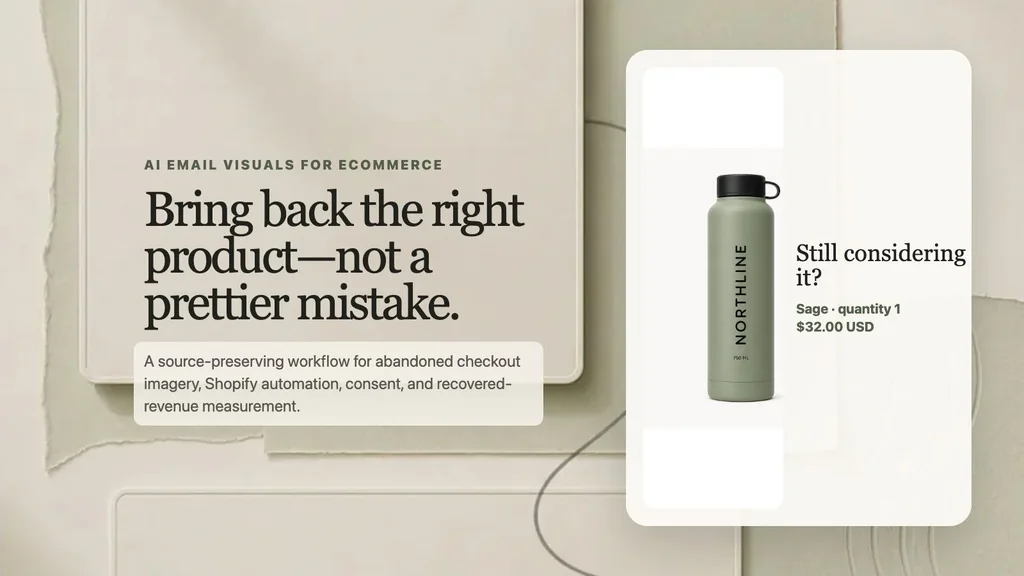
The controlled email creative places the approved source pixels without generative redraw. Product, variant, quantity, and price come from the event record; the button shown here is a visual label, while the real recovery URL must remain a live email link.
This is not a ready-to-send email. Keep useful product information as live HTML when possible, provide concise alt text, and avoid putting the entire message inside one bitmap. Test image blocking, mobile width, dark mode, supported fonts, contrast, link target, keyboard navigation, and the plain-text alternative. The selected item should remain understandable if the image never loads.
Step 5: audit the email against the recovery checkout
Download the checkout-to-email consistency audit. Its rows are controlled expected states, not observations from a live store.
| Surface | Required check |
|---|---|
| Controlled record | exact SKU, variant, quantity, original and discounted price, authorized offer |
| Email visual | exact approved source; deterministic facts; no personal data or fake urgency |
| Email line item | current title, variant, quantity, image, and price from automation context |
| Recovery link | live anchor uses the event recovery URL; image itself contains no token |
| Recovery checkout | same selection; current availability, price, discount, shipping, and tax visible |
| Suppressions | consent/market rule, recent order, newer checkout, payment error, bot/card testing, unavailable item |
| Rendering | desktop/mobile, image blocking, dark mode, alt text, plain text, link and analytics checks |
If the checkout has expired, inventory is gone, price changed, a newer checkout exists, or the customer already purchased, suppress or update the message according to the reviewed workflow. Do not “fix” a stale recovery path with more persuasive imagery.
The Shopify variant-image workflow establishes the exact selected product before lifecycle messaging. The one-SKU creative-testing matrix controls acquisition hypotheses, and the subscription-offer consistency workflow handles recurring terms rather than abandoned-checkout state.
If the shopper requested an alert while the exact variant was unavailable, use the AI back-in-stock email workflow to gate the message on real inventory, notification permission, batch size, and a purchasable storefront.
After a checkout becomes a paid order, use the AI post-purchase cross-sell workflow to select one approved companion from the exact purchased SKU, suppress duplicates and ineligible orders, and measure fulfilled contribution instead of recovery.
Step 6: measure recovered value, not email activity
Use recovered completed checkout and contribution as the primary commercial outcome. Delivery, click, recovery-link use, checkout start, and purchase are diagnostic steps. Discount cost, gross margin, bounce, complaint, unsubscribe, support contact, and sender reputation are guardrails.
eligible abandoned checkout → message attempted → delivered → recovery link used → valid checkout restored → completed order → contribution after discount, fulfillment, returns, and service cost
Separate holdout or comparison logic is required before calling the email causal. Shopify's automation Run IDs and results can help diagnose execution, but a recovered order is not automatically proof that the image caused it. Keep the eligibility definition, send window, audience, offer, template, destination, attribution window, and suppression logic versioned with the asset.
The useful output is not “an AI cart email.” It is one authorized event, one exact product, one privacy-minimized visual, one verified return path, and one revenue decision with deliverability guardrails.