The best AI video generator for a music video is not necessarily the model that makes the prettiest eight seconds. A useful model has to deliver footage an editor can cut: stable people, deliberate camera movement, repeatable art direction, clean transition points, and enough control to produce the next shot in the same visual language.
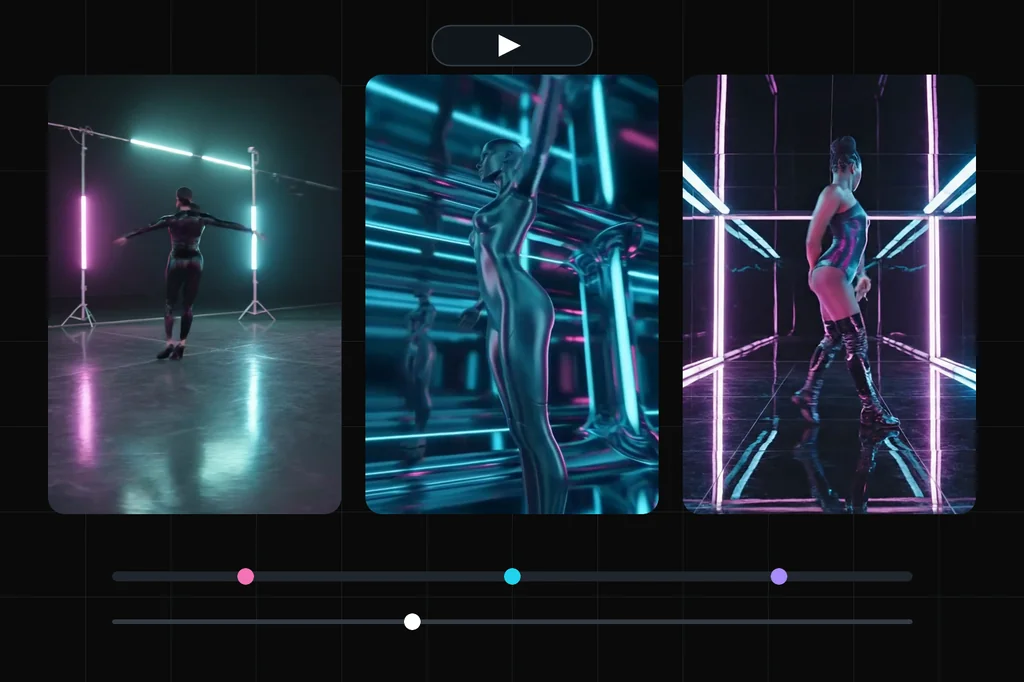
I tested one tightly specified performance insert across three current Masonry routes: Kling O3 Pro, Seedance 2.0, and Veo 3.1 Fast. Every model received the same prompt, 16:9 framing, and no audio. The resulting files are embedded below.
This is a three-model pilot with one candidate per model, not a statistically powered leaderboard. It can show how the routes interpreted this brief. It cannot prove that one model will win every song, performer, or art direction.
The quick answer
- Veo 3.1 Fast produced the most usable performance plate in this run. The dancer, outfit, mirrored set, and camera progression stayed coherent across the eight-second file.
- Seedance 2.0 produced the strongest visual identity. It turned the dancer into a chrome figure inside an elaborate reflective tunnel. That is a compelling treatment, but also a creative rewrite of the requested human performer.
- Kling O3 Pro produced the only 1080p file and a conventional studio look. The performer stayed recognizable, but the reflective corridor became visible light stands on a dark soundstage and the output lasted five seconds instead of the eight seconds requested in prose.
- No model proved beat synchronization. The prompt requested four evenly spaced light pulses. The outputs contain lighting changes, but none presents four unambiguous timing marks an editor should trust as beats.
The controlled music-video brief
The test asks for one continuous performance shot rather than a complete music video. That keeps the comparison observable: one performer, one set, one camera move, one spin, one end-state requirement, and four requested light pulses.
Eight-second 16:9 music-video insert, one continuous shot. A fictional adult dancer in a reflective black corridor under cyan and magenta practical lights. The camera makes one slow 180-degree orbit while the dancer completes one clean spin at the midpoint and returns to the opening pose by the final frame. Four evenly spaced light pulses create clear edit points. Stable face, body, outfit, reflections, and corridor geometry. No cuts, text, logos, extra people, morphing, flicker, or sudden camera jumps.
The CLI contracts were checked immediately before generation with masonry models params <model>. All three routes accepted text-to-video and a 16:9 request. Audio was disabled so the visual test did not quietly compare three unrelated generated soundtracks.
masonry video "<the prompt above>" --model kling-o3-pro --aspect 16:9 --no-audio masonry video "<the prompt above>" --model seedance-2-0 --aspect 16:9 --no-audio masonry video "<the prompt above>" --model veo-3.1-fast-generate-preview --aspect 16:9 --no-audio
The current model-specific CLI contracts did not expose a duration flag for these three routes. The requested eight seconds therefore remained prompt language, not a guaranteed parameter. The returned files make that distinction visible.
The three real clips
What the files actually measured
I downloaded every returned asset and inspected it at half-second intervals. ffprobe measured the delivered streams; the completion time is the single observed job duration reported by Masonry, not a speed benchmark.
| Model | Delivered file | Reported completion | What held | What missed |
|---|---|---|---|---|
| Kling O3 Pro | 5.042 s, 1920×1080, 24 fps | 70.1 s | Performer identity, outfit, conventional stage footage | Eight-second length, reflective corridor, clear 180-degree orbit |
| Seedance 2.0 | 8.042 s, 1280×720, 24 fps | 140.1 s | Reflective world, strong movement, coherent visual look | Human styling, literal outfit preservation, clean timing markers |
| Veo 3.1 Fast | 8.000 s, 1280×720, 24 fps | 90.1 s | Human continuity, outfit, corridor, readable turn | Exact return to opening pose, four unambiguous light pulses |
All three files were H.264 video with no audio stream, matching the test setting. The CLI did not report normalized generation cost in its job result, so this article does not invent a price comparison.
Which model should you use for a music video?
Choose Veo when the performer has to survive the shot
Veo is the first route I would retest for a recognizable performer. In this candidate, the body, outfit, hairstyle, and room remain legible while the dancer turns. That continuity matters more than an elaborate set when adjacent shots have to cut together.
The miss is equally important: the dancer does not land on the exact opening pose, and the camera movement reads more like a controlled progression around the performance than a literal, measurable 180-degree orbit. Use first and last frames when a route exposes them and the landing composition is non-negotiable.
Choose Seedance when the treatment can lead the performer
Seedance produced the most distinctive frame language: a deep chrome tunnel, strong symmetry, and a figure integrated into the reflections. It looks like a designed music-video world rather than a dressed studio.
That strength is also the risk. The performer becomes a stylized metallic character. If an artist, wardrobe, or recognizable face must remain exact, start from approved visual references and score identity before spectacle. For a fictional or fully synthetic performer, the same transformation can be the reason to choose it.
Choose Kling when you want a clean, conventional plate
Kling delivered the highest-resolution file and kept a consistent dancer against a restrained stage. It is the easiest result here to imagine as conventional performance b-roll.
It also followed the environment least literally. The corridor became a floor with visible light stands, and the five-second return shows why prose is not a substitute for a model parameter. Choose the route from its live contract, then write the prompt inside those constraints.
Why “on the beat” is not a synchronization method
A video model cannot synchronize to a song it never received. Text such as “four beats” or “pulse on every beat” describes an idea, not timestamps. Even when a model generates sound, its private rhythm is not automatically the rhythm of the track in your edit.
For a repeatable music-video workflow:
- Mark the real song's bar, beat, drop, and lyric timestamps in the edit first.
- Define shots by duration and action, not by vague energy: “hold for two seconds, turn, land facing camera.”
- Generate silent visual plates when the song will supply the final audio.
- Cut the selected plates to the actual waveform and add speed ramps or optical transitions in the edit.
- If exact endpoints matter, use approved first and last frames rather than asking text alone to recreate a pose.
The model supplies footage. The edit establishes musical synchronization.
A scorecard for your own test
One candidate per model is a useful pilot, not a buying decision. For a production comparison, generate at least four candidates per model and set the rejection rules before revealing the model name.
| Dimension | Reject when |
|---|---|
| Performer continuity | Face, body, hair, wardrobe, or number of people changes |
| Shot instruction | Camera path, action, start, or landing pose misses the brief |
| Temporal stability | Limbs, reflections, lights, or set geometry flicker or morph |
| Editability | The clip has no clean in/out point or usable moment for the intended cut |
| Art-direction fit | The model replaces the approved visual language with another concept |
| Delivery | Duration, aspect, resolution, or audio stream fails the edit requirement |
Count accepted clips, total generation spend, and review time. The useful economic metric is (generation spend + review labor + correction labor) / kept clips, not the price of the prettiest attempt.
The bottom line
For this specific brief, Veo 3.1 Fast is the best starting point for performer continuity, Seedance 2.0 for a bold synthetic treatment, and Kling O3 Pro for a conventional 1080p performance plate. None demonstrated trustworthy beat timing from text alone.
That is the actionable result: choose a model for the visual job, then synchronize the kept footage to the real track in the edit. Reproduce the prompt in Masonry's canvas, compare the wider market in the current AI video generator guide, or use the Kling 3.0 prompt guide and Seedance 2.5 guide to design the next shot.