The best Kling AI image-to-video prompt for a product ad starts with an approved product image and a short preservation contract. Tell the model what may move, how the camera observes it, and what must stay fixed. This guide gives you a completed ecommerce shot brief plus six prompts you can copy. Every prompt fits the current Kling O3 Pro contract instead of describing a short film the model cannot generate in one pass.
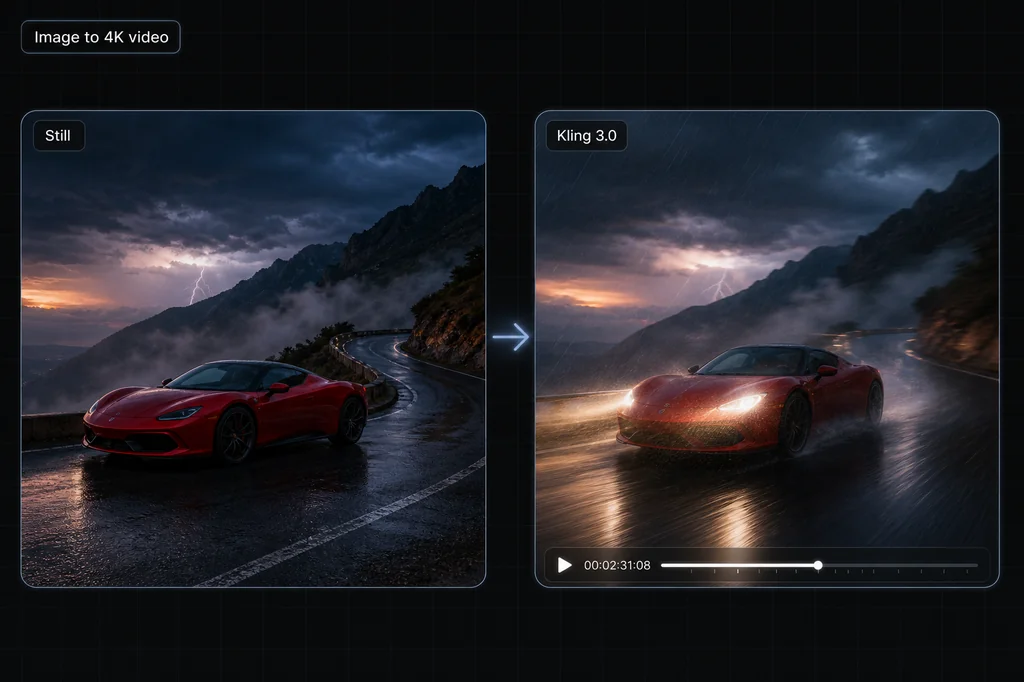
What changed: this page originally covered Kling 3.0 and claimed native 4K at 60fps. Masonry's current model is Kling O3 Pro, and its live contract exposes 1080p output, 3–15 second clips, optional native audio, and multi-shot prompts. Kling does offer a separate 4K endpoint through some providers, but 60fps is not part of the current Masonry contract, so this guide does not promise it.
The Kling prompt formula
Use this order for a single shot:
[subject and action]. [camera framing and movement]. [setting and lighting]. [physical motion and timing]. [details that must not change]. Audio: [ambience, effects, dialogue, or silence].
For multi-shot work, replace one large prose block with two or three smaller prompts and assign each a duration. The total must stay at fifteen seconds or less. Do not paste a thirty-second screenplay into a fifteen-second generation and expect the model to edit it for you.
Start with a product-ad shot contract
A prompt alone does not define a publishable ad. The merchant also needs to know which source is authoritative, which product details cannot change, what failure triggers rejection, where the clip will run, and which business metric the test is supposed to move.
Download the editable Kling product-ad shot brief. It contains five deliberately different rows:
| Row | Production route | Commercial job | Release rule |
|---|---|---|---|
| 1 | Kling O3 image-to-video | Make the exact SKU recognizable in a prospecting ad | Reject label, geometry, color, count, or background drift |
| 2 | Kling O3 image-to-video | Show an approved surface detail for retargeting | Reject invented texture, ingredients, claims, or copy |
| 3 | Kling O3 first/last frame | Demonstrate one documented product state change | Reject invented mechanics or any path that contradicts the physical product |
| 4 | Deterministic editor | Add offer, price, legal copy, and CTA after generation | Never ask the video model to typeset commerce facts |
| 5 | Human review | Decide whether a candidate can ship | Require product, brand, channel, and performance sign-off |
The completed sample uses a fictional NORTHLINE serum bottle so its claims are not confused with a real merchant record. Replace the sample fields with one exact SKU and approved assets before generating. The sheet is a planning template, not evidence that Kling will preserve every product.
Our separate same-photo Kling O3 product-ad screen shows why the rejection fields matter. Its first O3 return preserved the front wording but invented dense side copy as the camera moved, so the candidate was rejected. A technically successful generation is not automatically a usable ad.
What the current model actually supports
The table below reflects Masonry's live public model contract for kling-o3-pro, checked on August 4, 2026. Provider-specific variants can differ.
| Control | Current Masonry behavior | What it means for your prompt |
|---|---|---|
| Duration | 3–15 seconds | Keep every single or multi-shot idea inside one short arc |
| Output | 1920×1080, 1080×1920, or 1080×1080 | Choose landscape, vertical, or square before writing camera movement |
| Input | Text-to-video or image-to-video | Use a first frame when identity or product fidelity matters |
| Multi-shot | Optional prompt list | Use up to six shots, with a combined duration of 15 seconds or less |
| Audio | Optional; off by default | Turn it on deliberately and describe only sounds that fit the clip |
| Keyframes | Optional first and last images | Use them when the opening composition and landing frame both matter |
The Kling O3 API documentation confirms the 3–15 second duration range and multi-shot controls. The separate Kling O3 4K endpoint documents native 4K as a distinct configuration, not a universal setting for every Kling model surface.
Six Kling AI prompts to copy
1. Five-second product hero orbit
Use image-to-video and upload the approved packshot as the first frame.
Preserve the exact product from the first frame. Slow five-second camera orbit from front-left to front-right at label height. A soft studio key light travels across the material and reveals its texture while the product shape, label, colors, logo, and proportions remain unchanged. Clean charcoal gradient background, realistic contact shadow, restrained premium commercial look. No extra objects, no invented text, no deformation. Audio: quiet studio room tone and one subtle reveal whoosh.
Why it works: the shot has one motion, one lighting change, and an explicit preservation boundary. Product prompts fail when they ask the model to redesign the object and animate it at the same time.
2. Vertical beauty reveal for social
Use a 9:16 canvas and a clean first-frame portrait or product-and-model image.
Nine-second vertical beauty ad. The subject turns slowly toward camera while a narrow band of warm sunset light crosses the face from left to right. Camera makes a gentle push-in from medium close-up to close-up; natural skin texture and the exact makeup colors remain consistent. A soft breeze moves only the loose hair strands and translucent fabric. Minimal warm-beige studio background, elegant editorial pacing, no sudden head movement, no new jewelry, no text overlays. Audio: soft fabric movement, distant city ambience, restrained low-frequency pulse.
Why it works: it separates subject motion, camera motion, and secondary motion. Saying “cinematic” alone does none of that work.
3. Tactical thriller push-in
This source asset is 13.1 seconds long, inside the current single-generation duration range. Treat it as a framing reference; it predates the O3 update and is not an O3 benchmark.
Thirteen-second tactical thriller shot. A woman in practical field gear stands alert in a dark modern room, holding her position while her eyes scan toward a floor-to-ceiling window. Begin in a static medium-wide frame, then make one slow push-in to a tight medium shot. Cyan moonlight enters through the window; one warm bedside lamp creates a believable opposing edge light. Bamboo shadows move slightly outside and her breathing is visible, but her stance and clothing remain consistent. Realistic low-light exposure, restrained movement, no weapon deformation, no camera cut. Audio: distant wind, quiet room tone, fabric creak, one controlled breath.
Why it works: the prompt spends its motion budget on one camera move and one acting beat. The light sources are described by location, so the model has a better chance of keeping them coherent.
4. Three-shot cyberpunk reveal
Enter these as three multi-shot prompts. The durations add up to fifteen seconds.
Shot 1 — 5 seconds: Wide establishing shot of a rain-dark corporate plaza at dusk. A lone analyst stands beneath a glass tower while cyan reflections ripple across wet stone. Slow forward dolly; restrained neon, realistic haze. Audio: rain, distant traffic, low electrical hum. Shot 2 — 5 seconds: Medium profile of the same analyst looking up as a fragmented blue holographic face begins forming across the tower windows. Camera stays steady; particles gather from the building edges rather than appearing at once. Audio: the electrical hum rises, glass vibrates softly, the analyst inhales. Shot 3 — 5 seconds: Tight close-up on the analyst's eyes reflecting the now-complete hologram. One small step backward, shallow depth of field, cyan light growing across the face. Preserve wardrobe and facial identity. Audio: rain drops away, one heartbeat, then silence.
Why it works: each shot changes exactly one piece of information—place, event, reaction—and the audio arc follows the same progression.
5. Documentary memory sequence
The video below is a 130.6-second edited reference reel, not one Kling generation. The prompt turns the same idea into a valid fifteen-second sequence.
Shot 1 — 5 seconds: Locked medium interview frame of an elderly engineer seated beside a workbench, looking just off camera. Soft north-window light, neutral documentary grade, natural blinking and breathing. He says, "we built it because no one told us we couldn't." Audio: clear voice, quiet room tone. Shot 2 — 5 seconds: Match cut to close-up archival-style hands threading tape through a reel-to-reel machine in the same workshop. Slow lateral slider move, slightly faded color, tactile mechanical detail. Audio: tape mechanism clicks and begins to turn. Shot 3 — 5 seconds: Return to a tighter interview close-up. The engineer watches the machine off screen and gives one restrained smile. Preserve face, clothing, and light direction. Audio: the tape continues softly; no music.
Why it works: the dialogue is short enough to fit its shot, and the insert shot gives the model a concrete visual bridge instead of asking for a lifetime of history in seconds.
6. Fantasy confrontation, not a whole battle
The source reel is 23 seconds, so it must be edited or compiled relative to the current fifteen-second limit. The useful move is to choose one confrontation rather than compress nine action beats.
Shot 1 — 5 seconds: Low-angle medium shot of a dark-armored knight standing in a ruined stone gate as embers cross the frame. The knight lowers a raised visor and grips a weathered sword. Slow push-in; warm firelight on one side, cold storm light on the other. Audio: distant fire, armor creak, one low drum hit. Shot 2 — 5 seconds: Wide side-tracking shot as the same knight charges across wet rubble toward one massive armored creature. Preserve the knight's helmet, cape, and sword design. Powerful but readable strides, realistic weight, no extra fighters. Audio: metal footsteps, rain, rising strings. Shot 3 — 5 seconds: Tight three-quarter impact shot. The creature blocks the sword; sparks and rain burst outward while both bodies hold believable weight and contact. Brief camera shake only at impact, then settle. No dismemberment, no new weapons. Audio: one heavy metal strike, debris, music cuts to silence.
Why it works: coherent action is usually won by subtracting beats. Three connected shots give the model time to establish identity, motion, and contact.
What the shipped examples can prove
We inspected the media on the live article rather than assuming every embed was a raw generation. Five of the nine source videos run longer than the current fifteen-second maximum: approximately 23, 32, 62, 90, and 131 seconds. They are useful creative references, but they cannot be presented as single current-model outputs. The revised captions call out edited reels, and every copy-ready prompt above stays within the documented limit.
That distinction matters. An edited reel can demonstrate taste, pacing, and the kinds of scenes worth attempting. It cannot prove that one prompt produced the entire sequence, that character identity held across every cut, or that Kling produced the final sound mix without post-production.
How to debug a Kling prompt
| Symptom | Likely cause | Rewrite |
|---|---|---|
| Too many unrelated cuts | The prompt contains a full script | Keep one action arc or use 2–3 timed shots |
| Subject changes between shots | Identity is described differently each time | Reuse the same subject description or start-frame reference |
| Camera motion feels chaotic | Several camera moves compete | Give each shot one named move |
| Product or wardrobe mutates | The model is asked to invent missing detail | Add a reference image and a short “must remain unchanged” list |
| Audio feels crowded | Every possible sound is requested | Choose ambience, one featured effect, and at most one short line |
| Final beat gets cut off | Shot durations consume the entire clip | End the action before the last second and reserve time to settle |
How to run the prompts in Masonry
- Open Masonry's canvas and select Kling O3 Pro.
- Choose 16:9, 9:16, or 1:1 for text-to-video. For image-to-video, the first frame determines the composition.
- Use one prompt for a continuous shot. Use multi-shot mode for the examples with timed shot blocks.
- Keep the total duration between three and fifteen seconds.
- Turn audio on only when the prompt includes an audio plan; it is off by default.
- Generate at least three candidates and judge instruction adherence, identity, motion, and sound separately.
The practical rule is simple: one short clip should contain one visual idea. If you need a minute-long trailer, generate several valid shots and edit them as a sequence. For model selection, compare the best AI video generators; for commercial briefs specifically, see the AI video model product-ad test. For a performance brief, inspect Kling beside Seedance and Veo in the same-prompt music-video test.
When the visual idea is a controlled push between two approved portraits, the consistent-character two-frame tutorial provides the source frames, final clip, consent boundary, and a frame-by-frame rejection sheet.