


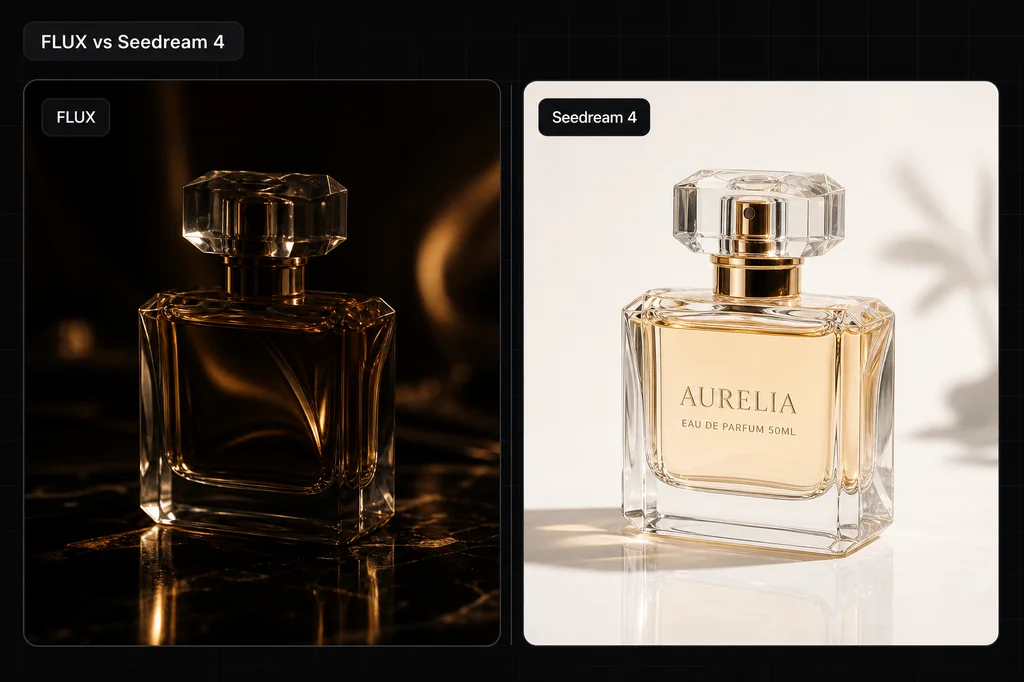
The honest FLUX-versus-Seedream answer is no longer “FLUX for realism, Seedream for text.” In the current pair, FLUX.2 Pro and Seedream 5 Pro, both rendered a three-line product label exactly. They separated on a harder thing to summarize in a spec table: how literally each model staged an action.
I ran two prompts through both models at 1024 × 1024. On the product brief, both passed the text test and invented different bottle geometry. On the portrait brief, FLUX put the ceramic artist at the wheel with a visibly unfinished vase; Seedream placed the artist at a worktable beside a more finished, decorated vase. Both images are strong. Only one followed that particular action brief closely.
Quick verdict
- Exact short label text: tie in this one-prompt sample. Both returned all three lines with the requested spelling and order.
- Literal action and process staging: FLUX.2 Pro won this portrait sample.
- A polished, posed editorial portrait: Seedream 5 Pro produced the cleaner version in this sample.
- Reference-led generation in the current Masonry CLI: Seedream 5 Pro. Its live contract accepts up to ten references; the current FLUX.2 Pro route exposes text-to-image.
- Open weights: neither Pro model. FLUX.2 has separate open-weight variants, but they are not the FLUX.2 Pro endpoint tested here.
Evidence boundary: this is a controlled same-prompt comparison with one retained 1024 × 1024 output per model per brief. It is not a statistically powered benchmark. Seeds do not represent equivalent noise across different model architectures, and four images cannot prove a universal winner.
How the test was run
I generated the files on August 4, 2026 through the logged-in Masonry CLI:
- Same prompt within each test
- Same requested 1024 × 1024 dimensions
- Same seed within each test:
42817for product,90214for portrait - Prompt enhancement off
- No input or reference images
- First successful size-matched output retained; earlier Seedream default-size runs were excluded because they were 1536 × 1536
The final files are shown unedited except for responsive delivery by Masonry's media CDN. The model names in each caption are the models that generated them.
Test 1: exact label text on a fictional product
Square editorial product photograph of a fictional cobalt-blue glass skincare pump bottle standing on warm travertine, soft window light from camera-left, one eucalyptus shadow on the wall, premium but physically plausible materials. The bottle label must show exactly three centered lines: ALBA, NIGHT REPAIR, 30 ML. Front-facing bottle, label fully readable, no other text, no extra bottles, no logo.
FLUX.2 Pro output
Seedream 5 Pro output
What the files show: both models passed the short-text requirement. FLUX rendered more complex glass, pump, and stone surfaces. Seedream made the botanical shadow more prominent and the composition more graphic. Neither can be called product-faithful because the brief described a fictional bottle without a source photo; each was free to invent the package.
Verdict for this test: tie on the requested text. Pick by the surface treatment you prefer, then test several more labels before trusting either model with production typography. For a real SKU, use a consented source image and reject any output that changes its shape, closure, label, color, or included claims.
If the bottle has to match a product you actually sell, this fictional-package test is not the decision. Run both routes against the same approved source in the same-SKU product-photo fidelity test, lock the product invariants before generation, and compare accepted files rather than attractive inventions.
Test 2: candid ceramic-artist process portrait
Square candid 35mm editorial photograph of an adult ceramic artist in a sunlit working studio, seated beside a half-finished stoneware vase, rust linen apron over a charcoal shirt, both hands visible with a light dusting of clay, natural skin texture, flyaway hair, shelves of irregular handmade bowls softly out of focus, side window light, realistic color, no beauty retouching, no text, no extra fingers.
FLUX.2 Pro output
Seedream 5 Pro output
What the files show: FLUX interpreted “half-finished” and “working studio” as an active wheel scene. Seedream followed the wardrobe, light, shelves, hands, and studio context but made the vase look finished and decorated. Seedream's face is softer and the subject placement more editorial; FLUX's process story is clearer.
Verdict for this test: FLUX followed the action brief more literally. Seedream made a strong image, but it changed the moment. If the subject must be performing a specific action, that difference is a rejection criterion, not an aesthetic preference.
Current Masonry contract: do not confuse the family with the route
These parameter contracts were checked with masonry models params on August 4, 2026:
| Current Masonry route | FLUX.2 Pro | Seedream 5 Pro |
|---|---|---|
| Model slug | flux-2-pro | seedream-5-pro |
| Current capabilities | Text-to-image | Text-to-image, image-conditioned generation |
| Square choices | 1024 × 1024 | 1024 × 1024, 1536 × 1536, 2048 × 2048 |
| Other listed shapes | 16:9, 9:16, 3:2, 2:3, 4:5, 5:4, 4:3, 3:4 | 16:9, 9:16, 3:2, 2:3, 4:3, 3:4 |
| Reference images | Not exposed on this current route | Up to 10 |
| Seed | Supported | Supported |
Black Forest Labs' own FLUX.2 documentation describes broader editing and multi-reference support across its provider endpoints, and its current output guide documents FLUX.2 output up to four megapixels. That does not change what the current Masonry flux-2-pro adapter accepts. Check the contract you will actually call.
The old article also treated “FLUX has open weights” as a property of FLUX Pro. That is incorrect. FLUX.2 Pro is hosted. The broader family includes FLUX.2 klein, whose 4B variant is Apache 2.0, and FLUX.2 dev under Black Forest Labs' non-commercial license. Do not transfer a Pro quality result to a different open-weight model.
Reproduce the test from the CLI
Run masonry models params flux-2-pro and masonry models params seedream-5-pro first. Then keep prompt, dimensions, and seed fixed:
masonry image "your controlled prompt" \ --model flux-2-pro \ --dimension 1024x1024 \ --seed 42817 \ --output flux.png masonry image "your controlled prompt" \ --model seedream-5-pro \ --dimension 1024x1024 \ --seed 42817 \ --output seedream.png
The CLI returns a job ID. Download each result with the masonry job download command it prints. Keep the raw files, prompt, model slug, dimensions, seed, run date, and rejection notes together so the comparison remains auditable.
Score accepted images, not attractive images
Use the same acceptance sheet before looking at the model name:
| Dimension | Reject when |
|---|---|
| Required text | Any word, number, punctuation mark, line break, or hierarchy is wrong |
| Product truth | Shape, closure, material, color, label, logo, or claims differ from the real SKU |
| Action | The subject is posed when the brief requires an action, or performs the wrong action |
| Anatomy | Hands merge, fingers repeat, joints bend implausibly, or gaze is incoherent |
| Composition | Required subject, negative space, crop, or placement is missing |
| Light and materials | Reflections, shadows, transparency, or surface behavior contradict the scene |
| Channel fit | Required text or disclosure becomes unreadable at the actual placement size |
Generate the same number of candidates per model and calculate acceptance rate. Then divide the credits spent by accepted images. That quotient is the cost per accepted image. A cheaper generation that fails the label or action brief has no production value.
Which one should you use?
- Use FLUX.2 Pro first when literal action staging, surface detail, or a fixed production endpoint matters. In these files it followed the process portrait more closely.
- Use Seedream 5 Pro first when your workflow starts from reference images or needs larger square output options in the current Masonry route.
- Run both when the image is expensive to get wrong. The product test shows why: both satisfied the written requirement, but they made different creative decisions that a spec sheet cannot rank for your brand.
This article replaces a legacy FLUX 1.1 Pro versus Seedream 4 spec comparison. Those models remain available, but they are not the current pair tested here. For a broader cross-model view, see the product-photography model roundup, the text-rendering comparison, and GPT Image 2 vs FLUX.2.


