


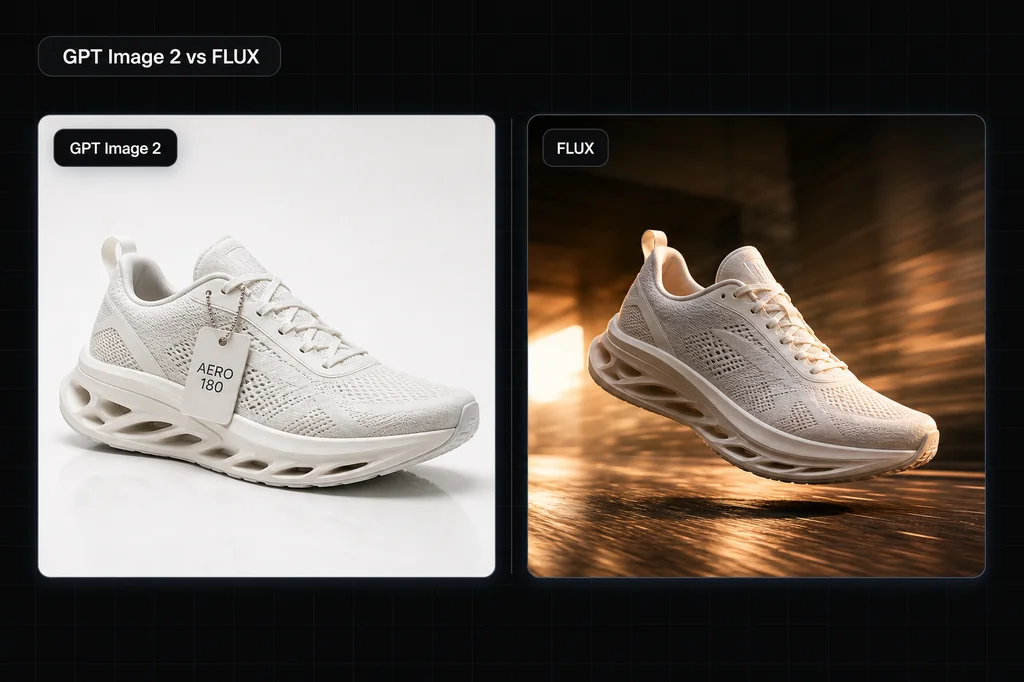
Start with GPT Image 2 when your image has to contain correct, readable text or when you need a mask-guided edit. Include a FLUX.2 variant when you need a speed-first hosted model, typography controls, multi-reference editing, or weights you can run locally under the appropriate license. In one matched seven-region packaging run, GPT Image 2 preserved every requested character and FLUX.2 Flex dropped the dot from a URL.
That is the shortlist in two sentences. Everything below separates vendor-documented capabilities and prices from the performance test you still need to run. This article publishes one matched text screen, not a full performance benchmark. One output per route cannot establish latency, cost per accepted file, editing quality, multilingual performance, or repeatability. We have covered GPT Image 2 on its own in the GPT Image 2 deep-dive; this post designs the broader head-to-head against the FLUX.2 family.
The short version
GPT Image 2 is a precision tool. FLUX is a range of models, from a near-instant one to a frontier flagship, and the whole family leans toward speed, openness, and cost control. They're not really competing for the same job, which is why "which is better" has no single answer.
- Words on the image? GPT Image 2 was exact in our one seven-region output; FLUX.2 Flex omitted one punctuation mark. Require repeated candidates from both routes before choosing.
- Hundreds of images on a budget? FLUX.2 Klein starts at $0.014 through the BFL API and is designed for sub-second inference on suitable hardware.
- Run it on your own hardware, or fine-tune it? FLUX.2 Klein 4B is the cleanest commercial path because its weights are Apache 2.0. Klein 9B and Dev have non-commercial license restrictions.
- Targeted edits to a real photo? GPT Image 2. Its mask workflow lets you specify the region to change; still QA the entire result for drift.
- Many reference images or unusual framing? FLUX.2 supports multi-reference editing and any aspect ratio within its pixel limit.
Ecommerce merchant shortcut: if the input is an approved real SKU rather than a packaging mockup, do not choose from this text test alone. Use the AI product-photography model comparison to map label, geometry, color, material, set-count, and claim risks, then run both routes on the same source and compare accepted assets, review time, and correction cost.
One matched text result we can publish
On 4 August 2026, we sent both routes the same 1024×1024 coffee-package prompt through the authenticated Masonry CLI. It required seven distinct text regions and exact capitalization, punctuation, digits, an em dash, slash marks, parentheses, units, and a lowercase URL. We generated one output per route.
| Route | Observed result | Evidence boundary |
|---|---|---|
| GPT Image 2 | Exact across all seven regions | One Latin-text packaging output |
| FLUX.2 Flex | Failed the URL because one dot was omitted | One punctuation failure, not a model-wide rate |
The result supports a precise statement about these two files and nothing broader. It does not prove that GPT Image 2 will win the next run or that FLUX.2 Pro, Max, Klein, or Dev behave like Flex. The full five-route prompt and evidence boundary are in our AI image text-rendering test.
The eight-output comparison protocol
- Generate four candidates in GPT Image 2 with the prefilled prompt, one aspect ratio, and one quality target.
- Duplicate the exact prompt and settings into FLUX.2 Pro and generate four candidates there.
- Review the files without hiding failures or selecting one favorite from each set.
| Acceptance check | Pass condition |
|---|---|
| Exact copy | All three requested lines appear once, in order, with no invented words |
| Package geometry | Bag edges, seal, label plane, and contact shadow remain coherent |
| Material | Paper or foil surface remains distinct from stone and background |
| Prompt adherence | Black bag, warm stone, and photoreal lighting all appear |
| Rerun consistency | At least three of four outputs pass the first four checks |
Record accepted outputs and total generation cost. Compare cost per accepted image, not the cheapest advertised attempt, and preserve the failed files so the decision can be audited.
Feature comparison
| What you're comparing | GPT Image 2 | FLUX.2 |
|---|---|---|
| First candidate for | Dense text, packaging, UI mockups, mask-guided edits | Variant-specific speed, typography, multi-reference, and local workflows |
| Text-rendering test | Start here for dense, small, and multilingual layouts | Include Flex when typography controls fit the brief |
| Speed | Varies with prompt, quality, and pixel count | Klein is the sub-second, real-time variant |
| Published pricing | Token-based; quality and pixel count change output cost | Klein from $0.014; Pro from $0.03; Flex from $0.05 |
| Aspect ratios | Up to 3:1; max edge 3840px; max 8,294,400 pixels | Any ratio within a 4MP output limit |
| Local weights | No | Klein 4B Apache 2.0; Klein 9B and Dev non-commercial without a license |
| Editing | Image edit endpoint with mask support and high-fidelity input | Multi-reference editing: up to 8 by API, 10 in the playground |
| Current primary docs | OpenAI image guide | BFL FLUX.2 overview |
A note on the FLUX column: "FLUX" is a family, not one model. The current FLUX.2 lineup assigns distinct jobs to Klein, Pro, Flex, Max, and Dev. Klein launched in January 2026; the 4B release is Apache 2.0, while the 9B and Dev weights use the FLUX Non-Commercial License. A comparison that does not name the variant, hosting path, resolution, and license is incomplete.
Where GPT Image 2 is the stronger starting candidate
Dense text and mask-guided corrections
If your image needs real words—a banner headline and price, coffee packaging, an infographic, or a UI mockup—start the comparison with GPT Image 2. Its current API supports flexible output sizes and mask-guided corrections, so it fits workflows where one failed label must be repaired without discarding the whole composition. That documented workflow fit is not a spelling win rate; use the eight-output protocol above to measure the exact copy load against FLUX.2 Flex or Pro.
Edits that change one thing
GPT Image 2 has an image edit endpoint with mask support. In practice that means you can target a product variant, background, or label instead of asking for an unconstrained reroll. The result still needs visual QA: OpenAI documents improved editing, not a guarantee that every unmasked pixel will remain identical.
FLUX.2 supports up to eight reference images through the API and ten in the playground, which is useful for combining products, styles, and characters. That is a different editing strength from GPT Image 2's explicit mask workflow.
Composition from multiple inputs
GPT Image 2 accepts high-fidelity image inputs, while FLUX.2 documents multi-reference editing. Both are reasons to include a model in a product-plus-background or packaging-visualization test; neither feature guarantees preservation of a real product. Use the same approved source, state the invariants, and reject any output that changes them.
Where FLUX has structural advantages
Speed and cost at volume
FLUX.2 Klein is now the cleanest speed-first comparison. Black Forest Labs advertises sub-second inference on suitable modern hardware and lists the hosted 4B and 9B variants from $0.014 and $0.015 per image. Pro starts at $0.03 and Flex at $0.05. See the current BFL pricing table, because output resolution and variant change the total.
GPT Image 2 pricing is token-based and varies with prompt input, image inputs, output quality, and pixel count. Its API supports arbitrary valid sizes through 4K landscape or portrait, but OpenAI labels outputs above 2560×1440 experimental and notes that complex prompts may take up to two minutes. Do a small batch at the exact settings you plan to ship before comparing unit economics.
Open, downloadable weights
This one is structural and GPT Image 2 cannot match it. FLUX.2 Klein 4B is open under Apache 2.0, runs on consumer-class GPUs, and can be fine-tuned for commercial local use. Klein 9B and FLUX.2 Dev are also downloadable, but their weights use the FLUX Non-Commercial License; commercial use requires the appropriate license or a commercial API. GPT Image 2 is API-only and does not support fine-tuning.
Flexible aspect ratios
FLUX.2 supports any aspect ratio within a 4MP output limit. GPT Image 2 also supports flexible sizes, but constrains the long-to-short edge ratio to 3:1, requires edges that are multiples of 16, and caps total pixels at 8,294,400. Choose based on the exact target dimensions; the older claim that GPT Image 2 was limited to only a few presets is no longer true.
Which one for your use case
Text-heavy creatives, packaging, UI mockups
Start with GPT Image 2, then run the same copy in the FLUX.2 variant under consideration. Ad creatives with a headline and CTA, product packaging, app store screenshots, and infographics should pass exact spelling, region completeness, and rerun consistency before cost or visual taste decides the model.
High-volume, cost-sensitive, or real-time
Start with FLUX.2 Klein for the speed-first path, then compare Pro when final-image quality matters more than latency. Bulk social variations, thumbnail generation, prototyping, or any feature where a user is waiting on the result are the intended Klein jobs.
On-prem, privacy-sensitive, or custom-trained
Start with FLUX.2 Klein 4B when Apache 2.0 commercial weights and consumer-GPU deployment fit the quality bar. Consider Klein 9B or Dev only after reviewing their non-commercial license and obtaining the rights your use requires. GPT Image 2 has no local-weight equivalent.
Surgical photo edits
Start with GPT Image 2 for mask-guided single-element edits. Include FLUX.2 when the job uses multiple references and needs style or subject cues from several source images. Inspect the entire result in either workflow; a control being available does not guarantee unchanged pixels or identity.
Honest weaknesses
GPT Image 2. Latency and cost rise with harder prompts, higher quality, and more pixels, so a 4K final should not be your first iteration. It is API-only, has no fine-tuning, and does not provide local weights. Text and masked edits are strengths, but the API documentation still warns about precise text placement, visual consistency, and layout-sensitive composition.
FLUX. "FLUX" is fragmented across FLUX.1 and FLUX.2 and five-plus tiers, so picking the right variant takes homework, and a benchmark that tested schnell says little about FLUX.2 Pro. The fast, cheap tiers are positioned around different tradeoffs. Dense or tiny text still requires the same controlled copy test, and self-hosted open weights mean you own infrastructure and operations that a hosted API handles for you.
Don't guess, run both
The honest move here is to stop reading comparisons, including this one, and put your actual prompt through both models. Text-rendering benchmarks and arena scores are a starting point, not a verdict on your specific creative.
On Masonry you can do exactly that. Drop in your own product photo or brief, generate with GPT Image 2 and FLUX.2 Pro side by side on the same canvas, and decide with your own eyes. For a banner with a headline you may keep GPT Image 2; for fast variations you may reach for a FLUX.2 variant. Seeing them on your own input settles it faster than any leaderboard.
The bottom line
GPT Image 2 and FLUX.2 are tools for different constraints. GPT Image 2 is the safer starting point when dense text or a mask-guided edit carries the job. FLUX.2 lets you choose among real-time Klein, production Pro, typography-focused Flex, quality-first Max, and downloadable weights with variant-specific licenses. The fastest way to find your line between them is to run the same prompt through both on Masonry and score the outputs against your actual requirements.


