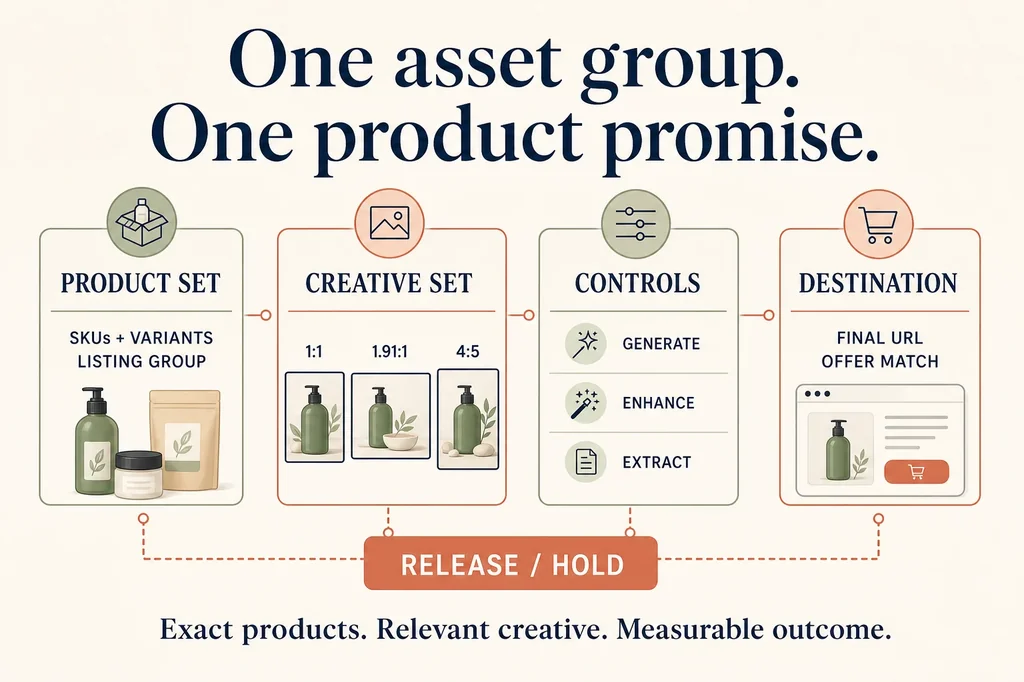
Performance Max can combine Merchant Center products, uploaded creative, generated assets, landing-page images, text, video, and automation across several Google inventories. That flexibility creates a specific ecommerce failure: the products in a listing group and the creative in its asset group can describe different promises.
A merchant with 2,000 products does not solve that by generating more images. The useful job is to make one asset group internally coherent: the included SKUs, approved product sources, scene, claims, offer, final URL, AI controls, rendered combinations, and commercial readout should all refer to the same product promise.
This article provides that workflow and a
downloadable 35-field release manifest.
Its four rows are controlled examples for square, horizontal, vertical, and automation-control
records. Every row stays HOLD until an authorized account supplies product, preview, policy, and
performance evidence.
Quick answer
- Begin with the listing group, not the image prompt. Google says listing groups live inside an asset group and organize the Merchant Center listings that campaign structure can include.
- Give an asset group one understandable merchant job. If every included SKU cannot truthfully use the same image, copy, offer, and destination, split or narrow the product set before producing creative.
- Separate merchant-created assets from Google's runtime controls. Optional asset generation, image enhancements, landing-page-image extraction, text customization, and video automation can create different delivered assets and require separate review records.
- Preview combinations and open the destination. An approved source file is not evidence of the final ad. Confirm the product, claim, offer, and URL in the combinations and previews actually available to the account.
- Use commercial outcomes to make the decision. Ad Strength and asset labels are diagnostics. The campaign objective, conversion value, cost, contribution, and negative outcomes decide whether the product promise deserves more spend.
The asset group is a contract
| Layer | Record before production | Release question |
|---|---|---|
| Product set | Merchant Center ID, listing-group filter, included and excluded SKUs | Can every included product use this exact promise? |
| Creative set | Asset ID, source hash, aspect ratio, dimensions, AI-change scope | Does each export still show the approved product accurately? |
| Controls | Generation, image enhancement, landing-page images, text and video settings | Which additional assets can Google create or extract? |
| Destination | Final URL, offer, selected product or collection, availability | Does the click preserve the same product promise? |
| Readout | Policy state, preview, Ad Strength, cost, conversions, value, contribution | Did the complete group produce the intended business result? |
The manifest repeats the product-set and control fields on every asset row. That redundancy is intentional. If an image is exported, replaced, removed, or generated later, the reviewer can still see which listings and settings it was meant to accompany without joining several informal sheets.
Step 1: state the decision the group should make
Start with a commercial question narrow enough to answer. For example:
Can source-faithful lifestyle images for the Sage 750 ml bottle produce incremental conversion value from prospecting traffic at an acceptable contribution after media and production cost?
That sentence fixes the product family, creative job, audience role, primary business outcome, and cost boundary. It does not assume a new image will improve the result.
Avoid a group named ALL PRODUCTS unless all products genuinely share the same visual and offer.
“Everything in the catalog” is easy to configure but difficult to review. A bottle, serum, shoe,
replacement part, and gift bundle cannot all be truthfully described by one narrow campaign scene.
The one-SKU ad creative matrix is the right upstream workflow when the creative question itself is still unknown. Use this page when the product and visual hypothesis are ready to enter Performance Max structure.
Step 2: freeze the Merchant Center product subset
Google's current asset-group documentation says listing groups are part of an asset group and organize products or collections using Merchant Center attributes. Record the actual filter and expand it into an auditable product list before creative production.
For every included product or variant, retain:
- Merchant Center item ID and item-group relationship;
- merchant SKU and variant attributes;
- main product image and approved secondary sources;
- title, price, availability, and destination;
- custom labels or other attributes used by the listing-group filter;
- explicit exclusions.
Do not stop at custom_label_0=SAGE_BOTTLE. Export or inspect which item IDs that filter currently
resolves to. A feed can change after the group is built. The label is a rule; the resolved product
set is the evidence needed for creative review.
If the feed-image or landing-variant mapping is already broken, stop and use the Shopify-to-Merchant-Center image workflow. Performance Max should not amplify an unresolved catalog join.
Step 3: bind one matching final URL and offer
The final URL should support every included product and every claim in the creative. A one-SKU group can normally use the exact product page. A tightly related collection can use a category page only when all included products, prices, availability states, and claims remain consistent with it.
Record the offer separately. The image must not silently introduce a discount, bundle, free gift, rating, scarcity message, or shipping promise. If the campaign has no offer, say so explicitly. If it has one, store the approved amount, eligible SKUs, market, dates, code, inventory rule, and destination behavior outside the generated pixels.
Before release, open the final URL and verify:
- the expected product or collection is visible;
- every included SKU can be purchased in the target market;
- price and offer match the creative and text;
- the factual product image is present;
- the cart preserves the intended item and offer.
URL expansion and other campaign controls can change destination behavior. Record the account's actual control state and preview rather than treating the configured final URL as the only possible landing path.
Step 4: build the minimum useful image set
Google's current Performance Max specifications recommend these image exports:
| Shape | Recommended | Current minimum | Review use |
|---|---|---|---|
Square 1:1 | 1200 × 1200 | 300 × 300 | product clarity and balanced crops |
Horizontal 1.91:1 | 1200 × 628 | 600 × 314 | wide inventory and headline-safe composition |
Vertical 4:5 | 960 × 1200 | 480 × 600 | mobile-first placements and tall product framing |
The specification distinguishes recommended assets from minimum requirements, including different rules for asset groups with a Merchant Center feed attached. Recheck the live table before export; do not copy these numbers into a permanent production system without a freshness owner.
Create the widest clean master the concept needs, but review each final crop independently. The product should remain large enough to identify without being clipped. Labels, handles, package counts, accessories, and distinguishing variant details must survive. Keep headlines, prices, offers, and legal copy outside the generated image where practical so the same approved visual can serve several combinations.
Use the same-SKU product-fidelity test when a model redraws the product. For sensitive geometry or packaging, generate an empty background and composite the approved product pixels rather than asking the model to recreate them.
Step 5: inventory every way a new asset can appear
“We uploaded three approved images” does not describe the delivered creative system. Performance Max can contain assets from several sources, each with a different control and review path.
Optional asset-group generation
Google's current generative-AI asset-group workflow starts from a URL and an editable product or service summary. Eligible advertisers can generate or receive suggestions for text, images, logos, and video, then select, regenerate, or discard assets. Google states that generation is optional and generated assets are not guaranteed Ads Policy approval.
Record the input URL, edited summary, output asset IDs, reviewer, product-match decision, claims, and disposition. The summary is a prompt input, not product authority. Correct it before generation and reject any output that imports a page-wide claim into an SKU that does not support it.
Image enhancements and landing-page images
Google's current image-optimization documentation describes two campaign-level controls:
- image enhancements can adjust uploaded images to fit more inventory and formats;
- landing-page images can extract relevant visuals from the destination page.
Record these separately. A merchant may accept crop or presentation enhancements while refusing page-image extraction, or vice versa. If landing-page images are enabled, audit the entire eligible page rather than only the hero image. A stale seasonal banner, customer image, wrong variant, or editorial graphic can become an unintended source.
Text and video automation
Keep text customization and video enhancements in the same release record even when this production cycle is image-led. Google notes that when an asset group lacks a video, one or more videos may be auto-generated from its assets. The source images can therefore become frames in a moving asset with new crops, sequencing, text, or audio.
The manifest's control row remains HOLD until the account's actual settings and delivered assets
are observed. A default or remembered setting is not evidence.
Step 6: review product truth and claims after every derivative
Inspect the delivered file or preview at full resolution. Compare it against the approved source and product record:
- exact variant, color, material, geometry, package, and quantity;
- visible label, logo, specification, and included items;
- implied use, scale, setting, result, and audience;
- headline, description, call to action, offer, and destination;
- any generated person, testimonial, expert, review, certification, or before-and-after effect.
Route every claim to an authority record. An attractive product scene cannot authorize “leakproof,” “clinically tested,” “fits every cup holder,” a five-star rating, or a discount. A landing page that mentions several products cannot authorize each claim for every item in the listing group.
Use three decisions:
PASS: exact product and claim authority are verified for the complete included set;REVISE: the asset can be corrected without changing the group's commercial question;HOLD: the mismatch, missing evidence, or control state prevents responsible release.
Do not use policy approval as a substitute for merchant review. Automated approval does not prove that the image is on-brand, the product is exact, or the promise matches the destination.
Step 7: preview combinations, not just individual files
An asset group is combinatorial. Review the individual assets, then inspect the available combinations and channel previews. Confirm that the image, headline, description, product listing, offer, call to action, and destination can coexist truthfully.
Google's asset-group reporting documentation describes a Combinations report showing top text, image, and video combinations and previews across Google inventory. It is a useful observed-output surface, not a complete log of every impression.
For each reviewed combination, save or record:
- observed image and source type;
- accompanying text and call to action;
- product or product family shown;
- destination and offer;
- review time, market, and account state;
- release, removal, or escalation owner.
If one product in the listing group makes the combination misleading, narrow the group or change the creative. Do not ask the platform to infer which visual promise fits a heterogeneous catalog.
Step 8: use the commercial readout, not Ad Strength, as the finish line
Ad Strength can diagnose missing breadth, aspect ratios, or variety. It does not answer whether the campaign produced profitable incremental demand. Record it, but do not make it the primary decision metric.
At campaign and asset-group level, review the outcome the campaign is optimized to produce:
- impressions, clicks, cost, and conversion lag;
- conversions and conversion value using a verified primary action;
- cost per acquisition and conversion value divided by cost;
- contribution after product cost, discounts, fulfillment, media, and creative production;
- cancellations, returns, “not as described” contacts, and policy issues;
- feed, destination, and tracking failures.
Google cautions that asset groups with worse average CPA or ROAS can still contribute to the campaign-level objective. Do not remove a group from one early average or replace a low-labeled asset without enough outcome evidence. The manifest records raw outcomes and a named decision so a future reviewer can distinguish observation from recommendation.
If the business wants a controlled creative question, use a campaign experiment or another predeclared design that keeps product set, budget treatment, conversion action, market, offer, and destination stable. Performance Max automation makes causal claims difficult; state that limitation rather than declaring an image the winner from aggregate campaign movement.
Release checklist
- Name the commercial decision and campaign objective.
- Save the listing-group filter and resolved Merchant Center item IDs.
- Confirm every included SKU can use the same visual promise and offer.
- Freeze the matching final URL and destination behavior.
- Hash the approved product sources.
- Export and inspect square, horizontal, and vertical images.
- Record optional generation, image enhancement, landing-page image, text, and video controls.
- Route every generated or extracted claim to authority.
- Review individual assets, combinations, policy state, product match, and destination.
- Name a human release or hold owner and a rollback path.
- Measure conversion value, cost, contribution, negative outcomes, and tracking quality.
- Change one commercial hypothesis at a time.
Where this fits
Use the Merchant Center image-feed workflow when product identity fails before advertising. Use the AI product-ad creative matrix to decide which visual hypothesis deserves a channel test. Use the ecommerce AI workflow map when the bottleneck may sit elsewhere in the merchant journey.
This Performance Max workflow owns the handoff between those layers: exact catalog subset, relevant creative, explicit automation controls, observed combinations, matching destination, and a commercial decision.
Claims were rechecked on 16 August 2026 against current Google Ads asset-group, generative-AI, image-optimization, specifications, and reporting documentation. Controls, eligibility, names, formats, and reporting surfaces change. Recheck the linked sources and the settings visible in the authorized account before a consequential release.