“Test more creatives” is incomplete advice. If every new ad changes the product scene, headline, offer, crop, audience, and landing page at once, the results cannot tell a merchant what worked.
This first-hand workflow starts with one factual product control and adds two deliberately different visual hypotheses: routine context and distinctive product world. The SKU, visible label, portrait format, negative-space requirement, generation model, and review sheet stay fixed. Copy, offer, CTA, destination, audience, and campaign settings should stay fixed when the pack enters a real test.
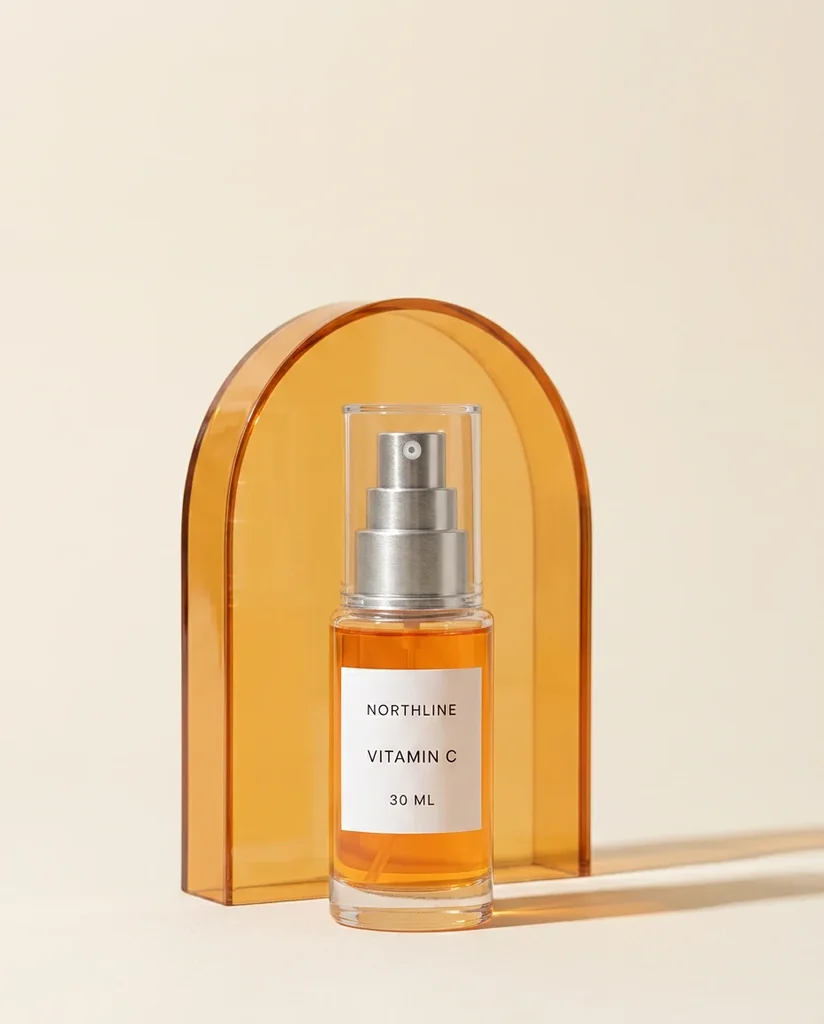
Evidence boundary: NORTHLINE is the same fictional serum used in our same-SKU fidelity test, not a merchant product. The source and three candidates below are real files. Two prompts produced three successful Masonry jobs; a fourth request failed before generation for insufficient credits. This article does not report ad performance, a conversion lift, or a universal creative winner.
The decision this pack is designed to answer
The first test asks one narrow question:
Does a factual packshot, a recognizable use context, or a distinctive graphic environment produce the strongest downstream result for this SKU and offer?
That is a visual-concept test, not a finished campaign strategy. The control establishes the sold product. The two treatments change the job performed by the surrounding pixels, not the product promise.
| Creative | Visual hypothesis | What changes | What stays fixed |
|---|---|---|---|
| C0 — factual control | Product clarity is enough | No generated scene | SKU, copy, offer, CTA, destination, audience, placement |
| V1 — routine context | A recognizable use moment adds relevance | Shelf, window light, composition | Product truth and every campaign variable above |
| V2 — product world | A distinctive color-and-shape system adds recognition | Amber arch, shadow, composition | Product truth and every campaign variable above |
Do not call minor background-color swaps separate hypotheses. If two versions communicate the same idea, they belong inside one production route, not as two strategic test cells.
C0: keep the factual source as the control
The control is intentionally plain. It gives the test a truthful baseline and prevents “newer” from automatically meaning “better.” Keep an approved product image on the destination page too, so the ad and PDP do not set conflicting expectations.
V1: routine context
The routine brief requested a limestone bathroom shelf, morning light, and a quiet upper copy zone. It prohibited people, fruit, water, added products, and all generated ad copy.
This is the useful routine candidate. It creates a recognizable environment without inventing a person, result, or application method. It is campaign-ready only after product review because reference conditioning did not lock the physical package.
The same prompt produced a second valid-looking image:
Rejecting this candidate is part of the economics. A downloadable file is not automatically an accepted creative. Here the rejection reason is hypothesis failure, not ugliness: it does not make the intended routine context distinct enough to answer a new question.
The exact generation contract was:
masonry image "Using the supplied reference image as the immutable product, create a 4:5 paid-social ecommerce photograph. Place the exact bottle lower-center on a pale warm-gray limestone bathroom shelf in soft morning window light. Reserve the upper 35 percent as quiet warm off-white negative space for approved copy added later outside the generated image. Change only the environment, surface, composition, and lighting. Preserve exactly the bottle silhouette and proportions, orange liquid and fill line, transparent over-cap, silver pump geometry, white label size and placement, and every character of NORTHLINE, VITAMIN C, 30 ML. One bottle only. No person, hand, fruit, leaves, water, box, claims, icons, headline, price, CTA, watermark, or extra text." \ --model gemini-3.1-flash-image-preview \ --ref ./northline-approved-source.webp \ --aspect 4:5 \ --seed 202608141 masonry job wait <job-id> masonry job download <job-id> --output ./northline-routine-v1.png
V2: distinctive product world
The second hypothesis removes literal use context. It asks whether a restrained amber visual system makes the product more recognizable while retaining one focal point and a clean copy zone.
Its fixed prompt used the same product invariants and exclusions, replacing only the environment instruction with:
Place the exact bottle centered in the lower two-thirds on a clean matte warm-cream surface with one translucent amber acrylic arch behind it and a crisp soft-edged shadow. Reserve the upper 28 percent as uncluttered negative space for approved copy added later outside the generated image.
The successful Masonry jobs were 62c1ed63-57ee-411f-8c7b-1ffd8d747eb6, 297558db-5adf-4bcc-b397-8fd1a937be7b, and 00f98296-ebda-4f9e-ad06-d45e0dfb73f1. One second-seed product-world request failed before generation for insufficient credits. No replacement output was hidden behind a reroll.
Product and creative acceptance sheet
Score product truth before advertising taste.
| Gate | C0 control | V1 routine | V1 rejected | V2 product world |
|---|---|---|---|---|
| Exact visible label text | Pass | Pass | Pass | Pass |
| One product; correct orange color | Pass | Pass | Pass | Pass |
| Source-locked package geometry | Pass | Review | Review | Review |
| Clear upper copy zone | Not applicable | Pass | Pass | Pass |
| Distinct declared hypothesis | Control | Pass | Fail | Pass |
| Test-cell disposition | Keep | Keep after approval | Reject | Keep after approval |
This run produced three successful candidates, two accepted treatment concepts, and one rejected candidate. That is a 67% concept acceptance rate among generated files, not a model reliability rate and not an ad win rate. With the failed credit-gated request included, the operational record is two accepted concepts from four attempts.
For products with exact geometry, regulated packaging, intricate hardware, or hard-to-read labels, generate only the background and composite the approved packshot. The same-SKU fidelity benchmark shows why exact text can coexist with a materially redrawn bottle.
Add copy after the image passes
Generated copy creates unnecessary spelling, offer, and claim risk. For the first visual test, use the same approved text everywhere. A deliberately plain fictional contract might be:
| Field | Fixed value |
|---|---|
| Primary text | Meet NORTHLINE Vitamin C. |
| Headline | NORTHLINE Vitamin C — 30 ML |
| CTA | Shop now |
| Offer | No promotional offer in the first visual test |
| Destination | The exact SKU and variant page; use the Shopify variant-image workflow to verify that its selected preview and gallery stay correct |
A real merchant should source every feature, benefit, price, discount, review, certification, and before/after implication from the approved product and legal record. Once the visual winner has enough evidence, keep that image fixed and run a separate copy-hypothesis test.
Meta's current photo-ad guidance recommends a single focal point, restrained image text, visual consistency, and experimenting before committing. Its Ads Manager guidance also supports previewing placements and setting up an A/B test. Use the official photo-ad guidance and current Ads Manager workflow instead of treating this article's 4:5 export as a permanent platform specification.
If Advantage+ creative or another platform feature generates crops, backgrounds, or text variations, preview and review those variants too. Automation can create a new unapproved treatment after the uploaded file leaves your folder.
For Google retail campaigns, use the Performance Max AI product-image workflow to join the chosen creative hypothesis to the exact Merchant Center listing group, square/horizontal/vertical assets, generation and enhancement controls, final URL, combinations preview, and conversion-value readout.
For Meta catalog campaigns, use the Advantage+ catalog AI creative workflow to trace that approved hypothesis through the exact product set, item-level media, creative controls, observed combinations, destination, and commercial readout.
Name the files so the result is diagnosable
Use names that expose the one changed variable:
NL_VITC_C0_PACKSHOT_4x5_v1.webp NL_VITC_V1_ROUTINE_4x5_v1.webp NL_VITC_V2_AMBERWORLD_4x5_v1.webp
The accompanying experiment record should contain:
| Field | Record |
|---|---|
| Decision | Which visual concept deserves the next production round? |
| Fixed variables | SKU, offer, copy, CTA, URL, audience, optimization event, placements, attribution, budget treatment |
| Changed variable | Visual concept only |
| Primary decision metric | Purchase or the downstream event the campaign is genuinely optimized for |
| Diagnostics | Impression, thumb-stop if available, outbound click, landing-page view, add-to-cart, checkout |
| Guardrails | Product complaints, “not as described” contacts, returns, contribution economics, tracking failures |
| Decision rule | Declared before launch; do not crown an early winner from a handful of conversions |
Do not use a universal CTR benchmark from another store to decide whether your creative works. A high click rate can coexist with a mismatched product page, weak buying intent, broken tracking, or no purchases. If a creative earns clicks but no downstream movement, first verify the optimization event and tracking, then inspect whether the ad promise, variant, price, shipping information, and destination page agree.
Why this is more useful than generating 100 ads
Current merchant discussions make the failure mode plain. One established Shopify advertiser described AI changing intricate product proportions and details, and argued for using real product media as the truth layer while AI varies the surrounding hook or structure. Read the July 2026 discussion.
Another merchant had already tried more than fifteen creatives and still could not distinguish a creative problem from an offer or product problem. That thread is qualitative evidence, not a performance benchmark, but it shows why “more variants” is not a measurement plan. Read the creative-testing question.
The useful unit is not one generation. It is one named hypothesis that preserves the product, survives review, enters a controlled test, and produces a decision.
For the moving-image extension of the routine cell, the real-product AI UGC workflow shows the approved source, generated keyframe, five-second hand-reach clip, temporal rejection gate, and purchase-oriented measurement handoff.
When an accepted cell expands into another language or market, use the product image localization workflow to preserve the source creative, review target copy, and verify the actual channel mapping before launch.
When the declared variable is a seasonal offer, use the AI Black Friday ad creative workflow to keep the product, style board, discount record, dates, code, and checkout handoff independently reviewable.
When the offer recurs, use the AI subscription ad creative workflow to map the approved product, price, billing and delivery cadence, renewal, cancellation, PDP, cart, and checkout to one versioned record before the cell enters a test.
When a shopper leaves after the click, use the AI abandoned-cart email workflow to restore the exact line item and recovery destination without inventing a discount, exposing personal data, or confusing email activity with recovered revenue.
When the team has not yet chosen the question worth testing, use the AI review-mining to creative-brief workflow to code authorized feedback, reject unsupported claims, and feed one authority-backed buyer question into this matrix.
Put this workflow in the ecommerce production stack
Start with the supplier-photo to complete image-set workflow when the launch needs PDP, detail, social, and campaign deliverables. Use this page when the job is specifically a diagnosable static-ad test. Apply the AI product-photo trust guardrails before release and the product-photography model comparison when the current route fails the SKU.
If the next merchant job might belong in catalog, PDP, acquisition, customer evidence, lifecycle, or wholesale rather than another ad cell, use the AI for ecommerce workflow map to choose its authority record and commercial finish line before generating.
After one visual hypothesis is chosen, use the five-card ecommerce carousel workflow when the next job is an ordered manual story with per-card product authority, copy, destination, preview evidence, and one complete release decision.
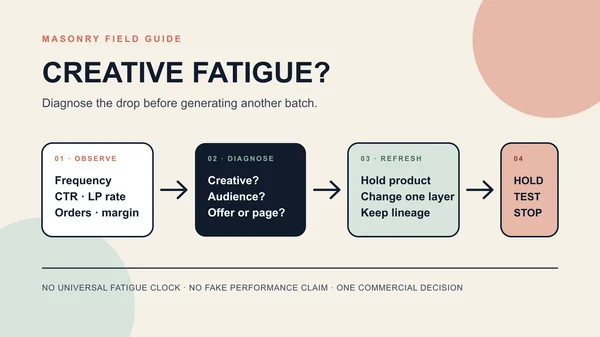
Once that control has delivery history and performance starts to move, use the ecommerce creative-fatigue diagnosis and refresh workflow to separate attention decay from audience, offer, page, checkout, and tracking problems before producing replacements.
Build the scenes in Masonry's AI product photography studio, or use the Masonry CLI to record prompt, route, seed, job ID, file name, reviewer, and disposition automatically.
When the declared variable moves from the ad into the Shopify PDP hero, use the Shopify product-image A/B-test workflow. It keeps the product and commerce path fixed while adding stable assignment, rendered exposure, sample-size planning, performance and return guardrails, and a recoverable decision record.
Bottom line
A profitable creative process does not begin with maximum output. It begins with a question the test can answer. Keep one factual product control, add two genuinely different visual hypotheses, separate approved copy from generation, reject duplicates and product drift, and let downstream business results—not file count or aesthetic taste—decide the next production round.