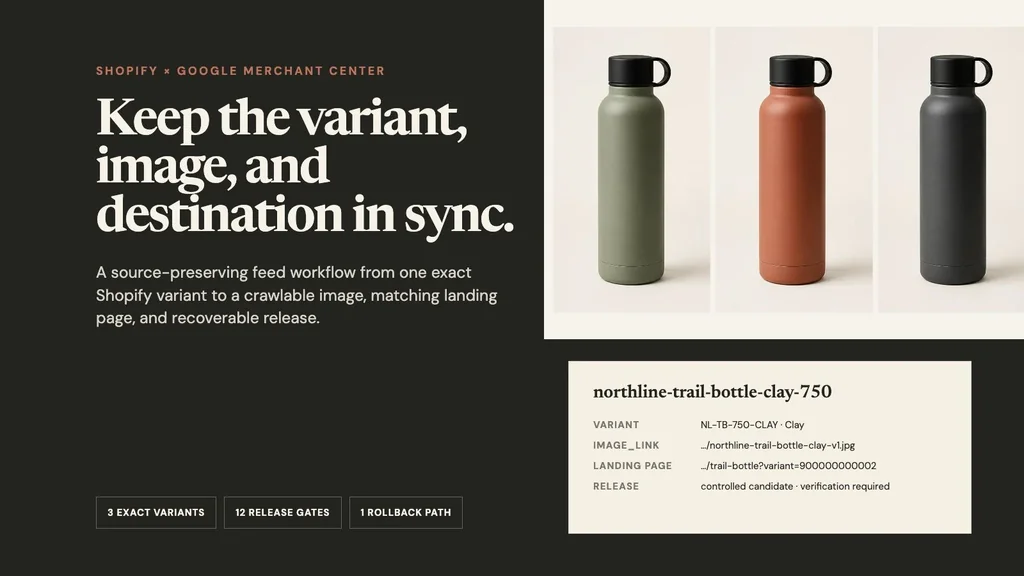
The reliable Shopify-to-Google-Merchant-Center image workflow is exact Shopify variant → stable Google item ID → reviewed main and additional image roles → versioned crawlable asset URL → preserved AI-source metadata → matching preselected landing variant → processed Merchant Center preview → recoverable release → matured exact-variant contribution.
A successful Shopify sync is not the finish line. It only says data crossed a boundary. The merchant still needs to prove that the Sage item did not inherit the Clay image, that Google can crawl the actual file, that an AI-created asset retained required metadata after delivery, that the click opens the same purchasable variant, and that the previous approved image can be restored if processing fails.
Evidence boundary: NORTHLINE, the bottle family, Shopify store, variant IDs, Google product IDs, URLs, catalog, prices, inventory, feed, incident, customers, orders, and economics are fictional controlled records. One three-variant source sheet was generated for this article. The crops, hashes, XMP profile injection, local metadata checks, feed record, release audit, incident log, diagrams, and measurement contract are real. No public CDN, Google crawler, Shopify channel sync, Merchant Center account, item review, ad, free listing, click, order, return, conversion lift, or product approval was tested.
Why this is a separate merchant job
The Shopify variant-image workflow stops at the store: exact source, generated secondary candidate, file manifest, native assignment, selected option, gallery, cart, and checkout. The platform image-rules comparison explains what different marketplaces permit. This workflow starts after those decisions and asks a different operational question: did one exact sellable variant survive product-data transport, public image delivery, Google processing, and the click back to the store?
Shopify says its Google & YouTube channel automatically syncs products and relevant store information to Merchant Center, and products available to the online store can sync automatically after setup. Shopify also warns that connecting an existing Merchant Center account can overwrite an existing product feed to avoid conflicts. That makes source ownership and rollback important before a merchant reconnects or changes the integration. Read Shopify's current channel requirements and setup guidance.
Merchant reports show the failure shape. A 2026 Shopify Community thread describes product removals, price changes, and attribute edits that appeared stale in Merchant Center. Other merchants report old or duplicate items, slow image or availability updates, and an image-link or landing-link issue presenting as an unreachable store. These discussions are qualitative troubleshooting evidence, not proof of a universal Shopify defect; some replies promote feed apps and should not be treated as neutral recommendations. Read the stale-feed report, the stale and duplicate catalog discussion, and the crawlability discussion.
The supplied top-1,000 Search Console query export contains 922 rows after excluding obvious Masonry brand variants, representing 552 clicks and 41,835 impressions in that bounded file. It includes a 26-impression question about compliant AI product images and lifestyle mockups for ecommerce listings at average position 5.46, but no query for a Shopify–Merchant Center image sync workflow. This is an adjacent merchant-intent expansion, not a claim that Masonry already owns the keyword.
Step 1: freeze the exact three-variant record
We generated one fictional source sheet with exactly the same unbranded insulated bottle in Sage, Clay, and Graphite. The prompt locked the body, shoulder, black loop cap, base ring, view, scale, crop, and lighting, changing only the body color.
The source prompt prohibited text, labels, people, props, liquid, extra accessories, and design changes. Visual inspection found the same broad bottle geometry and cap construction across the three panels. That makes it suitable for a fictional operations record—not a physical product-fidelity claim.
Download the complete three-variant feed record. Each row binds:
- one Shopify variant ID, SKU, and color option;
- one stable Google product
idand shareditem_group_id; - the exact title, availability, price, and preselected landing URL;
- one versioned
image_linkand oneadditional_image_link; - the local source asset, dimensions, SHA-256 hash, generation status, required source-type value, and metadata audit;
- a separate delivery-metadata status and release disposition.
The one-to-one join matters more than the filename. Google currently requires variants to use a unique item ID, share an item_group_id, provide variant-defining attributes, and land on the matching variant. It advises against changing the group ID after assignment. Review Google's current variant-group specification and landing-page requirements.
Step 2: separate the main image from additional views
Google's current image_link guidance treats the main image as a single field. Other useful views belong in additional_image_link. It says the image should accurately show the product, color variants should submit the correct color image, the whole product should be visible, and promotional overlays, placeholders, or items not sold together should stay out. Read the current image-link specification.
That produces a conservative image contract:
| Surface | Controlled role | Release rule |
|---|---|---|
| Shopify assigned variant image | factual storefront preview | preserve the exact sold variant and test rendered selection |
Google image_link | factual main image for one Google item | one direct URL; exact variant; no promotional overlay or unrelated item |
Google additional_image_link | reviewed secondary view or context | still the same product; record order, source, metadata, and disposition |
| Paid campaign creative | acquisition hypothesis | separate offer, audience, disclosure, destination, and measurement contract |
Do not send a dramatic lifestyle candidate as the main image merely because it attracts attention. Keep the factual packshot as the anchor and use secondary fields only after product and policy review.
When that reviewed product subset enters paid acquisition, use the Performance Max AI product-image workflow to bind its listing group to relevant creative assets, final URL, generation and enhancement controls, combinations, and commercial outcomes without turning a feed image into an untracked ad hypothesis.
If the same commerce source also supplies Meta, use the Advantage+ catalog AI creative workflow to preserve item-level media, product-set scope, generated derivatives, observed surfaces, and destination evidence as a separate release contract.
Step 3: make the public image a versioned release artifact
For the controlled local assets, we cropped each source panel to a 512 × 1024 JPEG, embedded an XMP profile containing the IPTC DigitalSourceType URI for trainedAlgorithmicMedia, and recorded the SHA-256 hash. The actual transform was deterministic:
magick source-variants.png \ -crop 512x1024+512+0 +repage \ -profile ai-source-metadata.xmp \ -quality 91 northline-trail-bottle-clay.jpg identify -format '%f %wx%h %[profiles]\n' northline-trail-bottle-clay.jpg strings northline-trail-bottle-clay.jpg | rg 'trainedAlgorithmicMedia'
All three local JPEGs report an XMP profile and contain the expected value; their distinct hashes are in the download. This is a local metadata pass only. Google currently says all images created using generative AI must retain the IPTC DigitalSourceType metadata value indicating TrainedAlgorithmicMedia, including images used in image_link, additional_image_link, and lifestyle_image_link. Read Google's current AI-generated-content guidance.
A CDN, Shopify transformation, image optimizer, or format conversion can change the bytes or strip embedded metadata. In production, fetch the exact public URL from the feed and audit that delivered object. Do not inspect the source on a laptop and infer that Google received the same file.
The crops also demonstrate a useful boundary. At 512 × 1024 they clear Google's announced 500 × 500 minimum that begins January 31, 2027, but they remain far below Google's current 1500 × 1500 recommendation. Passing a future minimum is not the same as providing an optimal source. Do not upscale a weak image and call the source improved; publish a genuinely higher-resolution approved asset when quality matters.
If Merchant Center has already raised an image-too-small warning, use the same-source resize and AI-upscaling test to retrieve the largest original, compare a deterministic control with a reconstructed candidate, and authorize one named replacement.
Step 4: treat the URL and crawler as product surfaces
The image URL should point directly to a supported image, return the correct MIME type, remain accessible to Googlebot and Googlebot-Image, avoid authentication and expiring signatures, and use a stable address. If the bytes change, Google recommends a new unique URL to signal the replacement and prompt a faster recrawl. Its current guidance says a new URL is typically recrawled within about three days, while changing content behind the same URL can take much longer. Those are typical windows, not guarantees.
Google's current image-processing guidance adds an important rollback detail: for an already approved item, the prior image can continue serving while a new URL is processed. If the new image cannot be processed within the retry window, the offer may eventually be disapproved; a merchant can revert to the previous crawlable image URL. Read Google's image-processing recovery guidance.
Before submission, verify:
direct public URL → HTTP 200 → supported image MIME → expected dimensions → expected byte hash → embedded AI-source metadata retained → Googlebot and Googlebot-Image allowed → no redirect or expiring token
After submission, verify the item itself rather than assuming the feed was accepted. Merchant Center's Needs attention view can surface affected products, business impact, issue examples, fixes, and review actions. Review Google's current issue workflow.
Step 5: release through twelve independent gates
Download the twelve-gate release audit. It deliberately refuses to collapse different evidence into one green check:
- Local pass: the exact fictional variant crop, dimensions, hash, XMP profile, and required value can be inspected.
- Pass with limit: 512 × 1024 clears the announced minimum but does not meet the recommended source size.
- Review: composition still needs a merchant decision at the intended placement.
- Fictional expected: the versioned URL and landing behavior exist only in the controlled record.
- Untested: public crawlability, delivered metadata, image processing, issue status, and serving do not exist without a live store and Merchant Center account.
This is the essential distinction: “synced from Shopify” is a transport state; “released” is an exact-item evidence state.
Step 6: recover one wrong variant without rewriting the catalog
The worked incident assumes the Clay Google item mistakenly references the Sage image. The correct response is not to reconnect every source, regenerate all variants, or overwrite the same URL in place.
Download the eight-state incident log. The states are explicit:
- detect the wrong preview and freeze changes to the affected item;
- compare all three rows and prove that only Clay is cross-mapped;
- approve exact Clay bytes, metadata, dimensions, and a new hash;
- publish those bytes at a new versioned public URL and audit the delivered object;
- update only the exact Clay Google item and record the data-source version;
- leave product facts stable while the replacement is under review;
- verify Needs attention, the rendered Google preview, and the preselected Clay landing page;
- keep the prior approved image ready for rollback until verification clears.
Google notes that the previous image may continue serving during replacement processing. If the merchant simultaneously changes the color, title, price, or availability, the old image can become materially inconsistent with the new attributes. Freeze adjacent changes or treat them as a coordinated release.
Step 7: measure integrity before attribution
Download the ten-metric measurement contract. The primary commercial decision is matured completed-order contribution per eligible Shopping click, joined to the exact Google item and Shopify variant. Include media, discount, fulfillment, payment, return, support, feed-operations, and accepted-asset costs.
Three guardrails come first:
- exact-variant image coverage: the served main image actually shows the submitted variant;
- wrong-variant landing rate: the image or attributes disagree with the preselected destination option;
- wrong-color or not-as-described rate after fulfillment.
Image-eligible item coverage, affected-item count, processing time, click-through, and add-to-cart are useful diagnostics. They do not establish that an image caused an order. Use a valid comparison, stable offer, sufficient sample, and matured returns before claiming lift.
Reject the workflow when the authority is missing
Do not use AI or a feed override to conceal an unresolved catalog problem. Stop when:
- Shopify variant IDs, SKUs, option values, or channel publication cannot be joined one-to-one;
- the image represents a sibling color, size, bundle, pack count, or unavailable configuration;
- a generated primary image changes product identity or lacks the required source metadata;
- the public URL redirects, expires, blocks Google crawlers, returns HTML, or strips metadata;
- the landing URL does not preselect the submitted variant or its price and availability disagree;
- another source owns the same field and will overwrite the correction;
- the previous approved URL and feed version cannot be recovered;
- the team cannot inspect Merchant Center processing and item issues after release.
The best first fix may be catalog cleanup, a conventional product photo, a source-preserving composite, a direct image-hosting change, a feed-source decision, or a storefront variant URL correction. AI only belongs in the visual candidate layer.
Bottom line
Shopify-to-Google image consistency is an exact-item release workflow, not an image-upload task. Keep one product authority record, one Google item, one main image role, one versioned delivered object, one matching destination, and one rollback path connected by evidence.
Generate secondary scenes only after the factual variant is controlled. Audit AI-source metadata on the bytes Google can fetch. Use a new URL when the image changes, monitor processing and issues, and judge the system by correct exact-variant orders and contribution after cost—not by sync status or the number of assets produced.
Upstream, use the supplier-photo image-set workflow to define factual and secondary asset roles and the same-SKU fidelity test to reject product drift before export. For the wider merchant decision, return to the AI ecommerce workflow map.
This feed workflow does not cover organic Google Images discovery from Shopify's rendered storefront. Use the Shopify product-image SEO audit to inspect the page-level img output, alt text and context, Product schema, sitemap evidence, preferred preview, responsive delivery, and non-brand landing-page outcomes.