

- 1344x768
Measured output
- 24 fps
Frame rate
- T2V, I2V, R2V
Modes
- AAC stereo
Audio
About MiniMax H3 Max
MiniMax H3 Max is the flagship route in the MiniMax H3 video family, and the mode that distinguishes it is reference-to-video. Alongside text-to-video and image-to-video, it accepts reference images and builds a new scene around what they contain, so a specific person or a specific product can appear in a shot that never existed rather than being described in words and hoped for. In a first-hand run on September 4, 2026, two references — a photograph of a person and a photograph of a particular bottle — both survived into the generated clip, with face, hair, wardrobe, and the exact bottle intact while the model executed the requested action.
The route also takes written camera direction seriously. A text-to-video prompt asking for a slow dolly-in returned a genuine slow dolly-in, and the response carried an expanded prompt: a long structured shot description naming the framing, the lighting mix, the wardrobe, and the camera move it decided to build. That field is the debugging surface — when a result surprises you, the expansion shows what the model decided you asked for. Note that the text-to-video responses observed here returned no seed, so reruns are guided by reading the expansion rather than by pinning a number.
Two measurements are worth carrying into production planning. The `768P` setting renders 1344×768, not 1280×720, so read the delivered frame rather than the label when a placement needs exact dimensions. And a requested duration of 5 came back as 5.184 seconds on every clip measured, so treat requested duration as a target and measure the file before cutting to a fixed slot.
Why teams choose MiniMax H3 Max
Choose MiniMax H3 Max when the shot depends on something you already have a picture of. Reference-to-video is the reason to reach for this key rather than its Turbo sibling, which does not list the mode, and in a same-image comparison on September 4, 2026 it accepted a photograph of a person that Seedance 2.5 refused with a content-policy error. If the job is a product-only reference, either family can do it. If you want to iterate cheaply before committing, H3 Max Turbo is exactly half the per-second rate. What this page does not claim is a quality ranking: one paired run on one prompt is not a benchmark, and the honest way to choose is to run your own prompt set on both keys with the acceptance sheet held fixed.
What MiniMax H3 Max can do
The capabilities that set MiniMax H3 Max apart and earn its place in a brief
Reference-to-Video with Up to 4 Images
Submit up to 4 reference images and the model builds a new scene around what they contain. In a measured run, two references — a person and a specific bottle — both carried into the output with identity and product detail preserved while the requested action played out.
Written Camera Moves That Land
Camera direction written into the prompt carries into the motion. A brief asking for a slow dolly-in returned a genuine slow dolly-in, which is what separates a directable route from one where framing is a lottery.
An Expanded Prompt You Can Read Back
The response includes a structured expansion of your prompt that names the shot, the lighting, the wardrobe, and the camera move. When output diverges from intent, the expansion usually shows where the disagreement started.
1344x768 Output at the 768P Setting
Every clip measured at the 768P setting with a 16:9 request returned 1344x768 at 24 fps in H.264. Wider than the 1280x720 the label suggests, so confirm the delivered frame against your placement.
Audio in the Same Pass
Measured clips arrived with an AAC stereo track at 32 kHz alongside the video. Sound is delivered whether or not the edit calls for it, so listen before publishing rather than assuming a silent file.
A Half-Price Sibling for Draft Passes
H3 Max Turbo runs the same family at exactly half the per-second provider rate at every listed resolution, without the reference mode. Iterate framing there, then commit the render on whichever route your own test prefers.
Where teams reach for MiniMax H3 Max
- Reference shots that must carry a specific person into a scene that was never photographed
- Product motion built around a real product image rather than a text description
- Directed single-take shots where the camera move is written into the brief
- Social and ad concepts that need sound delivered with the clip, not added afterwards
- Draft-then-commit workflows that iterate on the Turbo route and finish on H3 Max
- Storyboard-to-motion passes where reading the expanded prompt speeds up the next revision
What sets MiniMax H3 Max apart
The strengths teams reach for, shown on real renders.

Two References, One New Scene
A photograph of a person and a photograph of a specific bottle were submitted together. Both arrived in the generated clip — face, bob haircut, and charcoal turtleneck on one side, the exact bottle on the other — while the model performed the requested lift-and-turn.
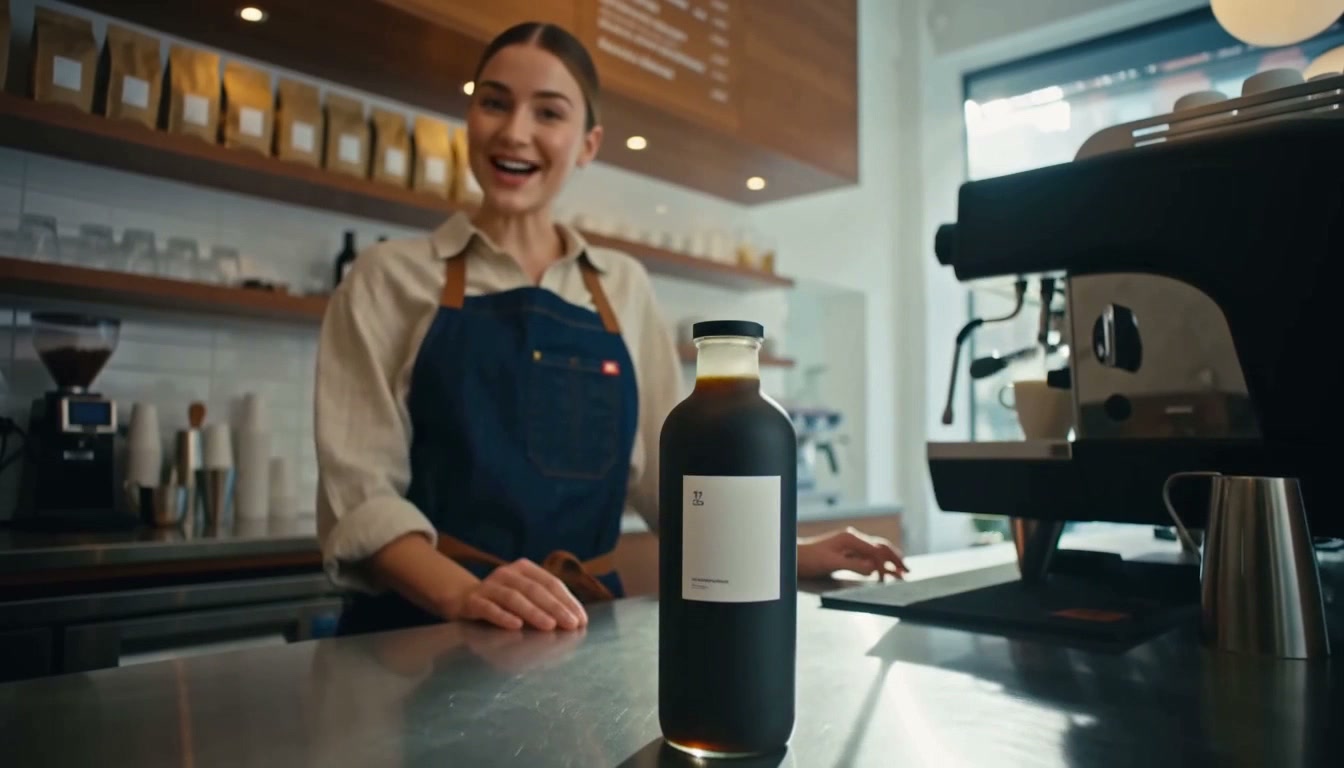
A Camera Move Written Down and Delivered
The text-to-video brief asked for a modern coffee bar in morning light, a barista sliding a matte-black bottle across a steel counter, and a slow dolly-in. The returned clip performs the dolly-in and includes every named prop.
Frequently asked questions
What teams need to know about creating with MiniMax H3 Max in Masonry
What modes does MiniMax H3 Max support on Masonry?
The route lists text-to-video, image-to-video, and reference-to-video under the key minimax-h3-max. Reference-to-video is the mode that separates it from H3 Max Turbo, which lists text-to-video and image-to-video only. Capability listings change, so recheck the live model list before building automation against a mode.
What resolution does the 768P setting actually produce?
Clips requested at 768P with a 16:9 aspect ratio measured 1344x768 at 24 fps in H.264, with an AAC stereo audio track at 32 kHz. That is wider than the 1280x720 the label implies. Read the delivered file rather than the label whenever a placement depends on exact pixel dimensions.
Can H3 Max use a photograph of a real person as a reference?
In a run recorded on September 4, 2026, the reference-to-video route accepted a photograph of a person and returned a clip carrying that person into a new scene. The identical image sent to Seedance 2.5 reference-to-video was refused with an HTTP 422 content-policy error. That is one observation per route on one image, not a general permission. Provider policy can change, and rights and consent for any likeness you upload remain your responsibility.
How accurate is the requested duration?
Three separate clips requested at a duration of 5 all measured 5.184 seconds. Requested duration behaves as a target rather than an exact contract, so do not build a hard-cut edit that assumes a delivered length of exactly 5.000 seconds. Measure the downloaded file before placing it on a fixed timeline.
Does H3 Max return a seed for reproducible reruns?
The text-to-video responses recorded here returned no seed. They returned an expanded prompt instead, a structured shot description naming framing, lighting, wardrobe, and camera move. Seedance 2.5 is the opposite, returning a seed and no expansion. Build rerun logic around the field the chosen route actually returns rather than assuming both are present.
How much does MiniMax H3 Max cost?
At the standard provider rates checked September 4, 2026, H3 Max is 0.05 US dollars per second at 480P and 0.08 US dollars per second at 768P, so a five-second 768P clip is about 0.40 US dollars of provider cost. H3 Max Turbo is exactly half at both resolutions. Those are provider rates, and what a Masonry generation is metered at is set separately in the platform pricing table.
Is H3 Max better than H3 Max Turbo?
This page does not claim that. The two routes were run once each on an identical text-to-video prompt, and the Turbo result was comparable rather than obviously worse, with a different composition and a darker grade. One pair of clips is not a benchmark. If the difference matters to your budget, run your own prompt set on both keys with the prompt, resolution, duration, and acceptance sheet held constant, then compare accepted clips rather than impressions.
What should a good H3 Max prompt include?
Name the subject, the environment, the props that must appear, the action, and the camera move in plain language, plus the audio intent and anything the shot must not contain. Written camera direction demonstrably carries into the output, so it is worth spending a clause on. After the run, read the returned expanded prompt to see how the model interpreted the brief before writing the next revision.
What is MiniMax H3 Max?
MiniMax H3 Max is an AI video generation model from MiniMax, available inside Masonry, the AI creative agent teams use to produce marketing, product, and brand videos.
How does my team use MiniMax H3 Max in Masonry?
Open a Masonry canvas, pick MiniMax H3 Max from the model selector, and describe the video you need: a product shot, an ad creative, a social post. Masonry generates it, then you refine, edit, and combine MiniMax H3 Max with other models in one workspace.
Is MiniMax H3 Max free to try?
Yes, you can start generating videos with MiniMax H3 Max on Masonry's free tier, then scale up with higher limits and priority processing as your team grows.
How do I write good prompts for MiniMax H3 Max?
Write the camera move down. H3 Max carries written camera direction into the motion and hands back an expanded prompt describing the shot it built, so a brief that names the framing, the props, the action, and the move gives you both a better first result and a readable trail for the next revision.
Who makes MiniMax H3 Max?
MiniMax H3 Max is built by MiniMax. Inside Masonry it runs alongside 50+ image and video models, so your team can pick the right one for each brief without switching tools.
Start creating with MiniMax H3 Max
Generate, edit, and compare across 50+ models in one workspace.
Guides for MiniMax H3 Max
Prompt walkthroughs and examples from the Masonry blog
Explore more AI models
Compare MiniMax H3 Max with other models teams run in Masonry