

Crystal Upscaler
Enlarge one product image into a sharper review candidate with creativity control and PNG or JPEG output—without treating reconstructed detail as truth.

- 1 image
Required input
- 2× upscale
Current default
- 0–10
Creativity
- PNG · JPEG
Output formats
About Crystal Upscaler
Crystal Upscaler is an adaptive image-enhancement model by Philz1337x, served through fal and available in Masonry as a one-image upscale route. The current public Masonry contract requires one image, exposes creativity from 0 to 10, and returns PNG by default with JPEG also available. Its current backend uses a 2× default scale; although the provider API has a scale-factor field, Masonry's public parameter surface checked August 17, 2026 does not expose a scale selector. That distinction matters for production planning: inspect the live route you can actually run instead of copying controls from a provider playground.
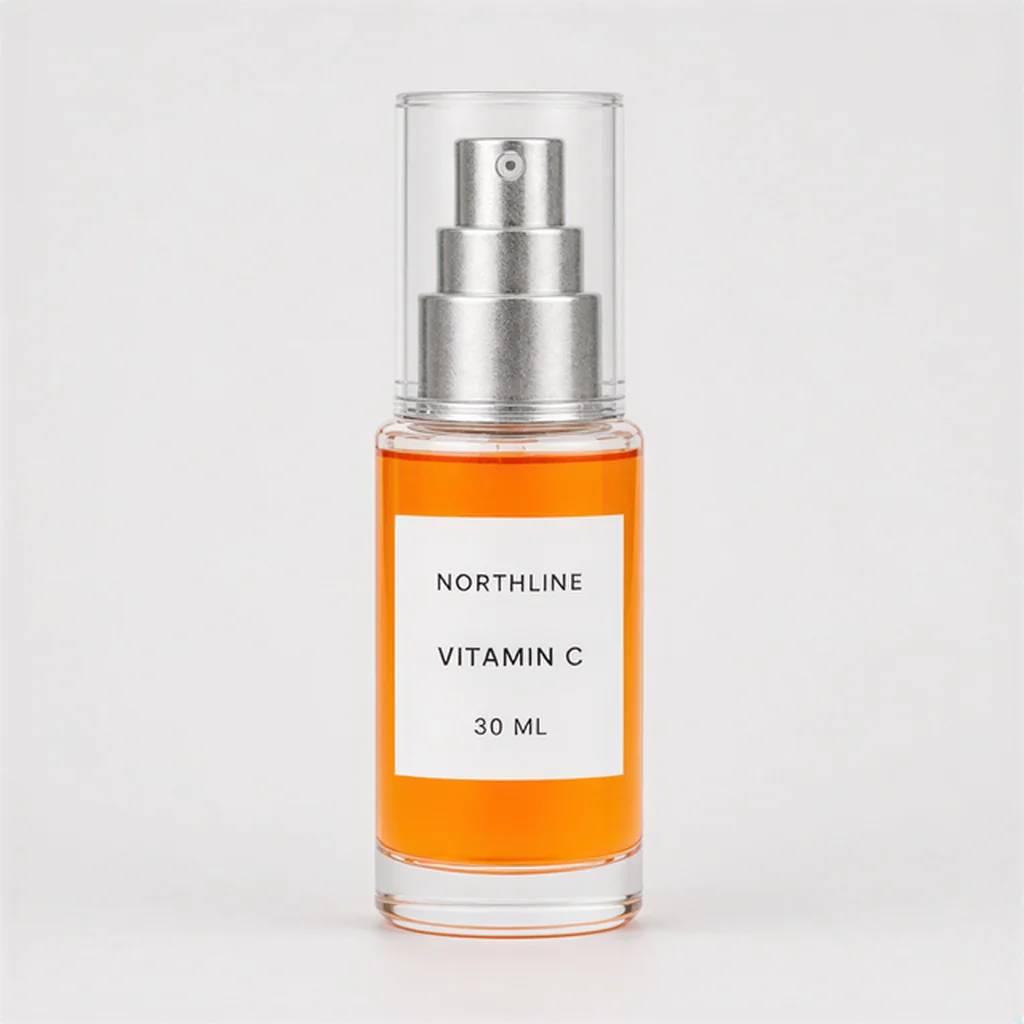
The provider describes the model primarily as a facial- and portrait-detail enhancer, not an ecommerce truth system. Masonry therefore tested it on a deliberately difficult merchant job: recover a 320×320 product thumbnail while retaining a 1254×1254 authority file for comparison. The first successful return was a sharper 640×640 candidate that kept one fictional NORTHLINE bottle, its main silhouette, orange liquid, and the visible lines “NORTHLINE,” “VITAMIN C,” and “30 ML.” It cleared a 500-pixel dimension floor but rebuilt product and background pixels and remained below the roughly 1500-pixel neighborhood recommended for strong Merchant Center source imagery. The result was `HOLD_MAIN_IMAGE`, pending product-owner review—not “AI fixed it.” Use this model to create candidates when retrieval and deterministic delivery fixes are exhausted, then release only the exact file that passes a named product-truth and channel review.
Why teams choose Crystal Upscaler
Choose Crystal Upscaler when the input is genuinely too small or soft, a larger approved original cannot be retrieved, and a sharper review candidate is worth human inspection. Do not choose it merely because a storefront is blurry: the real defect may be a thumbnail URL, theme crop, transformation setting, compression pipeline, or feed mismatch. A deterministic resize is safer when the job is only to change canvas dimensions without intentionally synthesizing new local detail, though it cannot restore missing information. A fresh product shoot, supplier master, or approved render is stronger when labels, materials, transparency, fine hardware, pattern, or variant identity must be factual. The model's practical value is candidate recovery under a controlled review system—not permission to turn a thumbnail into unverified primary product media.
What Crystal Upscaler can do
The capabilities that set Crystal Upscaler apart and earn its place in a brief
One-Image Enhancement Route
Supply exactly one product, lifestyle, campaign, or portrait image. A narrow one-input contract makes the source and output easy to version, but it does not tell the model which pixels are legally, mechanically, or commercially authoritative.
Sharper-Looking Reconstructed Detail
The model can rebuild edges, texture, type-like forms, highlights, and local contrast that look cleaner than a small input. Those details are generated estimates rather than recovered camera evidence, so apparent sharpness must remain separate from product accuracy.
Creativity from Zero to Ten
Masonry exposes a numeric creativity range of 0–10. Lower settings express a more conservative brief and higher settings permit more interpretation, but no value guarantees label, material, color, geometry, face, or background fidelity. Validate the actual output instead of treating the control as a truth percentage.
Current Two-Times Default
Masonry's current backend defaults this route to 2× enlargement. The provider API documents a scale-factor field, while the live Masonry catalog and CLI currently do not expose that selector. Plan around the returned file dimensions and recheck the public contract before scripting a batch.
PNG or JPEG Delivery
The current Masonry route defaults to PNG and also accepts JPEG output. Choose format for the real destination, then inspect dimensions, bytes, color, transparency needs, compression artifacts, and served URL separately; a larger file is not necessarily a higher-quality product record.
Reviewable Candidate, Not Product Authority
Keep the original source, job, settings, output hash, full-resolution comparison, reviewer, placement, and disposition together. This turns an enhancement into an auditable production candidate instead of silently overwriting the file that established the sold SKU.
Where teams reach for Crystal Upscaler
- Sub-minimum marketplace image recoveryCreate a review candidate when a channel rejects an image for dimensions and no larger original can be recovered, then verify current technical rules and exact product truth before replacing the feed URL.
- Legacy catalog thumbnail triageTest a few representative low-resolution SKUs before committing a catalog batch, separating source retrieval, delivery-URL fixes, deterministic resize, and generated enhancement as different routes.
- Secondary PDP detail candidatesImprove the apparent clarity of a non-authoritative supporting image when a product owner can compare the result with approved photography, packaging, physical samples, or a digital asset master.
- Collection and merchandising previewsProduce cleaner candidate imagery for small collection cards or internal visual review while keeping the approved high-resolution file as the source for factual zoom and marketplace delivery.
- Portrait-led ecommerce creativeExplore enhancement for creator, model, or founder imagery—the provider's stated strength—while reviewing face identity, skin texture, apparel, accessories, product interaction, and disclosure requirements.
- Supplier-image rescue testsEvaluate whether a low-resolution supplier file can support a secondary placement, but retrieve the supplier's largest original and verify licensing, exact variant, packaging, and included items before generation.
- Deterministic-resize comparisonRun an ordinary resize as a control beside the AI candidate. The resize answers whether dimensions alone can be changed; the model answers whether reconstructed detail creates a more useful file without crossing the product-truth boundary.
- Batch acceptance-rate pilotsSample transparent, reflective, text-heavy, patterned, and face-containing SKUs, then measure accepted outputs and review time by failure class before expanding beyond a pilot.
What sets Crystal Upscaler apart
The strengths teams reach for, shown on real renders.
One First-Return Product Candidate
In Masonry's August 16, 2026 controlled run, Crystal Upscaler received a deliberately reduced 320×320 image and returned a 640×640 PNG. The file kept one fictional bottle, its major silhouette, orange liquid, pump, and three visible label lines while producing materially cleaner edges. Because product and background pixels were reconstructed, the exact candidate remained `HOLD_MAIN_IMAGE` pending product-owner review.
Three Files Answer Three Different Questions
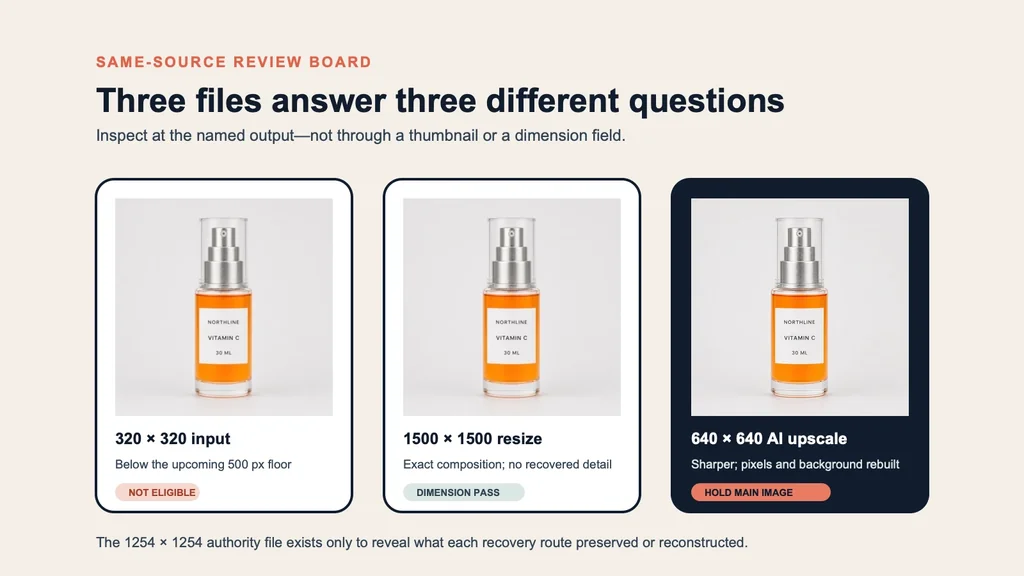
The 320×320 input shows the dimension failure. A deterministic 1500×1500 resize changes the dimensions but remains soft. The 640×640 Crystal return looks sharper by rebuilding detail. The retained 1254×1254 authority file is what makes those differences inspectable; none of the recovery routes becomes factual merely because it is larger.
Frequently asked questions
What teams need to know about creating with Crystal Upscaler in Masonry
What is Crystal Upscaler?
Crystal Upscaler is an adaptive image-enhancement model by Philz1337x, served through fal and available in Masonry as a one-image upscale route. The provider positions it around facial and portrait detail. Ecommerce product imagery is therefore a controlled secondary use that needs explicit SKU review, not an advertised product-fidelity guarantee.
What inputs does Crystal Upscaler require in Masonry?
The current `crystal-upscaler` route requires exactly one image. Masonry's public contract checked August 17, 2026 also exposes creativity from 0 to 10 and output format, with PNG as the current default and JPEG available. It does not accept a descriptive text prompt or multiple reference images.
How much does Crystal Upscaler enlarge an image in Masonry?
Masonry's current backend uses a 2× default, which matches the controlled 320×320 input returning 640×640. The provider API documents a scale-factor field, but Masonry's live public model catalog and CLI did not expose a scale selector when checked August 17, 2026. Inspect the returned dimensions and recheck the route before automating a batch.
What does the Crystal Upscaler creativity setting do?
Creativity controls how much interpretive freedom the upscaler may take, on a Masonry range from 0 to 10. It is not a product-accuracy score. A conservative value can still reconstruct pixels, while a higher value can create attractive detail that does not match the sold item. Review outputs at every setting used.
Does Crystal Upscaler support PNG and JPEG output?
Yes. Masonry currently defaults to PNG and also maps JPEG output. Choose based on the destination's transparency, compression, size, and color requirements. Format does not settle whether the image is accurate, eligible, or visually useful; inspect the encoded file and the final served transformation.
Is Crystal Upscaler good for ecommerce product photos?
It can create sharper product-image candidates, but the provider describes the model primarily for facial and portrait detail rather than exact-SKU reconstruction. Masonry's one bottle test produced a useful-looking result that retained visible identity checks, yet it remained on hold because sharper product pixels were generated rather than recovered evidence.
Can Crystal Upscaler preserve exact label text and packaging?
It may retain readable words, as the three lines did in Masonry's one controlled bottle return, but exact preservation is not guaranteed. Check every character, font-like shape, label boundary, logo, claim, regulatory line, barcode, ingredient panel, variant cue, and package edge against an approved source. Reject unsupported or ambiguous changes.
Can Crystal Upscaler fix a Google Merchant Center image-too-small warning?
A returned file may clear a dimension minimum, but that is only one part of remediation. Retrieve the largest original first, confirm the feed is not serving a thumbnail, check current Google requirements, verify the exact product and variant, update the correct URL, wait for reprocessing, and inspect the named surface. The model cannot grant platform approval.
Is AI upscaling better than a deterministic resize for product images?
They answer different questions. A deterministic resize changes dimensions by interpolation and usually remains soft; it does not intentionally reconstruct semantic detail. An AI upscaler can look sharper by synthesizing edges and texture, which creates more review work. Compare both with the same source and choose by approved output, not appearance alone.
Should merchants upscale a thumbnail when a larger original exists?
No. Retrieve the highest-resolution licensed authority from the photographer, supplier, Shopify media library, DAM, PIM, or campaign archive first. In Masonry's controlled test, the retained 1254×1254 original was stronger authority than either recovery route. Upscaling a smaller derivative would add uncertainty without recovering a missing asset.
How should source images be prepared for Crystal Upscaler?
Use the largest available source, correct SKU and variant, stable color profile, intended crop, and least-compressed file you control. Record dimensions, bytes, hash, owner, visible facts, and unknowns. Do not strip meaningful shadows, reflections, transparent edges, texture, packaging text, or variant cues merely to make the input simpler.
How should a Crystal Upscaler product output be reviewed?
Compare the full-resolution output with product authority, not only with the small input. Check object count, silhouette, proportions, closure, hardware, color, material, liquid level, pattern, transparent and reflective boundaries, every readable character, crop, background, shadow, sharpening halos, and compression. Record a named approval, hold, or rejection.
Can a Crystal Upscaler result replace a primary PDP or marketplace image?
Only when an authorized product and channel reviewer approves that exact file for that exact placement. The safer default is approved photography or verified rendering for factual primary media. A reconstructed candidate may be suitable for a secondary module or campaign placement while still being inappropriate for zoom, marketplace main imagery, or regulated claims.
How should merchants pilot Crystal Upscaler across a catalog?
Start with a stratified sample rather than the easiest SKU. Include text-heavy packaging, transparent and reflective materials, patterns, small hardware, multiple variants, and portrait-led imagery where relevant. Record technical success, product-truth pass, visual-quality pass, review minutes, corrections, and cost per accepted file before scaling.
How should a Crystal Upscaler workflow be measured?
Track source retrieval rate, technical completion, returned dimensions, product-truth acceptance, visual-quality acceptance, review and correction time, and cost per accepted asset. After approved files are exposed, measure the exact placement against a stable control. A cleared warning, download, or later purchase alone does not prove that upscaling caused revenue.
How does my team use Crystal Upscaler in Masonry?
Open a Masonry canvas, pick Crystal Upscaler from the model selector, and describe the image you need: a product shot, an ad creative, a social post. Masonry generates it, then you refine, edit, and combine Crystal Upscaler with other models in one workspace.
Is Crystal Upscaler free to try?
Yes, you can start generating images with Crystal Upscaler on Masonry's free tier, then scale up with higher limits and priority processing as your team grows.
How do I write good prompts for Crystal Upscaler?
This route is controlled by an image and settings rather than a text prompt. Begin with the largest licensed source available and record its SKU, variant, dimensions, bytes, and hash. Diagnose whether the visible defect comes from the source file, a CDN transformation, theme crop, feed URL, or marketplace rule before upscaling. Test one representative SKU, retain a deterministic resize as a control, and compare the returned file at full resolution against product authority. Review every readable character, silhouette, color, material, transparent boundary, reflective edge, part, quantity, pattern, face, hand, shadow, and background. Release only a named file to a named placement; do not overwrite the authority source. See the prompt gallery on this page for real Crystal Upscaler prompts you can copy and adapt.
Who makes Crystal Upscaler?
Crystal Upscaler is built by Philz1337x. Inside Masonry it runs alongside 50+ image and video models, so your team can pick the right one for each brief without switching tools.
Can I see examples made with Crystal Upscaler?
Yes, the prompt gallery on this page shows real images teams have generated with Crystal Upscaler in Masonry, each paired with the exact prompt you can copy and adapt for your own brand.
Start creating with Crystal Upscaler
Generate, edit, and compare across 50+ models in one workspace.
Guides for Crystal Upscaler
Prompt walkthroughs and examples from the Masonry blog
Explore more AI models
Compare Crystal Upscaler with other models teams run in Masonry