

- 1–10
Products per request
- Up to 11
Total input images
- x, y, width, height
Placement controls
- 1 background
Required scene
About Bria Embed Product
Bria Embed Product is a purpose-built compositing model: it starts with an existing background scene, one or more approved product images, and a placement box for every product. Instead of asking a general image model to infer where a SKU belongs from prose, the current Masonry contract exposes four explicit coordinate values—x, y, width, and height—for each element. One request can place from 1 to 10 products, with a maximum of 11 input images once the required scene is counted.
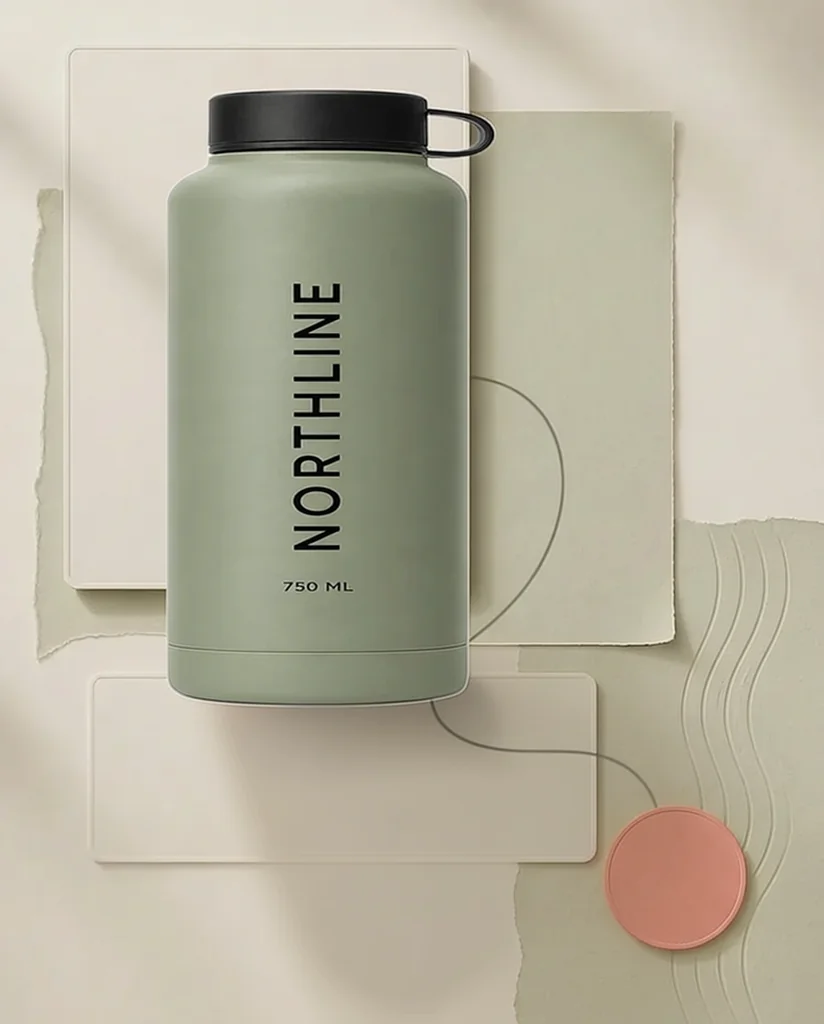
That narrower contract fits a real merchant production job: keep a product source separate from the campaign environment, decide where it should appear, and generate an integrated candidate with perspective, light, and shadow. It does not turn one packshot into proof of every hidden product detail, and it should not be described as pixel-preserving compositing. In Masonry's first controlled run, the model kept a fictional sage bottle's silhouette, black cap and loop, color, vertical “NORTHLINE” wordmark, and “750 ML” line while placing it into the requested area of a supplied scene. That is useful first-hand evidence for one output, not a repeatability rate or a guarantee for a merchant SKU.
Why teams choose Bria Embed Product
Choose Bria Embed Product when the job begins with an approved product image, a prepared destination scene, and an explicit placement—not when the job begins with a blank canvas and a creative concept. A general reference-led model such as Seedream 5 Pro or Nano Banana 2 can invent more of the environment and respond to natural-language art direction, but it can also redraw product geometry while doing so. Bria narrows the problem to scene, elements, and boxes, which makes a batch easier to specify and review. For a factual primary packshot or any placement that must preserve the exact original pixels, use approved photography or deterministic compositing instead of treating a generative result as proof.
What Bria Embed Product can do
The capabilities that set Bria Embed Product apart and earn its place in a brief
Coordinate-Controlled Product Placement
Every product requires an integer x and y position plus a positive width and height. The box makes placement intent inspectable before generation, which is more operationally useful than repeatedly rewriting “move it left” or “make it smaller” in a text prompt.
Separate Scene and Product Inputs
Supply one required background as `first_frame_image`, then add each approved product under `elements`. Keeping those sources separate supports a safer ecommerce review because the scene is not being mistaken for the factual SKU record.
One to Ten Products Per Request
The current Masonry route accepts 1–10 product elements in addition to the background scene. That supports a single hero, a small bundle, or a controlled collection layout without claiming the model understands catalog relationships by itself.
Placement-Aware Integration
Bria is designed to reconcile the supplied product with the destination scene's perspective, lighting, and contact shadow. Review the result at full resolution because convincing integration and exact product fidelity are separate acceptance criteria.
Seeded Comparison Runs
Masonry exposes an optional integer seed and currently defaults it to 5555. Record the seed with the scene, product sources, coordinate boxes, date, and output so a candidate can be audited or compared with a changed placement.
Structured Inputs Instead of Prompt Guesswork
The live route is controlled primarily through images and JSON fields, not a descriptive art prompt. That is well suited to repeatable production scripts, but it means a generic text-to-image command is the wrong interface for this model.
Where teams reach for Bria Embed Product
- Secondary PDP lifestyle scenesPlace an approved cutout into a room, vanity, desk, kitchen, or outdoor context while retaining the factual packshot as the primary product record.
- Paid-social composition variantsReuse one approved product source across prepared square, portrait, and landscape scene plates, with a documented box for each placement.
- Seasonal campaign refreshesMove the same product into holiday or promotional environments without asking a general model to redraw the entire scene and SKU from scratch.
- Product bundles and kitsPlace several approved product sources into one scene using separate coordinate boxes, then verify count, relative scale, overlap, and included-item truth.
- Collection and category artworkBuild controlled multi-product compositions for collection headers or merchandising modules when the source files and visual hierarchy are already approved.
- Marketplace secondary imageryProduce contextual candidates for channels that permit them, then check current image policies, product accuracy, metadata, and variant mapping before syndication.
- Layout prototyping before retouchingTest product scale and location on a prepared art-direction plate, then route the accepted composition to a deterministic retouching workflow when exact source pixels are required.
What sets Bria Embed Product apart
The strengths teams reach for, shown on real renders.
One Controlled Product-in-Scene Result
In this August 17, 2026 Masonry run, Bria placed a fictional NORTHLINE bottle into the specified region of a supplied 928×1152 scene. The retained 747×928 result kept the visible bottle shape, sage color, black cap and loop, “NORTHLINE,” and “750 ML,” and added a plausible contact shadow. It remains one sample, not a measured success rate.
Frequently asked questions
What teams need to know about creating with Bria Embed Product in Masonry
What is Bria Embed Product best used for in ecommerce?
Bria Embed Product is best suited to placing approved product sources into prepared lifestyle, campaign, collection, or marketplace scenes. It is especially useful when a merchant already knows the desired location and size and wants structured coordinate control rather than prompt-only composition.
What inputs does Bria Embed Product require in Masonry?
The current Masonry contract requires one background under `first_frame_image` and an `elements` array with at least one product. Every element needs an image plus integer x, y, width, and height coordinates. Width and height must be greater than zero, while x and y cannot be negative.
How many products can Bria Embed Product place at once?
The live `bria-embed-product` route checked August 17, 2026 accepts 1–10 product elements. With the required background, that is up to 11 input images. A multi-product request still needs a separate box and truth review for every item.
Does Bria Embed Product use a text prompt?
Its meaningful controls are the background image, product elements, coordinate boxes, and optional seed. Masonry's multimedia CLI currently requires a prompt argument at submission, so a neutral description can be supplied, but placement semantics come from the structured input rather than prose. Do not expect a text prompt to replace missing elements or coordinates.
How do I inspect the Bria Embed Product parameters in the Masonry CLI?
Run `masonry multimedia params bria-embed-product`. Use the multimedia command because the simpler image-parameter view does not express this route's required `elements` array. Recheck the live contract before turning a sample into a durable batch script.
What does a Bria Embed Product request look like?
Submit `first_frame_image` plus `elements` in the multimedia input JSON. A single-product element can look like `{"image":"https://example.com/product.png","coordinates":{"x":150,"y":80,"width":300,"height":560}}`. Replace both URLs and all four box values with the dimensions of your own approved files; the example is a schema illustration, not a universal placement.
Can Bria Embed Product preserve an exact SKU?
A controlled source and narrow task reduce ambiguity, but the output is still generative. Masonry's retained bottle sample kept all visible identity checks used in that run, yet one success cannot establish repeatability or pixel identity. Compare each output with approved source files and reject any changed geometry, label, color, quantity, variant, claim, or included item.
Is Bria Embed Product better than a general image model for product scenes?
It is better matched when the merchant already has both the product and scene and needs explicit placement. A general model can be more flexible for inventing an environment, changing art direction, or following a complex prose brief. The right comparison is accepted output per job, not which model made the most dramatic image.
Can I use Bria Embed Product for product bundles?
Yes, the route accepts up to 10 products, so it can assemble a bundle candidate from separate approved sources. Verify relative scale, count, overlap, front-to-back order, shadows, packaging, and whether every visible item is actually included in the offer. A beautiful arrangement must not imply a different bundle.
How should I choose product coordinates for Bria Embed Product?
Measure the desired box against the background image's pixel dimensions. Start with one product, keep the box inside a physically plausible surface or open region, and review the generated scale against scene cues. Save the exact x, y, width, and height with the output so a layout decision can be reproduced or revised deliberately.
How should I prepare source files for Bria Embed Product?
Start from the highest-quality product image you are licensed to use, preferably a front or three-quarter view that matches the destination camera angle. Keep the original file, approved label artwork, SKU and variant ID, physical dimensions, and visible-truth checklist together. A clean edge or uncluttered source gives the model a clearer product signal, but do not remove a real shadow or reflection if it contains material information you need to review. Prepare the background separately at its intended aspect ratio, leave physically plausible room for the product box, and avoid scene cues that imply an impossible scale. For a batch, version every source instead of silently replacing files under the same URL.
Does Bria Embed Product support repeatable tests?
Masonry exposes an optional integer seed and currently defaults it to 5555. Record that seed with the exact source files and boxes. A seed improves the audit trail, but it does not guarantee identical results after a hosted model or processing pipeline changes.
Should a Bria Embed Product result replace the primary listing image?
Not by default. Keep approved factual photography as the primary record unless the output passes the channel's current rules and a strict exact-SKU review. Generated contextual scenes are usually safer as secondary media, ads, collection art, or layout candidates; deterministic compositing is preferable when source pixels must not change.
How should merchants measure a Bria Embed Product workflow?
Track submitted candidates, service failures, product-truth passes, scene-quality passes, review minutes, correction minutes, and cost per accepted asset. Downstream CTR or conversion should be measured only after the creative is approved and exposed to enough traffic. Do not report downloads as completed assets when review rejects them.
What did Masonry's first Bria Embed Product test show?
One controlled run placed a fictional sage NORTHLINE bottle into a supplied neutral scene using x 150, y 80, width 300, and height 560 with seed 73017. The retained output preserved the visible silhouette, cap and loop, color, wordmark, and 750 ML line while adding a plausible shadow. That observation applies to one output and is not a model-wide fidelity claim.
What is Bria Embed Product?
Bria Embed Product is an AI image generation model from Bria, available inside Masonry, the AI creative agent teams use to produce marketing, product, and brand images.
How does my team use Bria Embed Product in Masonry?
Open a Masonry canvas, pick Bria Embed Product from the model selector, and describe the image you need: a product shot, an ad creative, a social post. Masonry generates it, then you refine, edit, and combine Bria Embed Product with other models in one workspace.
Is Bria Embed Product free to try?
New Masonry accounts get 50 free credits to try GPT Image 2.5 Flare. Bria Embed Product is included in every paid plan, and the editor shows the exact credit cost before you generate.
How do I write good prompts for Bria Embed Product?
Treat the scene and coordinate boxes as the brief. Start with a clean, licensed background whose perspective and available surface make physical sense. Use a product image with a clean edge, define the box in the background's pixel coordinate system, and run one placement before scaling a batch. Review silhouette, closure, color, label artwork, exact words, quantity, relative size, occlusion, perspective, contact shadow, and unsupported additions. If the sold SKU must remain pixel-identical, generate or select the empty scene and composite the approved product deterministically.
Who makes Bria Embed Product?
Bria Embed Product is built by Bria. Inside Masonry it runs alongside 50+ image and video models, so your team can pick the right one for each brief without switching tools.
Start creating with Bria Embed Product
Generate, edit, and compare across 50+ models in one workspace.
Guides for Bria Embed Product
Prompt walkthroughs and examples from the Masonry blog
Explore more AI models
Compare Bria Embed Product with other models teams run in Masonry