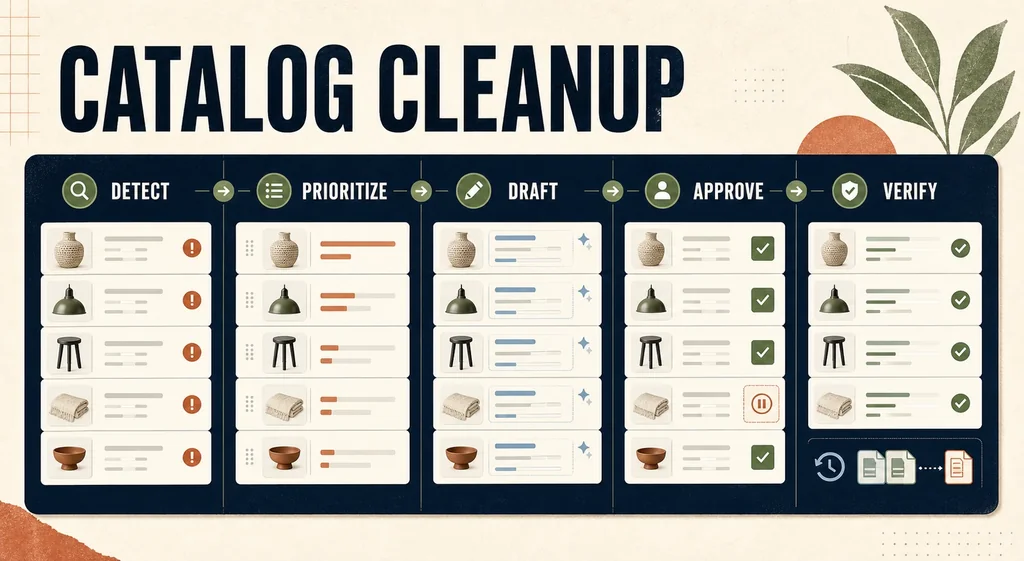
The risky version of “AI catalog cleanup” is one prompt, thousands of product rows, and a publish button. It is fast because it skips the work that protects the merchant: deciding which products matter, proving each fact, reviewing proposed copy, verifying downstream surfaces, and recovering when a bulk change is wrong.
The useful version is a release workflow. AI helps detect repeated defects and draft bounded changes. The catalog, product documents, storefront, and approved merchant records remain the authority. A human decides what advances from proposed to approved to published.
Evidence boundary: NORTHLINE and every product, metric, priority, defect, approval, and release below are fictional controlled examples. The operating templates and release logic are real. No Shopify store, Merchant Center account, Search Console property, import, product-page update, order, or revenue result was tested for this article. The visual is an editorial workflow board generated for this guide; it does not depict a live catalog.
Start with a defect backlog, not a generation queue
“Rewrite every description” is not a diagnosis. A product can have elegant copy and still fail because its selected variant, price, availability, image, structured data, feed record, or landing page disagrees with what is sold.
Create one row per product-and-defect pair. Keep at least these fields:
| Field | Why it exists |
|---|---|
| Product and variant ID | Prevents a parent product from hiding a child-variant problem |
| Surface and field | Names exactly what may change: PDP description, SEO title, alt text, metafield, feed attribute, or image slot |
| Observed defect | Stores the evidence instead of a vague “needs SEO” label |
| Authority source | Identifies the approved specification, product document, policy, or merchant owner that can verify the correction |
| Commercial context | Keeps sessions, stock, contribution, strategic collection, returns, and support signals separate |
| Proposed value | Holds the AI or human draft without overwriting the current value |
| Disposition | Uses PROPOSED, APPROVED, HOLD, REJECTED, PUBLISHED, or ROLLED_BACK |
| Previous value | Makes a field-level rollback possible |
Download the filled Shopify catalog-remediation backlog. It is intentionally a backlog, not an import-ready Shopify CSV. A proposal should not become publishable merely because its columns happen to match an upload format.
Prioritize the intersection of defect and value
Do not sort the backlog by the loudest keyword or the highest impression count. Rank products where a verified defect overlaps with a meaningful merchant outcome.
A practical priority formula is:
priority = defect severity × commercial importance × confidence in the fix
Use a small ordinal scale, such as 1–3, and retain the inputs beside the score. Commercial importance can include eligible product-page sessions, gross contribution after variable costs, in-stock status, strategic collection, repeated support questions, and matured return evidence. Search evidence can identify a page worth inspecting, but it does not prove that changing one field will create an order.
Google's current Search Console guidance says non-brand queries can indicate new-audience growth, while its Performance documentation also warns that anonymized queries are omitted and tables are truncated. That makes Search Console useful for page and query opportunity—not a complete demand ledger and not a query-to-order join. Read Google's current Performance-report guidance and its data limitations.
For the fictional NORTHLINE backlog, the first release contains only five decisions:
| Product | Evidence-backed defect | Priority | Decision |
|---|---|---|---|
| Cedar Travel Bottle, Clay | Description omits verified capacity and cleaning method; product has stock and material traffic | 18 | Draft copy fields |
| Cedar Travel Bottle, Sage | Selected image does not match the named variant in the controlled record | 18 | Hold copy; route to variant-image diagnosis |
| Ridge Task Lamp | Merchant Center warning says landing-page availability disagrees with supplied data | 27 | Fix system authority; do not rewrite copy |
| Loom Wool Throw | Existing description contains an unverified “hypoallergenic” claim | 27 | Remove claim after owner review |
| Alder Serving Bowl | Low traffic, low stock, no verified defect beyond stylistic preference | 2 | HOLD; no work |
The last row matters. A cleanup program needs a legitimate do nothing state or it becomes a content-churn machine.
Separate proposed, approved, and published states
Shopify Magic can generate product-description suggestions from merchant-provided details. Shopify's own guidance says generated text can be irrelevant, nonsensical, or offensive and that the merchant is responsible for reviewing it before publishing. That is the correct workflow boundary even when another model writes the draft. Review Shopify's current AI-text guidance.
For every drafted field, provide the model only:
- the current value;
- exact product and variant identifiers;
- approved factual inputs with named sources;
- the buyer question the field must answer;
- brand voice, length, format, and prohibited-claim rules;
- the target surface and character constraints;
- an instruction to return
INSUFFICIENT_AUTHORITYwhen the inputs cannot support a claim.
Do not feed the model a competitor page and ask it to “make ours similar.” Do not ask it to infer materials, compatibility, performance, medical outcomes, sustainability, warranty terms, country of origin, or included items from a product photo. A plausible sentence is not an approved fact.
The review surface should show current and proposed values side by side. The reviewer can approve one field, reject another, or hold the product. A single product row can therefore leave the cycle with an approved meta description and a rejected benefit claim.
Route each failure to the correct system
Catalog cleanup spans several authorities. The fastest safe workflow refuses to solve every problem with prose.
| Diagnosed problem | Correct first route | What AI may do |
|---|---|---|
| Missing factual copy | Approved product documents and product owner | Draft only from supplied facts |
| Wrong variant image | Shopify option-to-variant-to-media chain | Produce a bounded candidate only after source authority is locked |
| Price or availability mismatch | Commerce system, landing page, and feed source | Classify discrepancy; do not invent a value |
| Invalid product structured data | Rendered page template and Product markup | Explain the validation error; code change remains reviewed |
| Merchant Center product issue | Exact issue detail and affected item | Map the issue to an owner and evidence requirement |
| Crawl or canonical problem | Technical SEO owner | Summarize diagnostics; do not rewrite the description |
| Weak product imagery | Approved source, destination, and acceptance rubric | Generate or edit a review candidate |
Google currently says Merchant Center product-level issues can come from mismatches between supplied product data and the website, specification failures, or policy problems. It separates warnings from disapprovals and exposes affected products under Needs attention. A copy generator cannot repair a feed-to-page availability mismatch by choosing nicer words. Read Google's current Merchant Center issue guidance.
For organic product results, Google recommends product structured data on the page, a Merchant Center feed, or both. It also provides separate Search Console reports for merchant listings and product snippets. Treat those reports as delivery and eligibility evidence; they do not certify that the product description is persuasive or that a rich result will appear. Read Google's product structured-data documentation.
When the defect is specifically image discovery, use the Shopify product-image SEO audit. When an approved Shopify variant needs a stable Google destination, use the Shopify-to-Merchant-Center image-feed workflow. When the problem is AI-channel representation rather than catalog hygiene, use the Agentic Storefront product-discovery audit.
Publish a canary batch with a field-level rollback
Shopify supports bulk edits and CSV-based product changes, but those mechanisms increase the blast radius of a weak release contract. Shopify's import guidance says merchants should export products before changing them by CSV and warns that included columns can overwrite existing values for matching handles. It also warns that sorting a product CSV can detach image relationships. Review Shopify's current product-import guidance.
Use this release sequence:
- Freeze a timestamped export of the affected products.
- Choose 5–20 low-risk products that represent the field types in the batch.
- Remove unchanged columns from the change package where the chosen method permits it.
- Require an authority source, reviewer, and previous value for every changed field.
- Publish the canary batch during an owned verification window.
- Stop if product identity, variant selection, price, inventory, layout, schema, feed state, or destination changes unexpectedly.
- Expand the batch only after the canary passes every relevant surface.
Download the Shopify catalog change-and-rollback log. The fictional rows demonstrate a proposed copy change, an approved field, one published canary, one held visual, and one rollback. Replace every sample identifier and value before use.
Verify the rendered and transported product
An admin save is not the finish line. Check the surface the shopper and channel receive.
For each published product, verify:
- the canonical product URL returns the expected status and product;
- selected options still map to the correct variant, image, price, availability, and add-to-cart state;
- the visible title, description, specifications, claims, and included items match the approved release row;
- rendered
Productstructured data uses the same product, offer, price, availability, identifiers, and variant relationships; - Merchant Center or another feed destination receives the intended values after its processing window;
- internal search, collection cards, recommendations, and localized surfaces did not inherit a misleading field;
- the previous value and rollback owner remain available until the observation window closes.
Google recommends monitoring the Merchant listings report after structured-data changes, checking live URLs when errors appear, and requesting validation after a fix. It also notes that Google does not guarantee a rich feature merely because markup is present. Review Google's product-snippet monitoring guidance.
Record verification as independent states. SHOPIFY_SAVED, PDP_RENDERED, SCHEMA_VALID, FEED_PROCESSED, and CHANNEL_VISIBLE should not collapse into one DONE cell.
Measure the program without inventing causality
Catalog cleanup has operational and commercial outcomes. Measure both.
Operational measures:
- defects reviewed per hour;
- proposed-to-approved rate by field and defect type;
- rejection reasons;
- published fields per batch;
- verification pass rate;
- rollback count and time to recovery;
- defect recurrence after 30 days.
Commercial measures:
- eligible product-page sessions;
- completed orders and gross contribution for the exact product cohort;
- product discovery clicks and impressions;
- add-to-cart and checkout progression;
- support contacts and matured returns tied to the corrected expectation;
- Merchant Center eligibility or warning state where relevant.
Use a stable pre/post or holdout design when traffic permits. Keep price, promotion, inventory, media spend, seasonality, and other catalog changes visible. A page improving after a cleanup is useful observational evidence; it is not proof that the AI-written sentence caused the result.
The release checklist
- Every row names an exact product, variant, surface, field, and observed defect.
- Search, commercial, support, return, and channel signals remain separate inputs.
- Each proposed fact points to approved authority or returns
INSUFFICIENT_AUTHORITY. - Current, proposed, approved, published, and rollback values are distinct.
- A merchant reviewer can approve, reject, or hold each field.
- Technical, feed, variant, price, availability, and schema failures leave the copy queue.
- New visual generation starts only from an exact-SKU source and named destination.
- A pre-change export and field-level previous values exist.
- The canary batch passes rendered storefront, structured-data, feed, and variant checks.
- Performance is evaluated with denominators, guardrails, and no query-to-order fiction.
Bottom line
AI should make catalog cleanup more inspectable, not more automatic. Detect evidence-backed defects, prioritize commercially meaningful products, draft from named authority, keep approval separate from publishing, release in a canary batch, verify every dependent surface, and preserve a rollback.
That workflow creates less copy than “rewrite everything.” It also creates a catalog a merchant can trust.