A Shopify product being eligible for an AI shopping channel does not mean the right variant will appear for a useful shopper question. It also does not mean the channel will use the same product feed, checkout, or measurement path as another channel.
Use this sequence:
record the channel contract → freeze one query, product, and variant → confirm eligibility and catalog transport → inspect search preview and listing evidence → route each gap to an authorized source → create a visual only when visual evidence is genuinely missing → verify representation by channel → measure the resulting session, order, contribution, and matured return.
This is a product-discovery audit, not an “AI readiness score.” Its purpose is to produce a small set of inspectable merchant decisions: keep the current record, correct an authorized field, add a source-faithful visual, or hold an unsupported claim.
Evidence boundary: NORTHLINE and every product, variant, query, status, preview, session,
order, contribution, and return in the examples are fictional controls or fields marked
NOT_RUN. The source review, workflow, TSV schemas, joins, and visual crop verification are real.
No authenticated Shopify merchant account, live channel preview, direct checkout, order, ranking,
revenue result, or product-discovery lift was tested.
Start with the channel contract
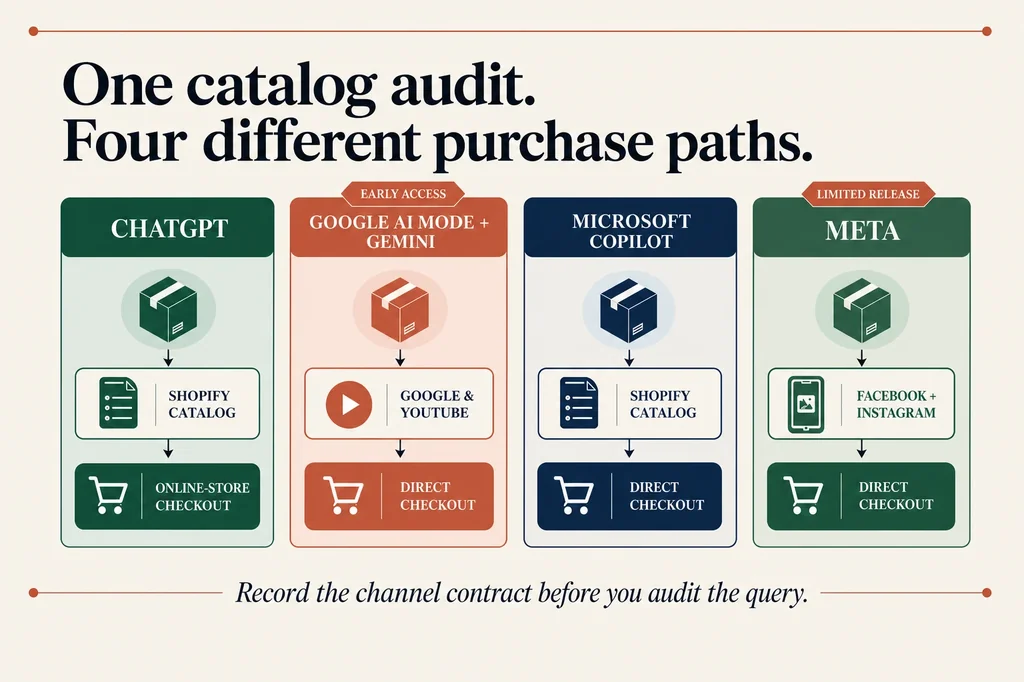
Do not combine the four current Shopify Agentic channels into one generic funnel. Shopify's current documentation describes different transports and checkout behavior:
| Channel | Product transport | Documented purchase path | Availability boundary |
|---|---|---|---|
| ChatGPT | Shopify Catalog | The shopper completes the merchant's online-store checkout in a ChatGPT in-app browser or a new web tab. Shopify exposes no ChatGPT direct-checkout toggle. | Active by default for eligible stores; merchants can remove Shopify Catalog access. |
| Google AI Mode and Gemini | Google & YouTube sales channel | Shopify-powered direct checkout when active; otherwise redirect to the online store. | Early access and not available to every store. Direct checkout is displayed only to U.S.-based customers. |
| Microsoft Copilot | Shopify Catalog | Shopify-powered direct checkout when active; otherwise redirect to the online store. | Direct checkout is active by default for eligible stores and displayed only to U.S.-based customers. |
| Meta | Facebook and Instagram by Meta sales channel | Shopify-powered direct checkout when active; otherwise redirect to the online store. Some unsupported checkout requirements can also cause a handoff to the store. | Direct checkout is active by default for eligible stores, but customer availability remains in limited release. |
Shopify's Agentic Storefront overview also says AI-channel orders appear in Shopify admin with channel or referrer attribution. That is an attribution surface, not proof that a channel caused an incremental order.
Before auditing a query, record the channel, catalog transport, documented checkout mode, and
whether an authorized person has actually observed the store's current account state. If the
account has not been checked, write NOT_RUN. Do not copy a documentation statement into a field
named “observed.”
The source pages are intentionally separate: ChatGPT, Google AI Mode and Gemini, Microsoft Copilot, and Meta. Recheck them before acting because eligibility, availability, and checkout behavior can change.
Build one query-to-variant release sheet
Start with four useful shopper questions, not a thousand synthetic prompts. Each row should join one query to one exact product and variant, one authority record, one catalog or channel surface, one decision, and one rollback record.
Download the four-query Agentic product-discovery evidence sheet.
It includes the controlled NORTHLINE example and keeps every account-only, preview, ranking,
session, order, contribution, return, and observation field at NOT_RUN.
The minimum fields are:
query_id · query_text · journey_phase · channel · target_product_id · target_variant_id eligibility_status · catalog_rank_band · listing_quality · listing_gap authority_source · verified_fact · visual_evidence_required · approved_asset_id catalog_mapping_source · conversational_attribute · preview_status baseline_sessions · baseline_orders · contribution_after_cost · matured_returns decision · owner · observed_at · rollback_record
Use NOT_RUN for every admin-only or live-channel field until someone executes the check. A blank
cell is ambiguous: it might mean zero, unavailable, forgotten, or not applicable. NOT_RUN makes
the evidence state reviewable.
Keep the query language literal. “Bottle with a black cap and carry loop” is a query. “Improve semantic relevance” is not. Record the journey phase only to help compare like with like; it does not turn one query into a universal funnel stage.
Step 1: freeze product authority
Create one immutable record for the exact product and variant before changing a title, description, mapping, answer, or image. At minimum, freeze:
- Shopify product ID, variant ID, SKU, selected options, landing URL, and sold configuration;
- approved title, category, price, availability, policies, and accountable owner;
- verified material, dimensions, capacity, compatibility, included items, and other product facts;
- approved source assets, their hashes, and the visual features each asset can actually prove;
- explicit
NOT_AUTHORIZEDvalues for facts the current record cannot support.
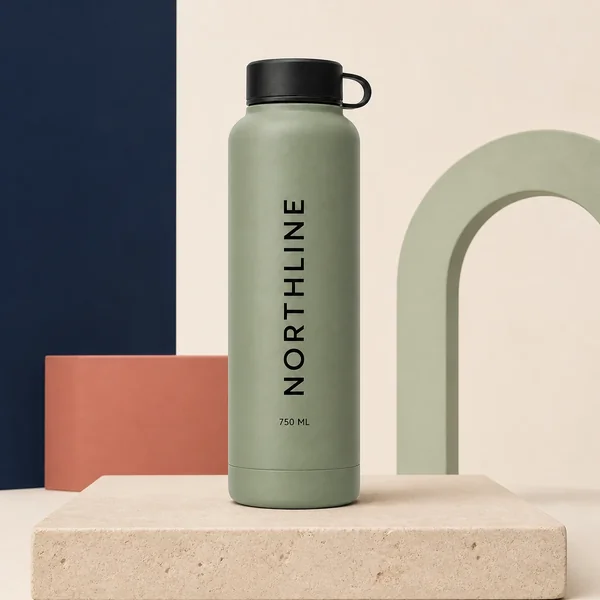
The distinction between authority data and visible evidence matters. A merchant record may authorize a 750 ml capacity, while the source image shows only an unmarked bottle body. That image does not independently prove 750 ml, and a generated label must not be used to manufacture the missing evidence.
If selected-option identity is already broken between the PDP, URL, image, cart, and checkout, stop here and use the Shopify variant-image workflow. Agentic distribution should not amplify a variant join that the merchant cannot resolve on the storefront.
Step 2: confirm eligibility and product transport
Shopify says products must meet channel and Shopify Catalog requirements. It lists restrictions around product status, market, policy records, and prohibited or unsupported products in its product discovery guidance. Google and Meta also depend on their respective sales-channel product syncs.
For the target variant, record:
- whether the store and product meet the documented channel requirements;
- whether required terms and store policies are complete;
- which catalog or sales channel transports the product;
- whether product and shipping syncs are active where required;
- whether the exact variant is available in the target market;
- whether Catalog access or direct checkout has been changed from its managed default.
Do not infer eligibility from a product being visible in one surface. A Google feed state does not prove ChatGPT Catalog access; ChatGPT discovery does not prove Google direct-checkout availability; and a store-level channel setting does not prove an exact variant is eligible.
When image URL, item ID, selected variant, and landing destination do not agree in Google, route that failure to the Shopify-to-Google Merchant Center image-feed workflow. Do not repair feed transport by generating another image.
Step 3: run a controlled Catalog search preview
Shopify documents Catalog search preview, top-ranking products, listing quality, listing insights, channel previews, and Agentic performance in its Agentic administration guidance. Shopify also warns that a Catalog preview is directional because an external channel can re-rank results.
Run each query exactly as recorded and capture:
- timestamp and account context;
- whether the exact product and variant are eligible;
- a rank band rather than false precision when the UI does not support stable rank comparison;
- listing-quality state and every named listing insight;
- displayed title, option, image, price, availability, and policy evidence;
- the channel preview result when available;
- screenshot or export location and reviewer.
Never translate “not returned in my preview” into “blocked from every shopper.” Record the observation, correct a supported gap, and recheck the same query. The preview helps diagnose a listing; it is not a ranking guarantee.
Step 4: route each gap to the right authority
Every gap should end in one of four dispositions:
| Gap | Correct destination | Do not do |
|---|---|---|
| An approved fact exists but the current Catalog title or description omits it | Correct the approved product field or use Shopify Catalog Mapping from a reviewed metafield or metaobject | Add every conversational phrase to the storefront description |
| A useful channel question has a verified answer that complements core product data | Add the supported conversational attribute where the channel makes it available | Convert a customer question into an unsupported product claim |
| The exact product fact is missing from merchant authority | Assign an owner and hold the query row | Ask a model or image to invent the answer |
| The fact is authorized but the current image does not show the required visible evidence | Create or photograph one bounded visual candidate and review it against the exact source | Regenerate the entire SKU or add text that pretends to prove the fact |
Shopify Catalog Mapping can source title, description, category, grouping, and option display from reviewed product data without forcing the same representation onto every storefront surface. Google's optional conversational attributes complement core product data; Google says not to duplicate information already carried in descriptions, highlights, or product-detail fields.
This is where most generic GEO advice becomes dangerous. Repetition is not evidence. A polished answer is not product authority. The useful correction is the smallest source-backed field that resolves the observed gap.
Step 5: decide whether a new visual is warranted
Use a visual only when the missing evidence is visible and the approved source can remain authoritative. Good candidates include an absent detail view, included-item view, exact-variant view, scale view with a verified reference, or use-context image that makes no new compatibility claim.
Reject generation when the requested image would need to establish:
- capacity, dimensions, weight, material, certification, safety, compatibility, or performance;
- a label, logo, quantity, package, component, or accessory absent from the source;
- a review, rating, award, price, inventory state, shipping promise, or return policy;
- a different product, variant, finish, sold configuration, or use case.
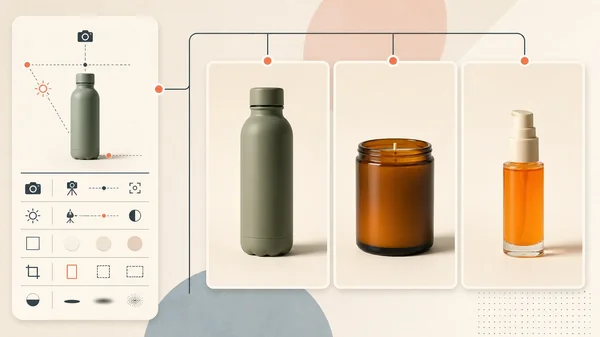
For a real edit, use the same-SKU product-fidelity test and keep the source, prompt, model, output, reviewer decision, and rollback record together. If a deterministic crop exposes the approved detail without changing pixels, prefer the crop. The goal is evidence coverage, not visual novelty.
Controlled example: four NORTHLINE queries
NORTHLINE is a fictional bottle record. Its product authority says the selected Sage variant has a 750 ml capacity and a price and availability state, but the approved source image visibly proves only a sage bottle body, black cap, carry loop, and unmarked front surface. Material, dimensions, approved use cases, dishwasher safety, and cup-holder compatibility are not authorized.
| Query | Evidence decision | Why |
|---|---|---|
sage 750 ml bottle | Keep the existing exact-variant image; route approved color and capacity through reviewed product data | The authority record supports Sage and 750 ml, but the image visibly confirms only Sage. Generating “750 ml” onto the bottle would create false visual evidence. |
bottle with black cap and carry loop | Approve one immutable crop from the existing source | The source visibly proves both features. A source crop provides the missing detail without changing pixels or product identity. |
dishwasher safe 750 ml bottle | Hold the claim | Dishwasher safety is not authorized. No image, Catalog Mapping change, or generated answer can establish it. |
bottle that fits a standard cup holder | Hold the claim pending measurements and a defined compatibility method | The authority record contains no dimensions. A lifestyle image cannot replace measurement evidence or define “standard.” |
The example is intentionally asymmetric. A useful audit should produce holds as well as changes. If every query ends in “generate more content,” the process is not protecting product truth.
Step 6: verify representation by channel
After an authorized correction, rerun the exact query and inspect the exact variant. Separate four questions:
- Discovery: did the target product appear in the native preview or channel surface available to the merchant?
- Representation: are product, variant, title, option, image, price, availability, policy, and supported answers consistent?
- Purchase path: does the shopper reach the documented checkout path for that channel and store state?
- Measurement: does Shopify admin record the session or order with the expected channel or referrer attribution?
Do not substitute one layer for another. A correct preview does not prove checkout. A direct checkout does not prove third-party pixels fired. Shopify documents that some client-side pixels, checkout blocks, bundles, subscriptions, customizable products, and delivery options can be unsupported in direct checkouts, with details varying by channel. Validate the merchant's actual required features before treating direct checkout as commercially equivalent to the online store.
Step 7: use a commercial finish line
Discovery work is not finished when a listing-quality indicator turns green. Record three layers:
- Discovery: eligible exact variants, query preview coverage, rank band, listing gaps, and—where the merchant actually has access—Google organic AI share of voice and query-frequency signals.
- Representation: correct product and variant, approved title and options, correct image, price, availability, policies, and verified answer coverage.
- Outcome: Agentic sessions, channel- or referrer-attributed orders, online-store conversion, contribution after channel fees and production cost, cancellations, support contacts, and matured not-as-described returns.
Google describes its AI performance insights
as a limited pilot with category-scoped reporting. Write UNAVAILABLE when the report is not
present; do not estimate share of voice from a few manual prompts.
Shopify's aggregated Agentic sales can include multiple surfaces. Report the channel or referrer grain available to the merchant, keep Shop and third-party channels separate where the data allows, and do not call an attributed order incremental revenue. A credible keep-or-stop decision needs a defined baseline, eligible population, observation window, production cost, return-maturity window, and rollback rule.
The release checklist
Before releasing a correction, confirm:
- The target query, product ID, variant ID, SKU, market, and channel are frozen.
- Channel availability, catalog transport, and checkout mode were rechecked from current docs.
- Live account, preview, checkout, session, and order fields are
NOT_RUNuntil observed. - The exact variant's eligibility and transport were checked independently.
- Every changed fact joins to an approved authority source and accountable owner.
- The Catalog preview, listing gaps, and channel preview were captured without promising rank.
- Product field, Catalog Mapping, conversational attribute, and visual work remain separate.
- Any image candidate preserves exact-SKU and variant identity at full resolution.
- Unsupported claims are held instead of rewritten or generated.
- The purchase path and required checkout features were verified for the target channel.
- Sessions, orders, contribution, cancellations, and matured returns have explicit windows.
- The rollback record restores the prior mapping, asset, or attribute without changing the SKU.
Where this workflow fits
Use the Shopify product-image SEO audit when the problem is open-web crawlability, rendered image markup, alt text, structured data, sitemaps, or Google Images. Use the Merchant Center image-feed workflow when Google item IDs, image URLs, selected variants, processing, and destinations drift. Use the Shopify variant-image workflow when PDP selection, URL, image, cart, and checkout disagree. Use the product-listing infographic workflow for deterministic factual overlays, and the same-SKU fidelity test when a missing visual truly requires a candidate.
For the broader sequence from catalog foundation through acquisition, lifecycle, and commercial measurement, use the AI for ecommerce workflow map.
The smallest useful Agentic Storefront audit is one channel contract, four real shopper questions, one exact variant, one authority record, one evidence-backed correction at a time, and one measured commercial decision window. That is enough to learn whether the catalog can represent the product more accurately—without turning AI shopping into an unverifiable content-production exercise.