The safest way to use AI for Amazon A+ Content is not to ask a model to invent the whole module. Generate the part allowed to vary—an empty scene or layout direction—then composite the approved product and render factual copy from a controlled record.
That hybrid split answers the real merchant decision. Use actual product photography when scale, construction, fit, loading, color, or use must be proven. Use AI for a nonfactual environment, visual exploration, or a secondary creative hypothesis. Keep the ASIN, sold configuration, product pixels, measurements, included items, claims, and final copy outside the model.
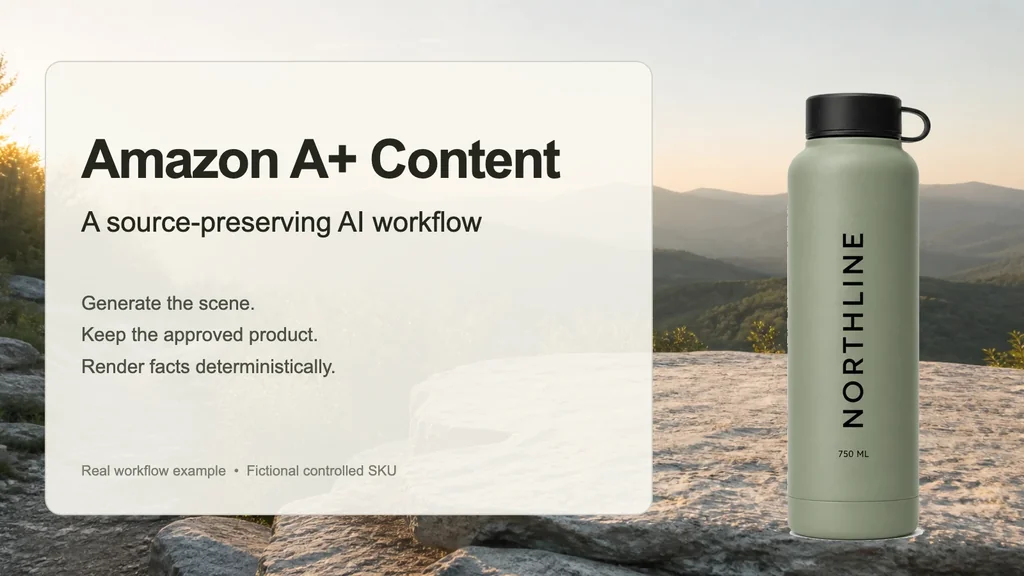
For this article we produced one empty trail scene, kept the approved fictional NORTHLINE bottle pixels, and built two deterministic exports: a 1464 × 600 Premium A+ module and a separately composed 970 × 300 Basic A+ module. The generated plate contains no product, person, text, logo, badge, or claim.
Evidence boundary: NORTHLINE is a fictional controlled SKU reused from Masonry's merchant workflow tests. The generated background, source extraction, two final composites, dimensions, and text review are first-hand artifacts from this production cycle. They are not Amazon submissions, shopper research, conversion results, physical-product evidence, or proof that a module will pass Amazon review. Amazon specifications and eligibility come from current Amazon sources; seller discussions provide qualitative workflow signals only.
Why A+ Content is a distinct job
Amazon's ordinary main image answers “what is being sold?” under strict presentation rules. A+ Content sits farther down the detail page and can explain use, construction, comparisons, or brand context through modules. That extra flexibility does not turn the model into product authority.
Amazon's current Basic-versus-Premium comparison lists 970 × 300 for Basic A+ image size and 1464 × 600 for Premium A+, with different module sets and page allowances. It also describes eligibility through a Professional selling account and an appropriate Brand Registry role for the ASIN. Individual module slots still control the final export, so confirm the live placeholder rather than treating those two hero dimensions as universal.
Current seller discussions expose three practical problems:
- merchants are weighing AI lifestyle and A+ packages against a smaller increment for real photography and video, especially where product scale and use matter;
- sellers report attractive AI concepts that still need real product photos, deterministic text, and cleanup before they are usable;
- others are troubleshooting sharp local files that become soft or unreadable after the selected A+ module processes them.
Read the qualitative discussions about AI versus real listing images, using AI generators for listing and A+ images, and A+ upload quality. These threads show the decision and failure modes; they do not establish average performance, policy, or a universal recommendation.
The source-preserving workflow
1. Start from the sold product and one buyer question
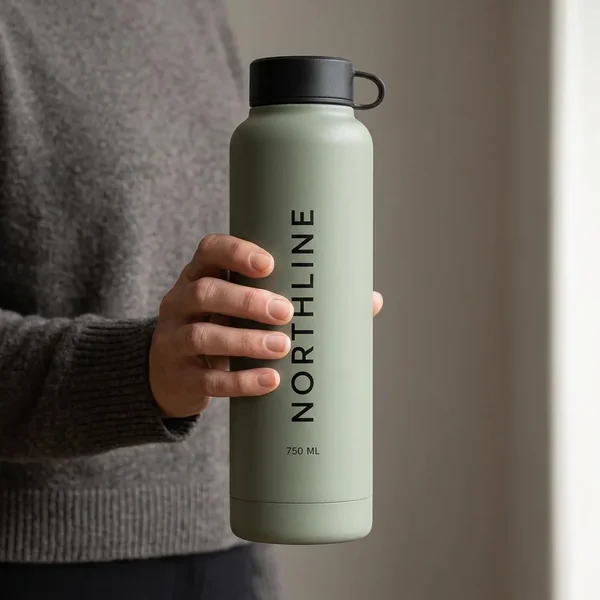
This demonstration uses the approved fictional NTH-BTL-SGE source. The visible source supports a sage bottle, black cap, vertical NORTHLINE mark, and 750 ML label. Its separate controlled record says the sold configuration is one bottle plus its black cap and no accessories.
The selected buyer question is deliberately narrow: what bottle and included item does this module describe? It does not claim thermal duration, leak resistance, trail performance, material, dimensions, or physical capacity beyond the fictional controlled record.
Download the completed A+ asset manifest. It records the source authority, generated layer, deterministic fields, dimensions, review gate, and disposition for every asset in this example.
2. Generate only the empty scene
The first-hand background was generated at a wide composition and cropped to 1464 × 600. The exact brief was:
Photorealistic empty lifestyle background plate for an Amazon A+ module. Quiet sunrise trailhead overlook, pale weathered stone, soft mountain vegetation, and distant layered hills. Keep one clean flat stone surface in the foreground for a later approved product composite and calm negative space for deterministic copy. Background only: no bottle, package, person, hand, animal, readable signage, text, logo, watermark, badge, UI, product claim, or implied specification.
The plate still needs review. A generated environment can imply weather, terrain, use, or performance even without words. Reject a scene if it suggests an unsupported product capability or unsafe use.
3. Composite the approved product and controlled copy
The Premium A+ example combines three independent layers:
- the generated trail plate;
- an extracted copy of the approved source bottle pixels;
- deterministic text from the controlled record.
The visible module says 750 mL Sage Bottle and One bottle + black cap. Those strings can be updated from the record without regenerating the background. If the cap, label, volume, or sold configuration changes, the module becomes visibly stale and can be rebuilt from the new source.
4. Recompose; do not merely stretch
The Basic A+ example uses the same accepted scene, source, and facts, but a separate 970 × 300 composition. Copy size, card width, bottle scale, and spacing are rebuilt for the shorter module.
Do the same for every selected module. Treat the A+ Content Manager placeholder as the export contract. Preview the assembled page rather than judging isolated files, because crop, type size, module order, and mobile stacking change the reading experience.
Choose real photography when the image must prove use
The hybrid workflow is not a reason to avoid a shoot. Use real photography or video when the buyer needs evidence of:
- true scale against a body, room, vehicle, or known object;
- fit, load-bearing, movement, assembly, or physical interaction;
- texture, construction, finish, color, transparency, or reflective behavior that must match the received item;
- a real person's experience, endorsement, before-and-after result, or product outcome;
- regulated, safety-critical, or category-specific use.
An exercise-equipment bundle is a good example. A generated room can supply a layout direction, but body loading, actual component scale, grip, setup, and movement deserve real source evidence. The right split may be real lifestyle photography and video for proof, then AI-assisted empty scenes or nonfactual plates for secondary exploration.
Apply the AI-person metadata rule separately
Amazon's current seller announcement says product images and A+ media containing photorealistic people entirely generated by AI must include the contains-synthetic-performer keyword in the dc:subject XMP field before upload. It says the requirement applies across Amazon's worldwide stores and lists exclusions for real people altered with AI, expressive-work characters, media without people, and non-photorealistic people. Read Amazon's current announcement.
This workflow's plate has no person, so that specific tag is not part of the demonstration. That exclusion does not approve the product, scene, claims, rights, or A+ module. The Amazon AI image rules guide keeps the synthetic-person rule separate from main-image accuracy and suppression risk.
Review before Amazon submission
Run four gates on the assembled content:
| Gate | Reject when |
|---|---|
| Product truth | geometry, color, finish, marks, package, quantity, included items, scale, or use differs |
| Copy and claims | text is unsupported, outdated, promotional, unclear, too small, or attached to the wrong visual cue |
| Module production | pixel dimensions, crop, file, type size, alt text, stacking, or live rendering fails |
| Disclosure and rights | required synthetic-person metadata, consent, trademarks, licensed assets, or substantiation is missing |
Review the source and composite at full resolution, then the A+ preview on desktop and mobile. Confirm the exact ASIN mapping and sold variant. Submit through A+ Content Manager and inspect the live detail page after approval; do not use approval itself as evidence that the product or claim is true.
The fact-safe product listing infographic workflow provides the stricter manifest and semantic-arrow pattern when the module contains dimensions, capacity, compatibility, or included-item diagrams.
Measure a commercial hypothesis, not an image refresh
Amazon's Manage Your Experiments documentation says eligible Brand Registry sellers can compare two approved A+ versions on the same eligible, sufficiently trafficked ASIN. Read Amazon's experiment overview. Eligibility and current reporting belong to the live account, so verify them before planning a test.
For the complete Amazon-native decision contract—including product-image and supporting-image tests, pre-registration, run-to-significance guidance, simultaneous-experiment interpretation, contribution translation, and delayed trust guardrails—use the Amazon product-image A/B testing workflow.
Change one meaningful hypothesis, such as:
- control: current product-and-brand module;
- candidate: source-preserving module that answers the included-item question earlier.
Keep the product, price, offer, inventory, traffic eligibility, and experiment window stable. Use Amazon's experiment result for the primary decision, then inspect contribution, returns, refunds, not-as-described contacts, and support burden before scaling the production method. A module can attract attention and still create a worse customer expectation.
If the ASIN is not eligible, establish a versioned baseline and wait for enough comparable traffic rather than declaring a winner from a before-and-after date split. The AI product-photo trust test explains the same control-versus-candidate boundary for product imagery outside A+.
Bottom line
AI is useful in Amazon A+ production when it is assigned the right layer. Generate an empty environment or layout candidate. Preserve the exact product source. Render factual copy deterministically. Recompose for each module. Apply synthetic-person metadata when the current rule requires it. Then measure an approved commercial hypothesis instead of counting generated images.
If A+ Content is not the current bottleneck, the 22-workflow ecommerce AI map routes catalog production, product-page decisions, acquisition, customer evidence, lifecycle revenue, and wholesale operations by the authority record and commercial finish line each job needs.
The durable deliverable is not one pretty banner. It is a joinable record linking the ASIN, exact product source, generated plate, deterministic copy, module dimensions, disclosure decision, reviewer, Amazon submission, live version, experiment, and customer outcome.