The safest way to create an AI product infographic is to split it into two layers: use AI for layout exploration or a nonfactual visual layer, then render dimensions, quantities, included items, and claims from an approved SKU record with deterministic typography. A number can be spelled correctly and still communicate the wrong thing if the arrow, product, or variant is wrong.
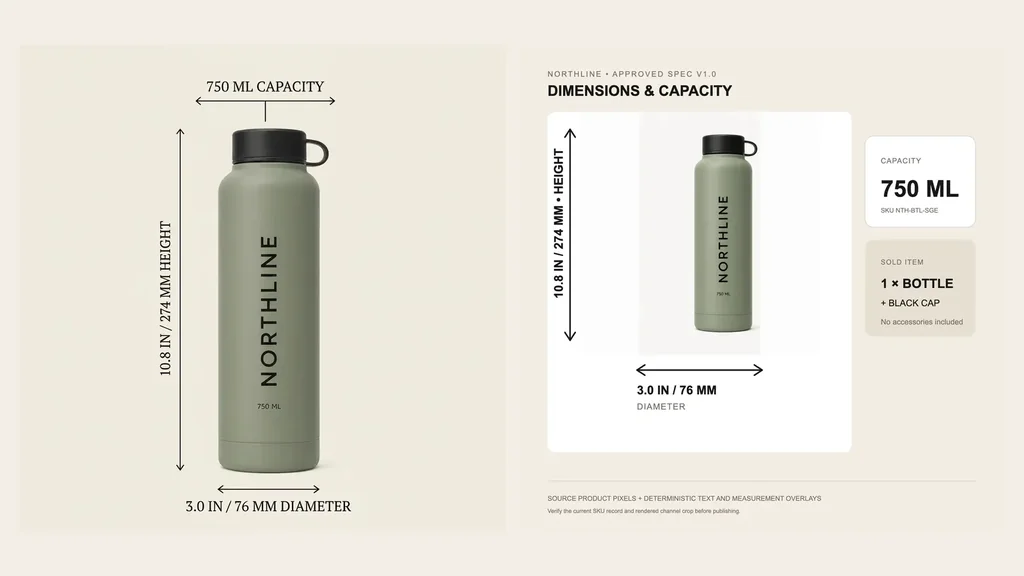
We tested that boundary with one fictional NORTHLINE sage bottle and four approved facts: 750 ML capacity, 10.8 IN / 274 MM height, 3.0 IN / 76 MM diameter, and one included bottle with black cap and no accessories. Nano Banana 2 produced a polished square draft with every requested string spelled correctly. It also placed 750 ML CAPACITY over a horizontal dimension arrow, visually treating volume like width, and redrew the source product.
The final listing asset therefore keeps the approved source pixels and applies the facts as controlled vector-style overlays. The result is less magical and more useful: the product, measurement direction, text, sold configuration, spec version, and review record can be changed independently.
Evidence boundary: NORTHLINE and its specification record are fictional controlled assets, not a physical merchant SKU. The generation job, output, exact-text review, semantic-layout failure, and deterministic final asset are real. This one example does not establish model reliability, physical dimensional accuracy, conversion lift, return reduction, or marketplace compliance.
Why listing infographics are a distinct merchant job
Masonry already has a broad AI infographic generator for processes, comparisons, timelines, statistics, and editorial visuals. A product listing infographic has a narrower burden: it sits beside the buy button and can shape what a customer believes they will receive.
That job appears directly in seller questions. A February 2026 Amazon seller asked how to create use-case, dimension, and USP images while building a listing. Read the seller question. In another current listing-image discussion, sellers treated dimensions, scale, included items, and purchase objections as distinct secondary-image jobs rather than asking every slot to be another attractive angle. Read the qualitative workflow discussion.
Those threads establish qualitative intent, not conversion evidence. The supplied three-month Search Console export already contains broad queries such as ai infographic generator, text to infographic, and bulk infographics, but no product-listing-infographic or dimension-image query rows. This article is a merchant-specific expansion from existing topical visibility, not proof that Masonry already ranks for the exact workflow.
Step 1: choose one purchase question for the image
Start with the decision the gallery slot should help a buyer make:
| Buyer question | Suitable factual input | Common failure |
|---|---|---|
| Will it fit? | approved dimensions, orientation, tolerances | a correct number attached to the wrong axis |
| What do I receive? | included-item and quantity record | decorative props read as included accessories |
| Is it compatible? | approved model, size, region, or interface list | invented or outdated compatibility |
| How do I use it? | approved instructions and warnings | generated steps omit a safety constraint |
| Why choose it? | substantiated material, test, or comparison record | unsupported superiority or performance claim |
Do not begin with “make an infographic.” Begin with one unresolved purchase question and one source that is authorized to answer it.
Step 2: build an approved fact manifest
The product source remains the authority for visible identity:
The controlled fact record for this demonstration was:
| Fact ID | Approved value | Authority | Image role |
|---|---|---|---|
capacity | 750 ML | SKU record plus visible source label | capacity card, not a dimension arrow |
height | 10.8 IN / 274 MM | dimensional record v1.0 | vertical arrow |
diameter | 3.0 IN / 76 MM | dimensional record v1.0 | horizontal arrow |
included_items | one bottle + black cap; no accessories | sold-configuration record | included-item card |
Download the completed specification and review TSV. It stores the approved value, authority, exact published overlay, generated-draft review, final review, and disposition for every fact.
The manifest must carry a SKU or variant identifier and a version. If a size, material, accessory, or package changes, the old visual should become visibly stale rather than silently surviving in a design folder.
Step 3: use generation as a draft, not the product record
The live Nano Banana 2 route received one reference, square output, and seed 2608153. The exact request named only three callouts:
masonry image "Using the supplied NORTHLINE bottle as immutable product truth, create a square ecommerce secondary-gallery infographic. Render only: '750 ML CAPACITY', '10.8 IN / 274 MM HEIGHT', and '3.0 IN / 76 MM DIAMETER'. Add clear dimension lines. Do not add a claim, accessory, certification, comparison, price, badge, or extra text." \ --model gemini-3.1-flash-image-preview \ --aspect 1:1 \ --seed 2608153 \ --ref ./sources/NTH-BTL-SGE.webp
The asynchronous job 1f9419da-0741-4c4d-a90b-48e69ecccbfd succeeded and returned a 1024 × 1024 file.
This is why spelling review is necessary but insufficient. The draft passed:
- exact requested strings;
- vertical height direction;
- horizontal diameter direction;
- one product and no added accessories.
It failed the intended production contract because capacity became a dimension-style callout and exact source pixels were not preserved. A reroll might look better, but it would not turn the generation into an approved specification system.
Step 4: render factual overlays deterministically
The final asset uses the approved source image unchanged inside the product panel and draws every factual element from the manifest:
For production, the deterministic layer can be HTML/CSS, SVG, a design-system template, or a graphics pipeline. The implementation matters less than four properties:
- text comes from approved structured data rather than prompt memory;
- arrows and labels map to named semantic fields;
- source product pixels or an approved render stay recoverable;
- the output records SKU, variant, spec version, channel, reviewer, and publication state.
If the product needs an AI-generated lifestyle or background layer, generate that plate separately and composite the approved product and factual overlays afterward.
Step 5: review the asset as a buyer would
Review at full size, gallery size, and thumbnail size. Then test the rendered product page on mobile and desktop:
- Is the relevant number readable without zoom?
- Does each arrow clearly indicate the intended axis?
- Does the graphic show the selected variant rather than a sibling color or size?
- Are every pictured accessory, package, and quantity included in the sale?
- Does the crop preserve the product, measurement endpoints, units, and qualification text?
- Is the underlying product description still complete for shoppers and assistive technology?
Shopify describes alt text as part of a product description and important for accessibility. Add concise text that communicates the useful image content, such as “NORTHLINE sage bottle dimensions: 10.8 inches high and 3 inches in diameter; 750 milliliter capacity.” Read Shopify's current product-media alt-text guidance.
Do not stuff the alt attribute with every visual decoration or use it as a hidden claim field. Keep the same approved facts in visible product content where customers and search systems can evaluate them.
After publication, use the Shopify product-image SEO audit to verify that the exact infographic and factual primary image are discoverable in rendered HTML, mapped to consistent Product data, represented in the expected sitemap scope, delivered responsively, and measured through non-brand landing demand rather than field completion.
Step 6: hand off and measure the accepted asset
Track the production funnel:
fact-record-ready → layout-draft-generated → exact-text-reviewed → semantic-mapping-reviewed → source-product-reviewed → channel-crop-reviewed → accepted → published
Measure cost and time per accepted listing asset, fact defects caught before publication, stale-asset incidents, and the product-page path from infographic view to variant selection, add-to-cart, checkout, and returns. Those downstream counts are diagnostic, not proof that one infographic caused a sale.
The text-rendering model test helps choose a route for copy-heavy concepts. The same-SKU fidelity benchmark explains why readable labels do not prove source-locked geometry. The catalog batch workflow provides the manifest, job, reviewer, and accepted-asset denominator when this expands across many SKUs.
If the same approved asset needs a second-language campaign version, continue to the source-to-market product image localization workflow and keep linguistic approval separate from factual overlay review.
When the buyer must choose among several merchant-owned SKUs instead of understand one product, use the AI product-comparison visual workflow to normalize definitions, preserve every source, expose disqualifying differences, and verify each destination.
When the factual graphic is an apparel size chart, continue to the AI apparel size-guide workflow to separate garment from body measurements, lock the measurement method and conversion rule, and verify product-specific variant and cart mapping.
The durable unit is not a pretty generated slide. It is one buyer question, one versioned fact record, one approved product source, one controlled overlay, and one channel-reviewed asset.
When several approved products become a wholesale offer instead of a single-SKU explanation, use the AI wholesale line-sheet workflow to preserve SKUs while keeping prices, case packs, order minimums, lead-time scope, buyer routing, and completed-order economics auditable.