AI product photos do not automatically hurt sales, and they do not automatically improve them. The useful question is narrower: does this image help a shopper understand the product that will arrive?
A faithful AI-assisted scene can give one approved SKU more useful contexts, crops, and seasonal variants. A beautiful scene that changes the color, shape, hardware, label, quantity, or included accessories advertises a different product. That second image may win a click and still lose the customer at zoom, checkout, unboxing, or return.
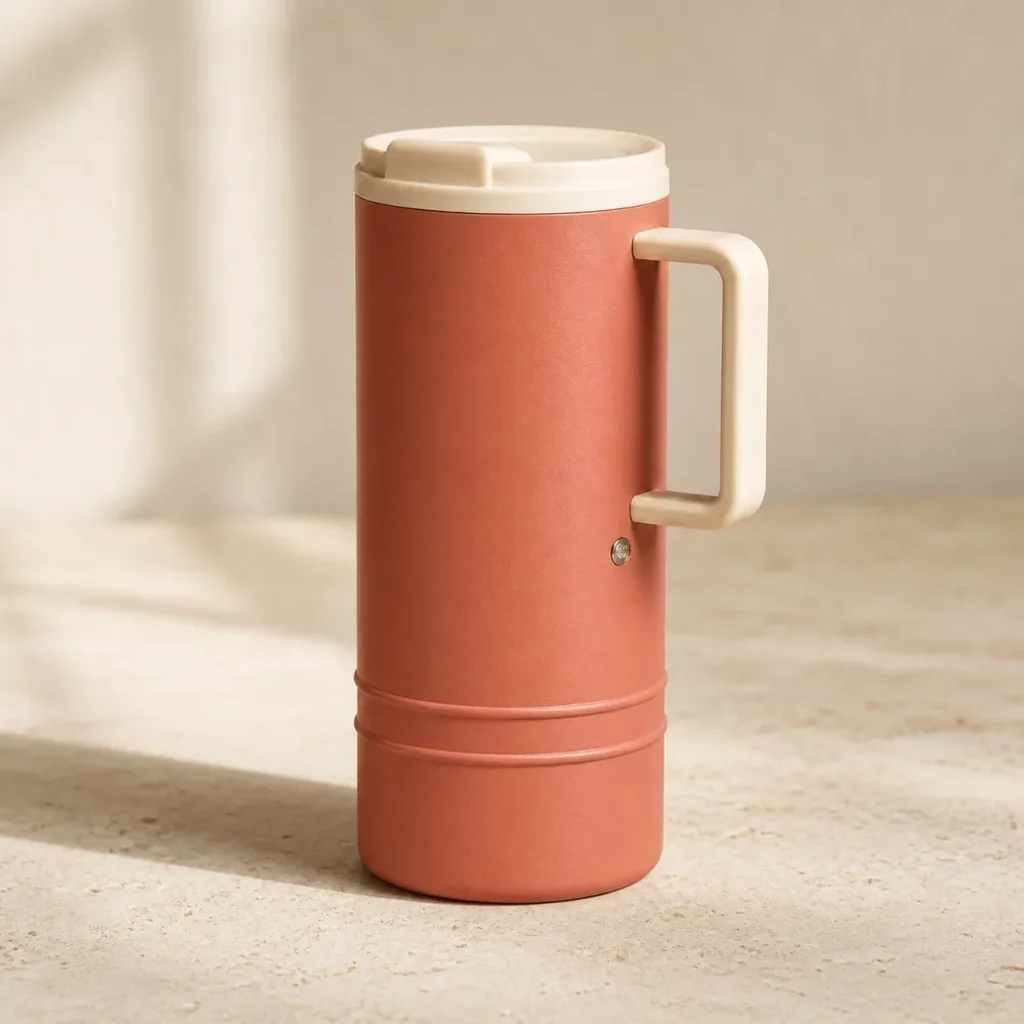
Evidence boundary: the three images below are a controlled synthetic demonstration created for this article. The reference is a fictional tumbler, not a real catalog SKU, and the two candidates intentionally illustrate editorial decisions. This is not a conversion experiment, shopper survey, model benchmark, or claim that one workflow will preserve every product.
Quick answer
- AI can help when it changes the environment while the sold product remains faithful to approved photography and product data.
- AI can hurt when it invents a more attractive but materially different product or makes a claim the source cannot support.
- A realistic look is not enough. Product identity, sold configuration, text, and claims still need review.
- Clicks are not the whole result. Measure purchase conversion alongside returns, “not as described” contacts, and refund reasons.
- The safest exact-SKU workflow is often to generate the scene and composite approved product photography.
A visual trust test: same brief, different truth
The fictional reference has a matte muted-coral straight-sided body, cream lid, one rectangular cream handle, exactly two lower ridges, and one circular metal accent. Those details form its acceptance sheet.
The reference is not a photograph of merchandise. Its role is to make the editorial decision inspectable: reviewers can name what must remain unchanged before asking for a new scene.
The faithful candidate moves the product to pale limestone and warm window light. The listed invariants remain visibly coherent at article size. That is a reason to advance it to full-resolution review—not proof that every dimension, color value, seam, or hidden surface is correct.
The dramatic candidate may look more expensive, but it fails the product test. It replaces the cream rectangular handle with rounded gold hardware, turns two ridges into three, removes the metal accent, shifts the color, and alters the silhouette. Better art direction cannot make it an honest listing image for the reference.
| Review question | Faithful candidate | Misleading candidate |
|---|---|---|
| Scene and light changed | Yes | Yes |
| Body shape and proportions preserved visibly | Broadly, pending overlay | No |
| Body color remains within the reference target | Broadly, pending color-managed review | No |
| Lid and handle configuration preserved | Yes at article size | No |
| Two lower ridges preserved | Yes | No, three appear |
| Metal accent preserved | Yes | No |
| Ready to publish | Only after source-level QA | No |
What actually creates sales risk
1. The image shows the wrong SKU
Common failures include a taller bottle, a different outsole, an extra zipper, missing stitching, a changed gemstone setting, altered ports, invented accessories, or a package count that does not match the offer. Each can change what a reasonable shopper expects.
2. The image implies an unsupported product fact
Pixels cannot establish capacity, dimensions, materials, ingredients, battery life, UV protection, waterproofing, safety, certifications, compatibility, performance, or what is included. Keep those facts tied to approved product data and substantiation.
3. Text and packaging drift
Proof every visible character: brand, variant, quantity, units, ingredients, warnings, model number, compliance copy, barcode, and background text. A near-correct label is still wrong.
4. The creative treatment hides useful information
Heavy reflections, shallow depth of field, dramatic shadows, props, or extreme crops can obscure the exact features a shopper needs. A premium mood is valuable only after the product remains inspectable.
5. The team optimizes the wrong metric
A creative can lift ad click-through by making the product look larger, glossier, or more complete than it is. If purchase conversion, returns, and “not as described” contacts worsen, that click lift was not a business win.
What policy and disclosure do—and do not—solve
The durable standard is that the overall commercial message cannot mislead. The U.S. Federal Trade Commission’s digital advertising disclosure guidance says the ad should be considered as a whole, including its product depictions, and that a disclosure cannot always cure an otherwise deceptive message.
Marketplace rules add their own image-position, background, content, and technical requirements. Amazon’s current seller guidance, for example, emphasizes that images must accurately represent the product. Check the live policy for the channel and category before publishing; do not treat this article as legal or marketplace-compliance advice.
Research on AI disclosure and trust is context-dependent rather than a clean universal penalty. A 2025 advertising experiment, “Disclaimer! This Content Is AI-Generated”, examines how disclosure changes trust under a particular design. It does not establish how your SKU, audience, creative, placement, or jurisdiction will behave. Test your own commercial outcome and get advice on applicable disclosure duties.
A reference-first workflow
1. Build an approved source set
Collect front, three-quarter, side, top, underside, detail, packaging, included-item, and scale views. Add artwork, dimensions, color targets, material notes, and product data. Label each source by role.
2. Write the rejection sheet before generating
List the details that identify the sold configuration: silhouette, proportions, color, material, parts, hardware, seams, texture, label, marks, quantity, packaging, and accessories. If a candidate changes one, reject it or route it to concept-only use.
3. Change one layer at a time
For a real reference image, a controlled Masonry CLI request can look like this:
masonry image "Change only the environment to pale limestone with soft camera-left window light. Keep the supplied product unchanged: silhouette, proportions, color, materials, lid, handle, hardware, seams, texture, label, and every visible character. Add one realistic contact shadow. Add no props, text, logo, hands, or extra products." \ --model gemini-3.1-flash-image-preview \ --ref ./approved-product-three-quarter.png \ --aspect 1:1 \ --output faithful-scene-candidate.png
The prompt is a constraint, not a product lock. Compare the candidate with all approved sources. For exact geometry, reflective products, regulated labels, or identity-critical surfaces, generate the empty scene and composite the approved product.
4. Review at full size
Use an overlay or flicker comparison for geometry. Sample color in a managed workflow. Zoom into text, seams, hardware, reflections, and edges. Check the sold configuration and all product facts outside the image.
5. Separate creative approval from listing approval
A concept can be beautiful and still fail the SKU. Record the candidate, source set, prompt, model route, date, reviewer, rejected differences, and final disposition so the decision can be reproduced.
Product-photo acceptance sheet
| Area | Pass condition |
|---|---|
| Source coverage | Candidate is compared with approved angles, details, artwork, dimensions, color targets, packaging, and included items. |
| Geometry | Silhouette, proportions, part count, angles, openings, attachments, seams, and hardware match the sold SKU. |
| Color and material | Color target, finish, texture, translucency, reflectivity, grain, wear, and edge treatment match approved sources. |
| Text and marks | Every visible character, logo, variant, unit, warning, code, and mark matches approved artwork. |
| Sold configuration | Quantity, variant, packaging, accessories, and included parts match the offer. |
| Product facts | No dimension, material, ingredient, performance, compatibility, safety, compliance, or included-item claim is inferred from generated pixels. |
| Scene honesty | Scale, props, reflections, shadows, crop, and context do not create a false product expectation. |
How to measure whether the images help sales
- Choose one decision. Test a fidelity-approved AI-assisted candidate against the current control for one SKU and one placement.
- Hold the offer steady. Keep price, copy, inventory, audience, device mix, and promotion as comparable as practical.
- Predefine the primary metric. PDP purchase conversion or qualified add-to-cart is usually more informative than image clicks alone.
- Add guardrails. Track return rate, “not as described” reasons, refunds, cancellations, support contacts, and review language over a suitable downstream window.
- Run to enough sample. Estimate the detectable effect before launch and avoid declaring a winner from a handful of orders.
- Read segments carefully. New versus returning shoppers, mobile versus desktop, channel, and product variant can react differently, but repeated slicing raises false-positive risk.
- Keep the source audit. A conversion lift does not authorize an inaccurate image. Fidelity is a release requirement, not a metric to trade away.
For the implementation layer behind those seven rules, use the Shopify product-image A/B-test workflow. It adds stable visitor assignment, render-confirmed exposure, sample-size planning, sample-ratio checks, accessibility and performance parity, and a signed keep-or-rollback record.
When the approved image appears in a paid ad, run the ad-to-product-page message-match audit before launch so the exact SKU, variant, offer, claim, visual, CTA, and final URL survive the click.
Bottom line
AI product photos hurt when the creative promise outruns the product in the box. They can help when they add useful scenes while preserving the sold SKU and when the team measures the whole customer outcome rather than a prettier thumbnail.
Start with approved sources, define what cannot change, generate one layer at a time, reject product drift, and measure purchase plus returns. See the controls applied to a complete ecommerce image-set workflow, inspect one fixed source across four routes in the same-SKU product-fidelity test, or carry an approved source into a controlled product-ad creative matrix that keeps copy and offer fixed. For production, use Masonry’s AI product photography studio.
If a background replacement keeps the product but still looks cut out, use the three-prompt product-grounding test to separate edge cleanup, floor contact, shadow direction, and shared-light failures before testing sales impact.
When verified return reasons already exist, use the return-reasons to PDP-image workflow to route operational causes, reject unsupported dimensions, and turn one authority-backed expectation gap into a source-preserving secondary image.
To choose the next bounded job beyond product photography, use the AI for ecommerce workflow map and pick one route with a current source of truth and a measurable commercial finish line.