Five current image models can produce a clean four-line coffee label. That easy prompt no longer tells you much. The useful failures appeared only after we added seven separate text regions, punctuation, mixed case, a date, units, parentheses, an em dash, and a lowercase URL.
Text used to be the embarrassing failure of every image model. Melted letters, invented characters, "PRESMIUM CFOFEE" on a coffee bag. The models are much better now, but the problem was solved unevenly. A model that nails one bold word on a poster may not hold five separate labels steady across a busy infographic. So the useful question isn't "which model is best at text," it's "which model is best at the kind of text I'm generating."
This article now includes a controlled single-output screen, run through the logged-in Masonry CLI on 4 August 2026. Every model received the same prompt and 1024×1024 size. That supports exact observations about these five files; it does not establish a universal ranking, acceptance rate, multilingual performance, or repeatability.
Quick answer: match the model to the text job
- Exact on this seven-region run: GPT Image 2, Nano Banana 2, and Seedream 5 Pro.
- One-character or punctuation failure on this run: Ideogram V4 changed
08to06; FLUX.2 Flex renderedarcadia examplewithout the required dot. - All five passed the easy prompt: four short uppercase lines were not enough to separate current models.
- No repeatability claim: one candidate per model cannot tell us whether the exact result was typical or lucky.
- No multilingual claim: the prompt used Latin characters only. Non-Latin copy requires its own controlled test and a native proofreader.
Merchant shortcut: if the words are buyer-facing product facts, a text-capable model still should not become their authority. Use the fact-safe product listing infographic workflow to keep dimensions, capacity, included items, price, and claims in a controlled record, generate only the visual plate, and place approved copy deterministically. Proof every render against the source before it reaches a listing.
The test that finally separated the models
We first used four short lines: AURORA COFFEE, SINGLE ORIGIN, ETHIOPIA, and NET WT 12 OZ. Every model rendered all four exactly in its first output. We therefore increased the load to seven regions and preserved the same product, square size, and no-extra-copy rule.
| Model route | Easy four-line output | Hard seven-region output | Exact observed miss |
|---|---|---|---|
| GPT Image 2 | Exact | Exact | None |
| Ideogram V4 | Exact | Failed | ROASTED 08 became ROASTED 06 |
| FLUX.2 Flex | Exact | Failed | arcadia.example lost the dot |
| Nano Banana 2 | Exact | Exact | None |
| Seedream 5 Pro | Exact | Exact | None |
The hard prompt is better, but the next production step is still four candidates per model and a predeclared acceptance threshold. A perfect single output proves only that the route can do the job. Repeatability and cost per accepted file determine whether it belongs in a catalog workflow.
The comparison at a glance
| Model | What this run showed | Documented reason to test it | Evidence boundary |
|---|---|---|---|
| GPT Image 2 | Preserved all seven regions exactly | Flexible sizing and image-edit workflow | One Latin-text packaging output |
| Ideogram V4 | Strong layout, but changed one digit | Ideogram explicitly focuses on text and design | One digit failure is not an acceptance rate |
| FLUX.2 Flex | Preserved words, but removed punctuation | FLUX.2 documentation includes typography and text | One URL failure is not a model-wide verdict |
| Nano Banana 2 | Preserved all seven regions exactly | Google documents advanced text rendering | One Latin-text packaging output |
| Seedream 5 Pro | Preserved all seven regions exactly | Current generation-and-editing route in Masonry | One Latin-text packaging output |
Specs and pricing change quickly. The current primary references are OpenAI's GPT Image 2 guide, Ideogram's text and typography guide, Black Forest Labs' FLUX.2 overview, and Google's Gemini image-generation guide. Google has deprecated the Imagen API routes in favor of Nano Banana models, so Imagen is no longer part of this comparison. Check the linked pages and the live route before budgeting a large run.
Why text remains hard for image models
An image generator outputs pixels, not an editable text layer with stored strings, fonts, and layout constraints. Even when a model understands the requested spelling, it still has to synthesize each glyph, its spacing, and its placement as part of the final image. That is why an output can look like polished typography from across the room and reveal one invented character at full zoom.
Three things make it harder than it sounds:
Letters are precise where pixels are forgiving. A face can be off by a few percent and still read as a face. Swap one stroke on a "B" and you get an "R," or garbage. Text has almost no error tolerance, so the model has to be far more exact than it does anywhere else in the frame.
Errors compound with element count. A packaging mock with a brand name, flavor, weight, ingredient line, and barcode caption creates five independent precision constraints. That is why an easy one-word test cannot support a dense-layout recommendation: preserve the real number, size, and placement of text regions in every comparison.
Non-Latin scripts are the deep end. CJK characters, Arabic, Devanagari, and others have larger glyph sets and contextual shaping. A model that looks good in English can produce believable-but-wrong characters in another script. This run used Latin text only, so it cannot support a multilingual recommendation. Treat "proofread by a native reader" as mandatory.
Reproduce the screen in Masonry
The installed CLI accepted --dimension 1024x1024 for these runs. It returned a job ID, which we waited on and then downloaded:
masonry image "$PROMPT" --model gpt-image-2 --dimension 1024x1024 masonry job wait <job-id> masonry job download <job-id> --output ./gpt-image-2.png
Repeat that sequence with ideogram-v4, flux-2-flex, gemini-3.1-flash-image-preview, and seedream-5-pro. Masonry exposed Nano Banana 2 under the preview route on the test date; Google's current model documentation lists the stable route as gemini-3.1-flash-image, so check masonry models list --type image before reproducing the run. The model parameter view advertised --size, but this installed CLI build accepted --dimension; the commands above reflect what worked.
Per-model verdicts
GPT Image 2. It preserved every requested character in this output. Its documented image workflow supports flexible output sizes and mask-guided edits, which matters when one label needs correction without rerolling the whole composition. First test: infographics, app screens, and packaging with multiple copy blocks. Watch out for: one exact file does not tell us how frequently the model succeeds. Our GPT Image 2 guide goes deeper on the edit workflow.
Ideogram V4. Its layout was polished, but it changed ROASTED 08 AUG 2026 to ROASTED 06 AUG 2026. Ideogram's own typography guide warns that spelling errors, missing text, and extra words can still occur. First test: short styled text, logos-with-text, and posters. Watch out for: plausible-looking digits are easy to miss during a visual review; compare copy character by character. Our separate ecommerce text-creative test applies the same release gate to three paid-social and launch-card prompts.
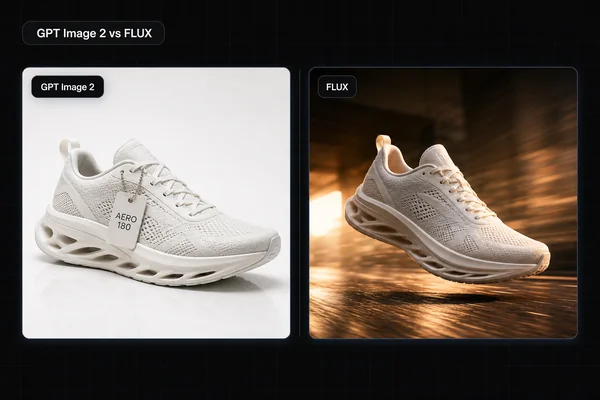
FLUX.2 Flex. It preserved the words but rendered arcadia.example as arcadia example. That is a failure for a URL even though the result looks clean at a glance. BFL's model overview lists typography and text among FLUX.2's capabilities. First test: short headlines, UI mockups, and brand-color work. Watch out for: punctuation and small copy need explicit full-size inspection. See our GPT Image 2 vs FLUX head-to-head, which covers text directly.
Nano Banana 2 (Gemini 3.1 Flash Image). It preserved every requested character in this output, including the em dash, slash marks, parentheses, date, and lowercase URL. Google's current image-generation guide documents advanced text rendering, but this one file does not establish performance across candidates or scripts. First test: text inside a photoreal scene or a copy-heavy package. Watch out for: route names can change; inspect the live catalog before automating a batch. Read the Nano Banana 2 guide and the Nano Banana 2 vs GPT Image 2 comparison.
Seedream 5 Pro. It preserved every requested character in this output. This is an observed result from the current Masonry route, not a claim about multilingual accuracy, repeatability, or proprietary model specifications. First test: the exact production label at its real copy load. Watch out for: visually plausible but invalid characters still require a character-by-character proof. Our Seedream 4 guide remains useful as historical workflow context, but verify the current route before reproducing it.
How we'd actually make a text-critical image
Say the job is a product ad: a real-looking bottle on a kitchen counter, with a brand name and a tagline that has to be spelled correctly. Here's the workflow that survives contact with reality.
-
Decide what carries the weight. If the words are the point (a poster, a UI, a diagram), begin with the three routes that were exact in this run, then generate at least four candidates per route. If typographic styling is the point, include Ideogram V4, but do not assume a polished layout means every digit is correct.
-
If the photo is the point, split the layers. Generate the photoreal scene on the model that makes the best image, even if its text is mediocre, then handle the text-bearing layer separately on a text-strong model. You get the realism of one model and the typography of another.
-
Proof the spelling before anything else. Read every word out loud, zoom to 100%, and have a native speaker check non-Latin text. Models are confident and wrong. This step is non-negotiable.
-
Fix text in place with a mask edit, don't reroll the whole image. When one label is wrong, mask just that region in GPT Image 2 and regenerate it. The rest of the frame stays pixel-stable, so you don't lose the composition you liked while chasing a fixed word. This is the single biggest time-saver and the reason GPT Image 2 earns its place in a text workflow even when another model made the base image.
The friction in steps 2 and 4 is that they usually mean two or three different tools and a round-trip through an editor. A multi-model canvas removes that. In Masonry, you can generate the photoreal base on one model, drop a text layer from a text-strong model onto the same canvas, and run the mask-and-fix edit, without exporting and re-importing between apps. The point isn't any one model. It's putting the right model on each layer in one place. If packaging is your use case specifically, our AI product photography tools roundup covers the label-and-bottle side in more depth.
For a second-language campaign asset, use the source-to-market product image localization workflow; it keeps exact-text review separate from native-market approval and source-pixel preservation.