Ideogram Vector is live on Masonry as ideogram-vector, and it is the second route on the platform that returns real SVG files. Send a prompt with no image and it runs text-to-vector, generating logos, posters, and illustrations as editable vector markup. Attach one image and the same key switches to image-to-vector, converting that image into vector shapes; the prompt is not used for a conversion. Both endpoints hand back an image/svg+xml file with the name vector.svg.
The useful part of a launch post is not the format claim. It is three files that were generated, downloaded, opened, and measured, plus the one behaviour that will actually change how you queue work: whether an image is attached decides which endpoint runs.
Evidence boundary: this article rests on six SVG generations across the two endpoints on October 22, 2026, three of which are shown below. Each is a single run of a single input. There were no repeated trials, no held-out prompt set, no standardized queue timing, no reliability rate, and no leaderboard position. File facts came from the fal responses and from opening the downloaded SVGs; path counts came from counting <path> elements. Masonry bills each SVG in credits and shows the cost before each generation; the price comes from fal list rates checked October 23, 2026, set by quality for text-to-vector and flat for image-to-vector. Nothing here establishes how the route behaves on your prompts, your photos, or your acceptance bar.
Quick answer
- New route:
ideogram-vector. A prompt with no image runs text-to-vector; one attached image switches the call to image-to-vector. - Returned format:
image/svg+xmlon all six files: zero embedded raster images, zero base64 payloads, zero<text>elements. Headlines arrive as outlined paths. - Measured files: a 4,739-byte logo with 7 paths at 2048×2048; a 1.1 MB poster with 2,001 paths at 1536×2048; a 681 KB photo conversion with 581 paths at 1024×1024.
- Seed: the published schema lists one; fal rejected it on all four attempts on October 22, 2026, and responses returned null. Reruns vary.
- Not established here: multi-image batches, quality-tier gaps, latency, reliability, or any Masonry credit price.
The two endpoints and what they accept
| Item | Checked October 22, 2026 | Production implication |
|---|---|---|
| Route key | ideogram-vector | Pin the exact key in automation; the raster Ideogram routes are different models. |
| Text-to-vector input | Runs when no image is attached. Prompt (required), quality low/medium/high, 17 aspect ratios from 1:4 to 4:1 plus auto | No reference images: an attached image switches the call to image-to-vector. |
| Image-to-vector input | Runs when one image is attached. JPEG/PNG/WebP up to 50 MB; prompt, quality, and aspect are not sent | The SVG keeps the input image's frame. |
| Output | images[] with URL, content_type, file name vector.svg, file size | Download promptly; fal file URLs expire. |
| Reproducibility field | None (seed rejected, response seed null) | Generate candidates and pick; there is no number to hold. |
The image rows deserve emphasis because they change what an attachment means. On a route such as GPT Image 2, an attached image is a reference that steers the prompt. Here it is the input to a conversion: the call switches to image-to-vector, the prompt is not sent, and the SVG redraws the attached image. To generate from a prompt, send it without an image.
The seed row deserves emphasis too, because the schema says otherwise. The fal API schema documents a seed integer from 0 to 2147483647. On October 22, 2026, four text-to-vector submissions carrying a seed — 7 three times, 0 once — each came back input_value_error within a second, while the identical prompt without the field succeeded. Rerun scripts should not assume a seed exists.
Three shipped SVGs
A logo in under 5 KB
The brief asked for a minimal geometric coffee bean from two interlocking arcs, in terracotta and cream, with no text. The file is seven paths: background, two bean halves, shading shapes. Nothing to delete, nothing to merge. That sparseness is the specific thing worth checking in a logo run, because a 400-path mark with overlapping fills is a cleanup job, not a deliverable.
A headline that survived contact with vector
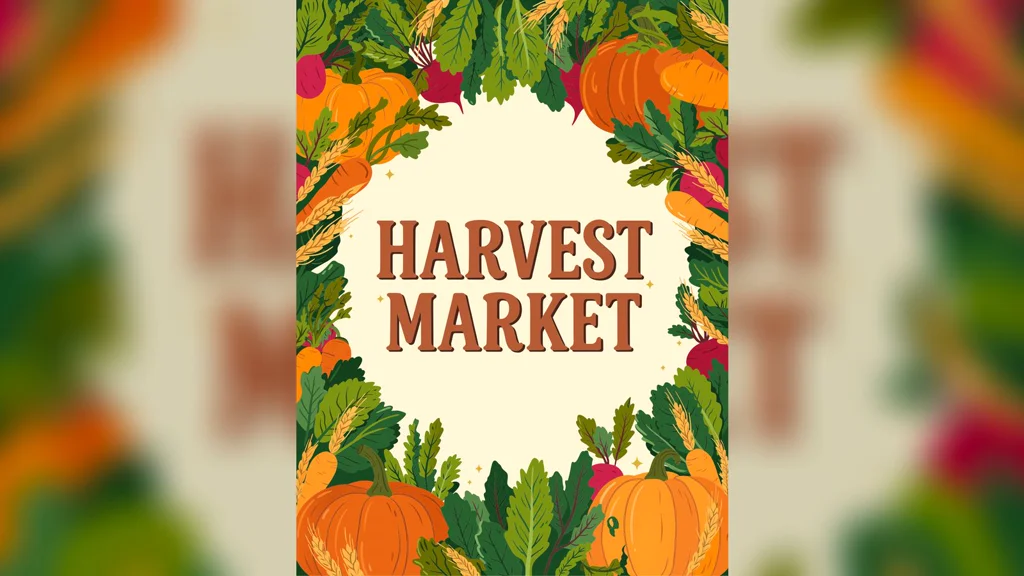
The brief put the headline in quotes and named the style, border, and background. HARVEST MARKET came back with all fourteen letters correct in this single run. The aspect behaved too: a 3:4 request returned exactly 1536×2048.
Read the fine print of that success. The letters are outlines, not live type: there is no <text> element in the file, so a typo cannot be fixed by retyping; it can only be reshaped or regenerated. Spell-check the brief before submitting, then proof the render character by character the same way our text-rendering test proofs raster headlines. Vector does not remove the proof step; it removes the retracing step.
A photograph redrawn as 581 paths
The conversion keeps what matters for downstream artwork: the face reads as the same person, the blouse print survives as lavender sprigs, the cafe chairs and awning sit where they should. Detail collapses the way posterization always collapses it: stone texture becomes flat regions, hair becomes ribbon shapes. Judge it as a starting point for merch or editorial illustration, the way you would judge a junior designer's first pass: composition and identity preserved, finish still yours to add.
Choosing between the vector routes
For finished pixel images with typography: Ideogram V4, covered in our text-rendering test and our prompting guide.
For anything that must ship as paths: Ideogram Vector. The decision rule is the deliverable format, not taste. If the asset ends in a layout tool as editable shapes (logo, icon set, signage, packaging direction), generate it here. If it ends as a flat export (hero image, ad creative, photoreal scene), generate it on a raster route.
This article ran no auto-tracer, so it makes no path-quality claim against tracing a raster image. The practical test is to open both files in a vector tool and count what you would delete; the logo above has 7 paths. For prompt construction that transfers across either route, the discipline in the prompting guide still applies: name the subject, constrain the palette, quote the copy.
Not established here
- Batches of more than one SVG per request. Every run here asked for 1.
- Quality-tier gaps. Low and medium each ran on different briefs, which cannot separate tier from prompt.
- Latency, queue time, throughput, retry rate, or failure rate. (For the record, fal reported 31.8 seconds of inference time on the poster run: one observation, not a benchmark.)
- Identity or product fidelity across repeated conversions.
- Any Masonry credit price, margin, or per-generation cost to you.
Bottom line
One key, two endpoints chosen by whether an image is attached, and one file format that matters: real SVG with no embedded pixels, headlines that survive as outlines, and no seed to lean on. The three files here show the route working across the jobs vector work actually is: a featherweight mark, a typographic poster, a photo redrawn as shapes. They do not rank the route against anything.
Start with the live route, quote the headline, cap the palette, measure the delivered file, and compare cost per accepted asset rather than cost per generation. The full spec sheet with prompt examples lives on Ideogram Vector's model page. Browse the rest of the lineup on Masonry's model hub.