

- SVG, true vector
Output format
- HARVEST MARKET exact
Text test
- Text-to-vector, image-to-vector
Modes
- 1, converted to SVG
Image input
About Ideogram Vector
Ideogram Vector is Ideogram's vector route on Masonry, and it does two jobs that raster image models cannot. Send a prompt with no image and it runs text-to-vector, generating true SVG files — logos, posters, illustrations — with real editable paths rather than pixels. Attach one image and the same key switches to image-to-vector, converting that image into vector shapes without using the prompt, so an existing photograph can become scalable artwork. Both endpoints return the SVG directly, with an `image/svg+xml` content type and no embedded raster data: six files generated on October 22, 2026 contain zero embedded images and zero base64 payloads, only paths, fills, and gradients.
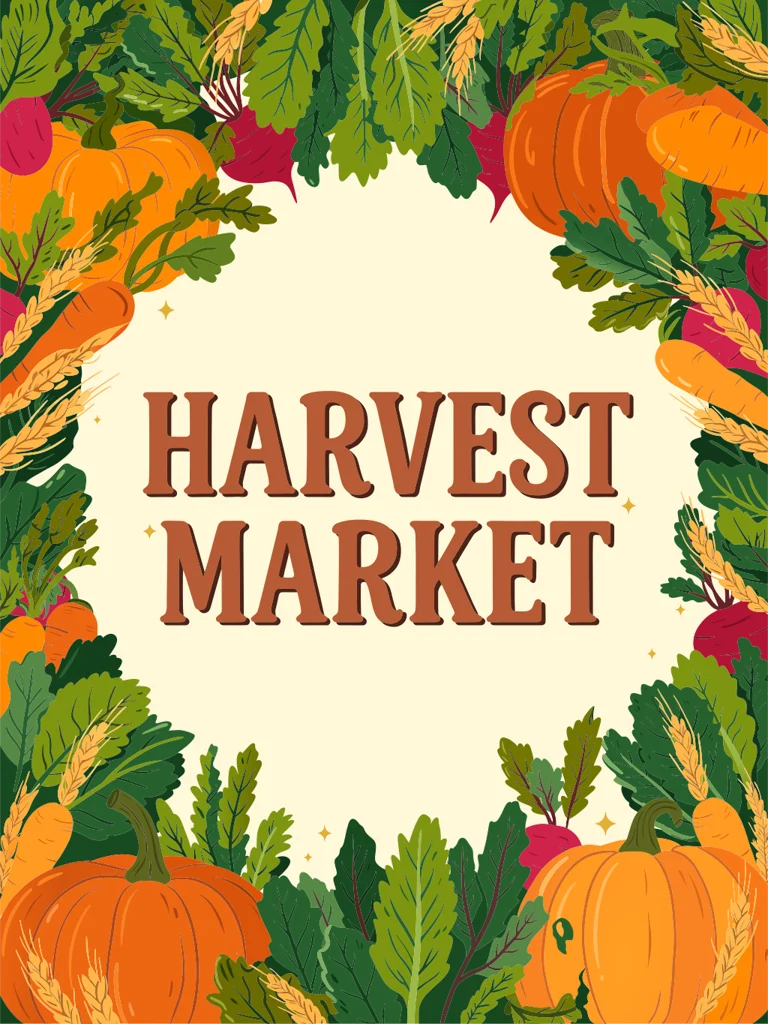
The reason to reach for this route over Ideogram's raster models is the file format. In the single run behind this page, a poster brief asking for the words HARVEST MARKET in a bold hand-lettered serif came back with every letter correct, drawn as vector outlines at 1536×2048: lettering that arrives as scalable shapes instead of pixels that must be retraced. One run is not an accuracy rate. A logo brief in the same session returned a 4,739-byte file with 7 paths, clean enough to open and edit directly.
Why teams choose Ideogram Vector
Choose Ideogram Vector when the deliverable is vector, not just vector-looking. Against Ideogram V4, the difference is the file: V4 renders raster posters whose lettering must be retraced before production, while Vector hands over paths. The same key also redraws an attached image as vector shapes, so one route covers generating new artwork from a prompt and converting an existing image. What this page does not claim is a quality ranking against other vector routes or against auto-tracing a raster image: no comparison run was made.
What Ideogram Vector can do
The capabilities that set Ideogram Vector apart and earn its place in a brief
True SVG Output, Not Traced Pixels
Every file measured for this page is genuine vector markup — paths with fills, plus gradients where the artwork needs them — and contains no embedded raster image. Open the file in Illustrator, Figma, Affinity Designer, or Inkscape and the artwork is selectable shapes, not a picture of shapes.
A Headline That Came Back Spelled Right
A poster brief naming the exact headline HARVEST MARKET returned with all fourteen letters correct in a bold serif, drawn as vector outlines. That is one run, not an accuracy rate, so proof every letter before posters, signage, or packaging direction go to print.
Photo-to-Vector Conversion
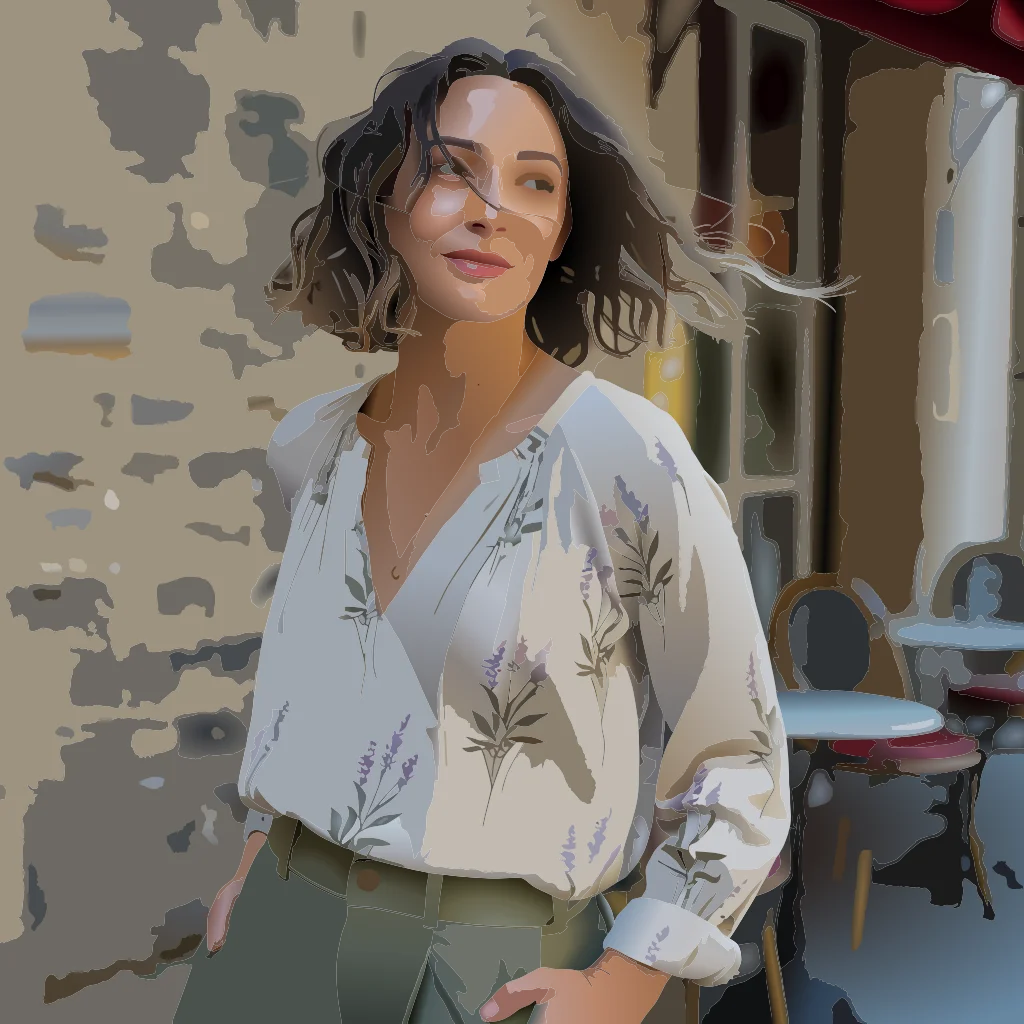
Attach a JPEG, PNG, or WebP up to 50 MB and the route switches to image-to-vector, redrawing that image as vector shapes without using the prompt. A street photograph converted on October 22, 2026 came back as a 1024×1024 SVG with 581 paths, keeping the face, clothing print, and background readable as flat vector regions.
One Key, Routed by the Attachment
Masonry serves both endpoints under ideogram-vector. A prompt with no image runs text-to-vector; one attached image switches the call to image-to-vector. An attached image is converted, not used as a reference for the prompt, so send a prompt alone to generate new artwork.
Three Qualities and Seventeen Aspect Ratios
Text generation exposes low, medium, and high quality and 17 aspect ratios from 1:4 to 4:1, including 1:1, 3:4, and 16:9, plus auto. A 3:4 request returned exactly 1536×2048, so the aspect you ask for is the frame you get. Quality tiers were each run once, which is not enough to price the fidelity gap.
Small Files That Scale With Detail
A simple logo mark cost 4,739 bytes and 7 paths; a detailed poster cost 1.1 MB and 2,001 paths. File weight tracks artwork complexity, so icon and logo work stays featherweight while illustrated scenes grow. Plan storage and transfer around the complexity of the brief, not a fixed per-file size.
Where teams reach for Ideogram Vector
- Logo and wordmark exploration that arrives as editable SVG
- Event posters and signage with exact headline typography
- Converting product or lifestyle photos into vector artwork for merch and print
- Icon sets and spot illustrations in flat vector styles
- Packaging and label direction with accurate product names
- Social graphics where the type must stay crisp at any size
What sets Ideogram Vector apart
The strengths teams reach for, shown on real renders.
A Headline Drawn as Vector Outlines
The poster brief asked for HARVEST MARKET in a bold hand-lettered serif with an autumn border. Every letter came back correct at 1536×2048, drawn as 2,001 vector paths — typography that scales to signage size without redrawing.

A Logo in Under 5 KB
The roastery brief asked for a geometric coffee-bean mark in terracotta and cream with no text. The result is 4,739 bytes and 7 paths: the kind of featherweight file that drops straight into a site header or app icon.
A Photograph Redrawn as 581 Paths
The image-to-vector endpoint converted a street photograph into a 1024×1024 SVG that keeps the subject, clothing print, and cafe background readable as flat vector regions — a starting point for merch or editorial illustration.
Frequently asked questions
What teams need to know about creating with Ideogram Vector in Masonry
What is Ideogram Vector on Masonry?
It is Ideogram's vector generation route, keyed as ideogram-vector. A prompt with no image runs text-to-vector, which generates SVG files from the prompt; attaching an image switches the call to image-to-vector, which converts that image into vector shapes and does not use the prompt. Both return real SVG markup with an image/svg+xml content type.
Is the SVG output true vector or a traced raster image?
True vector. Six files generated on October 22, 2026 contain only paths, fills, and gradients — zero embedded raster images and zero base64 payloads. That is the meaningful distinction — the artwork opens as selectable shapes in Illustrator, Figma, Affinity Designer, or Inkscape rather than as a picture wrapped in an SVG container.
How accurate is text inside Ideogram Vector images?
In the run behind this page, a poster brief asking for the headline HARVEST MARKET returned with all fourteen letters correct, drawn as vector outlines. That is one run on one headline, not an accuracy rate, so compare copy character by character before anything goes to print.
Can I re-render the same result with a seed?
No. The endpoint schema published on fal.ai lists a seed field, but fal rejected seeded text-to-vector calls with an input validation error across four runs on October 22, 2026, and responses returned a null seed. Reruns vary, so generate candidates and pick rather than trying to pin a number.
What happens when I attach an image?
The call switches to image-to-vector and converts that one image into SVG. The prompt, quality, and aspect ratio are not sent with a conversion, and the SVG keeps the input image's frame — a 1024×1024 street photo came back as a 1024×1024 SVG with 581 paths.
What quality and aspect ratio controls exist?
Text-to-vector lists low, medium, and high quality with medium as the default, and seventeen aspect ratios from 1:4 to 4:1, including 1:1, 3:4, and 16:9, plus auto. A 3:4 request in the measured run returned exactly 1536×2048. Each quality tier was run once here, which establishes that the control exists, not how much fidelity each step buys.
Can I supply reference images?
No. On Masonry an attached image is not a reference for the prompt; it switches the call to image-to-vector, which converts that image into SVG. To generate new artwork, send a prompt with no image.
How big are the SVG files?
They track artwork complexity. Measured files range from 4,739 bytes and 7 paths for a simple logo mark to 1.1 MB and 2,001 paths for a detailed illustrated poster, with a photo conversion at 681 KB and 581 paths in between. Simple icon and logo work stays featherweight; illustrated scenes grow.
How does Ideogram Vector compare to Ideogram V4?
V4 is Ideogram's raster route, and it remains the pick when the deliverable is a finished pixel image. Vector is the pick when the deliverable must be editable paths — logos, icon sets, signage, and anything that scales. The typical workflow is to prove typographic direction on either route, then finish production artwork from the SVG.
How much does Ideogram Vector cost?
Masonry bills Ideogram Vector per SVG in credits and shows the cost before each generation. The price is set from fal's list rates, checked October 23, 2026, so text-to-vector costs more at each step up in quality, and image-to-vector has one flat price.
What is Ideogram Vector?
Ideogram Vector is an AI image generation model from Ideogram, available inside Masonry, the AI creative agent teams use to produce marketing, product, and brand images.
How does my team use Ideogram Vector in Masonry?
Open a Masonry canvas, pick Ideogram Vector from the model selector, and describe the image you need: a product shot, an ad creative, a social post. Masonry generates it, then you refine, edit, and combine Ideogram Vector with other models in one workspace.
Is Ideogram Vector free to try?
Yes, you can start generating images with Ideogram Vector on Masonry's free tier, then scale up with higher limits and priority processing as your team grows.
How do I write good prompts for Ideogram Vector?
Name the exact words in quotes and the layout around them, then constrain the palette. Vector output rewards short copy and limited colors: fewer words render more reliably, and two or three flat colors keep path counts — and file sizes — small. Ask for what the frame needs and nothing else.
Who makes Ideogram Vector?
Ideogram Vector is built by Ideogram. Inside Masonry it runs alongside 50+ image and video models, so your team can pick the right one for each brief without switching tools.
Start creating with Ideogram Vector
Generate, edit, and compare across 50+ models in one workspace.
Guides for Ideogram Vector
Prompt walkthroughs and examples from the Masonry blog
Explore more AI models
Compare Ideogram Vector with other models teams run in Masonry