

- 2048×2048
Max Masonry size
- Up to 10
Reference images
- 9
Listed dimensions
- Generate + reference
Current modes
About Seedream 5.0 Pro
Seedream 5.0 Pro is ByteDance's flagship image model for structured generation and reference-led editing. In Masonry, the `seedream-5-pro` route can start from a text brief or combine up to 10 approved reference images, with nine listed output dimensions from 1024×1024 to 2048×2048. That makes it useful for merchant work that has to move between square product tiles, portrait social placements, and wide campaign frames without changing tools.
Our first-hand tests show why the model belongs in a comparison rather than on a pedestal. One 1024×1024 generation reproduced the three requested label lines “ALBA”, “NIGHT REPAIR”, and “30 ML” exactly. Two 1536×1536 edits created convincing dark-surface reflections and kept the visible label words, but both changed the source bottle's proportions. A separate process-portrait output followed the wardrobe and studio cues while turning active wheel work into a posed scene. For ecommerce teams, the practical rule is simple: use the model to create candidates, then compare product shape, closure, label, color, quantity, and claims with the approved source before publishing.
Why teams choose Seedream 5.0 Pro
Choose Seedream 5 Pro when the brief benefits from several reference images, short in-image copy, or a range of merchant-ready aspect ratios. Its practical advantage is workflow breadth: one current Masonry route covers text generation and reference-led image work with up to 10 inputs. Do not choose it because a reference supposedly locks the SKU. Our two retained transparent-product edits kept the core identity checklist and exact visible words but changed bottle proportions. For a factual primary packshot, preserve approved photography or composite the approved product; for secondary creative, generate several candidates and calculate cost per accepted asset rather than cost per render.
What Seedream 5.0 Pro can do
The capabilities that set Seedream 5.0 Pro apart and earn its place in a brief
Text Generation and Reference-Led Editing
Start from a written brief or condition the result on approved product, scene, and style images. Masonry exposes generation, image mixing, and style-transfer capabilities through one model route.
Up to 10 Reference Images
Combine as many as 10 inputs in one request for a product, background, composition reference, and supporting brand assets. More references add context; they do not guarantee exact product preservation.
Short In-Image Copy
Useful for testing headlines, short labels, and localized creative. In one Masonry product sample, all three requested label lines were exact; review every new output because one success is not a repeatability rate.
Nine Listed Masonry Dimensions
Choose square, portrait, or landscape outputs from 1024×1024 through 2048×2048, including 16:9, 9:16, 3:2, and 2:3 placements for storefront and campaign channels.
Seeded Comparison Runs
Set an optional seed in the current Masonry contract so the run record is reproducible. Seeds help preserve an audit trail, but the same number is not equivalent noise across different model architectures.
Strong Material and Reflection Concepts
The two retained transparent-bottle edits produced the strongest dark reflection treatment in that limited model test. Both also changed bottle geometry, so scene quality and product fidelity must be scored separately.
Where teams reach for Seedream 5.0 Pro
- Secondary PDP and marketplace imagesPlace an approved product reference into a new surface or background, then reject candidates that alter the sold SKU.
- Campaign aspect-ratio variantsExplore square, portrait, and landscape compositions for storefronts, social ads, and email without changing model routes.
- Multilingual promotional conceptsPrototype short localized headlines and label treatments, with a native-language reviewer checking every character before release.
- Multi-reference compositionsCombine a product source, layout reference, palette, and environment cues in one brief using up to 10 inputs.
- Packaging and label conceptingTest short copy and hierarchy on fictional or preproduction packaging; keep approved artwork composited when exact legal copy matters.
- Product-material art directionExplore glass, liquid, metal, shadow, and reflection treatments while reviewing physical plausibility independently from visual appeal.
- Controlled model comparisonsRun the same prompt, dimensions, source, candidate count, and acceptance sheet against another current model before standardizing a workflow.
What sets Seedream 5.0 Pro apart
The strengths teams reach for, shown on real renders.
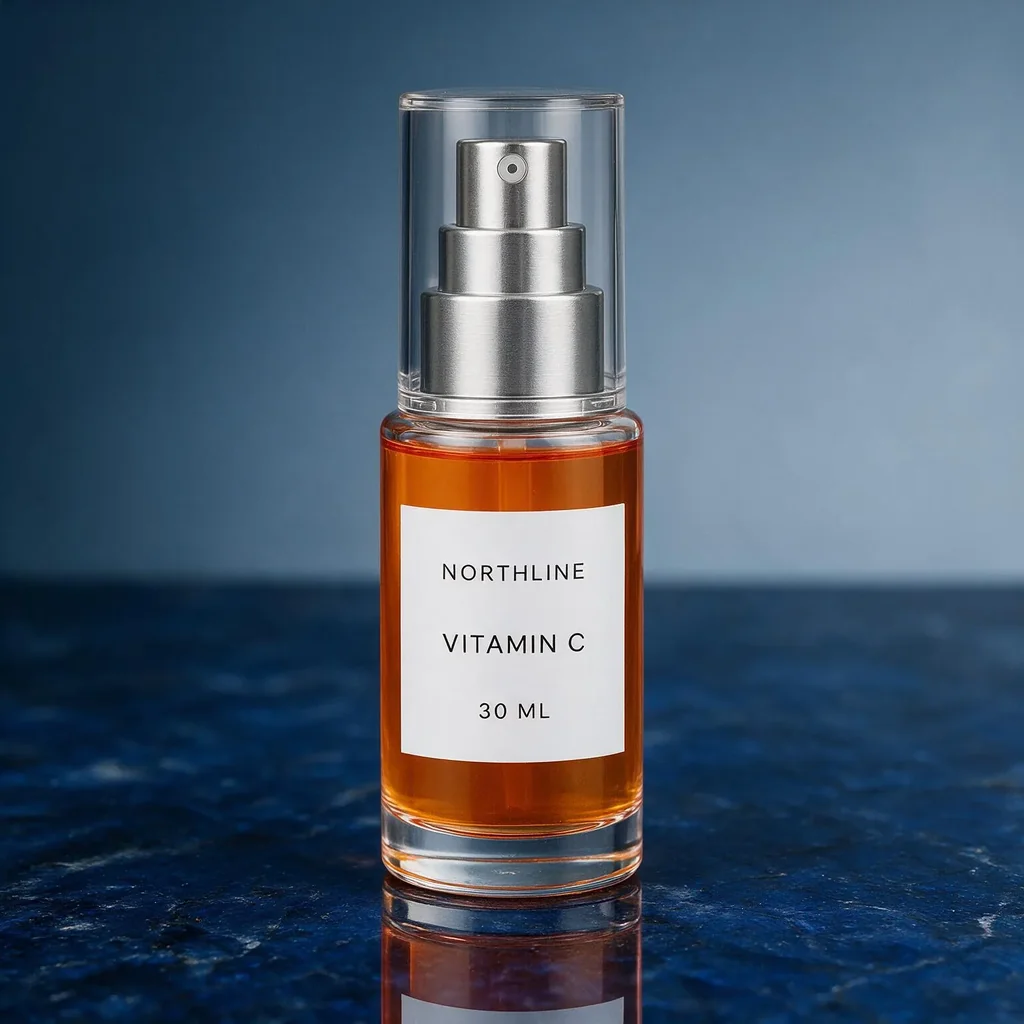
Dark-Surface Product Art Direction
This retained 1536×1536 Seedream 5 Pro edit created a strong controlled reflection and clean material separation. The bottle, cap, pump, and label relationships visibly drifted, so it is a secondary-creative candidate rather than an approved primary packshot.
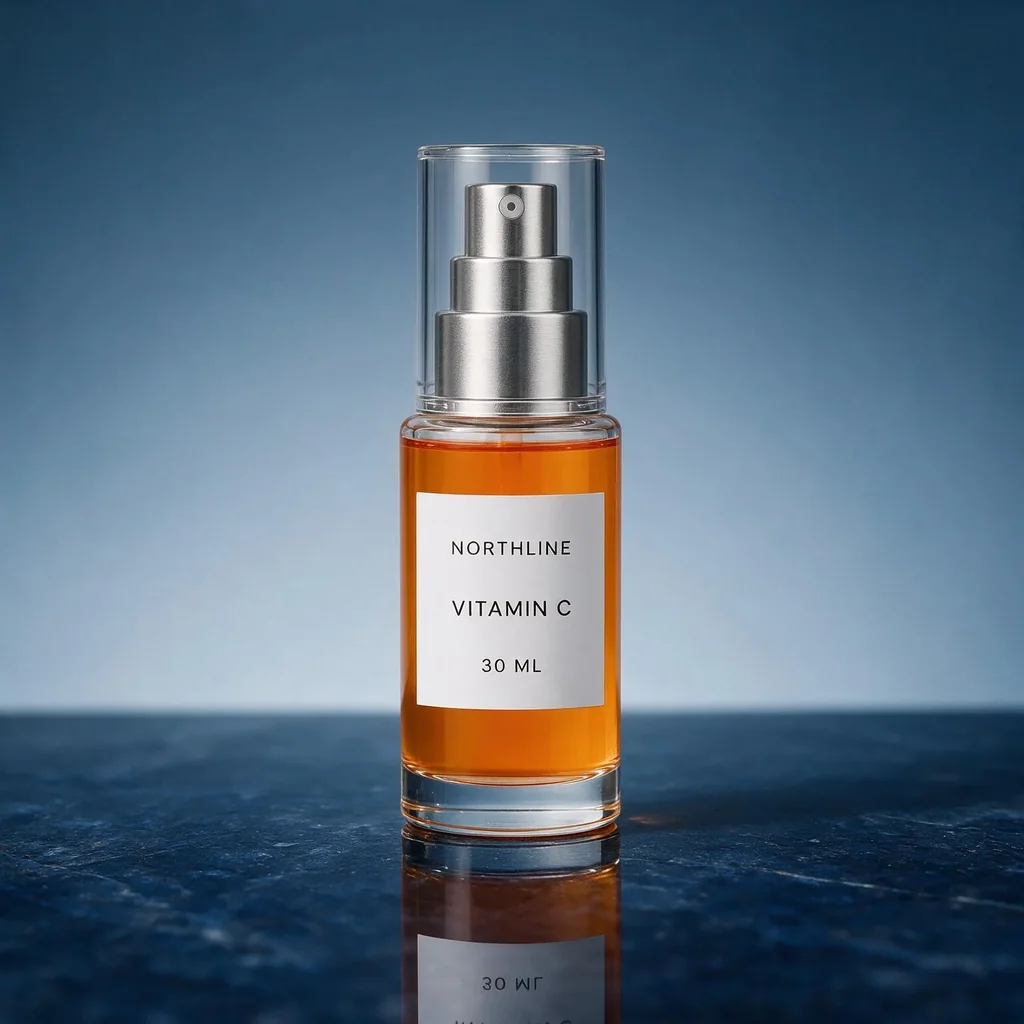
Exact Visible Words, Changed Geometry
A second candidate kept “NORTHLINE”, “VITAMIN C”, and “30 ML” readable while making the bottle taller and the label larger. It demonstrates why text accuracy and SKU fidelity need separate review gates.
Frequently asked questions
What teams need to know about creating with Seedream 5.0 Pro in Masonry
What is Seedream 5 Pro best used for in ecommerce?
It is a useful candidate for secondary product scenes, campaign variants, short-copy promotional concepts, and multi-reference compositions. The current Masonry route accepts up to 10 references and nine listed dimensions. Keep approved photography as the factual source and review every generated candidate for product drift.
Can Seedream 5 Pro preserve an exact product from a reference image?
A reference improves grounding but is not an identity lock. In Masonry's two retained transparent-bottle edits, the core product cues and visible words survived while bottle, cap, and label proportions changed. Compare silhouette, closure, label, color, fill, quantity, and every claim with approved sources before publishing.
How many reference images can I use in Masonry?
The live `seedream-5-pro` contract checked August 17, 2026 accepts up to 10 input images. Assign each reference a specific role—product truth, composition, palette, environment, or style—so the model is not left to guess which details should win.
What image sizes does Seedream 5 Pro support in Masonry?
The current route lists 1024×1024, 1536×1024, 1024×1536, 1920×1080, 1080×1920, 1536×1536, 2048×1536, 1536×2048, and 2048×2048. Recheck the live model parameters before hard-coding a production batch because hosted contracts can change.
Is Seedream 5 Pro good at text in product images?
It is worth testing for short text. One retained Masonry sample reproduced the requested three-line label exactly, and two reference edits kept three visible label lines. Those are individual outputs, not a reliability rate. Check every character, punctuation mark, unit, claim, and reading order before release.
Can I use it for multilingual ad creative?
The provider positions the model for native text across 14 languages. Treat that as a capability to test, not automatic approval. A native-language reviewer should verify spelling, diacritics, direction, cultural meaning, and any regulated claim in the final placement.
Does the model support both generation and editing?
Yes. Masonry currently exposes text-to-image plus image mixing and style-transfer capabilities for this route. You can begin with a written concept or supply references for an edit-style workflow without selecting a separate model ID.
Can I set a seed for repeatable tests?
Yes, the current Masonry parameter contract exposes an optional integer seed. Record the seed with the prompt, references, dimensions, date, and downloaded output. A shared seed does not make noise equivalent across different model families, so compare the visible result rather than the number.
Is Seedream 5 Pro reliable for glass and reflective products?
In one limited transparent-product test, its two candidates produced the strongest dark-surface reflection treatment among the retained samples. Both also changed product proportions. Score material and scene quality separately from exact-SKU geometry, and use an approved packshot or compositing when the product pixels must remain factual.
Should I use generated imagery as the main product image?
Only after it passes the marketplace rules and a strict product-truth review for the exact SKU. For many merchants, approved factual photography is the safer primary image while generated scenes are evaluated as secondary creative. Never let an attractive scene silently alter quantity, included parts, color, dimensions, label copy, or claims.
How should I compare Seedream 5 Pro with another image model?
Hold the source, prompt, dimensions, candidate count, and acceptance sheet constant. Reject failures before ranking aesthetics, calculate cost per accepted asset, and keep the raw files and run metadata. A one-image winner is a useful observation, not a universal model ranking.
How do I select Seedream 5 Pro in the Masonry CLI?
Use the model slug `seedream-5-pro`, inspect the current contract with `masonry models params seedream-5-pro`, then pass the slug with your image command. Store the job ID, prompt, source references, dimensions, seed, and review result together so the production decision remains auditable.
What is Seedream 5.0 Pro?
Seedream 5.0 Pro is an AI image generation model from ByteDance, available inside Masonry, the AI creative agent teams use to produce marketing, product, and brand images.
How does my team use Seedream 5.0 Pro in Masonry?
Open a Masonry canvas, pick Seedream 5.0 Pro from the model selector, and describe the image you need: a product shot, an ad creative, a social post. Masonry generates it, then you refine, edit, and combine Seedream 5.0 Pro with other models in one workspace.
Is Seedream 5.0 Pro free to try?
Yes, you can start generating images with Seedream 5.0 Pro on Masonry's free tier, then scale up with higher limits and priority processing as your team grows.
How do I write good prompts for Seedream 5.0 Pro?
Write the desired end state, then list the product facts that cannot change. For reference edits, name each invariant—silhouette, closure, label geometry, exact words, color, fill, quantity, and prohibited additions. Generate more than one candidate and review at full resolution. Quotation marks help make requested copy unambiguous, but every character still needs human verification.
Who makes Seedream 5.0 Pro?
Seedream 5.0 Pro is built by ByteDance. Inside Masonry it runs alongside 50+ image and video models, so your team can pick the right one for each brief without switching tools.
Start creating with Seedream 5.0 Pro
Generate, edit, and compare across 50+ models in one workspace.
Guides for Seedream 5.0 Pro
Prompt walkthroughs and examples from the Masonry blog
Explore more AI models
Compare Seedream 5.0 Pro with other models teams run in Masonry