To create an AI product-bundle image from separate photos, give the model one approved reference per sold component, declare the exact quantity of each SKU, and review the result against a component manifest. If a box or insert is part of the offer, it needs its own approved reference. Otherwise, the model can preserve the products yet still invent packaging the merchant does not sell.
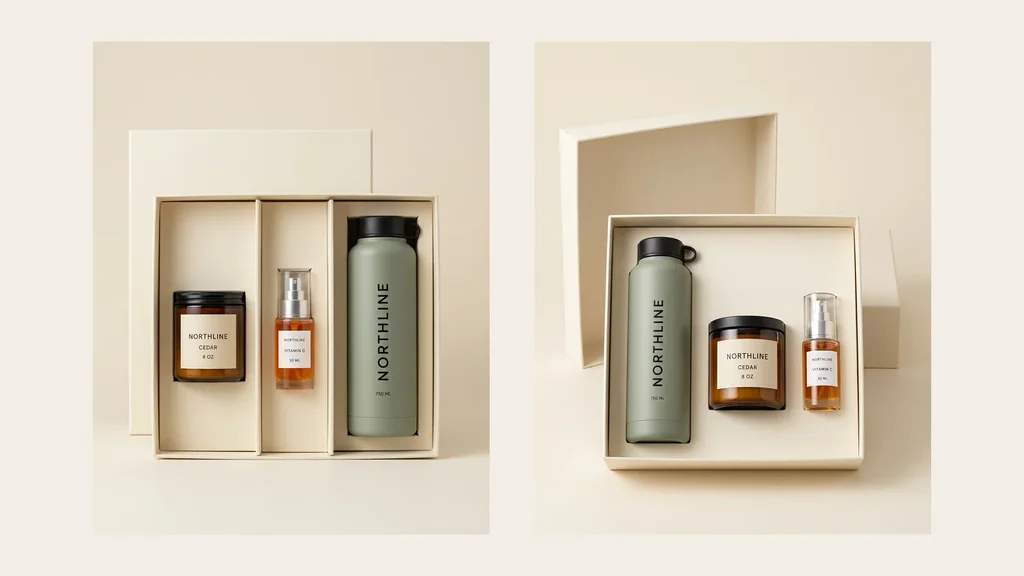
We tested that boundary with three fictional NORTHLINE products: one Cedar candle, one Vitamin C serum, and one sage 750 ML bottle. Two Nano Banana 2 jobs received the same three sources and the same fixed-bundle brief. Both returned exactly one of each named component with readable labels. They also returned two different cream gift boxes, even though no packaging source was supplied.
The useful outcome is not “AI made a gift set.” It is a production rule: component truth and packaging truth are separate approval layers. Both candidates can support merchandising exploration; neither should become factual primary listing media for a boxed gift set until the real box and insert are sourced.
Evidence boundary: the three NORTHLINE sources are fictional controlled assets from earlier Masonry tests. The two jobs, outputs, route, seeds, and review dispositions below are real. This is a two-candidate production example, not evidence of physical fidelity, route reliability, Shopify conversion lift, or bundle sales performance.
Why bundle imagery is a distinct merchant job
A bundle is not just another catalog row. It asks one image to communicate several sold products, exact quantities, variant choices, and sometimes the packaging that unifies the offer.
Shopify defines a bundle as two or more related products and distinguishes fixed, multipack, and mix-and-match bundles. A created bundle becomes a separate product listing, so its media needs a listing-level approval rather than inheriting truth automatically from component pages. Read Shopify's current bundle guidance and bundle eligibility and type definitions.
The image problem appears in merchant conversations. One Shopify merchant reported that variant image swatches from the first product were incorrectly reused for another product inside a bundle, making the selected colors ambiguous. Read the Shopify Community report. In a February 2026 gift-set critique, sellers repeatedly asked the merchant to remove anything not included, show the finished packaging, and make the contents easier to distinguish. Read the qualitative seller discussion.
A bundle-app concept also proposed automatically creating images from bundled items. That is vendor discovery, not proof that automated images are accurate or valuable. Read the proposal with that caveat.
The supplied three-month Search Console Queries.csv contains no rows for bundle images, gift-set images, multipacks, or product-set photography. This article is therefore an adjacent-intent expansion grounded in a distinct merchant workflow and direct product fit—not a claim that Masonry already ranks for this topic.
Step 1: define the sold bundle before generating
The source sheet contains one approved image per component. It does not contain a gift box.
The fixed bundle manifest was:
| Component | Required quantity | Immutable visible identity | Approved source |
|---|---|---|---|
NTH-CNDL-01 | 1 | amber cylindrical jar, black lid, NORTHLINE / CEDAR / 8 OZ | yes |
NTH-SRM-30 | 1 | clear cylinder, orange liquid, silver pump, clear cap, NORTHLINE / VITAMIN C / 30 ML | yes |
NTH-BTL-SGE | 1 | matte sage bottle, black cap and loop, vertical NORTHLINE, 750 ML | yes |
NTH-GIFT-BOX | 1 | actual dimensions, material, color, insert, closure, included filler | missing |
Download the completed bundle-review TSV. It records the exact sources, required counts, two real job IDs, per-layer review, and final disposition.
Do not let the prompt become the only record of what is sold. The manifest should be generated from the same bundle and variant mapping used for inventory. If the shopper can choose component colors, each valid combination needs an explicit mapping or a storefront visualization system that is tested separately.
Step 2: send all component references with an exact-count contract
The live Nano Banana 2 route accepted up to 14 references on August 15, 2026. This run supplied three references, requested 4:5 output (928 × 1152), and used seeds 2608151 and 2608152.
The exact command pattern was:
masonry image "Create one premium ecommerce hero for a fixed three-component gift bundle. Include exactly one candle, exactly one serum, and exactly one sage bottle from the supplied references. Preserve every component's identity, visible text, and quantity. No duplicate, missing, substituted, merged, cropped, or extra product. Treat packaging as conceptual unless an approved packaging reference is supplied." \ --model gemini-3.1-flash-image-preview \ --aspect 4:5 \ --seed 2608151 \ --ref ./sources/NTH-CNDL-01.webp \ --ref ./sources/NTH-SRM-30.webp \ --ref ./sources/NTH-BTL-SGE.webp
The CLI returned asynchronous job IDs. Candidate A was cfc94b22-796e-4f2b-a256-a9857373368e; candidate B was 2dc01c3a-ba0b-4183-8baa-d8e02a008e0b. Both jobs reached succeeded and downloaded normally. A service success only proves that a file exists.
Step 3: review component truth and packaging truth separately
Candidate A: passes count, fails packaging truth
Candidate A follows more of the scene brief: it uses a straight-on view, an open lid, and a fitted compartment for each item. That visual compliance is not evidence that NORTHLINE sells that insert. If a shopper receives a different box, the image creates a product-expectation problem despite showing the right three components.
Candidate B: passes count, fails packaging truth differently
Candidate B changes the order, scale, camera angle, lid geometry, tray depth, and insert design. The disagreement is direct evidence that the packaging came from the model rather than the supplied product record.
The acceptance decision
| Gate | Candidate A | Candidate B | Required action |
|---|---|---|---|
| exactly one candle | pass visible review | pass visible review | keep component row |
| exactly one serum | pass visible review | pass visible review | keep component row |
| exactly one sage bottle | pass visible review | pass visible review | keep component row |
| readable component identity and quantity | pass visible review | pass visible review | compare against approved source at full size |
| source-locked component geometry | review | review | use factual cutouts or physical photography when exactness is required |
| approved box and insert | fail: no source | fail: no source | photograph, render, or supply the real packaging |
| factual primary bundle image | reject | reject | do not publish as the factual listing anchor |
| disclosed merchandising concept | conditional | conditional | legal/brand review and clear internal disposition |
This run produced two service successes, six component-presence passes across the three required items, and zero packaging-truth passes. That is not a 0% model success rate. It is an honest denominator for the intended factual-listing job.
Step 4: choose the production route from the truth requirement
Use one of four routes:
- Real bundle photography: assemble the actual sellable bundle and photograph it. This is the strongest primary-listing source when packaging and component scale matter.
- Deterministic composite: cut out approved component and packaging images, place them into a locked scene, and build shadows consistently. This preserves exact product pixels while allowing layout control.
- Reference-led generation: generate secondary merchandising concepts, then reject any count, identity, variant, geometry, packaging, claim, or included-item failure. Keep the source images on the page.
- Scene-plate generation: generate only the background and presentation environment, then composite approved products and packaging into it.
If the box is not included in the sale, do not make it look included. If decorative props appear, the product page should make the sold contents unmistakable without relying on fine-print correction.
Step 5: hand the approved image to the Shopify listing
Shopify's bundle system owns component and inventory behavior; this image workflow does not. For a fixed bundle, retain a record that maps the bundle listing to the exact component product and variant IDs, quantities, and approved media version. Then QA:
- the bundle title and primary image show the same contents;
- selectable variants display the matching component colors and images;
- cart and checkout preserve the selected combination;
- unavailable component variants cannot be represented as available;
- the product description distinguishes included items from decorative presentation;
- thumbnails and mobile crops keep every sold component legible.
The existing Shopify variant-image workflow covers the variant, cart, and checkout checks in more detail. The catalog batch workflow explains how to keep job IDs, sources, review states, and cost per accepted asset when this expands to many bundle listings.
Measure accepted bundle images, not generated concepts
Track the operational funnel:
attempted → service-succeeded → component-count-passed → component-truth-passed → packaging-truth-passed → channel-accepted → published
Then calculate cost per accepted bundle image using generation, source preparation, packaging photography, compositing, review, reruns, and rejected files. The Masonry CLI did not return normalized per-job cost here, so this article does not invent a dollar estimate.
Use the supplier-photo asset workflow to create reviewed secondary media for one component and the product-fidelity benchmark to understand why readable text does not prove exact geometry. For bundle imagery, the additional question is always: does this image show exactly what the customer will receive—including the package?
If the complementary item is sold only after the initial order rather than as one bundle, use the AI post-purchase cross-sell workflow to separate the purchased SKU, offered SKU, duplicate suppression, authorized discount, fulfillment, and incremental-contribution decision.