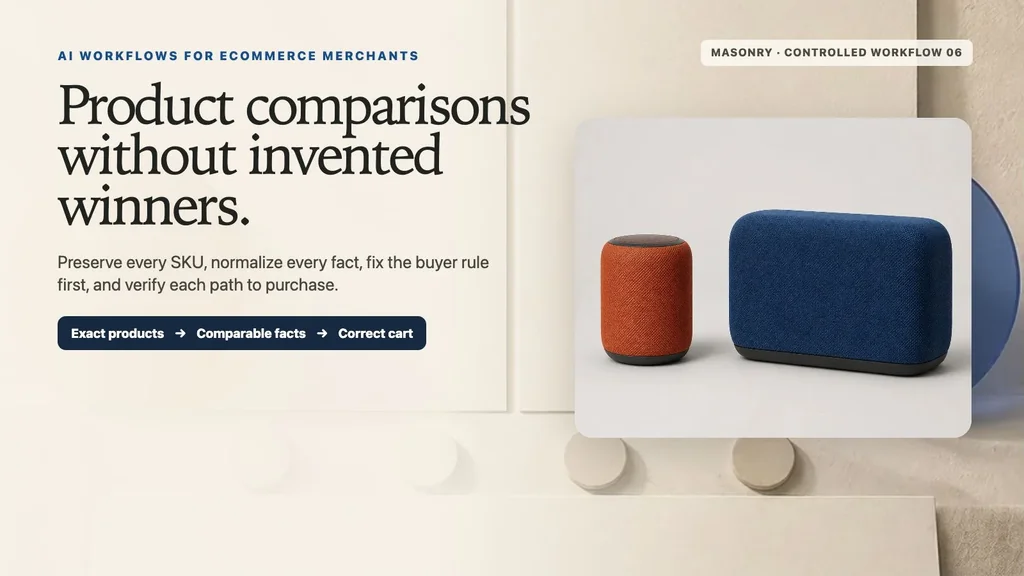
The useful AI product-comparison workflow is approved product sources → normalized comparable facts → buyer requirement fixed in advance → textless visual plate → deterministic products, differences, qualifiers, and destinations → mobile/PDP/cart audit → completed-order economics. AI can create a clear visual system. It should not decide which products are comparable, invent a specification, conceal a tradeoff, or crown a universal winner.
We ran that workflow on two fictional merchant-owned portable speakers: NORTHLINE ROAM MINI at $79.00 USD and NORTHLINE ROAM PLUS at $129.00 USD. A fictional daily-carry requirement is defined before the products are scored: budget at or below $100, product weight at or below 0.50 kg, longest side at or below 120 mm, an exact IP67 requirement, and at least eight hours in the stated battery test. Mini matches five of five thresholds; Plus matches one. That is a rule-specific result—not a claim that Mini is the better speaker for everyone.
Evidence boundary: NORTHLINE, both products, every specification, price, test condition, buyer requirement, destination, and channel state are fictional controlled records. The built-in source-sheet and style-board generations, live Masonry background job, source-preserving composition, deterministic comparison layer, and consistency audit are real. No live storefront, product test, purchase, conversion lift, or legal-compliance result is reported.
Why this is a distinct merchant job
Shopify's own guide defines a product comparison table as similar products arranged in columns with key features or attributes in rows. It distinguishes static tables selected by the merchant from dynamic tools selected by the shopper. Read Shopify's product-comparison overview.
The data layer matters more than the decoration. Shopify's current product-detail documentation says metafields can hold specialized product information such as part numbers, launch dates, related products, and downloadable files, and compatible themes can connect those values to the storefront. The comparison still needs merchant-owned definitions: a weight field that includes packaging for one SKU and excludes it for another is structured but not comparable. Read Shopify's current product-detail guidance.
Baymard's large-scale comparison-tool research identifies two relevant failure modes: inconsistently stored or formatted product specifications can make comparison impossible, and spec-heavy features without plain-language explanations force shoppers to guess or leave the site. Its mobile research also found that small viewports limit side-by-side comparison usefulness. Review Baymard's comparison-tool research and mobile comparison findings.
Recent merchant questions are literal: one Shopify seller asked for a comparison table that exposes feature and price differences, while another asked for a table with direct CTAs to each product. An older merchant implementation describes the recurring mobile problem—columns breaking outside the page container. These discussions establish qualitative intent, not conversion benchmarks or app endorsements. Read the feature-and-price request, the comparison-with-CTA request, and the responsive-table discussion.
The supplied three-month Search Console export contains comparison traffic for AI models and tools, but no non-brand Shopify product comparison image, product comparison table visual, compare my products, or equivalent merchant-owned SKU workflow row. This article is a revenue-intent expansion from Masonry's exact-SKU and deterministic-fact cluster—not an attempt to capture its existing model-versus-model queries.
Step 1: decide whether the products are actually comparable
A useful comparison needs a shared purchase decision. Both products should serve the same broad job, use fields with the same meaning, and have exact destinations. Reject the comparison when:
- the products solve unrelated jobs;
- a decisive row is missing for one SKU;
- units, scope, markets, dates, or test methods differ;
- an image is being used to infer a hidden specification;
- the merchant cannot explain a technical field in shopper language;
- one CTA cannot resolve to the exact named SKU and current state.
The ROAM pair clears the fictional gate because both are portable speakers owned by the same merchant and every displayed row has one definition. The generated source sheet is visual authority only:
Step 2: normalize the fact record before writing copy
Download the complete fictional product-comparison record. Every row names its authority and comparison rule.
| Field | ROAM MINI | ROAM PLUS | Definition |
|---|---|---|---|
| US price | $79.00 | $129.00 | same market and review timestamp |
| Dimensions | 82 × 82 × 112 mm | 210 × 92 × 125 mm | product only; ordered consistently |
| Weight | 0.42 kg | 0.92 kg | product only; packaging excluded |
| Battery | 8 h | 14 h | fictional bench test at 50% volume, AAC, 22°C |
| Ingress rating | IP67 | IPX6 | exact fictional certification record; no inferred meaning |
| Charge time | 2.2 h | 3.5 h | same fictional adapter and test conditions |
| Continuous output | 10 W | 30 W | engineering rating; not a sound-quality score |
| US warranty | 2 years | 2 years | same fictional market policy |
Do not silently convert a missing fact into “No.” Use Not provided, block the row, or remove it from both columns if it is not decision-critical. Do not compare list price for one SKU with a discounted price for another. Snapshot price, availability, market, and review time separately from slower-changing engineering fields.
Step 3: freeze the buyer rule before scoring the products
The fictional decision rule is:
budget ≤ $100 product weight ≤ 0.50 kg longest product side ≤ 120 mm exact IP67 requirement battery result ≥ 8 h under the stated test
Mini matches all five; Plus matches only the battery threshold. The output can therefore say “Mini matches this daily-carry rule”. It cannot say “Mini is best,” “Plus sounds better,” or “IP67 is always superior.” A different shopper who sets output at or above 25 W and battery at or above 12 h would obtain a different deterministic result.
This sequencing matters. If the content team sees the products first and writes the rule afterward, the table can become a disguised promotion. Store the requirement ID, threshold, unit, operator, fact version, pass/fail result, and rejected alternatives with the asset.
Step 4: generate only the comparison background
The textless style board supplies layout direction, not product or fact authority:
We used that board as the sole reference for a live Masonry background job:
masonry image "Create one textless portrait 4:5 editorial background plate for a premium ecommerce product-comparison workflow. Preserve two equal blank panels, a shared lower decision area, rust and cobalt accents, aligned neutral markers, warm ivory paper, linen, plaster, and soft directional light. Leave all product and copy zones empty. No product, speaker, package, words, letters, numbers, logo, UI, table, chart, checkmark, arrow, person, or watermark." \ --model gemini-3.1-flash-image-preview \ --aspect 4:5 \ --seed 2608162 \ --ref ./product-comparison-style-board.webp
Job 2e2a6933-1d9f-48d5-b390-021e3c6be812 succeeded and returned a 928 × 1152 file.
Step 5: composite exact products and facts deterministically
The controlled visual places the approved source pixels into separate columns. Names, prices, specs, qualifiers, threshold results, and destinations come from the TSV record—not the image model.
Treat the image as one channel rendition, not the database. Important facts need selectable text and accessible relationships in the page. On mobile, prefer a stacked decision summary or paired cards for the few critical differences; do not shrink ten columns or rely on unlabeled horizontal scrolling.
Step 6: audit comparison → exact PDP → cart
Download the ten-surface comparison audit. The observations are controlled expected states, not live-store results.
| Surface | Required controlled check |
|---|---|
| Source sheet | two exact products, colors, visible forms, scale relationship, and count |
| Fact record | shared field definitions, units, methods, scope, market, timestamps, and authorities |
| Buyer rule | requirements fixed before product evaluation; no retrofitted winner |
| Comparison | equal product identity; decisive differences and disqualifiers visible; qualifiers retained |
| Each PDP | exact SKU, source, price, current availability, and displayed specs agree |
| Variant destination | CTA resolves to the named SKU instead of a default or unavailable option |
| Cart | selected SKU, quantity, current price, and availability persist |
| Mobile | product and row identity survive; no clipped table, ambiguous scroll, or hidden difference |
Shopify's current theme guidance says a requested option combination can produce no selected variant when that combination does not exist. Verify each comparison link and selection state rather than assuming a product handle is enough. Read Shopify's current variant guidance.
The Shopify variant-image workflow establishes exact selected-product imagery. The product-listing infographic workflow handles verified facts for one SKU rather than choosing between several. The same-SKU fidelity benchmark is the rejection gate when a generated candidate redraws the product instead of preserving the approved source.
Step 7: measure decision quality, not table clicks
Use completed-order contribution from eligible comparison exposure as the commercial outcome. Comparison opens, row interactions, product clicks, add-to-cart, and checkout diagnose the path. Wrong-SKU incidents, rapid product-page backtracking, repeated comparison loops, support contacts, cancellations, returns, return reasons, margin, and mobile abandonment protect decision quality.
eligible category or PDP visit → comparison exposed → decision-critical differences inspected → exact product selected → correct SKU added to cart → completed order → fulfillment and return window matured → contribution after discounts, returns, support, and service cost
Version the product set, source files, fact definitions, fact values, prices, availability, buyer rule, comparison layout, destinations, audience, attribution, and measurement window. A product click after viewing the table is not incremental revenue. Use a valid holdout or controlled rollout before claiming the comparison caused more purchases or fewer returns.
The valuable output is not “an AI comparison chart.” It is two or more exact products, one normalized fact system, one buyer rule fixed before scoring, one accessible decision surface, and one verified path to the correct purchase.
When the same multi-SKU record becomes a B2B offer rather than a consumer decision tool, use the AI wholesale line-sheet workflow to keep wholesale prices, case packs, minimums, availability qualifiers, buyer assignments, and accepted-order measurement under separate authority.