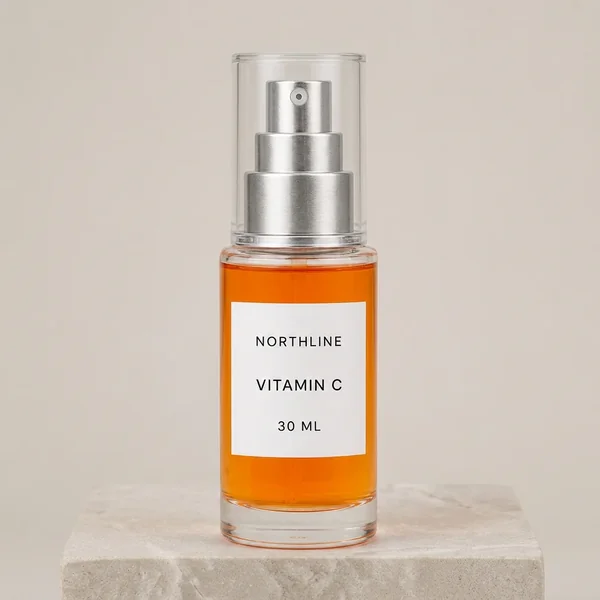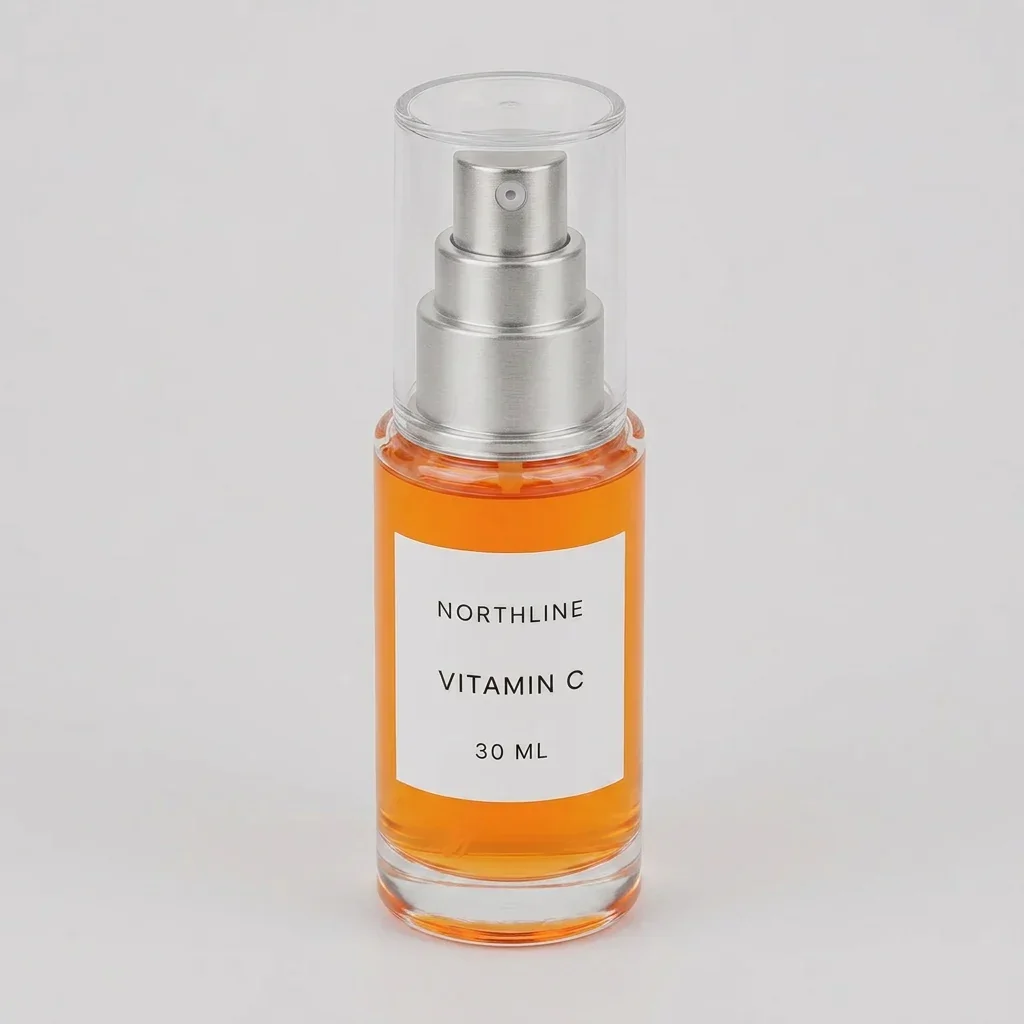
We asked a current image model to turn one straight-on serum packshot into three missing ecommerce views: camera-right, camera-left, and a modest high angle. The files look clean in isolation. They do not form a trustworthy multi-angle product set.
The two requested opposite rotations both stayed close to the front view and exposed similar pump orientation. Across the set, the label width and curvature, nozzle position, bottle proportions, fill relationship, and base geometry changed. The high-angle candidate is visually convincing, but the source photo cannot verify the top surfaces it shows.
That is the merchant answer: one source photo can support angle exploration, but it cannot prove unseen product details. Photograph the views you sell from, or supply authoritative multi-angle or 3D evidence, before using AI to change the scene.
Evidence boundary: NORTHLINE is a fictional product, and its source packshot was itself generated for a previous controlled test. We ran one candidate per requested view through Masonry on August 15, 2026, did not reroll the results, and assessed visible consistency manually. This test does not establish a repeatable success rate, physical-SKU accuracy, conversion lift, or a universal model ranking.
Why multiple product angles are a distinct ecommerce job
Shopify's current product-photography guidance tells merchants to show several perspectives and recommends rotating the product while preserving the frame for consistency. It specifically suggests eye-level, high, low, and bird's-eye views. Read Shopify's product-photography guidance.
The operational pressure is visible in merchant discussions too. One store operator described needing many channel-specific variations, including carousel images with multiple angles, while another discussion identified product accuracy and consistency—not the number of generated scenes—as the deciding requirement for ecommerce use. These threads are qualitative intent evidence, not market sizing or performance proof. Read the multi-channel workflow discussion and the product-consistency discussion.
The hard part is not making three attractive bottles. It is proving that all three views depict the item a customer will receive.
The source and acceptance contract
We fixed the model route, source, seed, square output, studio treatment, and one-candidate budget. Each prompt changed only the requested viewpoint. Before the run, we separated what the source could verify from what it could not.
| Evidence available from the source | Missing evidence the model cannot recover |
|---|---|
| Straight-on silhouette and proportions | True side and back geometry |
| Front label size, placement, and three text lines | Side/back artwork, seams, codes, and regulatory copy |
| Visible front of the pump and nozzle | Nozzle depth and pump geometry from other angles |
| Front-facing orange fill and clear base | Exact internal tube path and rear fill appearance |
| Clear cap from eye level | Cap top, neck, and closure from above |
The acceptance gate required three genuinely distinct viewpoints, a consistent product identity across all frames, exact front text where visible, no invented side or top detail, and one coherent studio set.
Exact run contract
The live route was gemini-3.1-flash-image-preview (Nano Banana 2). Every job used the same source, seed 20260815, and 1024x1024 output. The angle clause changed between approximately 35 degrees camera-right, 35 degrees camera-left, and 25 degrees above eye level. The shared constraint was:
Using the supplied front-view source as product evidence, create one square ecommerce secondary-gallery image showing the same fictional NORTHLINE Vitamin C bottle from the requested view. Keep the bottle fully visible and upright on the same pale warm-gray seamless studio surface with soft camera-left light. Preserve the visible bottle, liquid, cap, pump, label, and exact front text. Do not invent hidden copy, codes, claims, seams, or hardware. Where the source provides no evidence, keep the surface plain rather than inventing details.
masonry image "<fixed brief plus one requested angle>" \ --model gemini-3.1-flash-image-preview \ --ref ./northline-front.webp \ --aspect 1:1 \ --seed 20260815 masonry job wait <job-id> masonry job download <job-id> --output ./candidate.png
The successful job IDs were d2db6f46-f8da-49a4-82e6-8aec7f08ad04, c9a807fb-18e8-4bcd-9766-32fcc9bf1166, and 6eaa61fb-9d48-4170-89a8-555a075a24c1.
Three requested views, three real outputs
Camera-right request: polished, but not a reliable 35-degree view
The image is coherent enough to pass a fast aesthetic review. It fails the evidence review. A front source cannot confirm the revealed side or the tube path, and the product's visible proportions no longer match the source closely enough to call this an approved angle.
Camera-left request: the opposite prompt collapses toward a similar view
This is the clearest set-level failure. Two opposed prompts should produce visibly opposed views. Instead, both candidates favor a nearly frontal presentation and do not establish a coherent rotation around one object.
High-angle request: a meaningful camera change built on invented evidence
This is the strongest angle change and the most dangerous candidate to approve casually. The top surfaces look plausible precisely because the model supplies details the source cannot verify.
Consistency scorecard
| Acceptance check | Camera-right | Camera-left | High angle | Set decision |
|---|---|---|---|---|
| Requested view is clearly achieved | Fail | Fail | Pass | Fail |
| Same silhouette and proportions | Review | Review | Fail | Fail |
| Pump and nozzle remain coherent | Fail | Fail | Fail | Fail |
| Label geometry remains coherent | Fail | Fail | Fail | Fail |
| Exact visible front text | Pass | Pass | Pass | Pass |
| No unverified geometry is presented as fact | Fail | Fail | Fail | Fail |
| Background and lighting feel like one set | Pass | Pass | Pass | Pass |
Disposition: reject all three as factual missing-angle photography. The candidates are useful for composition review and for identifying which real angles to capture. They should not be uploaded as verified product views from this evidence alone.
Download the multi-angle product review sheet to reuse the acceptance fields with a real SKU.
The safer production workflow
- Choose the buyer question for each image. Use a front view for identity, a side view for depth or hardware, a rear view for controls or required copy, and a high view for closures or included parts. Do not add an angle merely to fill a gallery slot.
- Capture an authoritative source for every required view. Photograph the real product on a turntable with fixed camera, focal length, distance, lighting, and product position. For geometry-critical products, use approved CAD or a qualified 3D model.
- Name the evidence by SKU, variant, and angle. Keep
sku,variant,view,source_version,capture_date, and approval status beside each file. A prompt is not a product record. - Run angle-matched edits. Send the approved left view when making the left-view lifestyle candidate. Ask AI to vary only the environment, surface, lighting, or crop that the release contract allows.
- Review the set, not isolated favorites. Compare all frames for silhouette, scale, construction, label placement, hardware, color, fill, accessories, and included-item count. Reject a beautiful outlier that makes the gallery describe several different products.
- Keep a factual fallback. When product pixels must be exact, generate an empty environment and composite the approved angle-matched packshot. Preserve the unedited sources for marketplace, returns, and support review.
The existing same-SKU fidelity test compares how four models change one verified front view. The supplier-photo to ecommerce image-set workflow shows how to plan a complete gallery without pretending one source contains every answer. Use the Shopify variant-image workflow when adjacent colors or configurations need separate sources and assignments.
How to measure whether the workflow saves money
Do not report “three images generated” as success. Track:
- requested views and authoritative sources available;
- generated candidates and accepted assets by view;
- rejection reason and reviewer minutes;
- reshoot, compositing, and retouching time;
- cost per accepted gallery set, not cost per output;
- PDP engagement, conversion, returns, and “not as described” contacts after traffic is sufficient.
A one-source shortcut only saves money if it produces accurate, accepted assets. If it creates review debt or misrepresents hidden product details, the apparent production gain is false economy.
Bottom line
The model produced three polished bottle images and preserved the visible words. It did not reconstruct a dependable three-view product set from one front photo. The opposite rotations were not meaningfully opposite, and every new viewpoint introduced geometry the source could not verify.
For ecommerce merchants, the winning workflow is not “generate the missing angles.” It is capture product truth once per required view, then use AI to scale the scene around those approved sources. Run angle-matched candidates in Masonry's AI product photography workflow, or keep sources, prompts, model routes, seeds, job IDs, filenames, and dispositions auditable with the Masonry CLI.