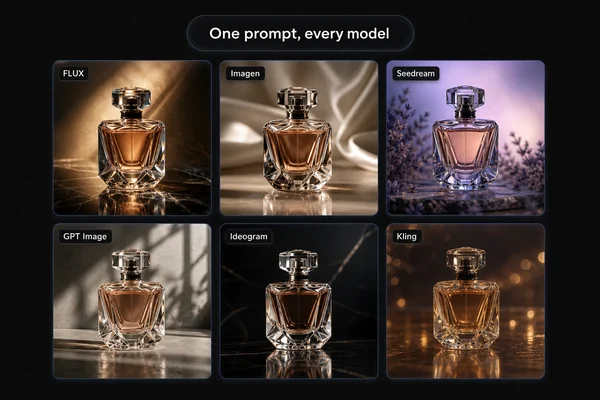
Pebblely and Masonry can both turn a product photo into a staged marketing asset, but they organize the work differently. Pebblely is a focused product-photography application with templates, custom descriptions, editing, group shots, and bulk generation. Masonry is a multi-model canvas and CLI for teams that want to choose an explicit image or video model and carry an approved brief into a repeatable workflow.
That distinction matters more than a generic list of AI features. The right choice depends on whether you want a dedicated product-photo interface or a broader model-routing workspace.
Evidence boundary: This is a source-backed feature and workflow comparison, not a hands-on image-quality benchmark. We did not run both products against a shared SKU, prompt, candidate count, and acceptance sheet for this article. Treat output-quality claims without that test as hypotheses, then use the protocol below before switching.
Quick answer
- Choose Pebblely when you want a purpose-built web flow for product staging, a large template library, custom prompts, automatic handling of visible product text, group shots, in-app edits, or bulk generation and download.
- Choose Masonry when named image and video models, side-by-side work on a canvas, or a CLI-driven production path are requirements rather than optional details.
- Do not choose from a homepage demo alone. Run the same approved product source, brief, candidate budget, and acceptance criteria through both tools. The better tool is the one that produces more accepted assets with less review and correction.
Pebblely pricing: quick answer
Pebblely's official pricing page listed these monthly plans when checked on August 17, 2026:
| Plan | Monthly price | Images per month | Headline cost per included image | Listed workflow features |
|---|---|---|---|---|
| Lite | US$9 | 30 | US$0.300 | 40+ background themes and custom prompts |
| Basic | US$19 | 200 | US$0.095 | Lite features plus bulk generation |
| Pro | US$39 | 500 | US$0.078 | Basic workflow with a larger monthly allowance |
These are headline allowances, not the cost of a usable catalog asset. If generated scenes need product corrections or fail channel review, the meaningful comparison is total spend and review time divided by accepted assets. Pricing and entitlements can change, so verify the live page before buying.
What Pebblely costs when not every image passes
The pricing page publishes subscriptions and image allowances; it does not publish your catalog's acceptance rate. To keep those two facts separate, calculate a planning scenario rather than inventing a quality claim.
Subscription-only cost per accepted image:
monthly subscription price ÷ accepted images, assuming the full monthly allowance is used and excluding review, correction, tax, overage, and unused capacity.
At a hypothetical 50% acceptance rate, the subscription-only figures become US$0.60 for Lite, US$0.19 for Basic, and US$0.156 for Pro. Those values are arithmetic illustrations—not observed Pebblely performance. A team accepting 25% of candidates would multiply the headline unit cost by four; a team accepting every candidate would use the headline figure in the pricing table.
Download the Pebblely and Masonry pricing-sensitivity TSV. It includes 25%, 50%, 75%, and 100% planning rows for all three Pebblely plans plus Masonry Starter and Pro. Masonry's published image capacities are approximate and model-route credit usage can vary, so the worksheet labels them as headline planning units rather than equivalent entitlements.
Pebblely vs Masonry at a glance
Features and pricing below were checked against the vendors' public pages on August 17, 2026. Product details change, so confirm them before buying.
| Decision area | Pebblely | Masonry |
|---|---|---|
| Primary workspace | Focused product-photo web application | Multi-model creative canvas plus CLI |
| Starting input | Product image, including an already staged source | Reference image and prompt routed to a selected model |
| Scene direction | Templates or a custom description | Prompt and parameters for a named model |
| Product handling | Automatic visible-text extraction; cropping and composition controls | Reference-image behavior depends on the selected model route |
| Multi-product scenes | Group shots with up to five products | Depends on the selected model and reference inputs |
| Iteration | Select an image, describe the edit, and generate alternatives | Iterate on the canvas or rerun a versioned CLI command |
| Batch work | Bulk generation and download on eligible plans | CLI and agent-oriented automation across image and video routes |
| Model choice | Pebblely presents the product workflow rather than a named-model router | User selects from named image and video model routes |
| Pricing basis | Monthly image allowances by plan | Credits consumed by the selected model route |
What current Pebblely actually offers
Pebblely's March 2026 rebuild changed the product enough that older comparisons can be misleading. Its launch explanation says a user can upload an existing product image, crop it, describe a scene, and create alternatives without first removing the background. It also describes templates, custom scenes, bulk generation, and bulk download.
The current Pebblely workflow guide adds several details that matter in a real evaluation:
- visible text on the product is extracted automatically and used during generation;
- a chosen result can be edited by describing the requested change;
- one scene can include as many as five product references for a group shot;
- eligible plans can generate or download a selection of assets in bulk.
Those are substantive controls. Describing current Pebblely as merely a fixed background-theme gallery would be inaccurate. Use the current pricing table above to map its monthly allowances to your expected volume, then run the same-SKU test before treating the lowest headline cost as the cheapest production option.
What Masonry offers instead
Masonry's advantage is not that it has prompts while Pebblely has presets—both support custom scene descriptions. The meaningful difference is explicit model routing.
On the Masonry canvas, a team can choose named image or video models and keep generations, references, and follow-up work in one visual workspace. The Masonry CLI exposes the same idea to a terminal or coding agent, which is useful when an asset run belongs inside a repeatable production process rather than an isolated browser session.
That flexibility also introduces more decisions. Reference fidelity, supported dimensions, generation cost, and available parameters vary by model route. A buyer who wants one opinionated product-photo interface may prefer Pebblely's narrower workflow. A buyer who needs to evaluate or automate multiple models may prefer Masonry's explicit routing.
For a broader category view, see the AI product-photography tools comparison. For model-specific test evidence, use the product-photography model roundup and read its methodology before applying a winner to your own catalog.
Run a fair same-SKU test
A comparison is useful only if both tools face the same job. Use this small acceptance test before migrating a catalog.
- Choose three representative SKUs. Include one easy product, one with small packaging text, and one with difficult material or geometry such as glass, chrome, or straps.
- Lock the source. Give both tools the same approved product photograph at the same crop and resolution. Do not quietly give one tool a cleaner reference.
- Lock the brief. Define aspect ratio, surface, background, lighting direction, prop limits, and negative constraints in advance. Translate only the syntax required by each interface.
- Lock the budget. Generate the same number of candidates per SKU. If costs differ, record both spend and candidate count.
- Score blind. Have a reviewer who does not know the source tool grade product shape, label accuracy, material accuracy, composition, brand fit, and visible artifacts.
- Measure accepted assets. Record candidates accepted without correction, minutes of review, minutes of editing, and total generation cost.
Use cost per accepted asset—not subscription price or the prettiest single sample—as the economic comparison:
(subscription allocation + generation spend + review labor + correction labor) / accepted assets
Download the blank four-route acceptance scorecard to record the actual candidate count, rejection classes, reviewer time, corrections, and evidence folder for each tool. Keep the pricing-sensitivity worksheet as a planning input; replace its assumed acceptance rows with the observed benchmark result before making a purchasing decision.
This test can produce different winners for catalog images, campaign heroes, and video. That is a useful result, not a failure of the comparison.
Who should stay with Pebblely
Stay with Pebblely when its focused workflow already produces approved product images at an acceptable cost, especially if templates, group shots, automatic text handling, edits, and bulk downloads cover the team's actual process. Switching tools without a measured acceptance-rate improvement adds retraining and review risk.
Consider Masonry when the requirement is explicit named-model choice, a shared canvas that extends beyond product stills, or CLI and agent automation. Those are workflow reasons to evaluate it—not evidence that it will automatically make a more accurate image.
The bottom line
Pebblely is the more focused product-photo application; Masonry is the broader multi-model canvas and CLI. Neither category label proves which one will preserve your SKU or save more production time. Run the same-SKU acceptance test, keep the measurements, and choose the workflow with the lower cost per approved asset.
Try that test in Masonry product photography, or inspect the CLI workflow if repeatable automation is the deciding requirement.