The safest AI-image workflow for a Pinterest catalog starts by separating six things that are easy to collapse into one: the approved product, the generated scene, the feed row, the Product Pin, the ad that may use it, and the order that may follow. Only the first three are built in this guide.
The practical release is simple: keep the product as an approved source layer, generate an empty 2:3 scene around it, publish the result under a new versioned URL, and update one explicit feed field. Then verify ingestion, Pin publication, delivery, and purchase behavior as separate states. Do not call the file a winning creative because it looks Pinterest-native.
Choose the Pinterest role before making the image
Pinterest's retail-catalog documentation currently gives the main image and extra images different feed roles:
| Role | Current platform behavior | Merchant release question |
|---|---|---|
image_link | Required main product image; Pinterest specifies at least 1000 × 1500 pixels | Is this the most factual, variant-correct product representation? |
additional_image_link | Optional, up to ten links; Pinterest says each additional image creates another Pin | Is every extra Pin accurate, useful, and intentionally distributed? |
| Collections hero | A separate existing image or video Pin can lead a collections ad | Does the hero promise the same products and destination as the selected product group? |
That distinction matters because a Shopify gallery, a Pinterest catalog, and a collections ad are not three views of the same object. They are three publishing systems. A merchant discussion about the Shopify Pinterest integration captures the operational confusion: the catalog-created Pins appeared square, variant behavior was unclear, and the merchant could not tell how automatic catalog Pins related to manually created Pins. That is qualitative intent evidence, not a description of every account.
Start with role authority:
- Keep the factual product source and variant mapping authoritative.
- Decide whether the new image is a main, additional, or hero asset.
- Assign a unique, versioned public URL to the reviewed bytes.
- Update only the intended feed or ad object.
- Preserve the prior URL and row for rollback.
Pinterest says changing an image later requires a different URL for both image_link and
additional_image_link. A stable versioned URL is therefore part of the release contract, not an
SEO filename flourish.
First-hand build: product pixels stay outside the model
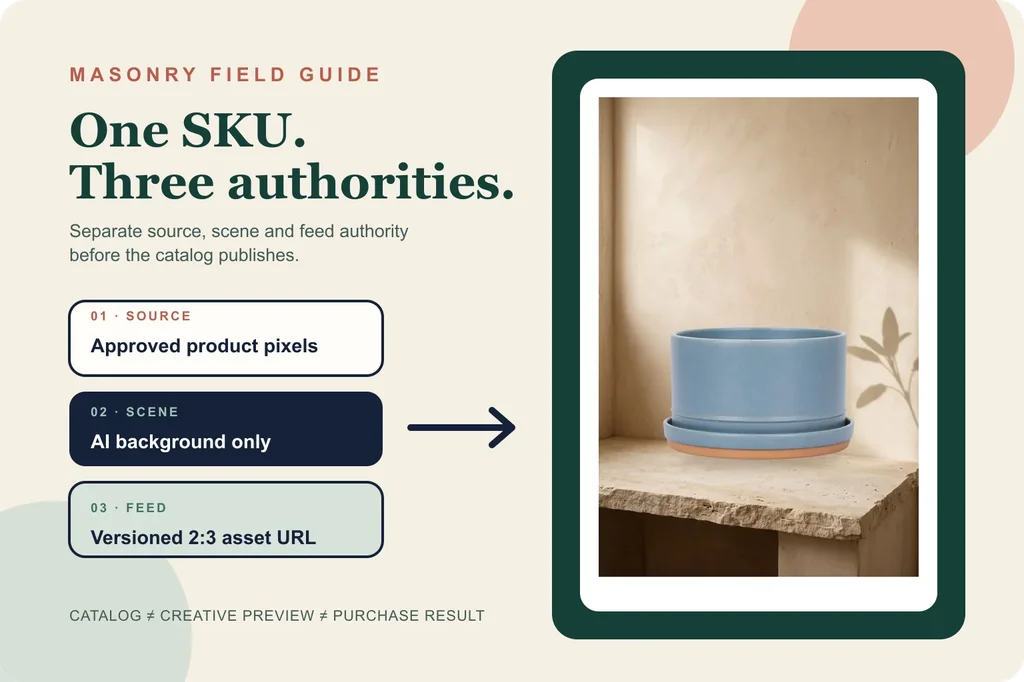
This example uses the same fictional blue planter source from our Walmart workflow. It is not a real merchant SKU. The source has no brand, copy, claim, plant, or included accessory, which keeps the review focused on shape, glaze, color, rim, saucer, base, and product count.
Masonry job 6078eb16-875d-4aa4-9f3e-af5aad0558c2 ran
gemini-3.1-flash-image-preview at seed 2026081804 on the 2:3:2k route. The prompt requested an
empty limestone setting with no product, package, label, logo, word, price, person, hand, or
watermark. It returned one 1696 × 2528 empty scene.
The final candidate was assembled deterministically. The approved RGBA product layer was trimmed, scaled, and composited onto the scene with a separate contact shadow. That process does resample the source; it does not ask a model to reconstruct the rim, glaze, base, or saucer.
The file is a SOURCE_PRESERVED_REVIEW_CANDIDATE, not a Pinterest-approved asset. No business
account, claimed site, Pinterest tag, catalog feed, Product Pin, product group, sales campaign,
buyer exposure, order, or contribution test ran. The exact prompt, job, dimensions, hashes, and
untested states are in the downloadable release manifest.
Feed preflight: make the image resolvable and reversible
Pinterest currently requires a business account, claimed website, Pinterest tag, and a site that
meets its merchant guidelines before a retail catalog is added. Its required catalog fields are
id, title, description, link, image_link, price, and availability, plus
item_group_id when a product has variants.
Before a feed update, verify:
- the image URL returns the intended bytes without authentication or redirect friction;
- the landing-page link opens the same product and variant;
- title, price, sale price, availability, and product identity agree;
- the 2:3 crop still shows the complete product at phone width;
- the file contains no invented accessory, plant, logo, claim, review, price, or offer;
- the old image URL and feed row remain available for rollback;
- the new URL changes when the asset bytes change.
Do not infer the feed state from the storefront gallery. Pinterest can access a hosted data source daily, and an error can affect the whole feed, part of the feed, or one row. Record the actual ingestion result and the item-level diagnostic.
Pinterest's own AI background layer needs a separate review
Pinterest's current Performance+ creative documentation says Sales campaigns can use generative AI to apply backgrounds to eligible product images. The same system can resize imagery by repositioning, focusing, or cropping.
Three boundaries in Pinterest's documentation are commercially important:
- enabling generated backgrounds does not update the ad preview window;
- backgrounds may range from complex lifestyle scenes to simple colors;
- Pinterest may change aspect ratio or remove logos and overlays that are part of the background.
That is not a reason to disable automation universally. It is a reason to keep platform-generated creative distinct from merchant-authored feed imagery in the test log. If the platform can alter the delivered treatment, a feed screenshot is not exposure evidence. Save the campaign settings, creative-optimization state, eligible product group, delivery dates, and observed ad examples before attributing any result to the catalog image you uploaded.
Collections are a composition job, not an extra image slot
Pinterest's collections-ad documentation separates one hero creative from smaller product creatives. A personalized collections ad chooses products from the selected product group, and the secondary set can change by relevance. Pinterest currently supports one static hero at 1:1 or 2:3 and up to 24 secondary creatives; its reporting for secondary creatives is aggregate, so tracking parameters are important for product-level outcomes.
Use the 2:3 candidate as a hero only after answering:
- Does the scene promise a use or included item the product page does not support?
- Does the hero destination match the group of products shown beneath it?
- Are out-of-stock and variant states reflected in the selected product group?
- Can the merchant reconstruct which products and image version were eligible during the test?
Do not assume the same image should be image_link, an additional Product Pin, and the collections
hero. Reuse can be efficient, but each role has a different factual and measurement contract.
Measure toward contribution, not Pinterest-native vanity
A current paid-media discussion reports that a 3,000-SKU catalog produced sales while one sales Pin did not. The useful signal is the question it raises—catalog breadth, product-group design, and the purchase funnel—not the anecdote as a benchmark. One advertiser's result does not define the minimum budget, ideal catalog size, or expected return for another merchant.
Read the sequence with raw counts and stable denominators:
| Stage | Evidence |
|---|---|
| Feed | successful ingestion and item eligibility for the exact versioned URL |
| Distribution | Product Pin or ad impressions for the intended product group |
| Traffic | outbound clicks and destination product-page views |
| Commerce | add to cart, checkout start, purchase, net contribution, and returns |
| Creative decision | keep, revise, rollback, or expand based on the commercial guardrail |
Do not optimize from CTR alone. If outbound clicks rise while product-page views or purchases fall, check destination agreement, variant mapping, price and availability, page speed, checkout, and tracking before generating another scene.
The release decision
For one Pinterest catalog image, the bounded workflow is:
- Approve the actual product source and variant record.
- Generate only the scene when exact product identity matters.
- Composite and review the full-resolution candidate.
- Choose
image_link,additional_image_link, or collections hero deliberately. - Publish under a new versioned URL with rollback.
- Verify feed, Pin, ad, and purchase states independently.
The file in this guide proves one first-hand assembly path. It does not prove Pinterest eligibility, distribution, sales lift, or a model reliability rate. That evidence begins only after a real merchant publishes an authorized SKU and observes the full commercial sequence.
For broader channel-policy differences, use the AI product-photo rules comparison. For the underlying decision between general editing, structured placement, and source-layer preservation, use the product-background fidelity test.