AI UGC becomes risky when the model is asked to invent the person, product, experience, script, and proof in one pass. A merchant can get an attractive video that shows the wrong bottle, implies a result nobody verified, or looks nothing like the product on the destination page.
This workflow narrows the job. An approved product image is the truth layer. AI builds one surrounding routine scene and one bounded motion. Product claims, captions, price, offer, CTA, and disclosure stay outside generation. Every file has to pass product review before it becomes an ad.
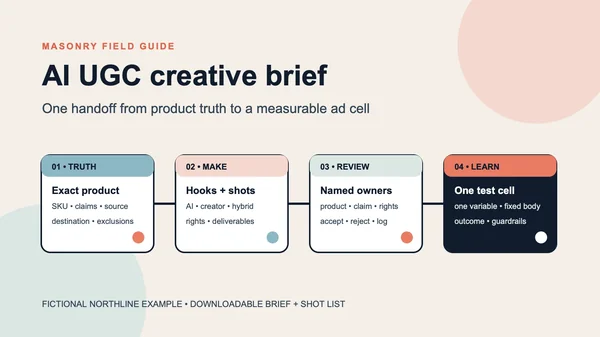
We ran the workflow on a fictional NORTHLINE Vitamin C bottle: source image → vertical routine keyframe → five-second hand-reach clip. The files, exact prompts, job IDs, and rejection rules are below. The goal is not to manufacture a fake customer endorsement. It is to test whether a familiar product-use visual can be produced without losing the SKU.
Evidence boundary: NORTHLINE is fictional. The source, keyframe, and clip are real files from one Masonry run. One accepted keyframe and one video cannot establish a model success rate, ad lift, or customer response. The visible review below is a production disposition for these files only.
The merchant job: make a hook without inventing product truth
Current merchant discussions describe a more specific problem than “make UGC.” One Shopify advertiser reported that AI changed intricate product proportions and details, required costly steering, and was least useful when the result was only a generic person holding a bottle. Their proposed division of labor was more practical: use real product media as the truth layer, then use AI around the hook, structure, or variation. That is qualitative intent, not performance evidence, but it defines a valuable workflow. Read the July 2026 discussion.
The production question becomes:
Can we turn one approved SKU image into a believable routine moment while keeping the product, promise, and measurement contract intact?
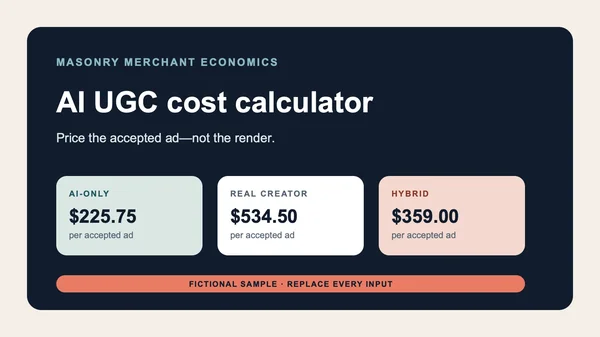
Before choosing AI-only, a commissioned creator, or a split workflow, use the AI UGC cost calculator to compare each route on the same accepted-ad denominator, including rejected attempts, rights, review, correction, and internal labor.
That is different from our AI UGC photo prompt guide, which builds fictional creator stills, and our same-photo product-video comparison, which compares model behavior. This page solves the end-to-end merchant handoff.
Step 1: establish the product truth layer
Before prompting, write down what cannot change. For this fictional SKU the invariants were:
- one clear cylindrical glass bottle, upright;
- orange liquid with the same apparent fill and no invented application result;
- stepped silver pump under a transparent cylindrical cap;
- one white rectangular front label;
- exact visible text:
NORTHLINE,VITAMIN C,30 ML; - no box, ingredient, certification, applicator, second product, or before/after claim.
A real merchant should get this record from approved product photography, packaging artwork, the product information system, and legal or regulatory review—not from the model's interpretation of a PDP.
Step 2: generate one bounded UGC-style keyframe
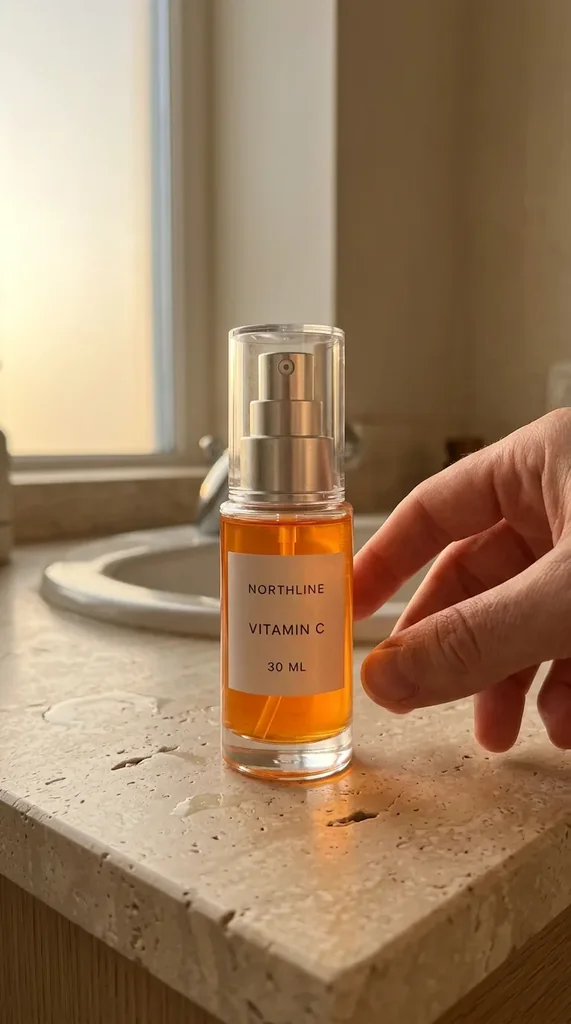
The keyframe changes the environment and introduces a cropped adult hand. It does not show a face, construct a customer identity, or depict a claimed result.
The exact successful request used Nano Banana 2 with seed 730241:
masonry image "Create a vertical phone-shot product-routine keyframe using the supplied approved product as the product truth layer. Keep the exact clear cylindrical pump bottle, silver pump and cap, orange serum, white rectangular label, and the exact readable label text NORTHLINE / VITAMIN C / 30 ML. Place that single bottle upright on a slightly imperfect light stone bathroom counter beside a sink at warm early-morning window light. One adult hand enters naturally from the right, fingertips just reaching toward the bottle without covering the label. Cropped wrist only; no face or person visible. Casual handheld smartphone composition, slight off-center framing, realistic skin and counter texture, plausible shadows, subtle phone-camera noise. No testimonial, no claim text, no overlay, no extra cosmetics, no duplicate product, no changed package geometry." \ --model gemini-3.1-flash-image-preview \ --aspect 9:16 \ --ref ./northline-approved-source.webp \ --seed 730241
The successful image job was 73391947-acee-4649-909c-46ae5517b004. The friendly alias returned by one parameter lookup did not resolve at generation time, so the run used the live route key from masonry image models. In production, resolve the current route immediately before running rather than storing an alias indefinitely.
The still passed because the exact label text is visible, the bottle is still recognizable as the source SKU, one plausible hand appears, and the scene adds routine context without adding a claim. It remains a generated redraw, not a substitute for the factual PDP image.
Step 3: animate one action, not an entire story
The motion brief asks the hand to steady the upright bottle and allows only slight camera drift. It explicitly prohibits dispensing, speech, captions, and package changes.
The exact video request was:
masonry video "A five-second vertical handheld smartphone product-routine shot. Preserve the exact NORTHLINE VITAMIN C 30 ML bottle, label spelling and layout, clear cylindrical glass, orange serum, silver pump, and transparent cap from the first frame. The adult hand slowly reaches in and gently steadies the bottle with fingertips while the camera makes a tiny natural handheld drift. Keep the bottle upright and the front label fully readable. Warm morning window light stays consistent. No cap removal, no dispensing, no face, no speech, no testimonial, no added text, no extra product, no changed packaging." \ --model kling-v2-6-pro-i2v \ --image ./northline-routine-keyframe.png \ --duration 5 \ --aspect 9:16 \ --no-audio \ --negative-prompt "warped fingers, extra fingers, duplicate bottle, changed label, misspelled text, morphing package, removed cap, spraying, pouring, face, dialogue, subtitles, overlay text, extra cosmetics, camera whip"
The CLI returned immediately with job fa39b3f8-110f-4196-8751-0f3183620be9; the result was retrieved only after the asynchronous status changed to succeeded. Run masonry models params kling-v2-6-pro-i2v before a new batch because route contracts can change independently of this stored file.
The delivered H.264 file measures 1076 × 1924 at 24 fps and 5.042 seconds, with no audio stream. Across the sampled first, middle, and last frames, the label remains legible, the bottle stays upright, and the fingers remain coherent. The hand does lift the bottle slightly, so the file passes product-identity review but only conditionally passes motion review. Use it as a routine-hook candidate if picking up the bottle is approved; reject or rerun it if the shot must only steady the bottle.
Step 4: use a frame-by-frame rejection gate
Review at full resolution. A clip fails if any one of these gates fails:
| Gate | Reject when |
|---|---|
| Product identity | Bottle silhouette, proportions, color, fill, material, cap, pump, label, logo, or visible text changes |
| Variant and quantity | The wrong variant appears, a second bottle materializes, or included items change |
| Human anatomy | Fingers merge, multiply, penetrate the bottle, or move implausibly |
| Product behavior | The clip opens, dispenses, sprays, pours, or applies the product without an approved brief |
| Temporal stability | Edges breathe, label characters shift, reflections jump, or parts appear and disappear |
| Claims and audio | Speech, captions, results, ingredients, certifications, or benefits appear without an approved source |
| Placement | The focal product or later copy zone falls outside the actual crop or safe area |
Do not repair a failed product by hiding it behind faster cuts. Either rerun the bounded motion, reduce movement, or composite approved product footage. For intricate jewelry, articulated hardware, patterned apparel, or regulated packaging, compositing is often the honest production route.
Step 5: add the ad layer deterministically
Keep generated media free of marketing copy. In the editor, add only approved elements:
- A first-frame hook that describes the observable routine, not a fabricated customer result.
- Product name and factual feature language sourced from the product record.
- Price, offer, CTA, captions, and required disclosure as editable layers.
- A destination URL for the exact SKU and variant shown.
- A synthetic-media or commercial disclosure appropriate to the channel, market, and actual content.
Do not give the synthetic hand a personal story. Do not write “I used this for seven days” or attach a fabricated review to a generated person. In the United States, endorsements must be truthful and material connections must be clearly disclosed; the FTC's Disclosures 101 and endorsement resources are useful starting points. They are not a substitute for campaign-specific legal review.
Preview the actual placements before launch. Meta's current guidance emphasizes a clear focal point, limited text in the image, visual consistency, and testing creative variants; use its official photo-ad guidance rather than treating this article's 9:16 file as a permanent universal specification.
Step 6: measure from first frame through purchase
An AI UGC clip is not successful because it looks native or earns a cheap click. Write the decision record before spending:
| Layer | What to record | What it diagnoses |
|---|---|---|
| Delivery | spend, impressions, frequency, placement | whether the test received comparable exposure |
| Attention | first-frame hold or platform view milestones | whether the opening earns continued viewing |
| Intent | outbound click and landing-page view | whether the ad creates enough relevant curiosity |
| Commerce | add-to-cart, checkout, purchase | whether attention survives the buying path |
| Economics | contribution after media, returns, support issues | whether the result is worth scaling |
| Trust | product complaints, “not as described,” variant errors | whether the generated scene mis-set expectations |
Keep the SKU, approved copy, offer, CTA, destination, audience, optimization event, placements, attribution treatment, budget rule, and test window fixed when comparing this clip with a control. Change only the declared visual route. The one-SKU creative testing matrix gives the full naming and decision contract.
If the same hook becomes a seasonal promotion, use the AI Black Friday ad creative workflow to keep the discount, code, dates, product scope, and deterministic offer layer out of the generated video.
If the hook comes from reviews or support conversations, run the AI review-mining to creative-brief workflow first so a repeated question does not become a fabricated testimonial, usage instruction, or product claim.
If the clip lifts early view metrics but loses purchase rate, do not celebrate the hook. Verify tracking, then inspect whether the ad's product, variant, price, promise, and destination match. A misleading curiosity gap can improve attention while harming revenue.
Where this fits in the ecommerce content stack
Use the supplier-photo ecommerce workflow when the job is to build the whole launch asset set. Use the same-SKU fidelity benchmark to choose or reject an image route. If the deliverable is a still photo with a person holding the product, use the same-SKU lifestyle product-photo test to review grip, occlusion, scale, markings, and scene before adding motion. Use this workflow when the specific job is a controlled routine-style ad built around an approved product. Before the click path goes live, run the Shopify variant-image workflow so the ad, selected variant, gallery, cart, and checkout show the same thing.
The operating rule is simple: the model may vary the hook; it does not get authority to rewrite the product or the customer's experience.
If the job has no synthetic creator and instead demonstrates one product operation on the PDP, use the AI PDP product-demo video workflow to approve the first and last states, reject invented mechanics across time, and verify the exact Shopify variant plus Google product-video handoff.
If the starting request is broader—turn a reviewed Shopify product record into a no-creator vertical acquisition asset—use the Shopify product-page-to-AI-video workflow. It shows why a URL is not product authority and publishes both rejected generative returns plus the source-preserving fallback.