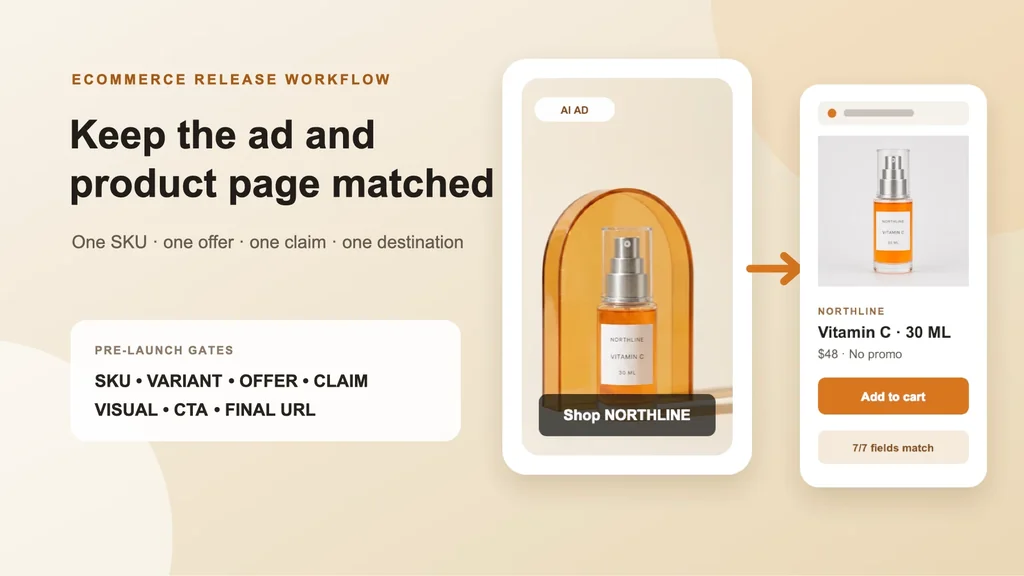
An AI ad can be visually excellent and still waste the click. The common failure is not always the model or the media buyer: the ad shows one product, offer, or outcome, while the destination opens on a different variant, hides the promotion, or drops the shopper into a broad collection.
This workflow adds one release gate between approved creative and campaign launch. It compares the ad with the actual mobile product page across nine fields: SKU, variant, quantity, offer, claim, CTA, visual, final URL, and rendered state.
Evidence boundary: NORTHLINE is a fictional serum, not a merchant or live store. The packshot and amber scene are real source-controlled assets from our same-SKU product fidelity test and one-SKU creative matrix. The product-page layouts, values, pass state, and reject state below are deterministic worked examples. No ad was launched, no product page was changed, and no conversion lift is claimed.
Start with one authority record, not two screenshots
A screenshot records pixels; it does not resolve which system controls a fact. Freeze the commercial record before creative review:
| Field | NORTHLINE worked value | Controlling source |
|---|---|---|
| SKU and variant | NL-VITC-30 / amber-serum-30ml | product catalog |
| Quantity | one 30 ML bottle | product catalog |
| Offer | no promotion | current offer record |
| Approved claim | “Vitamin C face serum” | reviewed product and claims record |
| Ad CTA | Shop now | campaign brief |
| Destination action | Add to cart | product-page template |
| Final URL | /products/northline-vitamin-c-30ml | campaign brief plus redirect check |
| Visual source | approved amber-bottle packshot | asset registry |
| Mobile review state | 390 × 844 capture | release evidence |
The ad CTA and page button do not need identical wording. They need a coherent sequence: “Shop now” may land on an exact product page with “Add to cart.” A specific 20% offer landing on a page with no discount is not a wording variation; it is a release failure.
Download the nine-field message-match audit. Every row is labeled FICTIONAL_WORKED_EXAMPLE_NOT_LIVE_PERFORMANCE, so the template cannot masquerade as campaign evidence.
What a releasable handoff looks like
The generated scene is allowed to change the environment; it is not allowed to redefine the product or commercial promise. Copy and offer remain deterministic layers after the product image passes review. The destination restores the factual packshot and exact sellable record, rather than asking a lifestyle image to carry all product evidence.
Run the audit against the exported placement and the rendered destination, not only the design file and CMS editor:
- Open the ad preview for every intended placement.
- Resolve the final URL through tracking parameters and redirects.
- Load the page at a representative mobile width in a clean session.
- Confirm the selected variant, price, inventory, offer, image, quantity, and button state.
- Add the item to cart and verify the same variant and commercial terms survive.
- Store the ad preview, page capture, timestamp, authority version, and reviewer disposition together.
If the platform can create crops, backgrounds, or text variations after upload, review the surfaced combinations too. An approved master file does not prove every automated placement is approved.
Reject the mismatch instead of generating more creative
This is the expensive trap: an attractive ad gets blamed for weak performance even though the click never reached the promised buying state. Do not respond by asking AI for ten new hooks. First repair the offer record and exact destination, then retest the existing approved creative.
Google Ads currently recommends keeping ad and landing-page messaging consistent, following through on the offer and CTA, and using the conversion rate as a signal when evaluating the landing-page experience. Its guidance also stresses mobile usability and speed. Review Google’s current Quality Score guidance.
Meta’s current ad-creative guidance emphasizes high-quality visuals and messaging that are relevant to the audience. Relevance does not stop at the ad boundary: the traffic objective sends the shopper to a website or landing page, where the promise must remain fulfillable. Review Meta’s current ad-creative guidance.
Merchant and operator discussions describe the same practical rule: the landing page should feel like an extension of the ad rather than a context switch. Treat that discussion as qualitative intent evidence, not a benchmark or causal study. Read the February 2026 ecommerce-ads discussion.
Use the nine-gate release decision
| Gate | Pass when | Hold or reject when |
|---|---|---|
| SKU | the ad and page resolve to the same catalog item | the ad product cannot be identified exactly |
| Variant | color, size, finish, pack, or subscription state agrees | the page defaults to another selection |
| Quantity | shown and sold quantity agree | a set, bundle, or count is implied but absent |
| Offer | price, discount, code, dates, and terms are current | the offer is missing, expired, or applied later without disclosure |
| Claim | language traces to an approved source | AI invents a benefit, result, rating, or certification |
| CTA | the next page can fulfill the expected action | the click opens a dead end or unrelated intent |
| Visual | the sold product remains recognizable and factual | generation changes package, material, color, label, or included items |
| Final URL | redirects resolve to the intended canonical destination | tracking or routing lands elsewhere |
| Mobile state | the key promise and purchase action are visible and usable | popups, latency, locale, or layout hide the buying state |
Use PASS_WITH_EXPECTED_LABEL_CHANGE sparingly. “Shop now” to “Add to cart” is coherent. “Get 20% off” to a full-price page is not.
Diagnose the layer before changing the creative
When delivery exists but commerce progression breaks, use the first failing transition:
| Observed pattern | Inspect first | Do not assume |
|---|---|---|
| outbound clicks but fewer landing-page views | page load, redirect, consent, browser, tracking | the creative needs a new hook |
| landing-page views but weak add-to-cart | message match, variant, offer, price, inventory, page clarity | the image caused low intent |
| add-to-cart but weak checkout | cart terms, shipping, tax, payment, promo application | the destination hero is the only issue |
| checkout but weak completed orders | payment errors, trust, total price, inventory, fraud controls | CTR predicts revenue |
| orders but weak contribution | media, discounts, fulfillment, returns, support cost | revenue alone proves a winner |
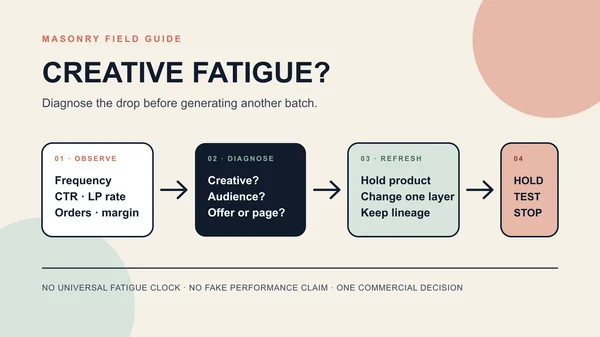
The creative-fatigue diagnosis workflow separates audience, auction, offer, page, checkout, tracking, and creative failures after an ad has history. If the exact selected product image is wrong, use the Shopify variant-image workflow. If the question is whether a new PDP image improves commerce, use the Shopify product-image A/B-test contract rather than swapping the hero without logged exposure.
Measure the handoff without claiming it caused the sale
The release audit is a guardrail. It can prevent a known mismatch; it cannot prove incremental revenue. Record the versioned path from impression to economics:
| Layer | Useful measures |
|---|---|
| delivery | spend, impressions, placement, creative version |
| click handoff | outbound click, redirect result, landing-page view, load failure |
| destination | selected variant, offer state, price state, add-to-cart |
| checkout | checkout start, promo application, payment failure, completed order |
| economics | contribution after media, discount, fulfillment, returns, and service |
| trust | mismatch complaints, “not as described” contacts, return reasons |
Compare a stable creative-and-destination version over a declared window. Keep campaign attribution separate from product analytics, and avoid calling all-site signups or assisted orders causal outcomes of this page or workflow.
The operating rule is simple: let AI propose the scene; let approved records define the product and offer; let the rendered destination prove the promise survives the click.
For the upstream source-to-ad build, use the Shopify product-page-to-AI-video workflow. For a controlled initial concept decision, use the one-SKU creative matrix. For the broader catalog, acquisition, retention, and operations stack, choose the next job from the AI ecommerce workflow map.