


Jewelry can look convincing long before it matches the item for sale. A bright clear stone, warm polished metal, shallow depth of field, and a soft reflection are enough to signal “solitaire ring” at a glance. They do not establish the stone, setting, metal, size, hallmark, condition, or value of a real piece.
This test sent one fictional brief through Seedream 4.5, FLUX.2 Pro, GPT Image 2, and Nano Banana 2. The four original outputs are useful because they show how a shared category prompt becomes four different products.
Evidence boundary: this is one displayed output per model from a fictional ring brief. No real ring, design drawing, dimensions, grading report, hallmark reference, or specification sheet was supplied. The observations below describe visible pixels in these four images; they are not reliability rates, gemstone identification, metal verification, or evidence that a model can preserve a jewelry SKU.
Quick answer
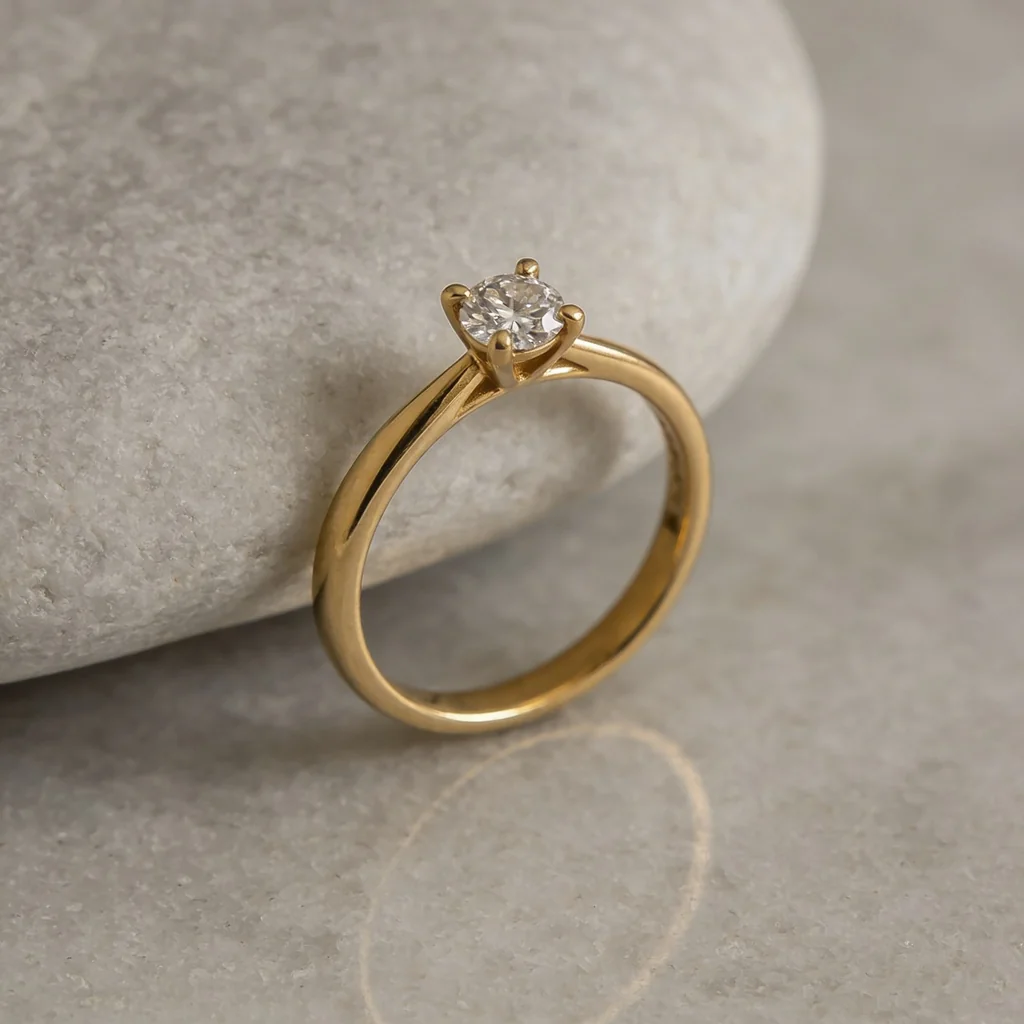
- Only upright hero composition: Seedream staged the ring vertically against pale stone, but its setting does not resolve as the requested unambiguous four-prong design.
- Clearest four-corner setting in this run: FLUX visibly placed one contact at each corner around the stone. That matches the text brief, not a real product.
- Second clean front treatment: GPT also shows four corner contacts and a centered clear faceted stone, with a different band and setting from FLUX.
- Most obvious setting drift: Nano's angled view appears to show more than four prong-like contacts.
- Commercial rule: use the displayed images for art direction only. Preserve approved piece photography when exact identity matters.
The controlled brief
The original article summarized the input instead of preserving the exact submitted prompt. This is a controlled reconstruction of the subject and checks used here:
One brand-free fictional polished 18k-yellow-gold-colored solitaire ring with one round brilliant clear faceted stone in a four-prong setting, photographed on pale gray stone in soft directional studio light. Delicate plain band, coherent warm-metal reflections, crisp stone detail, natural contact shadow, no hand, box, text, logo, hallmark, engraving, extra stone, or extra ring. Square macro product photograph.
The phrase “18k” belongs to the fictional brief, not to the pixels. Without a source ring or materials record, the images can be reviewed for composition, visible setting structure, surface treatment, and obvious consistency only.
The test, model by model
Seedream 4.5 produced the most distinctive composition: the ring stands against a pale rounded prop, and the warm metal reflection curves across the surface. The setting is less controlled. More than four prong-like tips or contacts appear visible around the stone at this angle. The image works as a fictional hero direction, not as evidence of a particular production setting.
FLUX.2 Pro made the easiest setting to count. Four contacts appear at the corners of the stone, and the front-facing crop separates them from the narrow band. That supports a bounded claim—this displayed image follows the requested four-prong pattern at this angle. It does not prove the underside basket, gallery, shank, stone identity, dimensions, or preservation of a real ring.
GPT Image 2 also produced a readable four-corner arrangement. The band is broader and the stone presentation differs from FLUX, even though both satisfy the category brief at article scale. Calling one “exact to the piece” would be unsupported: there was no piece. The output only shows that this one fictional render followed more of the written geometry.
Nano Banana 2 made the most angled product view. That angle reveals the shoulders and gives the stone more depth, but the setting appears to drift beyond the requested four-prong topology. A dark patch on the left side of the polished band reads as a scene reflection at this scale; it should be compared with a source to distinguish intended reflection, surface feature, or artifact.
What this comparison supports
| Question | What these images show | What remains untested |
|---|---|---|
| Can the models make a plausible fictional solitaire? | Yes, once each in the displayed run. | Reliability across seeds, prompts, views, and current model versions. |
| Can they show warm polished-metal cues? | All four contain bright highlights, dark reflected areas, and warm-colored surfaces. | Actual metal, fineness, alloy, plating, finish, color standard, and source match. |
| Can they show a clear faceted stone? | All four display one bright, faceted, colorless-looking center stone. | Identity, natural or laboratory-grown origin, treatments, 4Cs, measurements, report, and value. |
| Did they follow the four-prong brief? | FLUX and GPT show four clear corner contacts in the displayed view. | Other angles, basket and gallery structure, mechanical validity, and exact source preservation. |
| Can they preserve a real piece? | No evidence; no source jewelry was supplied. | Every stone, setting, dimension, mark, finish, condition detail, and unique characteristic. |
The useful ranking is therefore visual and task-specific, not “best jewelry model.” Seedream offers an upright scene direction; FLUX and GPT make setting review easier in these views; Nano exposes the setting-topology risk.
Define the product promise first
Jewelry listings commonly make one of three different promises:
- Exact one-of-one piece: the buyer receives the photographed ring, loose stone, estate piece, vintage item, or handmade object. Preserve its unique stone pattern, inclusions, setting, engraving, repairs, wear, patina, dimensions, and condition.
- Representative made-to-order design: the buyer receives a new piece made to a design, with disclosed permitted variation in natural stones, handmade texture, engraving, dimensions, or finish. The image must accurately represent that range rather than an idealized impossible specimen.
- Fixed SKU, variant, or assortment: the buyer selects a defined metal, size, stone option, earring pair, stack, set, or collection. Keep the chosen configuration, item count, scale relationship, and included pieces exact.
Text-only generation is appropriate for a fourth mode—fictional art-direction concepts—as long as the result is labeled and kept out of a real product gallery.
Jewelry checks before publishing
For an exact piece or fixed design, compare:
- Stone inventory: count, type, shape, outline, facet pattern, dimensions, orientation, color appearance, inclusions or unique characteristics, halo or side stones, and any missing or replaced stone.
- Setting topology: prong count and positions, shared prongs, bead or pave layout, bezel, channel, tension or invisible setting, basket, gallery, bridge, head, seat, and stone height.
- Band and construction: shank profile and width, taper, shoulders, split or knife edge, comfort fit, sizing area, joins, solder, hinge, clasp, chain, posts, backs, and visible hardware.
- Metal and finish: approved material description, color, polish, brushing, hammering, oxidation, plating, mixed-metal zones, edge treatment, and scene reflections. Pixels do not verify composition or fineness.
- Marks and customization: hallmark, maker's mark, assay or fineness mark, report inscription, serial, engraving, monogram, date, and personalized copy must match the approved piece or remain out of frame.
- Scale and fit: ring size, stone and head dimensions, chain or bracelet length, earring drop, pair matching, on-body scale, hand or model proportions, and packaging scale.
- Condition: scratches, chips, abrasions, inclusions, patina, repairs, resizing marks, loose or bent prongs, wear, and cleaning level—especially for one-of-one, resale, estate, and vintage inventory.
- Product data: metal, fineness, gemstone identity and origin description, treatments, carat weight, cut, color, clarity, measurements, report, provenance, care, warranty, and value come from authoritative records, not appearance.
The FTC Jewelry Guides provide U.S. marketing guidance for truthful descriptions and disclosures about precious metals, diamonds, gemstones, pearls, and related products. For a graded diamond, a qualified report—not a rendered image—is the evidence source; GIA's grading overview describes reports covering shape, color, clarity, cut, carat weight, proportions, finish, treatments, and identifying characteristics. Use the authorities and qualified review applicable to the actual product and market.
A reference-first jewelry workflow
1. Build a piece-level source set
Capture top, front, both profiles, three-quarter, underside, setting macro, hallmark and engraving, clasp or back, scale reference, condition details, and a full rotation when possible. Attach dimensions, SKU or inventory ID, variant, materials record, grading report, and approved product copy.
2. Lock identity before styling
Write the rejection sheet around the product promise: exact one-of-one, representative design, or fixed variant/assortment. Decide whether reflections, hand model, props, box, and background may change. Do not allow a styling edit to repair condition, enlarge a stone, narrow a band, or standardize natural variation unless the resulting image is clearly non-product concept art.
3. Prefer a real packshot on a generated plate
Generate the empty stone, pedestal, fabric, or lifestyle environment, then composite color-managed jewelry photography into it. Rebuild contact shadows and reflections for the final scene. This preserves tiny geometry and unique stone features better than reconstructing the piece.
4. Use reference editing only for bounded candidates
masonry image "Change only the environment to pale gray stone with soft camera-left studio light. Keep the supplied ring's stone count, shape, size, setting topology, prong count and positions, basket, gallery, shoulders, shank, dimensions, finish, reflections, hallmark, engraving, condition, crop, and perspective unchanged. Add no stone, text, hand, box, or extra jewelry." \ --model gemini-3.1-flash-image-preview \ --ref ./approved-ring-three-quarter.png \ --aspect 1:1 \ --output ring-scene-candidate.png
That instruction is a constraint, not a piece lock. Compare the candidate with every approved view and reject any invented or hidden surface.
For a fictional concept:
masonry image "One fictional warm-metal solitaire ring concept with one clear round faceted stone in a four-prong setting, pale gray stone surface, soft studio light, coherent reflections, natural contact shadow, no hallmark, engraving, text, hand, box, or extra jewelry, square macro product photograph." \ --model seedream-4-5 \ --aspect 1:1 \ --output fictional-ring-concept.png
For a second fictional direction under the same controls, repeat the brief with --model flux-2-pro and compare setting topology before judging surface style.
5. Review the collection as a system
Check full resolution, listing size, alternate views, zoom crops, on-body scale, paired items, variant selectors, thumbnails, and the collection grid. A single image may look plausible while the gallery changes prongs, stone size, band width, metal color, engraving, or condition between frames.
Jewelry acceptance sheet
| Area | Pass condition |
|---|---|
| Source match | Candidate is compared with all approved views and the correct inventory or SKU record. |
| Stones | Count, shape, dimensions, layout, orientation, color appearance, and unique visible features match. |
| Setting | Prongs, bezels, channels, pave, basket, gallery, head, shoulders, and stone height match. |
| Metal and construction | Band, joins, hardware, material appearance, finish, edges, and reflection behavior match. |
| Marks and condition | Hallmarks, engravings, inscriptions, serials, wear, repairs, chips, scratches, and patina match or stay out of frame. |
| Scale and assortment | Dimensions, on-body scale, pair or set count, variant, packaging, and included items are correct. |
| Scene | Perspective, crop, focus, light, contact shadow, reflection, props, and support surfaces are coherent. |
| Product data | No material, gemstone, grade, origin, treatment, carat, size, report, durability, or value claim is inferred from pixels. |
Bottom line
The four outputs belong in this guide because they make the failure mode visible: one “gold solitaire with a round brilliant stone in four prongs” becomes four different settings, bands, views, and reflections. Seedream supplies an upright hero direction but an ambiguous prong count. FLUX and GPT make four corner contacts easy to see in these views. Nano shows the clearest topology drift.
Use the images to choose an art direction, not to represent a piece you never supplied. Decide the product promise, keep approved photography and records authoritative, and reject any candidate that changes the stone, setting, band, mark, condition, scale, variant, or assortment. Compare the wider category results in the AI product photography model test, build a piece-first workflow in Masonry's jewelry photography tool, or automate controlled candidates with the Masonry CLI.


