An on-model clothing image has two separate acceptance problems: the person and scene must look plausible, and the garment must remain the product being sold. A convincing pose can hide a changed print, collar, seam, sleeve, stripe, or color.
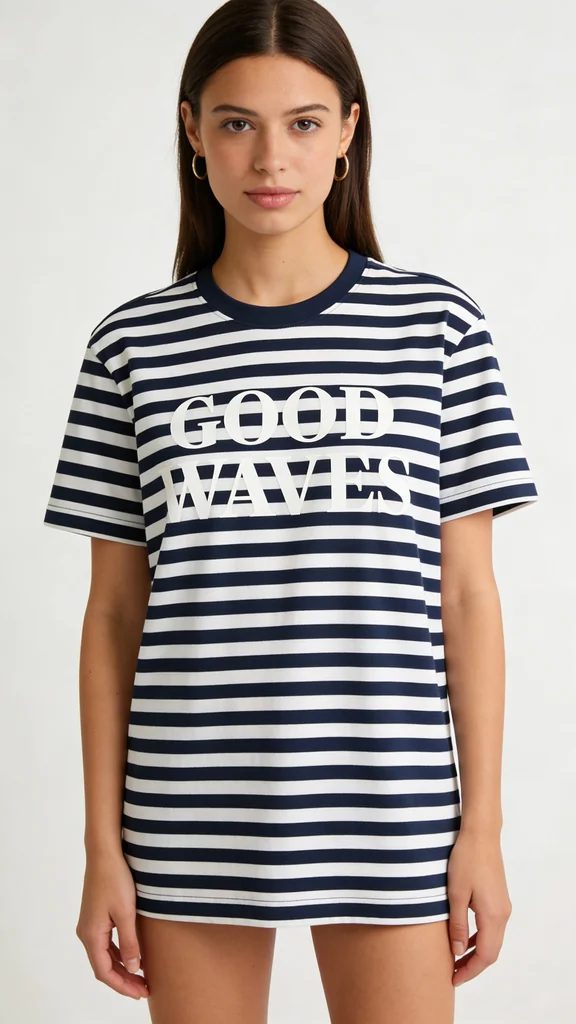
This first-hand test isolates that second problem. One generated navy-and-white striped flat-lay with “GOOD WAVES” artwork was passed to four image routes. All four returned plausible on-model photographs. Their treatment of the chest artwork differed visibly.
Evidence boundary: this is one generated source image, one prompt, one displayed output per model, and one reviewer's visual assessment—not a multi-seed benchmark or a real-garment validation. The recorded credit figures can change. Because the source tee was itself generated, the test measures visual preservation relative to those source pixels, not the truthfulness of a physical SKU.
Quick answer
- Closest displayed chest-artwork match: Seedream 4.5. The two-line layout, serif treatment, and legibility were closest to the source.
- Legible but restyled: GPT Image 2. The words survived, while the treatment became distressed and blended into the stripes.
- Legible but re-laid: FLUX.2 Pro. The two-line artwork became a thin single-line interpretation.
- Unreadable artwork: Nano Banana 2. The model, drape, and stripes looked plausible, while the chest print dissolved into near-text.
Those are findings from four candidates, not reliability rates. A production comparison should run several seeds, use a photographed or approved rendered garment, and count accepted outputs rather than attractive poses.
The source and controlled instruction
The source was created with GPT Image 2 for this test: a navy-and-white Breton-striped tee with a two-line serif “GOOD WAVES” chest print. It is a controlled synthetic reference, not merchandise.
Each model received the same core edit instruction:
Put this exact striped tee on a standing adult model for a clean ecommerce catalog image. Keep the tee's silhouette, navy-and-white stripe spacing, collar, sleeves, two-line “GOOD WAVES” serif artwork, artwork scale, placement, and every printed character unchanged. Neutral studio background, natural drape, no jacket, jewelry, bag, logo, or additional text.
The instruction defines the desired scene and invariants. It does not lock the source pixels; the four outputs demonstrate that difference.
Four on-model outputs
Seedream 4.5 produced the closest visual match according to the reviewer. The artwork remains crisp and recognizably two-line, and the stripe treatment stays close to the source while the shirt drapes plausibly on the model. “Closest” is deliberately narrower than “exact”: the candidate still needs a full-resolution overlay or pixel comparison before representing a real printed garment.
GPT Image 2 kept the words readable, but readability is not artwork fidelity. The candidate changes the treatment into a distressed, vintage interpretation that blends into the stripe field. A brand or licensed graphic can fail even when a human can still read it.
FLUX.2 Pro preserved the broad visual idea while changing the graphic design. The two-line serif artwork becomes a thin single-line treatment. The information is recognizable; the placement, hierarchy, weight, and layout are not the approved source.
Nano Banana 2 makes the review trap clearest. Pose, fit, drape, and stripes read as a polished catalog image at a glance. The chest artwork does not survive. A thumbnail-only review could approve the photograph while approving the wrong garment.
Side-by-side result
| Model | On-model assessment in this output | Broad stripe pattern | Chest artwork | Recorded credits |
|---|---|---|---|---|
| Seedream 4.5 | Plausible catalog image | Recognizable | Closest displayed match | ~4.8 |
| GPT Image 2 | Plausible catalog image | Recognizable | Legible, restyled | ~20.4 |
| FLUX.2 Pro | Plausible catalog image | Recognizable | Legible, re-laid | ~3.6 |
| Nano Banana 2 | Plausible catalog image | Recognizable | Unreadable near-text | ~9.3 |
The source is synthetic and the sample is one candidate per route. Cost per image is less useful than cost per accepted SKU view; a larger test should score several seeds, multiple garment constructions, and several artwork types.
Garment identity is more than the print
The GOOD WAVES artwork makes drift easy to see, but clothing QA should cover the entire product:
- silhouette, length, fit category, and proportions;
- collar, placket, cuffs, hem, seams, pockets, and closures;
- stripe or pattern spacing, direction, count, and registration at seams;
- artwork wording, glyphs, color, size, location, hierarchy, and distressing;
- fabric weave, weight, opacity, sheen, texture, and stretch;
- approved color under a known display and lighting workflow;
- front, side, and back details plus included accessories;
- size-dependent construction or grading that a single flat-lay cannot prove.
An aesthetically strong model image can fail on any one of these.
A reference-first clothing workflow
- Lock the approved source. Use a high-resolution flat-lay, mannequin photograph, or render of the physical SKU; include artwork files when available.
- List the invariants. Construction, fit, color, pattern, artwork, logos, hardware, and included parts cannot drift.
- Generate the on-model candidate. Specify model framing, pose, background, crop, and lighting separately from the garment invariants.
- Review the garment first. Compare full-resolution artwork and construction before judging face, pose, or scene quality.
- Composite when needed. Preserve a useful model and scene, then place the approved garment artwork or product pixels back into the result when the edit changes identity.
- Test coverage. Review several seeds, body types, poses, and required views; one front view does not validate a catalog.
- Record approval. Keep the source, prompt, model ID, size, seed when exposed, candidate, composite, and sign-off.
Current Masonry CLI examples
Both current examples attach the source with --ref, choose an output aspect supported by the route, and name the destination:
masonry image "Put this exact striped tee on a standing adult model for a clean ecommerce catalog image. Keep the silhouette, stripe spacing, collar, sleeves, two-line GOOD WAVES serif artwork, placement, and every character unchanged. Neutral studio background; no jacket, jewelry, bag, logo, or extra text." \ --model seedream-4-5 \ --ref ./approved-flat-lay.png \ --aspect 2:3 \ --output on-model-seedream-candidate.png masonry image "Put this exact striped tee on a standing adult model for a clean ecommerce catalog image. Keep the silhouette, stripe spacing, collar, sleeves, two-line GOOD WAVES serif artwork, placement, and every character unchanged. Neutral studio background; no jacket, jewelry, bag, logo, or extra text." \ --model gpt-image-2 \ --ref ./approved-flat-lay.png \ --aspect 2:3 \ --output on-model-gpt-image-2-candidate.png
“Unchanged” is an instruction, not a product lock. Compare each candidate with the approved source and composite when it drifts.
Clothing acceptance sheet
| Area | Reject the asset when… |
|---|---|
| Construction | silhouette, collar, sleeve, hem, seam, pocket, closure, or proportion differs from the source |
| Pattern | stripe, check, repeat, direction, spacing, count, or seam registration changes |
| Artwork | any glyph, word, logo shape, color, scale, placement, line break, weight, or treatment changes |
| Material and color | weave, opacity, sheen, stretch, texture, or approved color is misrepresented |
| Fit and view | pose hides required details or the result implies an unverified size, drape, or included part |
| Delivery | compositing introduces halos, broken patterns, skin overlap, warped edges, or mismatched lighting |
The bottom line
All four displayed candidates made plausible on-model photographs. Their garment fidelity was not equivalent. The broad stripe pattern remained recognizable, while the two-line artwork ranged from close to the source to restyled, re-laid, or unreadable.
Use this as a test design, not a promise that one route always wins. Start from an approved physical-product source, define the invariants, score the garment before the model, and composite exact artwork or product pixels when the generative edit drifts. The product-photography model guide covers broader selection, and the text-rendering guide isolates displayed-copy performance without treating it as garment preservation.
When the job shifts from showing the garment to helping a shopper choose a size, use the AI apparel size-guide workflow to keep body and garment measurements separate, preserve the approved method and size-set record, and verify the exact product, variant, mobile, cart, and return-window path.