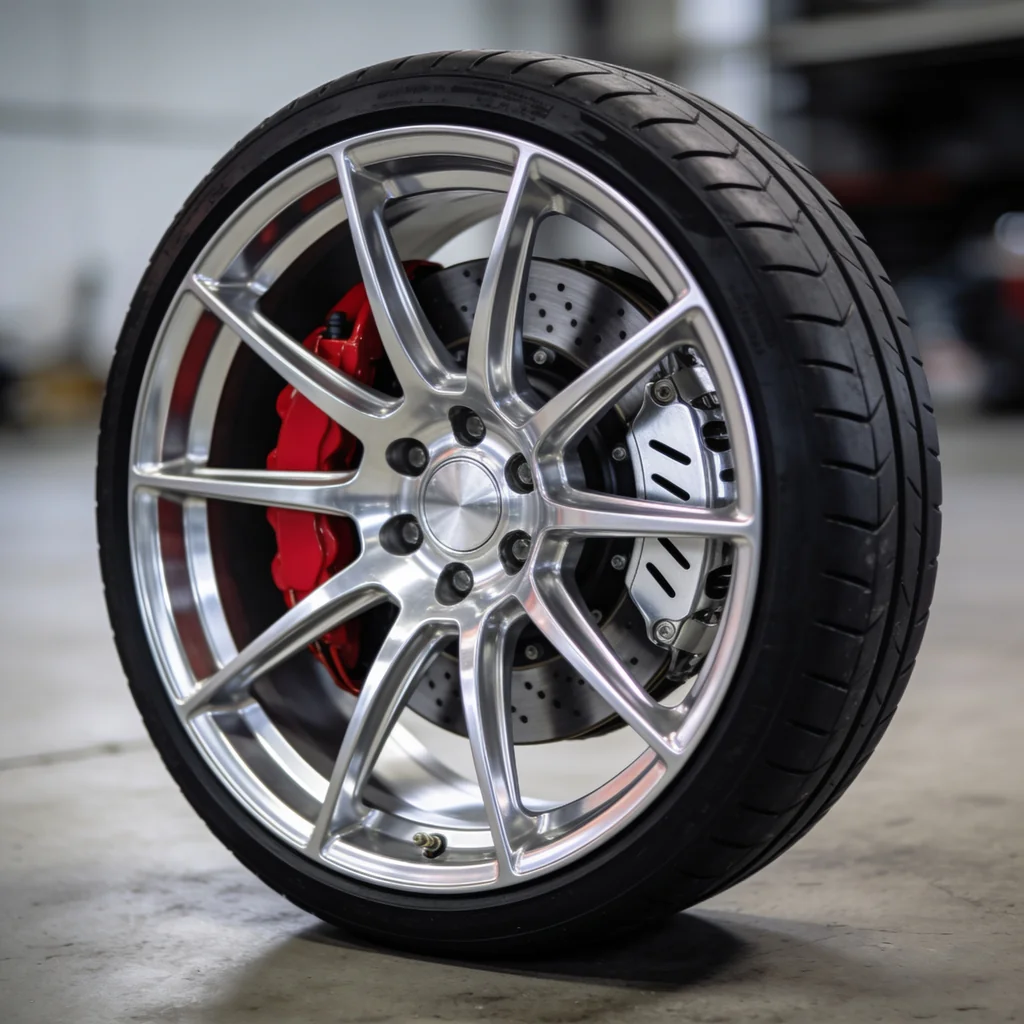
AI can make an alloy wheel look polished, symmetric, and ready for a catalog. That does not mean it generated your wheel—or a wheel that fits anything.
This test sent one fictional brief through SeedDream 4.5, Nano Banana 2, GPT Image 2, and FLUX.2 Pro. The four original outputs below are useful visual evidence. They are not evidence of SKU fidelity, fitment, load capacity, or repeated model reliability.
Evidence boundary: this is one prompt and one displayed output per model. The wheel was fictional, no product reference or specification sheet was supplied, and no physical fitment or safety check was possible. The observations describe these four images; they are not reliability rates or proof that wheel geometry is “solved.”
Quick answer
- Best displayed concept: Seedream 4.5 produced the most convincing polished-metal hero in this run.
- Most important result: all four invented different wheels. A plausible spoke pattern is not your SKU.
- Commercial rule: use approved product sources, review exact geometry and markings, and keep fitment claims outside the generated image workflow.
- Safer production path: generate the environment, then composite the approved wheel packshot when exact product truth matters.
The controlled brief
The original article summarized the prompt instead of publishing a reproducible one. This is the controlled brief that matches the tested subject and the observable checks used here:
Brand-free polished multi-spoke alloy wheel fitted with a low-profile black tire, shown three-quarter front on a clean concrete studio floor. Centered hub, five evenly spaced lug openings, red brake caliper, vented brake disc, machined-aluminum face with darker inner pockets, coherent soft studio reflections, natural contact shadow. No car, people, tools, text, logos, brand marks, watermarks, or extra wheels. Square product photograph.
The brief intentionally describes a fictional wheel. It is suitable for evaluating composition, material rendering, and obvious structural coherence. It cannot test whether a model preserves a production design it has never seen.
Four first-hand outputs
Seedream 4.5 made the strongest catalog-style concept of the four. The outer rim, spoke faces, darker pockets, tire, and contact shadow separate cleanly. The brake assembly reads through the wheel. That is a judgment about this image's visual craft, not evidence that the depicted disc, caliper, or mounting geometry is mechanically valid.
Nano Banana 2 chose a denser mesh. The repeated branches form a plausible radial rhythm, the polished face reads against darker pockets, and the caliper remains visible. Dense repetition deserves a full-resolution inspection: count branches, compare every quadrant, and look for merged or uneven junctions instead of relying on a thumbnail impression.
GPT Image 2 produced a restrained split-spoke treatment and a readable product silhouette. The finish and brake components look plausible at article scale. Because the prompt did not define a real design or supply measurements, “correct” can only mean visually coherent—not dimensionally or mechanically correct.
FLUX.2 Pro returned another visually plausible wheel, but the caliper shows an ambiguous light mark. That is enough to fail a no-branding requirement. Inspect center caps, calipers, spoke engraving, tire sidewalls, valve caps, and background signage; a tiny invented mark can turn a polished image into an unusable listing asset.
What the comparison actually supports
| Question | What these four images show | What remains untested |
|---|---|---|
| Can the models make a plausible wheel concept? | Yes, once each in this brief. | Reliability across seeds, prompts, and crops. |
| Can they render polished metal? | All four show readable bright faces and darker pockets. | Whether the finish matches a real machining pattern, paint code, or gloss level. |
| Can they make radial repetition look coherent? | The displayed patterns look broadly regular at article scale. | Exact spoke topology, symmetry overlays, and source preservation. |
| Can they preserve a SKU? | No evidence; no source SKU was supplied. | Every product-specific dimension, feature, and mark. |
| Can the images establish fitment? | No. | Diameter, width, PCD, bore, offset, load rating, brake clearance, tire spec, and vehicle compatibility. |
The original version called machined metal and exact geometry “solved.” These images support a narrower conclusion: four models created attractive fictional concepts from one brief. That is valuable for ideation, but it is not a product claim.
Product fidelity checks for a real wheel
Create the rejection sheet before generating. At minimum, compare:
- Face topology: spoke count, splits and branches, spoke-to-rim junctions, spoke-to-hub junctions, window shapes, and rotational symmetry.
- Rim and barrel: lip profile, step or concavity, bead-seat visibility, barrel depth, valve-stem location, and any hardware.
- Mounting area: lug count and layout, center bore appearance, center-cap geometry, and visible fasteners. Pixel review does not verify hidden dimensions.
- Finish: machined zones, painted pockets, color, gloss, grain direction, edge highlights, and approved material description.
- Brake and tire context: caliper and disc must be treated as scene elements unless they are also approved products; tire tread and sidewall copy cannot be invented.
- Marks: logos, model names, certifications, load markings, sizes, warnings, and trademarks must match approved artwork or be absent.
- Fitment data: keep diameter, width, bolt pattern or PCD, center bore, offset, load rating, tire specification, brake clearance, and vehicle compatibility in an authoritative product-data system. Never read them from generated pixels.
For a listing, a wrong spoke junction or center cap is already a product mismatch. A visually believable mounting face is not mechanical validation.
A reference-first workflow
1. Build an approved source set
Use a clean front view, a three-quarter view, a side or barrel view, finish references, approved center-cap artwork, and the product specification sheet. Assign each image one role rather than attaching an unexplained pile.
2. Separate concept work from listing work
Text-only generation is useful for lighting, backgrounds, crops, and campaign directions. Label those outputs as concepts. Do not let an invented wheel become the product photograph simply because it looks premium.
3. Generate a reference-conditioned candidate
Use the current executable model ID and state the invariants:
masonry image "Change only the environment to a clean concrete studio. Keep the supplied wheel's spoke count and topology, rim profile, center bore, lug layout, center cap, valve location, finish zones, color, and every visible mark unchanged. Add soft camera-left light and a natural contact shadow. Do not add a vehicle, caliper logo, text, or extra wheel." \ --model gemini-3.1-flash-image-preview \ --ref ./approved-wheel-three-quarter.png \ --aspect 1:1 \ --output wheel-scene-candidate.png
The instruction is not a product lock. Compare the candidate against every approved view and reject any unverified surface the model invented.
4. Prefer compositing for exact listings
When exact geometry and markings matter, use AI to generate the empty studio or garage plate, then composite a color-managed, approved wheel photograph into it. Add the correct shadow and reflection deliberately. This preserves product truth while still reducing location and set-production work.
For a fictional concept, the current Seedream command is:
masonry image "Brand-free polished multi-spoke alloy wheel with a low-profile black tire, red brake caliper and vented disc, three-quarter front on a clean concrete studio floor, coherent soft reflections, natural contact shadow, no text or logos, square product photograph." \ --model seedream-4-5 \ --aspect 1:1 \ --output wheel-concept.png
Wheel acceptance sheet
| Area | Pass condition |
|---|---|
| Source match | Candidate is compared with the approved views at full resolution, not from memory. |
| Spoke topology | Count, branching, window shape, junctions, and symmetry match the source. |
| Rim and mounting face | Lip, concavity, barrel, lug layout, center cap, valve, and visible hardware match. |
| Finish | Machined and painted zones, color, gloss, texture, and edge treatment match approved photography. |
| Marks | No invented caliper, cap, tire, spoke, certification, or background text appears. |
| Scene | Light direction, reflections, contact shadow, floor contact, crop, and perspective are coherent. |
| Product data | No fitment, load, size, or compatibility fact is inferred from the image. Approved data remains authoritative. |
Bottom line
The four visuals belong in this article because they are first-hand evidence and clearly show how differently models invent the same category. Their real lesson is not that wheels are solved. It is that visual plausibility arrives before product truth.
Use the images to choose a lighting or composition direction. Use your approved wheel to decide whether the final asset can ship. Before a retained candidate enters a listing or campaign, map its sources, marks, claims, metadata, destination, and approval in the AI product-photo commercial-use checklist. Compare other product-specific results in the AI product photography model test, or build a reference-first workflow in Masonry's product photography tool and automate controlled candidates with the Masonry CLI.