Live-plant photography has a fidelity question that ordinary products do not: natural variation is real, but the listing still makes an inventory promise. A beautiful plant can change identity, cultivar, maturity, height, spread, leaf count, fenestration, variegation, condition, support, pot, or size grade beyond what a customer will receive.
This test sent one fictional potted-monstera brief through Seedream 4.5, Nano Banana 2, GPT Image 2, and FLUX.2 Pro. The four original outputs below show useful differences in visible leaf detail, fullness, fenestration-like forms, pot, crop, and room light. No real plant, taxonomic record, cultivar, inventory grade, measurements, condition standard, pot specification, substrate, support, substitution policy, packaging, care data, or product record was supplied.
Evidence boundary: this is one text prompt and one displayed output per model. The observations describe visible fictional houseplants—not botanical identity, cultivar, inventory grade, plant health, measured size, condition, toxicity, care, model reliability, price/value, shoot replacement, or preservation of a real live-plant SKU.
Quick answer
- Most detailed displayed leaf surface: Seedream 4.5 in this run.
- Fullest displayed window-and-saucer scene: Nano Banana 2 in this run.
- Cleanest displayed tidy-room concept: GPT Image 2 in this run.
- Warmest displayed atmospheric treatment: FLUX.2 Pro in this run.
- What all four establish: each route made one plausible fictional monstera-like potted-plant concept.
- What none establish: the correct species/cultivar, age, maturity, height, spread, leaf count, fenestration, condition, pot, substrate, support, grade, substitutions, toxicity, care, or repeated reliability.
One output per route does not establish a universal winner or reliable species accuracy. Familiar split and perforated leaf cues are not a taxonomic record, and a lush generated specimen is not an inventory grade.
First define what the customer is buying
| Offer type | Fidelity target | Required evidence |
|---|---|---|
| Exact specimen | The photographed individual plant, subject only to disclosed growth or delivery change. | Current multi-angle inventory photography, measurements, pot/support, condition, identifying traits, packing state, and fulfillment link to that specimen. |
| Grade-based live plant | A representative plant within a disclosed natural-variation range. | Verified identity, pot/size grade, height/spread range, minimum or typical fullness, maturity, allowed cosmetic variation, support/substrate, substitution policy, and representative-photo disclosure. |
An AI image cannot decide which promise a seller makes. Define it first and review the candidate against that promise.
The controlled concept brief
The original article did not publish the exact prompt. A bounded version matching the displayed subject is:
Fictional brand-free monstera-like tropical houseplant with broad glossy green leaves and familiar split/perforation cues, planted in a plain terracotta-look pot with matching saucer beside a bright window, soft camera-left light, square plant-shop product photograph. No species label, cultivar claim, measurement, toxicity claim, care claim, flower, fruit, moss pole, person, pet, price, watermark, or extra plant.
This prompt can test composition and visible plant cues. It cannot preserve inventory because the model invents the identity, leaf count, forms, fenestration, maturity, stems/petioles, node/growth logic, roots, height, spread, condition, pot, substrate, and hidden side.
Four first-hand outputs
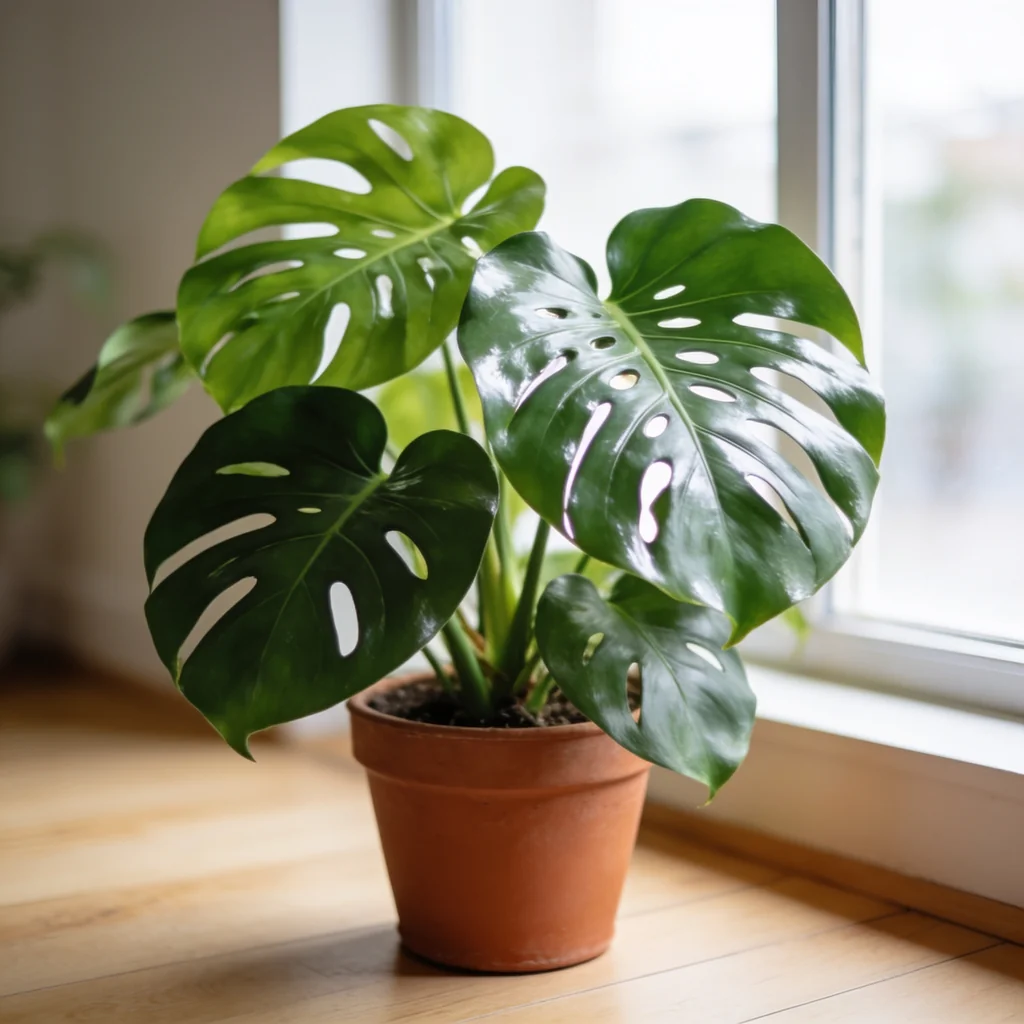
Seedream 4.5 produced the closest leaf-forward crop, with glossy surfaces, visible veins, split/perforated forms, stems, and a terracotta-look pot. That supports an art-direction observation about surface detail. It does not establish species/cultivar, plant age, leaf morphology, growth logic, height, spread, condition, pot size, substrate, or health.
Nano Banana 2 made the fullest displayed room concept, including a broad plant silhouette, multiple split/perforated leaves, a pot, saucer, window, and outdoor greenery. The scene reads as a complete listing hero. Without an inventory grade, measurements, or scale source, that fullness cannot establish what a buyer will receive.
GPT Image 2 produced a clean, orderly plant-and-room composition with multiple glossy leaves and a terracotta-look pot/saucer. It is easy to read as retail photography, which increases the need for a grade-level check: tidy presentation is not proof of identity, maturity, size, fullness, condition, or sold configuration.
FLUX.2 Pro emphasized warm raking light and a softer plant treatment. Some leaf and stem detail is less inspectable at article scale. Full-resolution review still needs to trace each visible leaf, perforation/split, petiole, node, overlap, pot edge, substrate/contact, support, condition marker, and scale cue.
What this comparison supports
| Question | What the four images show | What remains untested |
|---|---|---|
| Can the routes make a potted-plant concept? | Yes, once each for this fictional brief. | Reliability across seeds, taxa, cultivars, grades, conditions, crops, references, prompts, and current routes. |
| Do visible leaf and room treatments differ? | Yes; gloss, detail, fullness, crop, warmth, softness, pot, saucer, and background vary. | Taxonomy, cultivar, morphology, maturity, growth logic, health, condition, size, and real-light behavior. |
| Do the images show familiar monstera-like cues? | Yes; broad green leaves with splits/perforation-like forms are visible. | Expert identification, exact species/cultivar, age-dependent morphology, source match, and full-resolution coherence. |
| Is a real inventory SKU preserved? | No evidence; no specimen or grade was supplied. | Measurements, leaf/fullness rule, variegation, support, pot, substrate, damage, pests, packaging, substitutions, and fulfillment state. |
| Are care or safety facts established? | No. | Toxicity, pet/child safety, light, water, humidity, temperature, soil, fertilizer, growth, mature size, origin, pest/disease, quarantine, and warranty. |
The old article called every plant species-accurate and treated common houseplants as reliable. The defensible conclusion is narrower: four routes made attractive fictional monstera-like plant concepts once, and their displayed leaf, fullness, pot, and room treatments differ.
Live-plant fidelity checklist
Build the rejection sheet from verified taxonomic/inventory records, current specimen or grade photography, measurements, condition standards, pot/support/substrate specifications, substitution policy, packaging, horticultural data, and current product data:
- Identity: accepted scientific and common name, cultivar/trade name, source/provenance, distinguishing leaf/stem/node traits, variegation pattern, maturity, and expert verification where needed.
- Specimen or grade: exact individual or grade SKU; pot size, height, spread, leaf count or fullness rule, maturity range, stem/vine count, support, roots, growth point, and allowed natural variation.
- Visible morphology: leaf size/shape, margins, splits/perforations, venation, texture, gloss, color, petiole, sheath, node, internode, aerial roots, stem/vine path, emerging leaves, orientation, scale, and growth logic.
- Condition: bloom/growth stage, hydration-facing cues, dust/residue, mechanical damage, browning, yellowing, tears, scars, sun/cold injury, disease/pest-facing signs, treatment, pruning, and disclosed cosmetic tolerance.
- Pot and setup: nursery/decorative pot, diameter, height, color, material-facing cues, drainage, saucer/cachepot, substrate, top dressing, stake/trellis/moss pole, ties/clips, label, cover, and sold configuration.
- Scale and fulfillment: current measured height/spread, reference object, packing/pruning state, sleeve, box, insert, heat/cold pack, soil retention, support, accessories, substitution, season/growth change, and delivery expectation.
- Scene: approved crop, floor/window relationship, contact, shadow, pot stability, water/drainage logic, light direction, temperature/pet/child hazards, props, and no implied unsafe placement.
- Product facts: identity, toxicity, pet/child safety, care, mature size, growth rate, origin, rarity, availability, seasonality, pest/disease/quarantine, organic/certification, sustainability, condition guarantee, delivery, and warranty remain in approved data.
If the room looks aspirational but the identity, grade, size, fullness, maturity, condition, pot, support, substitutions, packaging, or claims differ, it is the wrong live-plant asset.
An inventory-first houseplant workflow
1. Capture authoritative sources
For an exact specimen, photograph current front, back, sides, top, base, leaves, nodes/stems, support, pot, substrate, labels, condition markers, packaging, and scale; record height and spread. For a grade SKU, photograph multiple representative units and document the minimum/typical/range for size, fullness, maturity, condition, pot, support, and substitutions.
2. Build the room separately
Generate or photograph an empty window, shelf, desk, floor, bathroom, porch, shop, or editorial plate at the final crop. Composite approved plant photography, then build contact, pot shadow, leaf occlusion, and background depth deliberately. This keeps identity and inventory truth deterministic.
3. Test a constrained reference edit
masonry image "Change only the environment to a simple bright room beside a window. Keep the supplied live plant unchanged: verified identity-facing traits, current height and spread, every visible leaf and fenestration, leaf count/fullness, color, variegation, stems, nodes, aerial roots, maturity, condition, damage, support, pot, saucer, substrate, label, and sold configuration. Add one natural contact shadow. Add no species label, care claim, person, pet, extra plant, or replacement leaf." \ --model gemini-3.1-flash-image-preview \ --ref ./approved-live-plant-inventory.png \ --aspect 1:1 \ --output houseplant-scene-candidate.png
The instruction is not an identity, condition, or inventory lock. Compare the candidate against current specimen/grade sources, measurements, condition rules, pot/support specifications, packaging, substitution policy, and horticultural data. Composite approved inventory photography when exactness matters.
For a fictional concept:
masonry image "Fictional brand-free monstera-like tropical houseplant with broad glossy green leaves and split/perforation cues, plain terracotta-look pot with saucer beside a bright window, soft light, no species label, cultivar claim, measurement, toxicity claim, care claim, flower, fruit, support, person, pet, or extra plant" \ --model seedream-4-5 \ --aspect 1:1 \ --output houseplant-concept.png
Houseplant acceptance sheet
| Area | Pass condition |
|---|---|
| Source match | Candidate is compared with verified identity records and current specimen/grade front, back, sides, top, base, morphology, support, pot, substrate, label, condition, packaging, scale, measurements, substitutions, and product data. |
| Identity and morphology | Scientific/common/cultivar identity, maturity, leaf/stem/node/root traits, variegation, splits/perforations, growth logic, orientation, scale, and expert review match approved evidence. |
| Grade and condition | Exact specimen or size grade, pot, height, spread, leaf/fullness rule, stems/vines, maturity, support, hydration-facing cues, damage, disease/pest-facing signs, pruning, and cosmetic tolerance match. |
| Configuration and delivery | Pot/saucer/cachepot, substrate, top dressing, support, ties, label, sleeve, box, inserts, packs, accessories, substitutions, packing state, sold configuration, crop, dimensions, color, and format are approved. |
| Claims and rights | No identity, rarity, toxicity, pet/child safety, care, mature size, growth, origin, availability, seasonality, pest-free, quarantine, organic, certified, sustainable, delivery, warranty, affiliation, or rights-clearance claim is inferred from appearance. |
Bottom line
These four outputs are useful as a leaf-and-room art-direction comparison. They are not evidence that species accuracy is reliable, the plant matches inventory, a fictional specimen is ready to list, or one route is always the best value.
Define the inventory promise first. Use fictional concepts to choose the room; use verified identity, current specimen or grade photography, measurements, condition, pot/support, substitutions, packaging, horticultural data, and product facts to decide whether an asset can ship. Compare the broader AI product photography model review, build a controlled scene in Masonry’s product photography tool, or automate candidates with the Masonry CLI.