


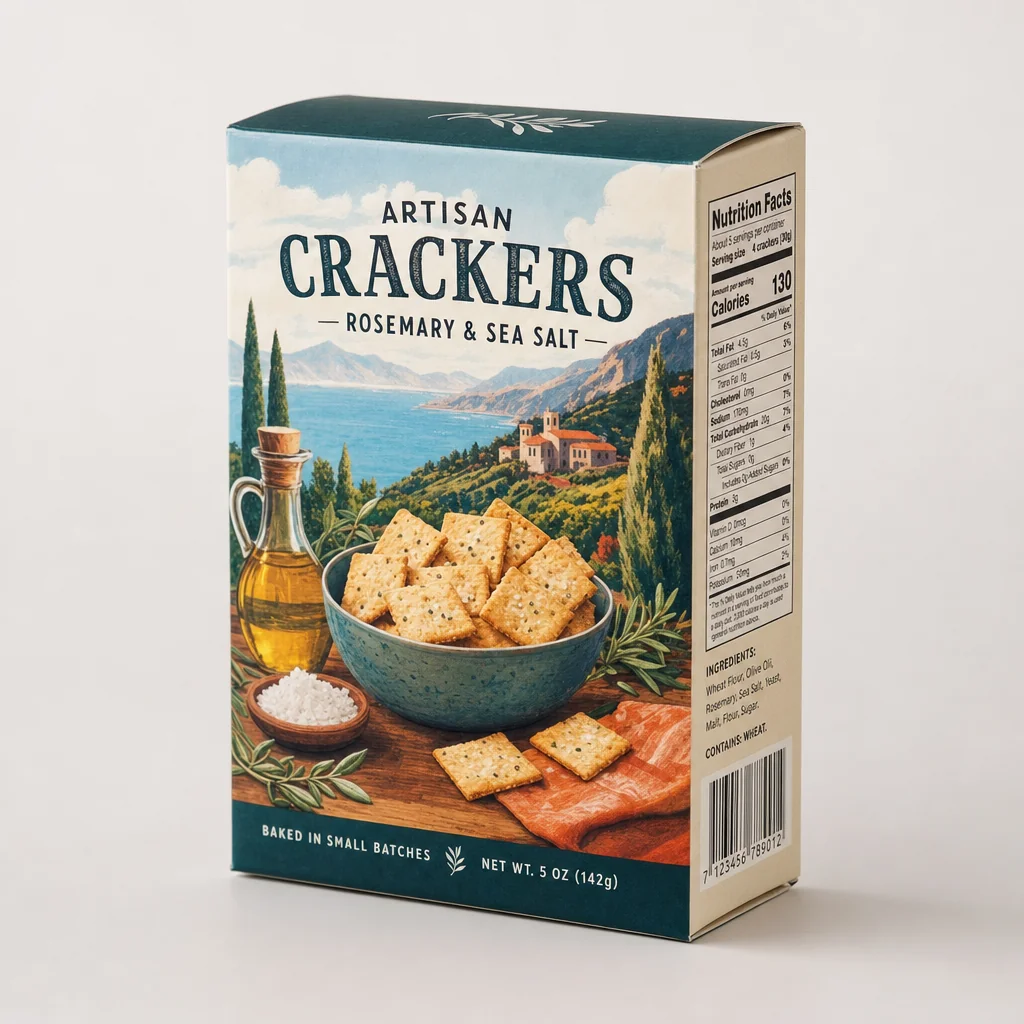
Packaging is where visual polish can hide the most product data. A cracker box is not only a rectangle and an illustration: it can carry the product identity, variant, net quantity, ingredients, allergens, nutrition data, claims, business information, barcode, dates, and handling instructions.
In this test, all four boxes look plausible at article size. None represents an approved product, because the models were given no source dieline, label artwork, formulation, barcode asset, or specification sheet. Every readable value is therefore part of the generated concept—not evidence about a food someone can sell or eat.
This article keeps the original outputs from GPT Image 2, Nano Banana 2, FLUX.2 Pro, and Seedream 4.5, then converts their visible failure modes into a packaging-production checklist.
Evidence boundary: this is one displayed output per model from a fictional cracker-box brief. No real package, dieline, formula, nutrition record, ingredient or allergen source, GTIN, approved barcode artwork, or regulatory review was supplied. The original test also did not document scanning or barcode verification. The observations below describe visible pixels, not model reliability or production readiness.
Quick answer
- Clearest single-box concept in this run: GPT Image 2 produced the most complete front-and-side presentation, including highly legible but unsupported food-label content.
- Most revealing barcode treatment: Nano placed the word “BARCODE” above a barcode-like symbol. The symbol is visible, but this test did not establish what it encodes or whether it scans.
- Largest SKU-control failure: Seedream returned three packages rather than one and misspelled the visible product name as “Artisian cruckers.”
- Commercial rule: preserve approved packaging photography and artwork. Generate the environment when exact product identity, label copy, and code integrity matter.
The controlled brief
The original article did not preserve the exact submitted prompt. This is a controlled reconstruction of the subject and constraints needed to evaluate the displayed outputs:
One brand-free fictional artisan cracker box, three-quarter front view on a neutral studio surface. Illustrated cracker serving scene, product name, flavor line, net quantity, side Nutrition Facts-style panel, ingredient area, and barcode placeholder. Coherent folded carton, print alignment, soft studio light, natural contact shadow. No real brand, certification, health claim, or extra package. Square product photograph.
This is a concept brief, not label input. It can test composition, carton rendering, panel visibility, and obvious text coherence. It cannot test a production dieline, formula, mandatory copy, barcode, color standard, print finish, regional requirement, or SKU preservation.
Four first-hand outputs
GPT Image 2 made the clearest retail-style concept in the set. The front hierarchy, landscape illustration, carton folds, and side-panel layout read cleanly. That legibility increases the review burden: a shopper could interpret the flavor, quantity, calorie value, ingredient-like text, and allergen-like line as real. With no source package or formulation, the image supports none of them.
Nano Banana 2 produced the most readable collection of front, side, and bottom details. The box also demonstrates why “the text looks right” is not an acceptance test. Product name, flavor, weight, nutrition values, origin-style copy, barcode data, and recycling graphics all require separate approved sources. A visually crisp symbol can still encode the wrong identifier, use the wrong dimensions, or fail after printing.
FLUX.2 Pro chose a quieter layout with generous white space. The product name and flavor are readable, while the side contains a dense information panel and small symbols. The visible principal face does not show a net-quantity statement. That may be a concept omission, crop choice, or placement outside the visible area; the image alone cannot decide compliance, but it is enough to trigger comparison with approved artwork.
Seedream 4.5 changed the unit of work from one box to a three-package assortment. The colorful fronts vary, the visible product name is misspelled, and each side appears to carry its own panel and code. This is more than a typography issue: it invents additional SKUs, artwork, product photography, label data, and assortment composition. A styled scene must still prove which exact packages and quantities belong in it.
What this comparison supports
| Question | What these images show | What remains untested |
|---|---|---|
| Can the models render a plausible folding carton concept? | Yes, once each in this displayed run. | Reliability across seeds, prompts, structures, and current model versions. |
| Can generated package copy look readable? | GPT, Nano, and FLUX contain several readable front and side elements. | Accuracy, completeness, legal sufficiency, font, size, placement, and match to approved artwork. |
| Did the models draw barcode-like symbols? | Yes, all four display one or more. | Encoded data, ownership, check digit, dimensions, quiet zones, contrast, scan performance, and printed quality. |
| Can these images establish a food label? | No; no authoritative label data was supplied. | Product identity, quantity, formula, ingredients, allergens, nutrition, claims, warnings, firm details, and market rules. |
| Can they preserve a packaging SKU? | No evidence; no source package was supplied. | Structure, artwork, variant, color, finish, marks, contents, and assortment count. |
The central lesson is not that every AI-drawn barcode must fail a scan. It is that an unverified graphic is not an approved identifier, and a familiar-looking panel is not an approved label.
Packaging controls before photography
Build the source-of-truth package before generating. The exact requirements depend on the product and market, but a packaged-food workflow commonly separates:
- Structure and dieline: dimensions, panel geometry, flaps, seams, folds, windows, cut lines, bleed, safe areas, glue zones, openings, closures, and the exact package type.
- Principal display panel: approved brand, statement of identity, variant or flavor, net quantity, claims, illustrations, required marks, hierarchy, and placement.
- Information panels: approved Nutrition Facts, ingredients, major-allergen declaration, responsible firm and address, directions, storage, warnings, and other product-specific copy.
- Identifiers and machine-readable data: authoritative GTIN or other identifier, approved UPC/EAN/2D artwork, human-readable digits, quiet zones, size, contrast, orientation, and placement.
- Variable data: lot or batch, production and date coding, expiration or best-by logic, serial or traceability fields, country or facility information, and reserved print areas.
- SKU and market: formula, size, count, flavor, language, region, channel, promotional version, multipack, assortment, and included product.
- Color and production: substrate, ink and spot-color targets, white ink, varnish, foil, emboss or deboss, laminate, transparency, print process, tolerances, and approved physical proof.
- Claims and certifications: nutrition, health, environmental, origin, organic, allergen, dietary, quality, safety, or performance language and marks must come from qualified product-specific review.
For U.S. packaged foods, the FDA's food-business guidance points businesses to product-specific labeling, nutrition, and allergen requirements; jurisdiction and exceptions vary. For codes, GS1's barcode-quality guidance covers check digits, quiet zones, contrast, construction, size, placement, and deterioration. Those controls belong upstream of the photograph, and final printed packaging still needs the appropriate validation and verification process.
An artwork-locked production workflow
1. Assemble approved sources by SKU
Collect the signed-off dieline, print PDF, all visible-panel exports, physical color proof, packshot views, formulation-linked label data, approved code artwork, and current specification sheet. Record version, market, language, size, flavor, and production date so an obsolete file cannot silently enter the scene.
2. Choose concept or listing mode
Text-only generation is useful for fictional form, composition, prop, lighting, and campaign exploration. Label it as a concept. For a real listing or campaign asset, keep the approved package itself fixed and vary only an explicitly allowed environment.
3. Prefer a real packshot on a generated plate
Generate an empty studio, shelf, kitchen, or lifestyle background, then composite color-managed photography of the actual package. Rebuild contact shadows and reflections deliberately. This preserves fine copy, print registration, codes, edges, and finishes without asking a model to reconstruct them.
4. Use reference editing only for bounded candidates
When a source-conditioned edit is appropriate, enumerate the lock:
masonry image "Change only the environment to a pale kitchen counter with soft window light. Keep the supplied package's structure, dieline, perspective, crop, every panel, word, number, code, mark, illustration, color, finish, seam, and included item unchanged. Add no package, food, claim, badge, text, or barcode." \ --model gemini-3.1-flash-image-preview \ --ref ./approved-package-three-quarter.png \ --aspect 1:1 \ --output package-scene-candidate.png
That instruction is a constraint, not an artwork lock. Compare the candidate with the approved packshot and print artwork at full resolution; reject changed or obscured copy, geometry, color, codes, and marks.
For fictional scene exploration, keep the package explicitly noncommercial:
masonry image "One fictional unbranded folding-carton concept on a neutral studio surface, abstract fruit illustration, blank side panels, no food, supplement, health, safety, environmental, or origin claims, no ingredients, nutrition panel, barcode, certification, quantity, logo, or extra package, square product photograph." \ --model gpt-image-2 \ --aspect 1:1 \ --output fictional-package-concept.png
5. Proof the image and the production package separately
For the marketing image, compare every visible panel, edge, word, digit, color, mark, and included item with approved sources at listing size and full resolution. For the physical package, validate identifier data and verify printed barcode quality on the intended substrate, finish, shape, press conditions, and scan environment. A screenshot scan is not a substitute for production verification.
Packaging acceptance sheet
| Area | Pass condition |
|---|---|
| Source match | Candidate is compared with the approved SKU, dieline, artwork, packshot, and version record. |
| Structure | Dimensions, panels, folds, seams, windows, closures, edges, and visible contents match. |
| Front | Identity, variant, quantity, claims, illustration, hierarchy, and required marks match. |
| Information panels | Nutrition, ingredients, allergens, firm details, directions, warnings, and other copy match approved artwork. |
| Codes | Correct artwork and human-readable data are preserved; no model-authored or distorted code ships. |
| Variant and count | Size, flavor, language, market, multipack, assortment, and package count are correct. |
| Print appearance | Color, substrate, ink, finish, registration, gloss, foil, embossing, and condition match the physical proof. |
| Scene | Perspective, scale, crop, light, contact shadow, reflections, props, and package-floor contact are coherent. |
| Production verification | Identifier data and final printed code quality are validated through the applicable packaging process. |
Bottom line
These images are useful because they show how quickly a box-shaped concept acquires authoritative-looking data. GPT produced the clearest single-box layout, but all visible label content is unsupported. Nano made the most details readable, including a literal BARCODE heading. FLUX showed that a quiet design can still omit or invent critical information. Seedream turned one package into three and misspelled the product name.
Use the outputs to choose a scene or design direction, not to represent a production package. Keep approved artwork and packshots authoritative, generate only what can safely vary, and reject any candidate that changes structure, identity, quantity, formula-linked copy, claims, marks, codes, variant, or package count. Compare the wider category results in the AI product photography model test, build an artwork-first workflow in Masonry's product photography tool, or automate controlled candidates with the Masonry CLI.


