


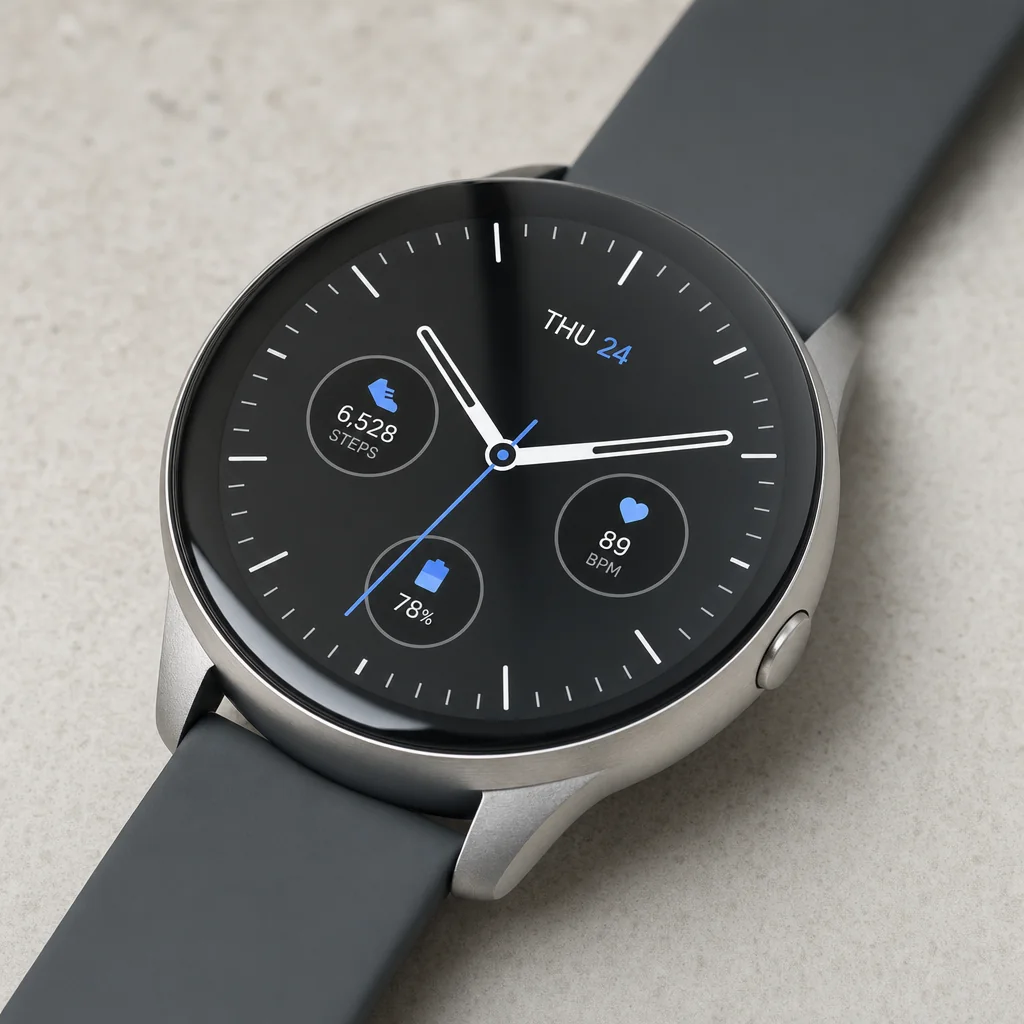
An AI image can make a smartwatch look polished before it makes it truthful. In this test, the four bodies look plausible at article size, but every visible screen contains information that came from the model rather than an approved product UI.
That difference matters. A clean watch face can imply features, data, apps, and software states the product may not have. A familiar-looking body can also drift away from the seller's own industrial design even when no wordmark appears.
This article keeps the four original outputs from GPT Image 2, Seedream 4.5, Nano Banana 2, and FLUX.2 Pro, then turns their visible failure modes into a production checklist for real electronics.
Evidence boundary: this is one displayed output per model from a fictional smartwatch brief. No real device, source UI, specification sheet, design drawing, test result, or compliance record was supplied. The observations below describe visible pixels in these four images; they are not model reliability rates or proof of product performance.
Quick answer
- Closest hardware macro in this run: Seedream 4.5 rendered the most detailed brushed-metal close-up, but it did not preserve a real SKU because none was supplied.
- Clearest UI lesson: all four displays contain model-authored content. GPT shows readings and complications; Seedream includes near-text and ring graphics; Nano shows time, date, and app-like icons; FLUX shows time and control-like symbols.
- Design-screening lesson: the Seedream, Nano, and FLUX bodies share a familiar rounded-square watch pattern. That visual resemblance is a review flag, not a conclusion about ownership or infringement.
- Listing rule: keep approved device photography, product data, UI, marks, and compliance evidence authoritative. Generate the environment when product truth matters.
The controlled brief
The original article did not preserve the exact submitted prompt. This is a controlled reconstruction of the subject and constraints needed to evaluate the displayed outputs:
Brand-free fictional smartwatch with a brushed-aluminum case, glossy black touchscreen, dark silicone band, and one side control, photographed on pale stone in soft studio light. Clean product, coherent glass and metal reflections, natural contact shadow. Generic nonfunctional display, no company logos, product names, trademarks, watermarks, medical claims, or extra devices. Square product photograph.
Because no real device or UI reference was included, this brief can test visual craft and obvious consistency only. It cannot test preservation of chassis geometry, controls, ports, software, sensors, finishes, accessories, specifications, or rights-cleared design.
Four first-hand outputs
GPT Image 2 produced the clearest round product silhouette and a visually orderly analog face. That order is the risk: the display includes a date, health- and activity-like readings, and small graphics that could be read as product capabilities. With no source screenshot or specification sheet, the image cannot support any of those implications.
Seedream 4.5 made the most detailed hardware macro of the four. The brushed case, crown edge, glass, and side control read clearly. The display does not hold the same standard: the lower line contains irregular near-text, and the ring graphics and numeric readouts have no approved UI source. The macro crop also hides most of the band and the opposite side of the chassis, so it provides limited evidence about a complete SKU.
Nano Banana 2 created the most immediately legible digital display in the set. Time, date, and colored app-like symbols are easy to parse, while the case and band look clean. Those elements are still model-authored. For a real listing, each icon, label, software state, locale, and control must come from the approved product—not from how convincing the display looks.
FLUX.2 Pro made the sparsest display, but it still added time and control-like symbols. The glass also shows visible speckling or wear. That is a useful reminder that condition is part of product fidelity: dust, scratches, fingerprints, dents, and protective-film edges can misrepresent a new item just as surely as the wrong button or icon.
What this comparison supports
| Question | What these images show | What remains untested |
|---|---|---|
| Can the models make a plausible fictional smartwatch? | Yes, once each in the displayed run. | Reliability across seeds, prompts, crops, and current model versions. |
| Can they render metal, glass, and silicone-like surfaces? | Each image contains readable material cues at article size. | Match to a real alloy, coating, glass treatment, band material, color, or finish standard. |
| Can they create a readable display? | GPT and Nano contain especially legible screen elements. | Fidelity to a real UI, software version, locale, feature set, state, or live data. |
| Can they preserve a device SKU? | No evidence; no source device was supplied. | Every product-specific dimension, control, port, sensor, mark, accessory, and variant. |
| Can pixels establish performance or compliance? | No. | Battery, charging, connectivity, ingress, health, safety, certification, and compatibility claims. |
The useful result is not that one model “wins electronics.” It is that a polished fictional device can look market-ready while its most meaningful details remain unverified.
Electronics SKU checks before publishing
Create a rejection sheet before generation. For a real device, compare at least:
- Body geometry: overall proportions, corner radius, bezel, display opening, thickness, back profile, antenna seams, and every visible panel break.
- Controls and ports: count, shape, placement, labels, crown or dial geometry, buttons, charging contacts, connector type, speaker and microphone openings, SIM or card slots, and covers.
- Sensors and optics: cameras, LEDs, sensor windows, flash elements, lenses, protective rings, and any health-sensor array. A convincing circle is not proof of a sensor or capability.
- Display: approved screenshot, software version, locale, time zone, feature state, icon set, copy, units, accessibility setting, data, notifications, and privacy-safe account content.
- Materials and condition: approved color, gloss, grain, coating, glass tint, band material, texture, assembly gaps, dust, fingerprints, scratches, and protective film.
- Marks and labels: brand, model, certification, recycling, safety, serial, regulatory, and interface marks must match approved artwork and placement or remain out of frame.
- Variant and bundle: size, color, storage or radio variant, regional model, band, cable, power adapter, dock, documentation, packaging, and every included or excluded accessory.
- Product claims: battery life, charging speed, wireless standards, device compatibility, water or dust resistance, health accuracy, operating limits, materials, dimensions, weight, warranty, and safety must come from approved data—not the image.
For U.S. marketing, the FTC's advertising guidance says advertising claims must be truthful, non-deceptive, and evidence-based. The USPTO glossary defines trade dress as a product's or packaging's 3D configuration used to signify source; visible resemblance is therefore worth screening, but the pixels alone do not decide a legal question. Product-specific safety and certification requirements vary, so use the CPSC business guidance library and other applicable authorities with qualified review for the actual device and market.
A reference-first production workflow
1. Build the approved source set
Collect front, back, both sides, three-quarter, display-on, display-off, ports, controls, sensor areas, accessories, packaging, finish targets, design drawings, approved UI exports, and the current product-data sheet. Label the SKU, variant, region, hardware revision, and software version.
2. Decide what AI is allowed to change
For a real listing, the safest boundary is usually the environment: background, floor, lighting direction, and contextual props. Lock the device, screen, marks, cables, accessories, and packaging. For a fictional campaign concept, label the output as a concept and keep it out of the SKU gallery.
3. Prefer an approved packshot plus a generated plate
Generate the empty studio, desk, or lifestyle environment, then composite color-managed product photography into it. Rebuild contact shadows and reflections deliberately. This preserves small but meaningful hardware features instead of asking a generative model to recreate them.
4. Use reference editing only for bounded candidates
When a reference-conditioned edit is appropriate, state the invariants and still compare the result against every approved view:
masonry image "Change only the environment to pale stone with soft camera-left studio light. Keep the supplied device's chassis geometry, bezel, screen opening, controls, ports, sensors, band attachment, finish, color, marks, accessories, crop, and perspective unchanged. Keep the screen black; add no icons, text, data, wear, fingerprints, or extra products." \ --model gemini-3.1-flash-image-preview \ --ref ./approved-device-three-quarter.png \ --aspect 1:1 \ --output device-scene-candidate.png
That instruction is a constraint, not a product lock. Reject any unverified surface, control, reflection, or mark the model changes.
For fictional scene exploration, use a clearly generic brief:
masonry image "Brand-free fictional smartwatch concept, round brushed-metal case, black blank screen, dark silicone band, pale stone surface, soft studio light, coherent reflections, natural contact shadow, no text, icons, data, logos, claims, or extra devices, square product photograph." \ --model seedream-4-5 \ --aspect 1:1 \ --output fictional-watch-concept.png
5. Add the real screen as a controlled asset
Use an approved UI export for the intended device, software version, locale, and state. Fit it to the physical display perspective and curvature, preserve the bezel, and rebuild glare and reflections above the UI. Review readability at listing size and full resolution. Never expose private account data or imply a feature the shipped product does not support.
Electronics acceptance sheet
| Area | Pass condition |
|---|---|
| Source match | Candidate is compared with all approved device views at full resolution. |
| Body | Chassis, bezel, back, controls, ports, sensors, seams, and band or attachment geometry match. |
| Screen | UI comes from an approved export and matches product, version, locale, state, copy, icons, units, and data policy. |
| Finish and condition | Color, material, gloss, texture, assembly, and new or used condition match the source. |
| Marks | No invented brand, certification, regulatory, serial, interface, accessory, or background text appears. |
| Bundle | Correct variant, cable, charger, dock, band, packaging, and included-item count are shown. |
| Scene | Perspective, crop, scale, light, glare, contact shadow, reflection, and product-floor contact are coherent. |
| Claims | No performance, compatibility, safety, health, compliance, or included-feature claim is inferred from pixels. |
Bottom line
These four images are useful because their hardware looks plausible while their displays and design details expose the limits of text-only generation. GPT made a clear round concept with unsupported readings. Seedream made the strongest macro but added irregular screen content. Nano made the cleanest simple display, still without a source UI. FLUX surfaced an additional condition-control problem on the glass.
Use those outputs to choose a lighting or composition direction, not to represent a production device. Keep the approved SKU and UI authoritative, generate only what can safely vary, and reject any candidate that invents a control, sensor, port, mark, accessory, screen state, or product claim. Compare the wider category results in the AI product photography model test, build a bounded workflow in Masonry's product photography tool, or automate controlled candidates with the Masonry CLI.


