


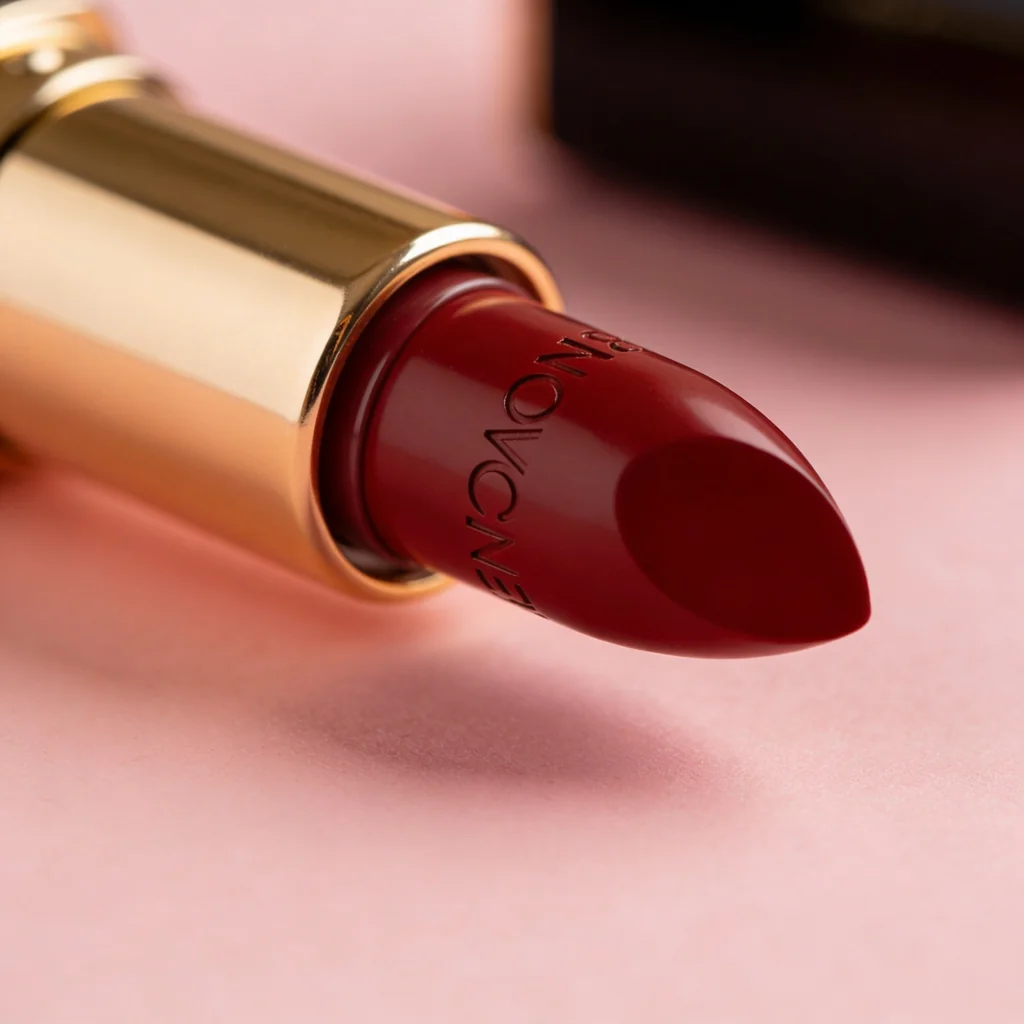
Makeup product photography has two products to preserve at once: the cosmetic and its component. A lipstick image can drift in shade, undertone, finish, opacity, tip geometry, case proportions, cap, collar, logo, and condition while still looking polished enough for an ad.
This test sent one fictional “deep crimson-red lipstick in a gold case” brief through GPT Image 2, Nano Banana 2, Seedream 4.5, and FLUX.2 Pro. The original outputs differ visibly in both color appearance and product design.
Evidence boundary: this is one displayed output per model from a fictional lipstick brief. No real cosmetic, formula, shade standard, component drawing, label artwork, swatch protocol, color target, or measured reference was supplied. The relative color descriptions below are visual judgments from the images as displayed together; they are not colorimetric measurements, reliability rates, or proof of SKU fidelity.
Quick answer
- Shade result: the four bullets do not share one visible red. GPT reads relatively redder and lighter; Nano reads deeper; Seedream reads glossy deep red; FLUX reads darkest and more wine-like in this displayed set.
- Component result: every model invented different packaging and bullet geometry. The differences are large enough to create four fictional SKUs.
- Marking result: Seedream added prominent lettering to the bullet, while Nano added a small circular cap emblem or engraving-like detail.
- Commercial rule: a color word, hex value, printed color reference, or casual swatch photo is an input—not a guarantee. Keep the physical product and a documented color-managed workflow authoritative.
The controlled brief
The original article summarized the input instead of preserving the exact submitted prompt. This is a controlled reconstruction of the subject and checks used here:
One brand-free fictional lipstick bullet in a polished warm-gold-colored case on a pale blush studio surface. Deep crimson-red cosmetic, satin finish, classic slanted tip, centered macro product photograph, soft directional light, coherent reflections, natural contact shadow. No cap emblem, text, logo, lettering, engraving, badge, hand, swatch, carton, or extra product. Square image.
This brief can test composition, relative color interpretation, surface cues, visible geometry, and unwanted marks. It cannot test a real shade, formula, color additive, finish, component, mechanism, label, claim, or variant that the model never received.
The test: one phrase, four products
GPT Image 2 made the simplest upright composition. The bullet reads as a comparatively direct red on the shared page, with a fine matte or satin texture and a tall pointed tip. The cylindrical case, collar, exposed fill, and cut geometry are all inventions. Without a source SKU or controlled capture, “redder” is a relative visual description—not a verified shade value.
Nano Banana 2 changed the composition to a horizontal lipstick resting on its cap. It also invented a ridged component system, circular cap-end detail, and speckled product surface. Those changes matter: texture can imply formula and condition, while a mark can imply brand or approved decoration. The deeper red appearance is only one part of the SKU drift.
Seedream 4.5 made the tightest macro and the glossiest-looking cosmetic surface. The large dark lettering across the bullet is the clearest rejection in the set because the controlled brief forbids text. The crop also hides much of the component, so it cannot establish the full case, cap, mechanism, or package even as a concept.
FLUX.2 Pro produced the most structurally distinct component: a square base, stacked collar, and two small dot-like hardware details. The bullet reads darkest and more wine-like in the page comparison. A viewer might interpret those changes as a different shade family, package line, or mechanism. They are all model-authored.
What this comparison supports
| Question | What these images show | What remains untested |
|---|---|---|
| Can the models make a plausible fictional lipstick image? | Yes, once each in the displayed run. | Reliability across seeds, prompts, products, and current model versions. |
| Did they interpret “deep crimson-red” identically? | No; the four displayed bullets differ visibly in hue, lightness, saturation, and finish cues. | Measured color difference, source-shade accuracy, and behavior across calibrated devices and lighting. |
| Did they preserve one component design? | No; case, cap, collar, tip, surface, and marks differ. | Match to an approved component, mechanism, drawing, artwork, and physical sample. |
| Can the pixels establish formula or performance? | No. | Ingredients, permitted color additives, safety, wear, transfer, hydration, coverage, finish, application, and claims. |
| Can they preserve a makeup SKU? | No evidence; no source product was supplied. | Exact formula, shade, component, label, fill, variant, packaging, swatch, and assortment. |
The useful conclusion is broader than “four reds.” Text-only generation changed the cosmetic, the container, and the product state at the same time.
Match the image type to its truth standard
- Packaged-SKU hero: preserve the exact filled component, cap, mechanism, label, carton, shade, product state, and included items. The actual packshot should remain authoritative.
- Texture or swatch macro: document substrate or skin area, preparation, application tool, passes or thickness, dry or set time, lighting, white balance, capture profile, and whether the result is wet, blended, sheered, or built up.
- On-model shade image: preserve the approved shade while accurately representing skin tone, undertone, texture, lighting, application, coverage, finish, and scale. Do not infer universal results from one generated face.
- Variant or assortment image: keep shade count, order, names or numbers, formula, component color, cap, carton, swatches, and included items aligned with the actual collection.
- Fictional art-direction concept: explore composition, materials, lighting, and campaign mood, label the result, and keep it out of a real SKU gallery.
Cosmetics checks before publishing
- Formula and shade: product and shade ID, formula revision, production standard, undertone, opacity, payoff, coverage, texture, finish, shimmer or pearl, and approved tolerance.
- Product state: new or used condition, fill height, bullet tip and shoulder, pan surface, powder press, cream peak, wand load, brush fibers, dispensing state, residue, sweating, bloom, cracking, chips, dents, and fingerprints.
- Component and applicator: dimensions, silhouette, mechanism, collar, case, cap, hinge, clasp, magnet, click, tube, pan, pump, wand, doe foot, brush, sponge, mirror, window, and visible hardware.
- Materials and color zones: approved metal, plastic, glass, coating, transparency, gloss, texture, case color, cap color, collar, trim, fill, and reflected environment.
- Marks and label: brand, logo, shade name or number, net contents, ingredients, warnings, directions, claims, color-additive copy, lot or batch, date area, recycling, certifications, barcode, and carton artwork.
- Color workflow: controlled illuminant and viewing conditions, camera settings and raw capture, gray and color target, custom or validated input profile, white balance, working and delivery spaces, embedded ICC profile, calibrated review display, and retained master.
- Swatch and model protocol: substrate or skin tone, prep, application tool, passes, pressure, thickness, blend area, set time, lighting geometry, angle, polarization, on-model scale, and retouch boundary.
- Variant and assortment: formula, shade family, size, market, language, component revision, carton, cap, applicator, tester or retail version, count, order, and included items.
- Product claims: safety, hypoallergenic, wear time, transfer resistance, water resistance, sun protection, treatment, hydration, plumping, coverage, ingredient, environmental, and performance claims require approved substantiation; they do not come from pixels.
For U.S. cosmetics, the FDA cosmetics-labeling hub points businesses to labeling, ingredient, warning, claim, and expiration guidance. FDA also maintains color-additive use information for cosmetics; a generated color does not establish formula authorization or labeling. For color reproduction, the International Color Consortium's color-management FAQ explains how device profiles connect camera, display, and print encodings through a standard color space. Apply the requirements and qualified review relevant to the actual formula, claims, and market.
A color-managed production workflow
1. Build approved physical and digital sources
Assign the exact SKU, shade, formula and component revision. Capture the product under documented lighting with raw files, gray and color targets, component views, label artwork, swatch and on-model references, and product-state notes. Attach approved formula, shade, packaging, and claim records.
2. Define the color path
Record illuminant, camera profile, white balance, working space, rendering intent where relevant, embedded output profile, target channel, calibrated approval display, and acceptable tolerance. A hex triplet without a named color space is incomplete; a printed reference without substrate and viewing conditions is incomplete; a swatch without application and capture controls is incomplete.
3. Prefer a real packshot on a generated plate
Generate the empty studio, vanity, fabric, bathroom, or lifestyle environment, then composite color-managed photography of the approved cosmetic and component. Rebuild contact shadows and reflections deliberately. This preserves color and component identity better than regenerating the product.
4. Use reference editing only for bounded candidates
masonry image "Change only the environment to pale blush fabric with soft camera-left studio light. Keep the supplied lipstick's shade appearance, formula finish, opacity, bullet fill and tip geometry, case, cap, collar, mechanism, marks, label, condition, crop, perspective, and every color zone unchanged. Add no text, emblem, swatch, hand, carton, or extra product." \ --model gemini-3.1-flash-image-preview \ --ref ./approved-lipstick-color-managed.png \ --aspect 1:1 \ --output lipstick-scene-candidate.png
That instruction is a constraint, not a color or SKU lock. Compare the candidate with the physical product and color-managed master through the approved viewing path.
For a fictional concept:
masonry image "One fictional unbranded lipstick concept with a neutral gray cosmetic in a simple silver cylindrical case, pale studio surface, soft light, coherent reflections, blank component, no color or performance claim, text, logo, emblem, swatch, hand, carton, or extra product, square macro photograph." \ --model gpt-image-2 \ --aspect 1:1 \ --output fictional-lipstick-concept.png
5. Review the full gallery and channel output
Compare hero, alternate angles, open and closed component, texture, swatch, on-model, carton, variant selector, thumbnails, and assortment grid. Confirm the embedded profile survives export and delivery, then review on the calibrated approval display and representative consumer devices without treating device agreement as a substitute for the master.
Makeup acceptance sheet
| Area | Pass condition |
|---|---|
| Source match | Candidate is tied to the correct SKU, shade, formula, component, artwork, and source version. |
| Cosmetic | Shade appearance, undertone, opacity, finish, texture, product state, fill, tip or pan, and unique details match. |
| Component | Case, cap, collar, mechanism, applicator, dimensions, materials, color zones, hardware, and included items match. |
| Marks and label | Brand, shade, quantity, ingredients, warnings, directions, claims, codes, dates, and carton copy match approved artwork or stay out of frame. |
| Color path | Lighting, capture, target, profile, white balance, working space, embedded delivery profile, and approval display are documented. |
| Swatch or model | Substrate or skin, prep, application, coverage, finish, scale, lighting, set time, and retouching follow the approved protocol. |
| Variant and assortment | Formula, shade, size, market, package revision, count, order, and included items are correct. |
| Scene and claims | Perspective, crop, light, shadow, reflection, contact, and props are coherent; no unsupported safety or performance claim is implied. |
Bottom line
These four images are valuable because they show the full drift hidden inside one color word. GPT made a comparatively redder upright product. Nano changed the scene, component, cap mark, and surface. Seedream added prominent lettering and a glossier finish. FLUX invented a square case and collar hardware while producing the darkest visible bullet.
Use the outputs to choose an art direction, not to represent a formula or component you never supplied. Keep the physical SKU, color-managed photography, artwork, and product data authoritative; reject any candidate that changes shade, finish, state, geometry, component, mark, label, variant, swatch, or assortment. Compare the wider category results in the AI product photography model test, build a source-first workflow in Masonry's product photography tool, or automate controlled candidates with the Masonry CLI.


